
1. Produktüberschreitungview
The JOYING JY-HT145N4 is an Android 13 car stereo head unit designed specifically for Honda Civic models from 2016 to 2021. This 9-inch unit integrates advanced features such as wireless Apple CarPlay and Android Auto, GPS navigation, Bluetooth 5.0, and a physical volume knob for enhanced user experience. It supports various factory features of your Honda Civic, including the reverse camera, steering wheel controls, USB ports, and amplifier, ensuring a seamless upgrade.
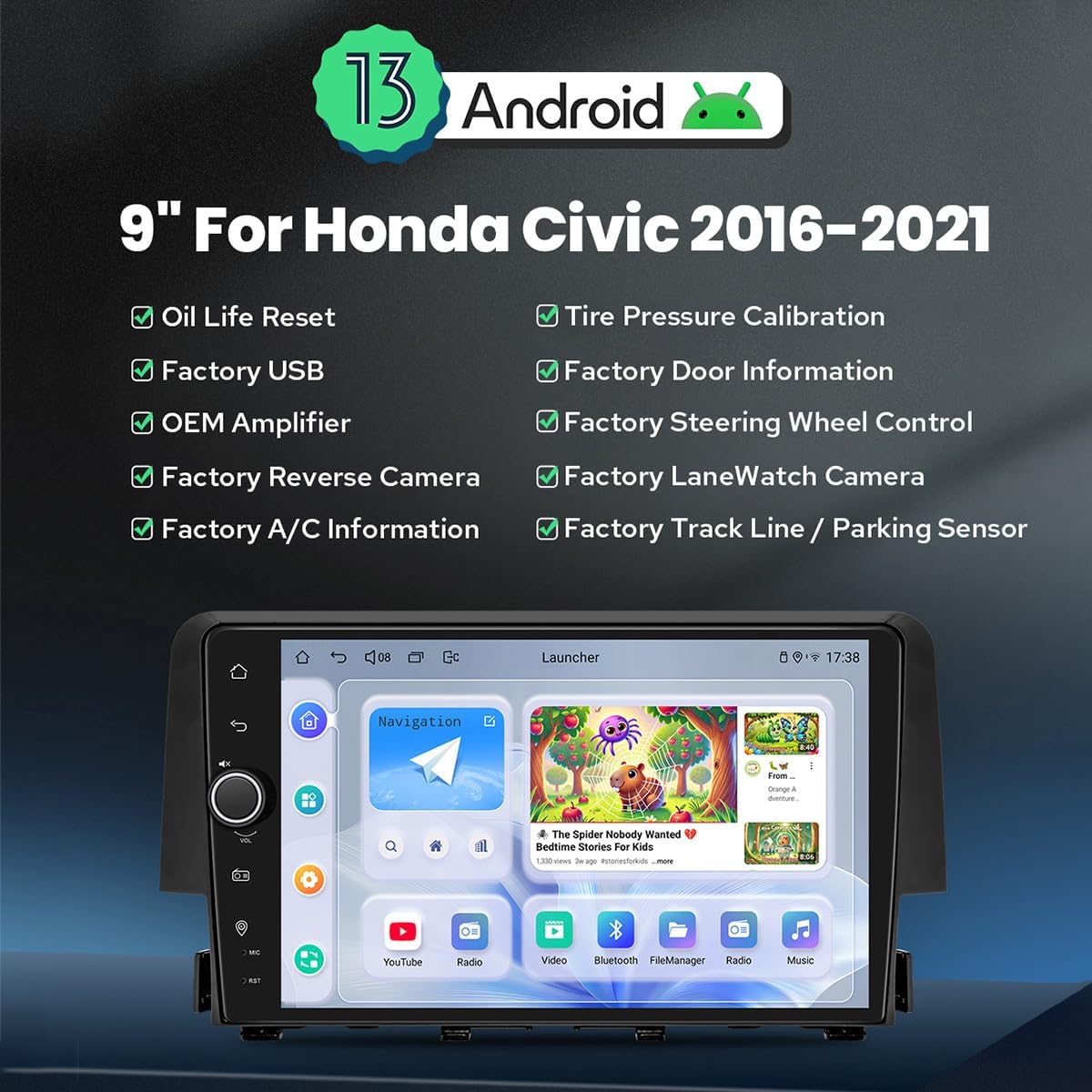
Bild 1.1: Vorderseite view of the JOYING Android 13 Car Stereo, highlighting key features like Android 13 OS, 9-inch display, and compatibility with various factory vehicle functions.
Hauptmerkmale:
- Betriebssystem Android 13: Provides a modern and responsive user interface.
- 9-Inch High-Definition Display: Offers clear visuals for navigation and media.
- Kabelloses Apple CarPlay & Android Auto: Nahtlose Smartphone-Integration für Navigation, Anrufe und Musik.
- GPS Navigation: Precise positioning with support for offline maps and real-time navigation.
- Bluetooth 5.0: For stable hands-free calling and audio streaming.
- Eingebautes 4G-Modul: Allows direct internet access via a SIM card (data only).
- Optical Fiber and Coaxial Digital Output: For high-fidelity audio output to external amplifizierer.
- Plug & Play-Installation: Designed for easy installation with included wiring harnesses, supporting factory features like reverse camera, steering wheel controls, and ampschwerer.
2. Einrichtung und Installation
This section provides guidance for installing your JOYING car stereo. It is designed for a plug-and-play experience, but professional installation is recommended if you are unfamiliar with car audio systems.
2.1 Auswahl des Kabelbaums
The correct wiring harness is crucial for proper functionality. Please identify your vehicle's original radio type to select the appropriate harness (A, B, or C).

Image 2.1: Guide for selecting the correct wiring harness based on your Honda Civic's original radio configuration.
- Wire Harness A: For OEM radios with a small screen.
- Wire Harness B: For OEM radios with a large screen.
- Wire Harness C: For OEM radios with a factory amplifier (includes power amplifier interface).
Ensure you select the harness that matches your vehicle's specifications to avoid installation issues.
2.2 CAN Bus Setting
Since your Honda Civic is equipped with a CAN bus system, you must set the communication protocol switch on the back of the head unit to the 'CAN' position. This ensures proper communication with your vehicle's systems, including steering wheel controls and factory cameras.

Image 2.2: Location of the CAN bus switch on the rear of the head unit. Ensure it is set to 'CAN' for correct vehicle integration.
2.3 Packungsinhalt
Vergewissern Sie sich vor Beginn der Installation, dass alle Komponenten in Ihrem Paket vorhanden sind:
- 9" Radio Head Unit (1)
- Single Din Cage (1)
- Left & Right Brackets (1 pair)
- WLAN-Antenne (1)
- GPS-Antenne (1)
- 4G Antennas (2)
- Externes Mikrofon (1)
- USB-Kabel (2)
- AR-Kabel (1)
- Flachbandkabel für Bildschirm (1)
- Stromkabel (1)
- Benutzerhandbuch (1)

Image 2.3: Visual representation of the included components in the JOYING car stereo package.
2.4 Optional Accessories (Not Included)
Enhance your experience with these optional accessories:
- OBD2-Scanner: Verbindet sich via Bluetooth, um Fahrzeugdaten in Echtzeit und Diagnosefehlercodes abzurufen.
- AR-Frontkamera: Records the road ahead automatically while driving.
- AR-Rückkamera: Bietet eine klare view behind the vehicle, automatically switching when reversing.

Abbildung 2.4: Beispielamples of optional accessories like OBD2, AR Front Camera, and AR Rear Camera.
3. Bedienungsanleitung
This section covers the primary functions and features of your JOYING car stereo.
3.1 Fast Boot
After the initial boot-up (which may take 30-40 seconds), the system will start almost instantly (within 2 seconds) when you turn on your vehicle, allowing quick access to the user interface.
3.2 GPS-Navigation
The unit features precise GPS navigation with an included GPS antenna for improved satellite signal reception. It supports offline maps, allowing you to download map data for specific regions and use navigation without an internet connection. You can also synchronize mobile phone map data via Apple CarPlay or Android Auto.
3.3 Built-in 4G Module
Insert a SIM card into the designated slot to enable internet access directly from the head unit. This module supports data services but cannot be used for phone calls or SMS messages. Supported bands include FDD-LTE: B2/B4/B5/B7/B12/B13/B14/B17/B25/B26/B38/B66/B71 and TDD-LTE: B41.
3.4 Audioausgang
The unit features Optical Fiber and Coaxial Digital Outputs. If your external amplifier supports these inputs, you can achieve superior sound quality directly from the head unit.

Image 3.1: Illustrates the audio capabilities, including the TDA7851 DSP chip, 48-band graphic equalizer, 4x50W output, and support for aftermarket amplifiers via various outputs.
3.5 Apple CarPlay & Android Auto
Connect your smartphone via USB cable or Bluetooth to utilize Apple CarPlay or Android Auto. This allows you to access navigation, make phone calls, send messages, and listen to music through the head unit's display.

Image 3.2: Depicts the user interfaces for Apple CarPlay and Android Auto on the head unit's screen.
3.6 Multitasking im Splitscreen-Modus
Die Split-Screen-Funktion ermöglicht es Ihnen, zwei Anwendungen gleichzeitig auf dem Bildschirm auszuführen. Zum BeispielampSie können view navigation on one side and a media player on the other. To activate, tap the recent apps icon, then select the split-screen function for a compatible app.

Image 3.3: Visual guide on how to activate and use the split-screen multitasking feature.
3.7 HDMI-Ausgang
The HDMI output provides a full digital image and sound interface, allowing synchronous output of audio and video signals to external displays, such as headrest monitors. This enables passengers to watch movies while the driver uses the main screen for navigation. Notiz: Ein HDMI-Kabel ist nicht im Lieferumfang enthalten.
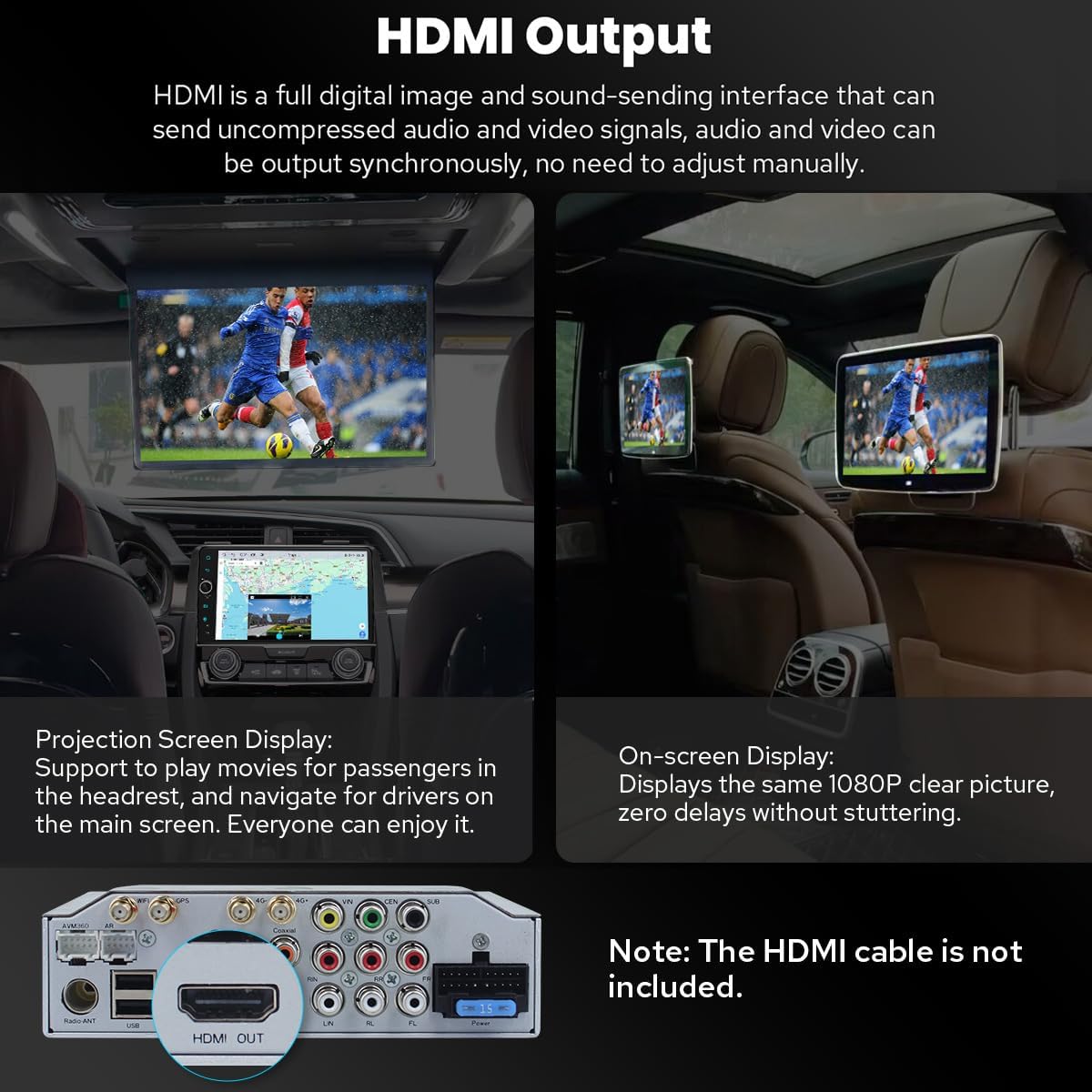
Image 3.4: Demonstrates the HDMI output functionality for connecting to rear seat entertainment systems.
3.8 Personalisierte Einstellungen
Customize your head unit experience with various settings:
- Logo für den Kofferraum: Select a custom logo to display when the unit starts.
- Anpassbare Hintergrundbilder: Personalize the background of your home screen.
- Changeable Button Color: Adjust the color of the physical buttons to match your vehicle's interior lighting.
- Einstellbare Bildschirmhelligkeit: Optimize display visibility for different lighting conditions.

Bild 3.5: Überview of personalized settings including boot logo, wallpapers, button color, and screen brightness adjustment.
3.9 Sonstige Funktionen
- AM/FM-Radio: Empfangen Sie lokale Radiosender.
- Freisprechanruf: Make and receive calls safely via Bluetooth.
- Bild-in-Bild: Display a small video window over other applications.
- 3 USB-Anschlüsse: For connecting external devices, charging, or media playback.
- Micro-SD-Kartensteckplatz: For additional storage or media.
- 4G-SIM-Kartensteckplatz: For mobile data connectivity.

Image 3.6: Icons representing additional features such as Fast Boot, GPS Navigation, AM/FM Radio, Hands-free Call, Picture-in-Picture, 3 USB Ports, Micro SD Card Slot, and 4G SIM Card Slot.
4. Wartung
Proper maintenance ensures the longevity and optimal performance of your JOYING car stereo.
4.1-Kühlsystem
The unit features an upgraded dual heat sink design for superior heat dissipation and improved temperature control, enhancing performance stability. A built-in fan automatically activates when the CPU temperature or radio volume exceeds a set warning value, preventing overheating.
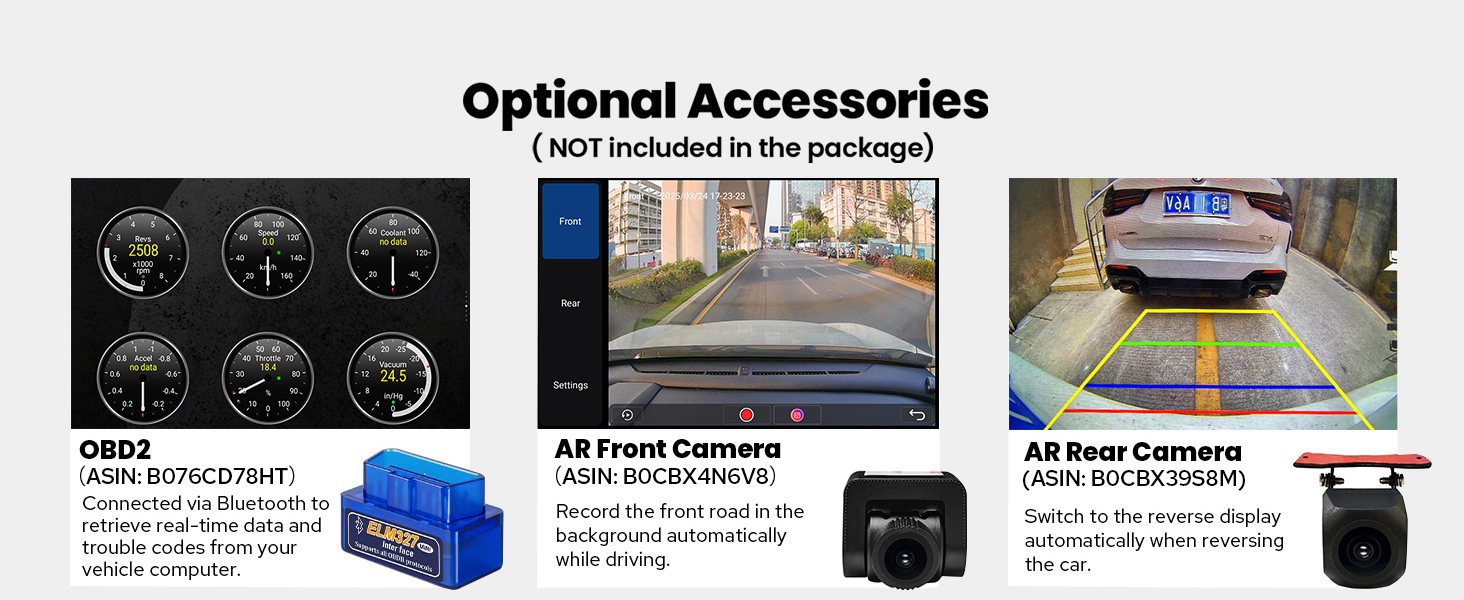
Image 4.1: Diagram illustrating the dual heat sink design and fan control for optimized cooling.
4.2 WiFi Signal
An independent WiFi antenna ensures stable signal quality and provides fast, smooth internet access. The unit supports 802.11a/b/g/n/AC standards across 2.4GHz and 5GHz spectral bands.

Image 4.2: Shows the independent WiFi antenna and its connection point on the rear of the unit, highlighting improved signal.
4.3 Allgemeine Pflege
- Reinigung: Reinigen Sie den Bildschirm und das Gehäuse mit einem weichen, trockenen Tuch. Vermeiden Sie Scheuermittel oder Lösungsmittel.
- Temperatur: Vermeiden Sie es, das Gerät über längere Zeiträume extremen Temperaturen, sowohl Hitze als auch Kälte, auszusetzen.
- Verbindungen: Überprüfen Sie regelmäßig alle Kabelverbindungen, um sicherzustellen, dass sie fest sitzen.
5. Fehlerbehebung
In diesem Abschnitt werden häufig auftretende Probleme behandelt und mögliche Lösungsansätze aufgezeigt.
5.1 Häufige Probleme und Lösungen
- Kein Strom/Gerät schaltet sich nicht ein:
Lösung: Check all power connections. Ensure the vehicle's ignition is on. Verify the fuse in the power cable is intact. - Kein Ton:
Lösung: Check speaker connections. Ensure the volume is not muted or set too low. If using an external ampVerstärker, überprüfen Sie die Stromversorgung und die Anschlüsse. - Rückfahrkamera zeigt kein Bild an:
Lösung: Confirm the camera is correctly wired to the head unit's reverse input. Check the camera settings in the unit's menu to ensure the correct camera type is selected. Verify the CAN bus switch is set to 'CAN'. - Lenkradbedienelemente funktionieren nicht:
Lösung: Ensure the CAN bus switch on the back of the unit is set to 'CAN'. Check the steering wheel control settings in the unit's menu for proper configuration. - Microphone Issues (Low Volume/Unclear Audio):
Lösung: Ensure the external microphone is securely connected and positioned correctly. Adjust microphone sensitivity settings in the unit's audio menu. - Android Auto/CarPlay Connection Issues:
Lösung: Ensure your phone's software is up to date. Try a different USB cable. Restart both the phone and the head unit. For wireless connections, ensure Bluetooth and Wi-Fi are enabled on your phone. - AC Controls Not Functioning Correctly:
Lösung: This issue can sometimes occur with aftermarket units. Double-check all wiring related to the AC system. Consult the vehicle's specific wiring diagram or contact support if the issue persists. - Gerät friert ein oder reagiert nicht mehr:
Lösung: Perform a soft reset by pressing the reset button (usually a small pinhole) or by turning off the vehicle and restarting it. If the issue persists, a factory reset may be necessary (note: this will erase all user data).
5.2 Allgemeine Tipps zur Fehlerbehebung
- Verbindungen prüfen: Always ensure all cables are securely connected.
- Restart the Unit: Kleinere Softwarefehler lassen sich oft durch einen einfachen Neustart beheben.
- Online-Ressourcen konsultieren: JOYING's official website or user forums may offer additional troubleshooting guides.
- Kontaktieren Sie den Support: If you cannot resolve an issue, refer to the Warranty & Support section for assistance.
6. Spezifikationen
Detailed technical specifications for the JOYING JY-HT145N4 car stereo.
| Besonderheit | Spezifikation |
|---|---|
| Marke | FREUDE |
| Modellname | HT145N4 |
| Betriebssystem | Android 13 |
| Bildschirmgröße | 9 Zoll |
| Anzeigetyp | LED |
| Touchscreen-Typ | Kapazitiv |
| Speicherkapazität | 64 GB |
| Konnektivitätstechnologie | Bluetooth, Ethernet, USB, WLAN |
| Konnektivitätsprotokoll | Bluetooth, Wi-Fi |
| Bluetooth-Version | 5.0 |
| Unterstütztes Satellitennavigationssystem | BeiDou, GLONASS, GPS |
| Kartentyp | North America (Offline maps supported) |
| Audioausgabemodus | Stereo |
| Besondere Merkmale | Bluetooth, Touchscreen, Carplay, Android Auto, Mirror Link, GPS Navigation, Volume Knob, Built-in 4G Module, Optical Fiber/Coaxial Digital Output |
| Montagetyp | Dashboard-Halterung |
| Kompatible Geräte | Kamera, Smartphone |
| Artikelgewicht | 6 Pfund |
7. Garantie und Support
7.1 Produktgarantie
The JOYING JY-HT145N4 car stereo comes with a 2 Jahr Garantie Diese Garantie gilt ab Kaufdatum und deckt Herstellungsfehler sowie Funktionsstörungen bei normalem Gebrauch ab. Bitte bewahren Sie Ihren Kaufbeleg für Garantieansprüche auf.
7.2 Kundendienst
For technical assistance, troubleshooting, or warranty inquiries, please contact JOYING customer support. It is recommended to reach out to the Amazon seller support for this product directly for the most responsive and helpful assistance. When contacting support, please provide your product model number (JY-HT145N4), purchase date, and a detailed description of the issue.
You can often find contact information for the seller through your Amazon order history.