
Einführung
This manual provides detailed instructions for the VINABTY Voice Remote Control, designed as a direct replacement for various OK. QLED TV models. This remote control features voice search capabilities, an ergonomic design, and durable construction for reliable performance. Please read this manual carefully to ensure proper setup and operation.
Aufstellen
1. Einlegen der Batterie
Für die Fernbedienung werden zwei AAA-Batterien benötigt (nicht im Lieferumfang enthalten). Gehen Sie zum Einlegen der Batterien wie folgt vor:
- Öffnen Sie die Abdeckung des Batteriefachs auf der Rückseite der Fernbedienung.
- Legen Sie zwei AAA-Batterien ein und achten Sie darauf, dass die positiven (+) und negativen (-) Anschlüsse mit den Abbildungen im Batteriefach übereinstimmen.
- Schließen Sie den Batteriefachdeckel fest.

Bild: Rückseite view of the remote control with the battery cover removed, illustrating the correct placement for two AAA batteries.
2. Kopplung mit Ihrem Fernseher
This remote control is designed for easy use and typically requires no programming. However, for voice search functionality, it must be paired with your TV. Refer to your TV's user manual for specific pairing instructions for a new remote control. Generally, this involves:
- Vergewissern Sie sich, dass Ihr Fernseher eingeschaltet ist.
- Navigate to the TV's settings menu, usually under 'Remotes & Accessories' or 'Bluetooth Settings'.
- Select 'Add new device' or 'Pair remote control'.
- Follow the on-screen prompts to complete the pairing process. This may involve holding down specific buttons on the remote.

Image: The VINABTY remote control positioned beside a television, highlighting its ready-to-use nature and material quality.
Bedienungsanleitung
The VINABTY Voice Remote Control offers intuitive control over your OK. QLED TV. Below are the primary functions:
- Power-Taste (⏻): Schaltet den Fernseher ein oder aus.
- Zifferntasten (0-9): Direkte Auswahl der Fernsehkanäle.
- Navigationsfeld (Hoch, Runter, Links, Rechts, OK): Navigieren Sie durch die Menüs und bestätigen Sie Ihre Auswahl.
- Lauter/Leiser (+/-): Passen Sie die Lautstärke des Fernsehers an.
- Channel Up/Down (P^/P˅): Fernsehkanäle wechseln.
- Stummschalttaste (🔇): Mute or unmute the TV audio.
- Zurück-Button (←): Kehren Sie zum vorherigen Bildschirm oder Menü zurück.
- Home "Button (🏠): Access the TV's home screen or smart hub.
- Sprachsteuerungstaste (🎤): Press and hold to activate voice search or commands (requires successful pairing).
- Schnellzugriffstasten: Dedicated buttons for popular streaming services like Netflix, YouTube, Prime Video, and Google Play for direct access. A USB button is also included for media playback.
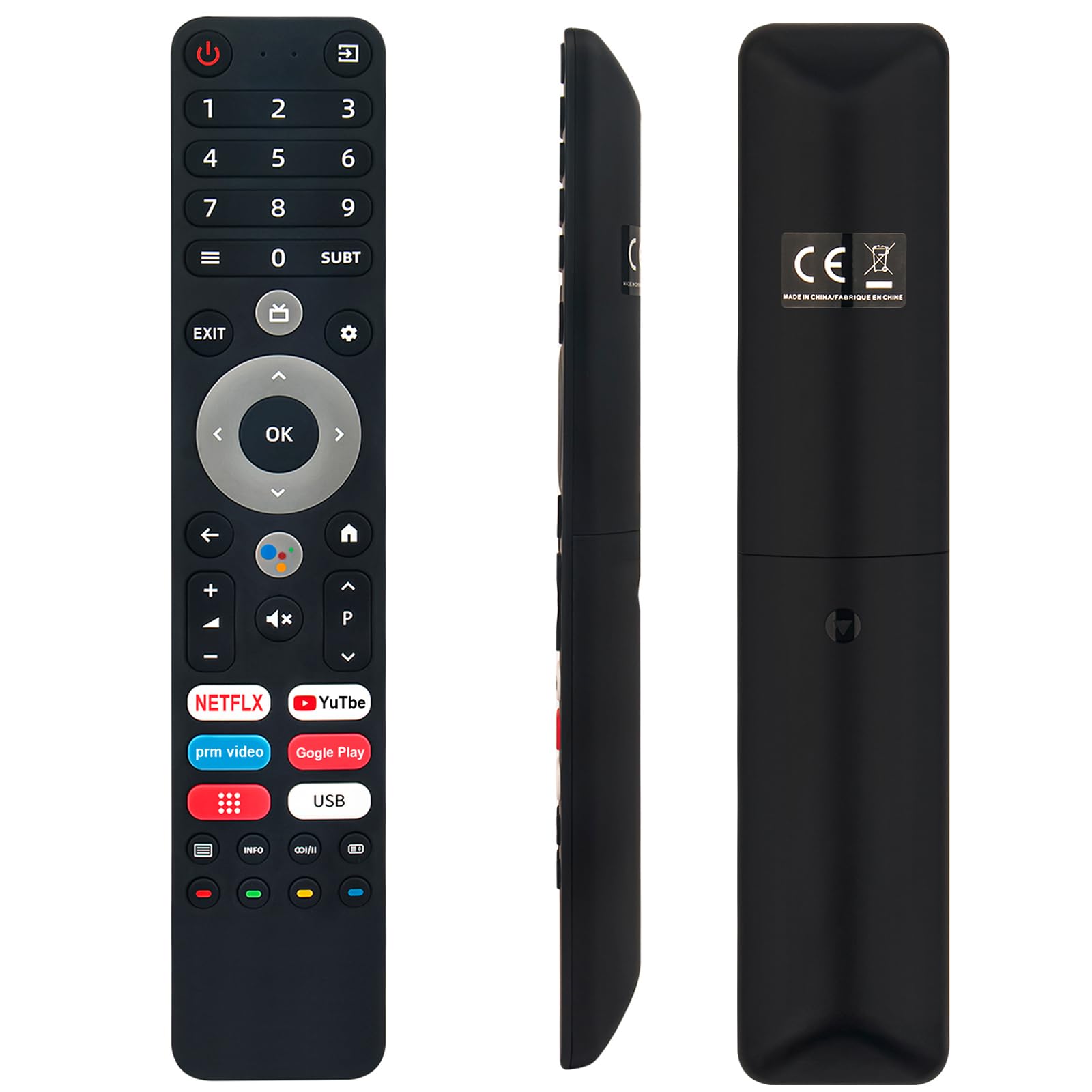
Image: The remote control with a visual emphasis on the voice command button, indicating its functionality.
Wartung
To ensure the longevity and optimal performance of your VINABTY Voice Remote Control, follow these maintenance guidelines:
- Reinigung: Use a soft, dry cloth to clean the remote control. Avoid using liquid cleaners, aerosols, or harsh chemicals, as these can damage the surface or internal components.
- Batteriewechsel: Tauschen Sie die Batterien aus, wenn die Fernbedienung nur noch langsam reagiert oder gar nicht mehr funktioniert. Ersetzen Sie immer beide Batterien gleichzeitig durch neue Batterien desselben Typs (AAA).
- Lagerung: Store the remote control in a cool, dry place away from direct sunlight, extreme temperatures, and high humidity. If the remote will not be used for an extended period, remove the batteries to prevent leakage.
- Handhabung: Avoid dropping the remote control or subjecting it to strong impacts, as this can damage internal circuitry.
Fehlerbehebung
If you encounter issues with your VINABTY Voice Remote Control, try the following solutions:
- Fernbedienung reagiert nicht:
- Prüfen Sie, ob die Batterien richtig eingesetzt und nicht entladen sind. Tauschen Sie sie gegebenenfalls aus.
- Stellen Sie sicher, dass sich keine Hindernisse zwischen der Fernbedienung und dem Infrarotempfänger des Fernsehers befinden.
- Vergewissern Sie sich, dass die Fernbedienung direkt auf den Fernseher gerichtet ist.
- Sprachsteuerung funktioniert nicht:
- Verify that the remote control is successfully paired with your TV. Refer to the 'Pairing with Your TV' section or your TV's manual.
- Ensure your TV's internet connection is stable, as voice commands often rely on online services.
- Tasten funktionieren nicht:
- Clean the remote control, especially around the buttons, to remove any dirt or debris that might be causing sticking.
Sollten diese Schritte das Problem nicht beheben, wenden Sie sich bitte an den Kundendienst, um weitere Unterstützung zu erhalten.
Technische Daten
| Besonderheit | Detail |
|---|---|
| Marke | VINABTY |
| Kompatible Modelle | OK. QLED TV OTV 55AU-5023C, OTV43AU-5023C, OTV50AU-5023C, OTV 43AU-5023C, OTV 50AU-5023C |
| Konnektivitätstechnologie | Infrarot |
| Maximale Reichweite | 10 Meter |
| Akku-Typ | 2 x AAA (nicht enthalten) |
| Material | ABS (body), Soft Rubber (buttons) |
| Farbe | Schwarz |
| Abmessungen (L x B x H) | 18 cm x 3 cm x 1.5 cm (ca. 7.09 x 1.18 x 0.59 Zoll) |
| Gewicht | 60 Gramm |
| Besondere Merkmale | Voice Control, No Programming Required, Ergonomic Design |

Image: The remote control displayed with its precise length and width measurements.
Unterstützung
For any questions regarding the VINABTY Voice Remote Control, or if you are unsure about its compatibility with your specific TV model, please contact our customer support team. We are committed to providing assistance and ensuring your satisfaction.
If you received a remote control that does not function as expected, or if you require further technical support, please reach out to us via email. We will respond promptly to address your concerns.