
HUABAO A117
HUABAO A117 Bluetooth-Karaoke-Lautsprecher – Benutzerhandbuch
Modell: A117
Einführung
Thank you for choosing the HUABAO A117 Bluetooth Karaoke Speaker. This portable PA system is designed to deliver high-quality audio with versatile connectivity and dynamic lighting effects. Please read this manual thoroughly before operating the device to ensure proper use and to maximize your experience.
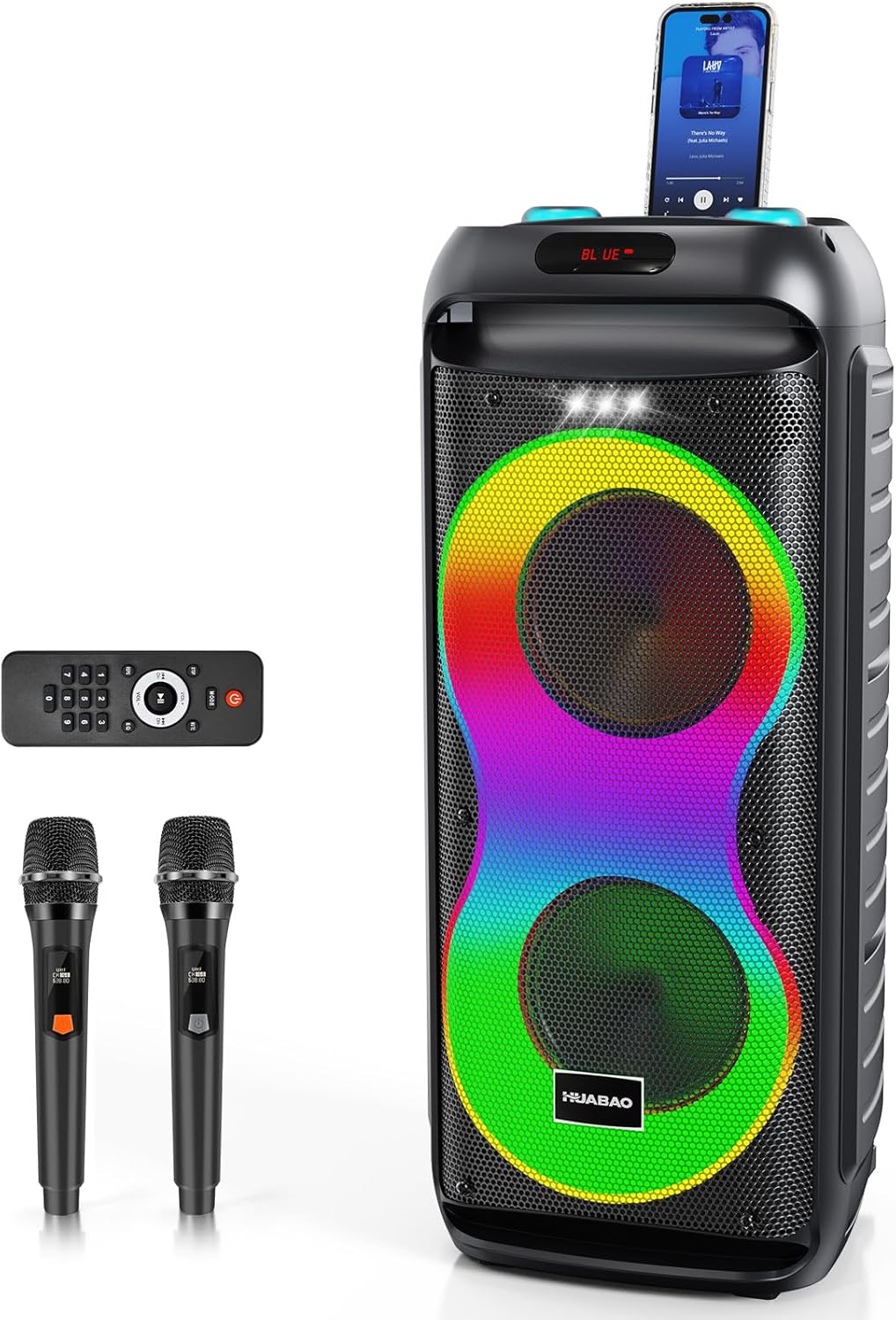
Image: The HUABAO A117 Bluetooth Karaoke Speaker, showcasing its main unit, two wireless microphones, and remote control. A smartphone is docked on top of the speaker.
Packungsinhalt
Bitte überprüfen Sie das Paket sorgfältig, um sicherzustellen, dass alle Artikel vorhanden und in einwandfreiem Zustand sind.
- 1 x HUABAO A117 Bluetooth Karaoke Speaker
- 2 x Wireless Microphones (rechargeable)
- 1 x Fernbedienung
- 1 x AUX-Kabel
- 1 x Typ-C Ladekabel
- 1 x Benutzerhandbuch (dieses Dokument)

Image: A visual representation of all items included in the HUABAO A117 package, laid out next to the speaker, with dimensions indicated for the speaker and microphones.
Produkt überview
Lautsprecherkomponenten
The HUABAO A117 features a robust audio setup for clear and powerful sound.
- Zwei 6.5-Zoll-Tieftöner: For deep and resonant bass.
- High-Frequency Tweeter: For crisp and clear treble.
- 40W Ausgangsleistung: Ensures high-definition audio performance.
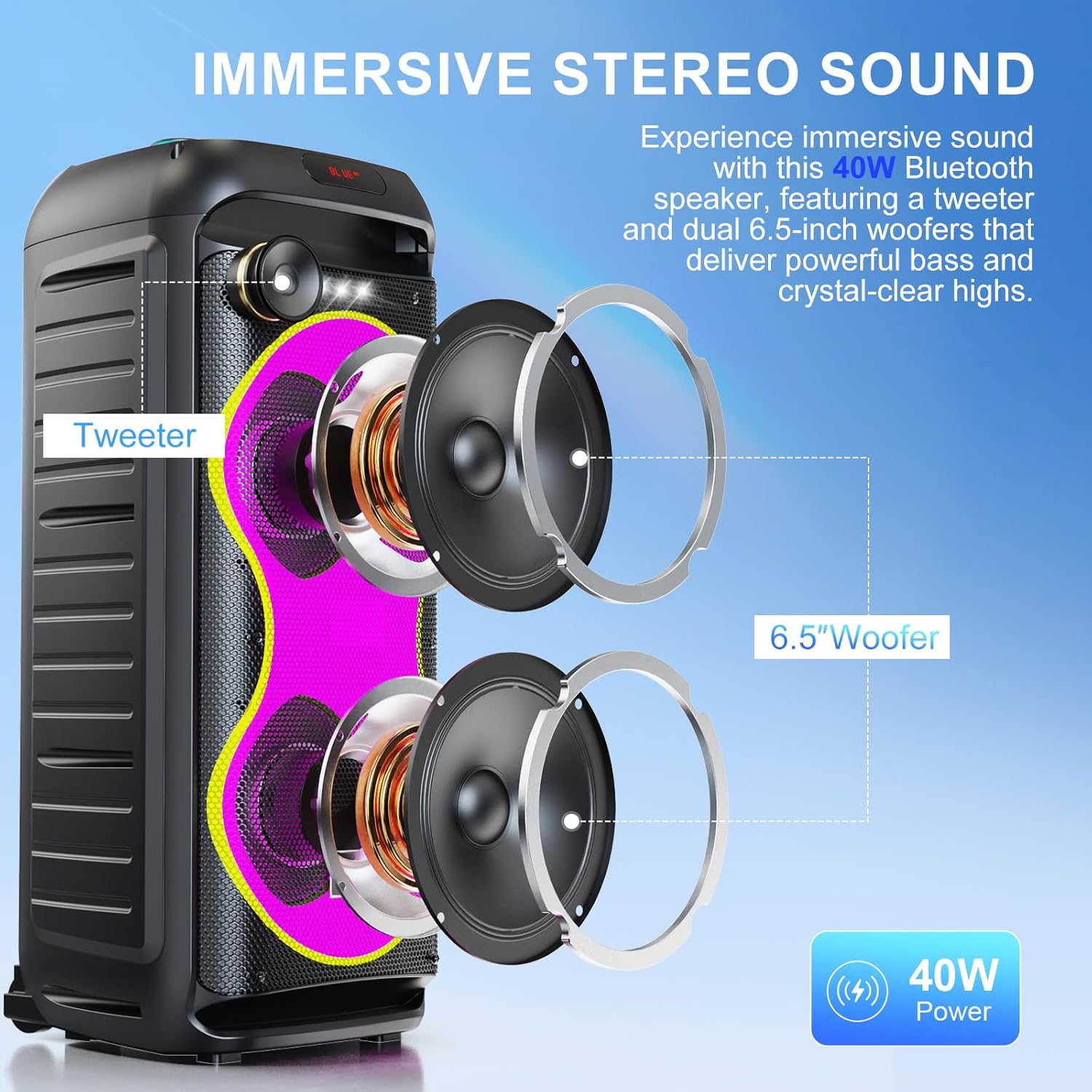
Bild: Eine explodierte view diagram of the speaker, highlighting the tweeter and two 6.5-inch woofers, illustrating the internal audio components.
Bedienfeld und Anschlüsse
The top panel provides access to all controls and input/output ports.

Bild: Eine Nahaufnahme view of the speaker's top control panel, showing the power switch, microphone inputs (MIC 1, MIC 2), AUX input, TF card slot, USB port, DC 9V IN charging port, and various control buttons for LED, Mode, Menu, and volume/mic volume knobs.
- EIN/AUS-Netzschalter: To power the speaker on or off.
- MIC 1 / MIC 2 Eingänge: 6.5mm jacks for wired microphones or instruments.
- AUX-Eingang: 3.5-mm-Klinkenbuchse zum Anschluss externer Audiogeräte.
- TF-Karten-Slot: Zum direkten Abspielen von Musik von einer TF-Karte (MicroSD-Karte).
- USB-Anschluss: For playing music directly from a USB drive or charging devices.
- DC 9 V IN: Ladeanschluss für den Lautsprecher.
- LED-Taste: To cycle through LED light modes.
- MODE-Taste: To switch between input modes (Bluetooth, AUX, USB, TF Card).
- MENU-Taste: To access sound adjustment settings (treble, bass, mic echo).
- Lautstärkeregler: Separate controls for main volume and microphone volume.
- Wiedergabesteuerung: Wiedergabe/Pause, Vorheriger Titel, Nächster Titel.
Aufstellen
Aufladen des Lautsprechers
Before first use, fully charge the speaker for optimal battery life. The speaker has a built-in 5400mAh rechargeable battery.
- Connect the provided Type-C charging cable to the DC 9V IN port on the speaker.
- Connect the other end of the charging cable to a suitable power adapter (not included) or USB power source.
- Die Ladeanzeige leuchtet auf. Sobald der Akku vollständig geladen ist, kann die Farbe der Anzeige je nach Modell wechseln oder sie erlöschen.
- A full charge provides approximately 6-8 hours of continuous music playback.

Image: A group of people enjoying music on a beach with the HUABAO A117 speaker, emphasizing its long-lasting 5400mAh battery for extended outdoor use.
Mikrofon-Setup
The package includes two rechargeable wireless microphones. Ensure they are charged before use.
- Drahtlose Mikrofone: Power on the microphones using their respective power buttons. They will automatically connect to the speaker.
- Kabelgebundene Mikrofone/Instrumente: If using wired microphones or instruments, connect them to the MIC 1 or MIC 2 6.5mm input jacks on the speaker's control panel.

Bild: Eine detaillierte view of the MIC 1 and MIC 2 input jacks on the speaker, indicating where wired microphones or instruments can be connected.
Bedienungsanleitung
Ein-/Ausschalten
- To turn on the speaker, slide the ON/OFF switch to the "ON" position.
- Um den Lautsprecher auszuschalten, schieben Sie den EIN/AUS-Schalter in die Position „AUS“.
Bluetooth-Kopplung
Connect your device wirelessly to the speaker.
- Schalten Sie den Lautsprecher ein. Er wechselt automatisch in den Bluetooth-Kopplungsmodus, was durch ein blinkendes „BLAU“ auf dem Display angezeigt wird.
- Gehen Sie auf Ihrem Smartphone, Tablet oder einem anderen Bluetooth-fähigen Gerät zu den Bluetooth-Einstellungen.
- Suchen nach "HUABAO A117" (or similar name) in the list of available devices and select it to pair.
- Once paired, the speaker will emit a confirmation sound, and the "BLUE" indicator will stop flashing.

Image: A visual guide illustrating the multi-connectivity options of the HUABAO A117 speaker, including Bluetooth, TF card, USB, and AUX, compatible with phones, tablets, laptops, and smart TVs.
TWS-Pairing (True Wireless Stereo)
For an immersive stereo experience, you can pair two HUABAO A117 speakers together.
- Ensure both speakers are turned on and in Bluetooth mode, but not yet paired with any device.
- On one of the speakers (this will be the primary speaker), long-press the "MODE" button until you hear a confirmation sound, indicating TWS pairing mode.
- Die beiden Lautsprecher verbinden sich automatisch miteinander. Nach erfolgreicher Verbindung ertönt ein Bestätigungston.
- Verbinden Sie nun Ihr Bluetooth-Gerät mit dem Hauptlautsprecher, wie im Abschnitt „Bluetooth-Kopplung“ beschrieben. Der Ton wird über beide Lautsprecher in Stereo wiedergegeben.

Image: A graphic demonstrating the True Wireless Stereo (TWS) pairing function, showing two HUABAO A117 speakers wirelessly connected to each other via Bluetooth for a stereo sound experience.
USB/TF-Kartenwiedergabe
Play music directly from a USB drive or TF card.
- Stecken Sie einen USB-Stick in den USB-Anschluss oder eine TF-Karte in den TF-Kartensteckplatz.
- The speaker will automatically switch to USB or TF card mode and begin playing music. If not, press the "MODE" button to select the correct input.
- Use the playback controls (Play/Pause, Previous, Next) on the speaker or remote control to manage your music.
AUX-Eingang
Schließen Sie externe Audiogeräte über das AUX-Kabel an.
- Verbinden Sie ein Ende des mitgelieferten AUX-Kabels mit dem AUX-Eingang des Lautsprechers.
- Verbinden Sie das andere Ende mit der Audioausgangsbuchse Ihres externen Geräts (z. B. MP3-Player, Laptop).
- Press the "MODE" button on the speaker until "AUX" is displayed.
- Steuern Sie Wiedergabe und Lautstärke über Ihr angeschlossenes Gerät.
Mikrofonnutzung
Use the included wireless microphones or connect wired ones for karaoke or public address.
- Ensure microphones are powered on and connected (wireless) or plugged in (wired).
- Die Mikrofonlautstärke kann mit dem Drehknopf „MIC VOL“ auf dem Bedienfeld eingestellt werden.
- To adjust microphone echo, press the "MENU" button repeatedly until "ECHO" is displayed, then use the Previous/Next track buttons to increase or decrease the echo effect.
Sound Adjustments (Treble, Bass, Echo)
Customize your audio output.
- Press the "MENU" button to cycle through adjustable settings: "TRE" (Treble), "BAS" (Bass), "ECHO" (Microphone Echo).
- Once the desired setting is displayed, use the Previous (⏪) und als nächstes (⏩) track buttons to adjust the level.
- The main volume can be adjusted using the "VOLUME" knob.
LED-Lichtmodi
Enhance your audio experience with dynamic lighting.
- Press the "LED" button on the control panel or remote control to cycle through 7 different LED light modes.
- The speaker also features a top-mounted white strobe light for additional visual effects.
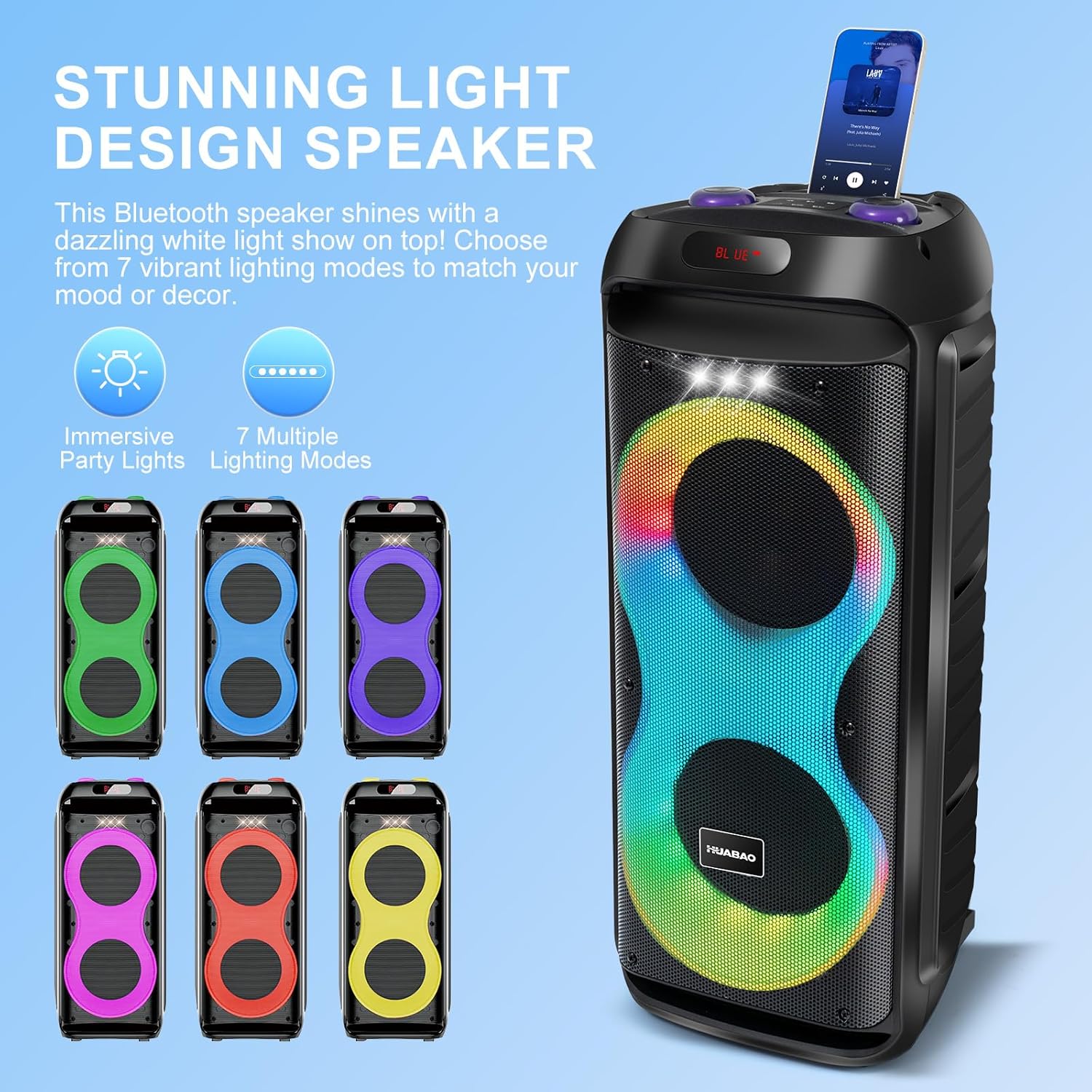
Image: The HUABAO A117 speaker showcasing its vibrant LED light display with multiple color patterns, illustrating the 7 available lighting modes.
Portabilität
The speaker is equipped with rolling wheels for easy transport.
- Utilize the integrated handle and smooth rolling wheels at the base to move the speaker effortlessly between locations.
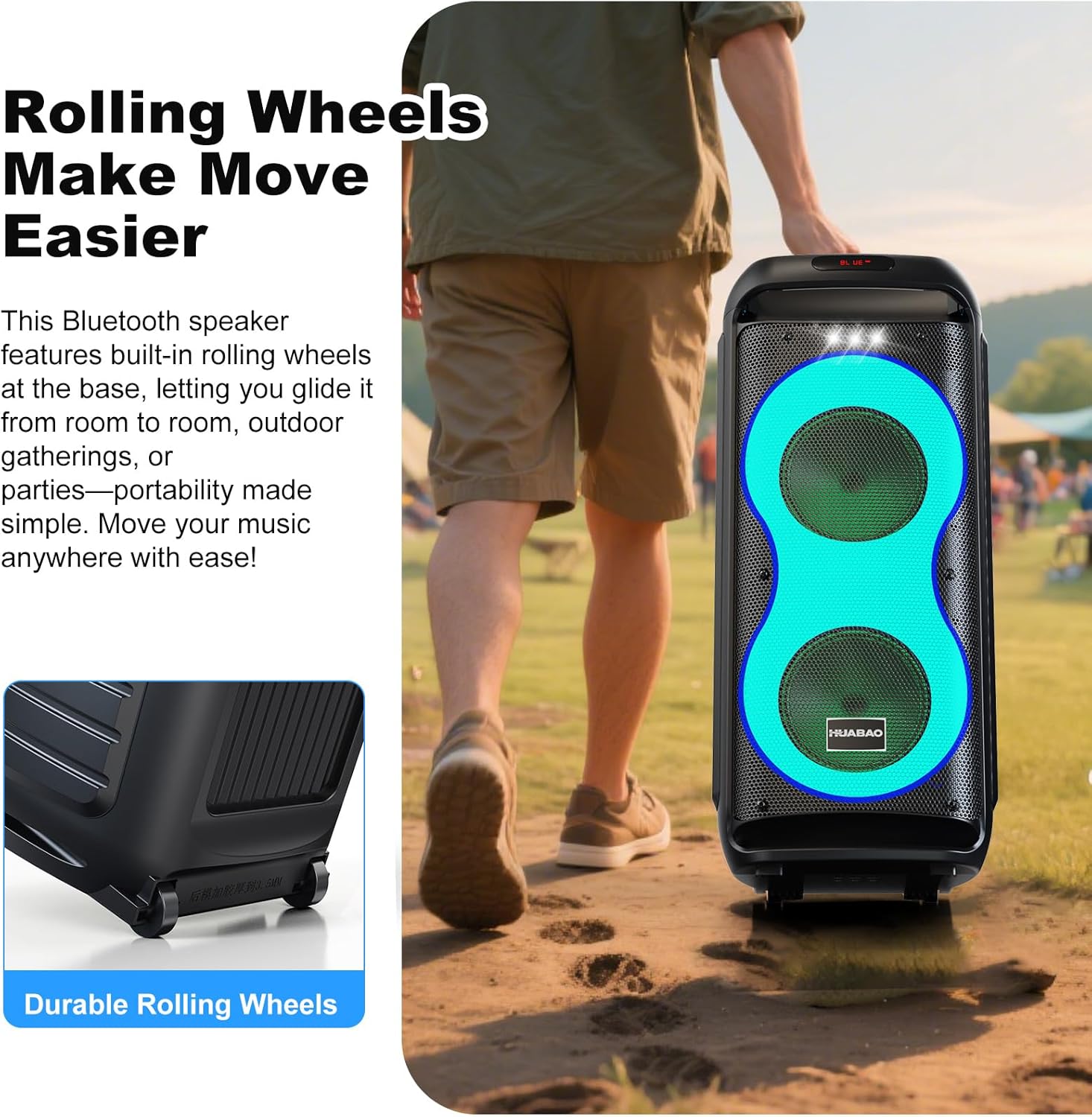
Image: A person pulling the HUABAO A117 speaker across an outdoor path, demonstrating the ease of transport provided by its durable rolling wheels.
Wartung
- Reinigung: Reinigen Sie die Außenseite des Lautsprechers mit einem weichen, trockenen Tuch. Vermeiden Sie die Verwendung von Scheuermitteln oder Lösungsmitteln.
- Lagerung: Bewahren Sie den Lautsprecher bei Nichtgebrauch an einem kühlen, trockenen Ort fern von direkter Sonneneinstrahlung und extremen Temperaturen auf.
- Batteriepflege: Um die Akkulaufzeit zu verlängern, vermeiden Sie häufiges vollständiges Entladen des Akkus. Laden Sie den Lautsprecher regelmäßig auf, auch wenn er längere Zeit nicht benutzt wird.
- Wassereinwirkung: This speaker is not waterproof. Avoid exposing it to rain, splashes, or high humidity.
Fehlerbehebung
| Problem | Mögliche Ursache | Lösung |
|---|---|---|
| Kein Strom | Batterie ist leer. | Charge the speaker using the provided Type-C charging cable. |
| Kein Ton | Volume is too low or muted. Incorrect input mode selected. Device not paired (Bluetooth). | Increase the volume. Press the "MODE" button to select the correct input. Re-pair your Bluetooth device. |
| Bluetooth-Kopplung fehlgeschlagen | Speaker is already paired to another device. Device is too far. Bluetooth is off on your device. | Disconnect from other devices. Ensure speaker and device are within 10 meters. Turn on Bluetooth on your device. |
| Mikrofon funktioniert nicht | Microphone is off or uncharged. MIC VOL knob is too low. | Ensure microphones are powered on and charged. Increase the "MIC VOL" knob. |
| TWS-Kopplung fehlgeschlagen | Speakers are already connected to a device. Incorrect pairing procedure. | Stellen Sie sicher, dass sich beide Lautsprecher im Bluetooth-Modus befinden und mit keinem anderen Gerät verbunden sind, bevor Sie die TWS-Kopplung starten. Befolgen Sie die TWS-Kopplungsschritte sorgfältig. |
Technische Daten
| Besonderheit | Detail |
|---|---|
| Modellnummer | A117 |
| Marke | HUABAO |
| Ausgangsleistung | 40 W |
| Lautsprechertreiber | Dual 6.5-inch Woofers + 1 Tweeter |
| Konnektivität | Bluetooth, AUX, USB, TF-Karte |
| Mikrofoneingänge | 2 x 6.5mm (for wired mics/instruments) |
| Drahtlose Mikrofone | 2 included, rechargeable |
| Batteriekapazität | 5400 mAh |
| Spielzeit | 6-8 Stunden (ca.) |
| LED-Leuchten | 7 modes + strobe light |
| Portabilität | Rolling wheels, integrated handle |
| Produktabmessungen (L x B x H) | 10.6 x 10.3 x 24.68 Zoll |
| Artikelgewicht | 11.68 Pfund |
Garantie und Support
HUABAO provides a 1-year warranty for this product, covering manufacturing defects from the date of purchase. Additionally, lifetime technical support is available.
If you encounter any issues or have questions regarding your HUABAO A117 speaker, please contact our customer support team for assistance. Refer to the product packaging or the official HUABAO webWebsite für Kontaktinformationen.
Ask a question about this manual
Ask about setup, troubleshooting, compatibility, parts, safety, or missing instructions. Manuals+ will review the question and use this page’s manual context to help answer it.