
1. Einleitung
This manual provides detailed instructions for the Deeyaple Computer Speakers (Model: G4C). This 40W wireless soundbar is designed for desktop PCs, offering Bluetooth 5.3 and USB audio connectivity, dynamic RGB lighting, and custom EQ software. It is compatible with various devices including laptops, gaming consoles, and smartphones.

Bild: Vorderseite view of the Deeyaple Computer Speakers, showcasing its sleek design and dynamic RGB lighting.

Image: The Deeyaple Computer Speakers integrated into a compact desktop setup, highlighting its stylish and space-saving design.
2. Packungsinhalt
Bitte überprüfen Sie, ob alle Artikel im Paket vorhanden sind:
- Deeyaple Computer Speaker (Model: G4C)
- Stromkabel
- Type-C to USB Audio Cable
- Kurzanleitung
3. Einrichtung
3.1 Stromanschluss
- Connect the provided power cable to the DC IN port on the back of the speaker.
- Stecken Sie das andere Ende des Stromkabels in eine normale Wandsteckdose.
- Der Lautsprecher schaltet sich automatisch ein oder kann über den Netzschalter eingeschaltet werden.
3.2 Audioanschlussoptionen
The Deeyaple Computer Speakers support both Bluetooth 5.3 wireless and USB wired audio connections.
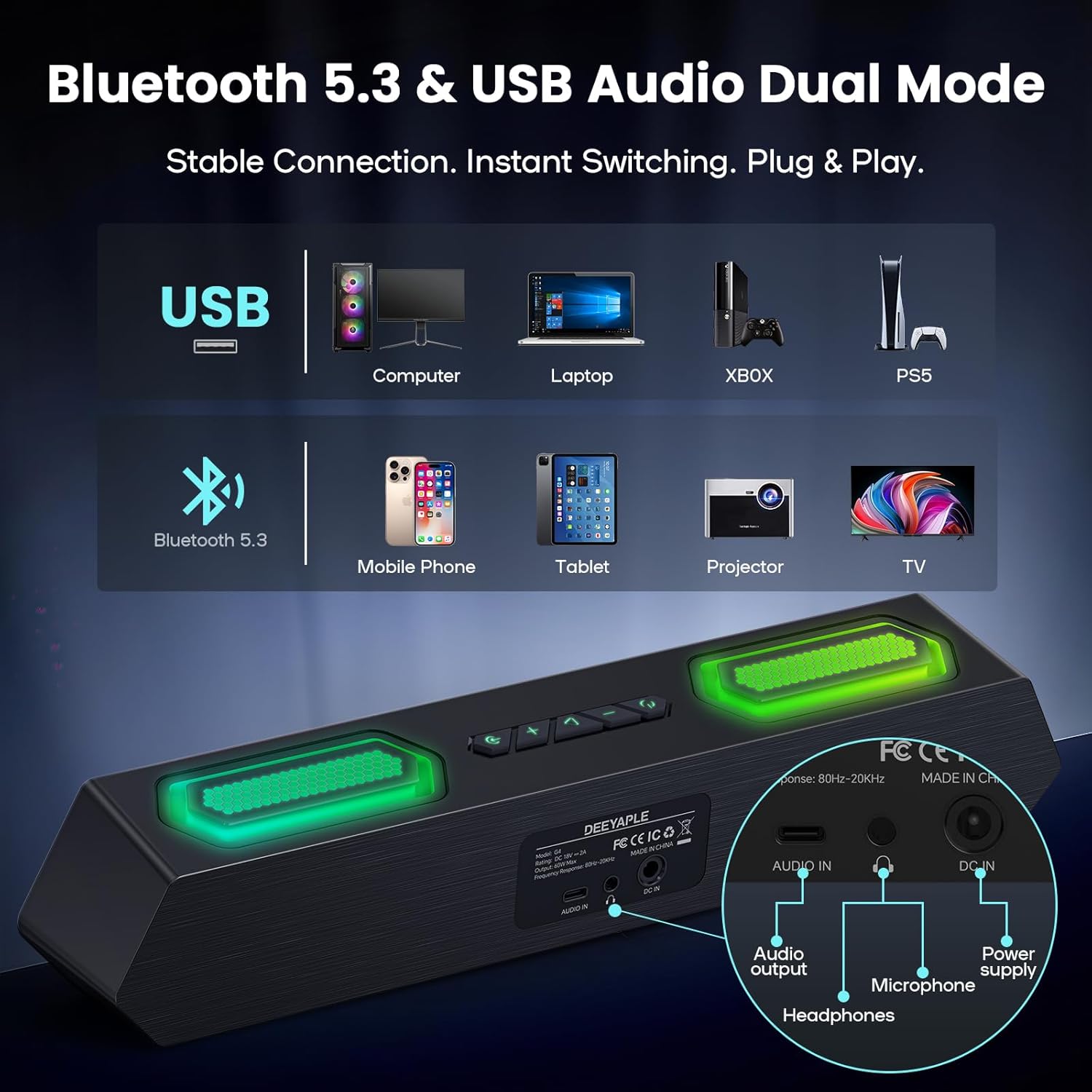
Bild: Rückseite view of the speaker showing USB, Audio In, DC In ports, and compatible devices for Bluetooth and USB connections.
3.2.1 Bluetooth-Verbindung
- Stellen Sie sicher, dass der Lautsprecher eingeschaltet ist.
- Press the Bluetooth button on the speaker to enter pairing mode (indicator light will flash).
- On your device (PC, laptop, smartphone, tablet), navigate to Bluetooth settings and search for "Deeyaple G4C".
- Select the speaker to pair. Once connected, the indicator light will become solid.
3.2.2 USB-Audioanschluss
- Connect one end of the provided Type-C to USB Audio Cable to the USB port on the speaker.
- Connect the other end of the cable to an available USB port on your computer or compatible device.
- The speaker will automatically switch to USB audio mode. You may need to select "Deeyaple G4C" as the audio output device in your computer's sound settings.
4. Bedienung
4.1 Grundlegende Bedienelemente
The speaker features full-button control for various functions:
- Netzschalter: Press and hold to turn on/off. Double-click to turn RGB lights completely off.
- Lautstärketasten: Adjust the audio volume. The volume level will be indicated by the bottom RGB bar.
- Modus-Taste: Switch between Bluetooth and USB audio input modes.
- RGB Lighting Button: Durchschalten Sie verschiedene RGB-Beleuchtungseffekte.
4.2 Audiowiedergabe
Once connected via Bluetooth or USB, audio from your device will play through the Deeyaple speakers. Use your device's media controls for play/pause and track skipping.

Image: Diagram illustrating the internal components of the speaker, including full-range drivers and bass diaphragms, highlighting 40W Hi-Fi Stereo Sound capabilities.

Image: A user engaged with a computer setup, experiencing immersive sound and dynamic RGB lighting from the Deeyaple Computer Speakers.
5. Software Control (Custom EQ & RGB Lighting)
For advanced customization of sound and lighting, download and install the dedicated PC software (often referred to as "Eduplight" or similar, check the Quick Start Guide for the exact name and download link).
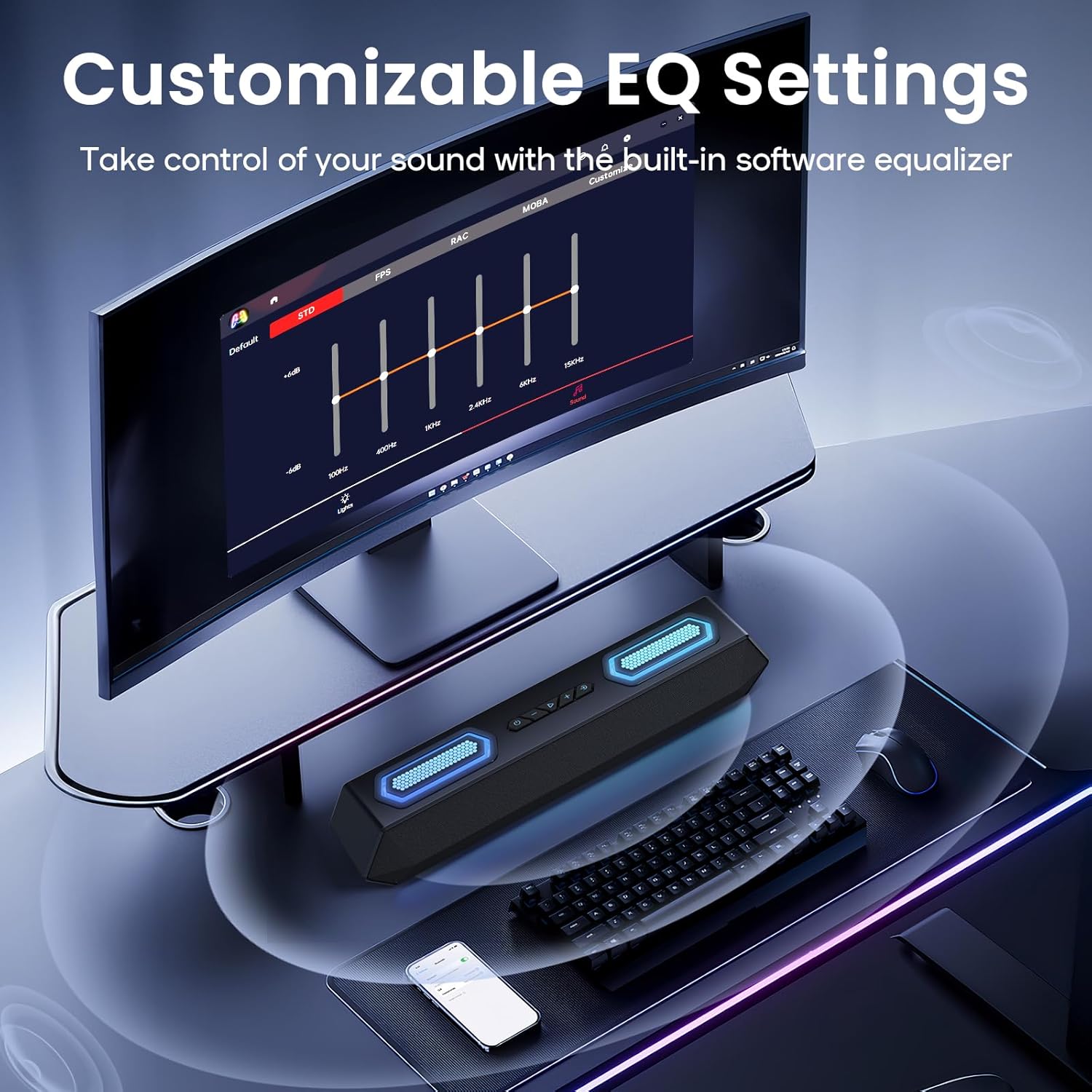
Image: Screenshot of the software interface for customizable EQ settings, showing sliders for bass, treble, and midrange adjustments.
5.1 Anpassbare EQ-Einstellungen
- The software allows you to adjust bass, treble, and midrange frequencies to create your preferred sound profile.
- Pre-set EQ modes may be available for different content types (e.g., gaming, music, movies).
5.2 RGB-Beleuchtungsmodi

Image: The Deeyaple Computer Speakers displaying various vibrant RGB lighting effects, including 12 presets and transitions controlled via PC software.
- Access 12 dynamic RGB effects through the software.
- Customize colors, brightness, and lighting patterns.
- Features include Screen Color Sync, which matches on-screen colors, and Music Reactive Lighting, which pulses with your audio.
Note: Some users have reported that the software may require an online account or login. If you prefer not to use the software, basic lighting modes can be cycled via the physical button, and volume can be controlled via your connected device.
6. Spezifikationen
| Besonderheit | Detail |
|---|---|
| Modellname | G4C |
| Lautsprechertyp | Tragbarer Lautsprecher |
| Maximale Lautsprecherausgangsleistung | 40 Watt |
| Konnektivitätstechnologie | Bluetooth 5.3, USB Audio |
| Besondere Merkmale | Bass Boost, LED Light (RGB), Software Custom EQ, Screen Color Sync, Music Reactive Lighting |
| Kompatible Geräte | PC, Laptop, Smartphone, Tablet, Gaming Console (Xbox, PS4) |
| Farbe | Schwarz |
| Technische Daten | 13.5"T x 2.5"B x 3.34"H |
| Artikelgewicht | 2.27 Pfund |
| Stromversorgung | Externes Netzteil |
| UPC | 850060113321 |
7. Fehlerbehebung
| Problem | Mögliche Lösung |
|---|---|
| Kein Ton aus den Lautsprechern. |
|
| Die Bluetooth-Kopplung schlägt fehl. |
|
| Die RGB-Beleuchtung funktioniert nicht oder ist defekt. |
|
| Sound quality issues (e.g., distortion, weak bass). |
|
| Software requires login/account. |
|
8. Wartung
- Reinigung: Reinigen Sie die Oberfläche des Lautsprechers mit einem weichen, trockenen Tuch. Verwenden Sie keine flüssigen Reinigungsmittel oder Scheuermittel.
- Lagerung: Bewahren Sie den Lautsprecher an einem kühlen, trockenen Ort fern von direkter Sonneneinstrahlung und extremen Temperaturen auf.
- Handhabung: Avoid dropping the speaker or exposing it to strong impacts.
- Wassereinwirkung: Dieses Produkt ist nicht wasserdicht. Schützen Sie es vor Wasser und hoher Luftfeuchtigkeit.
9. Garantie und Support
For warranty information and technical support, please refer to the warranty card included with your product or visit the official Deeyaple webWebsite. Bewahren Sie Ihren Kaufbeleg für Garantieansprüche auf.
For further assistance, you may contact Deeyaple customer service through their official channels.