
1. Einleitung
The ATTACK SHARK X11SE is a high-performance wireless gaming mouse designed for precision and comfort. It features a lightweight design, advanced sensor technology, and versatile connectivity options to enhance your gaming and productivity experience.

Bild: Überview of the ATTACK SHARK X11SE's key features including PAW3311 sensor, 63g lightweight design, 22000 DPI, HUANO switches, tri-mode switch, BK52820 chip, TTC encoders, and 65 hours of battery life.
Hauptmerkmale:
- PAW3311 Gaming Sensor: Equipped with the flagship PixArt PAW3311 sensor, offering up to 22,000 DPI with 6 adjustable levels, 400 IPS tracking speed, 35G acceleration, and a 1000Hz/1ms polling rate.
- Ultralight 63g Design: Weighing only 63 ± 3g, this mouse features a minimalist, full-casing design optimized for reduced weight without compromising build quality.
- Dreimodus-Konnektivität: Supports 2.4 GHz wireless, USB-C wired, and Bluetooth connections for versatile use across various devices.
- Durable Switches & Encoder: Features HUANO switches with a lifespan of 20 million clicks and an optimized TTC encoder for precise scroll wheel feedback.
- Ergonomisches Design: Dimensions (128 x 64 x 40 mm) suitable for medium to large hands, accommodating palm, claw, and fingertip grip styles for extended comfort.
- Dual Driver Support: Kompatibel mit Web Driver and proprietary ATTACK SHARK driver for advanced customization of buttons, DPI, polling rate, and macros.
2. Einrichtung
Packungsinhalt:
- ATTACK SHARK X11SE Kabellose Gaming-Maus
- USB-C-Kabel
- USB-Empfänger (2.4 GHz)
- Griffband
- Bedienungsanleitung
Aufladen der Maus:
Connect the mouse to your computer using the provided USB-C cable. The mouse has a 300mAh battery, providing up to 65 hours of uninterrupted use on a full charge (2-3 hours charging time).

Image: The ATTACK SHARK X11SE mouse illustrating its efficient battery management, offering up to 65 hours of use from a 300mAh battery, fully charged in 2-3 hours.
Konnektivitätsmodi:
The X11SE mouse supports three connection modes: 2.4GHz Wireless, Bluetooth, and USB-C Wired.

Image: The ATTACK SHARK X11SE mouse highlighting its lightning-fast 2.4G wireless connection, wired mode via USB-C, and Bluetooth 5.2 capabilities.
- 2.4-GHz-Wireless-Modus:
- Suchen Sie den USB-Empfänger, der sich normalerweise in einem Fach an der Unterseite der Maus befindet.
- Stecken Sie den USB-Empfänger in einen freien USB-Port Ihres Computers.
- Turn on the mouse using the switch on the bottom. Select the 2.4G mode.
- Die Maus sollte sich automatisch verbinden.
- Bluetooth-Modus:
- Turn on the mouse and select the Bluetooth mode using the switch on the bottom.
- Press and hold the Bluetooth toggle button (often located near the mode switch) for 3 seconds to enter pairing mode. The indicator light will flash.
- Öffnen Sie auf Ihrem Computer oder Gerät die Bluetooth-Einstellungen und suchen Sie nach neuen Geräten.
- Select "ATTACK SHARK X11SE" from the list to pair.
- USB-C-Kabelmodus:
- Connect the USB-C cable to the front port of the mouse and the other end to a USB port on your computer.
- Die Maus schaltet automatisch in den kabelgebundenen Modus und beginnt mit dem Ladevorgang.
3. Bedienung
Tastenfunktionen:
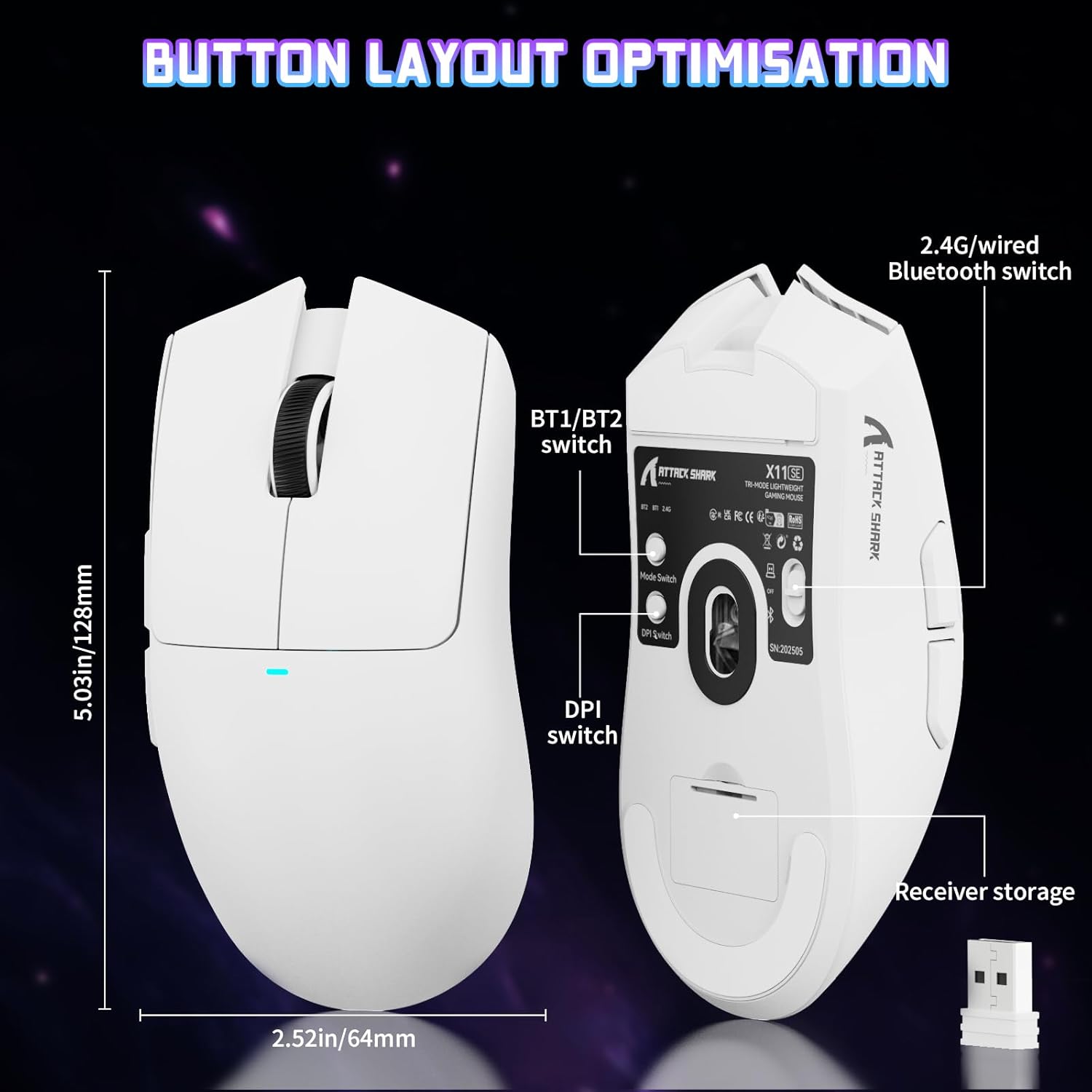
Image: The ATTACK SHARK X11SE mouse displaying its button layout, including the BT1/BT2 switch, DPI switch, and receiver storage, along with its dimensions (128mm length, 64mm width).
- Links Klick: Primäre Aktionsschaltfläche.
- Rechtsklick: Sekundäre Aktionsschaltfläche, typischerweise für Kontextmenüs.
- Scrollrad: Scrolls up/down. Can also be pressed for a middle-click function.
- Seitliche Tasten (Vorwärts/Rückwärts): Used for navigation in web Browser oder Aktionen im Spiel.
- DPI-Schalter: Located on the underside of the mouse, this button cycles through preset DPI levels.
- Modusschalter: Located on the underside, this switch allows you to select between 2.4G wireless, Bluetooth, and Off modes.
DPI-Anpassung:
The X11SE features a PixArt PAW3311 sensor with up to 22,000 DPI. You can adjust the DPI sensitivity using the dedicated DPI switch on the bottom of the mouse. For more precise control and custom DPI levels, use the official software.
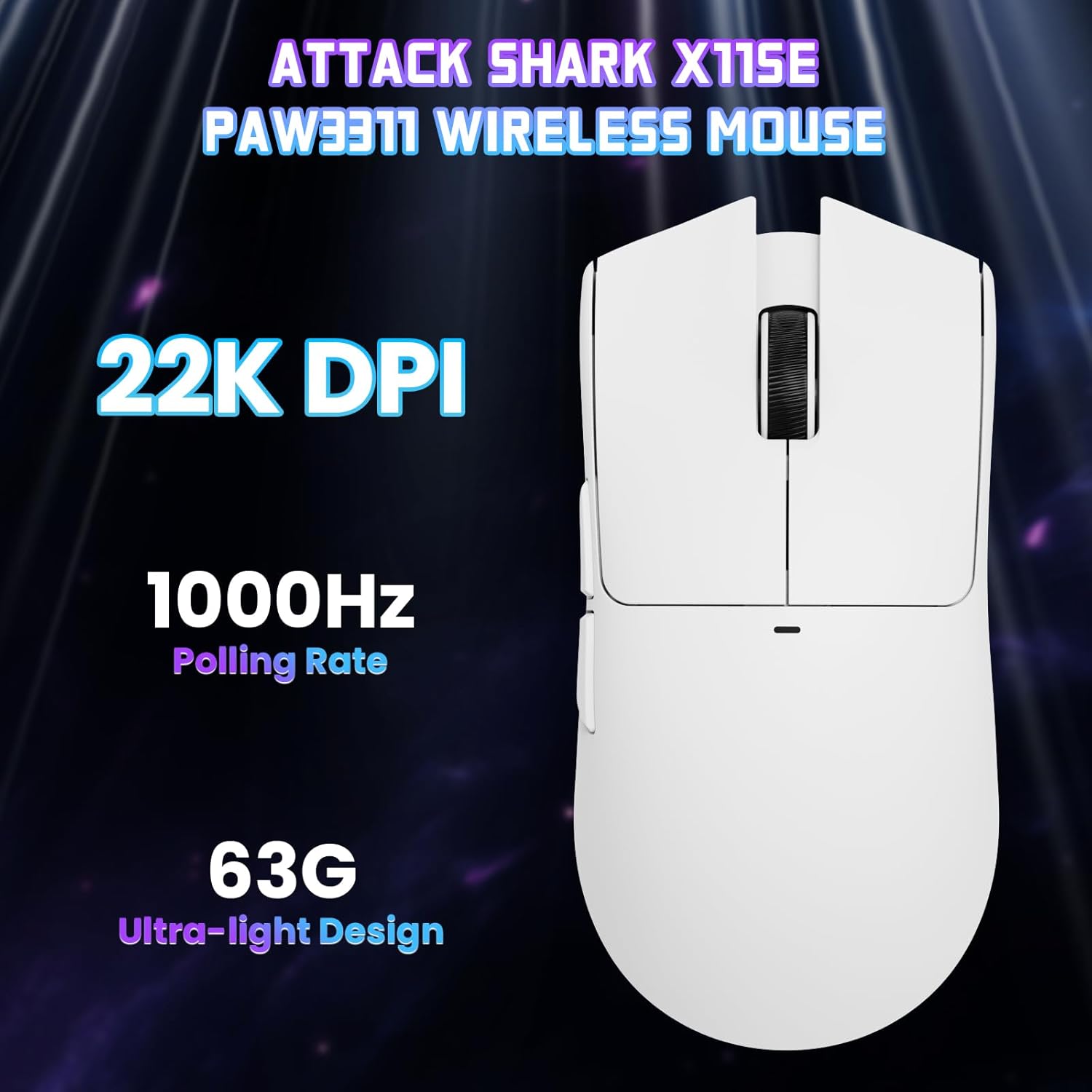
Bild: Eine Draufsicht view of the ATTACK SHARK X11SE mouse, emphasizing its 22,000 DPI capability and 1000Hz polling rate for high-performance gaming.
4. Anpassung
The ATTACK SHARK X11SE mouse offers extensive customization options through its dedicated software. This allows you to personalize button assignments, DPI settings, polling rate, and create macros.
Treiberinstallation:
The mouse supports two drivers:
- Web Treiber: Zugang über http://szslxd-tech.com/#/
- ATTACK SHARK Proprietary Driver: Herunterladen von https://attackshark.com/pages/dirver-download
Download and install the preferred driver software on your Windows, macOS, or Linux system.
Software-Features:

Image: The ATTACK SHARK X11SE software interface, demonstrating options for mouse settings, DPI adjustments, parameter settings, macro editing, and personal profiles.
- Tastenprogrammierung: Reassign functions to any of the 5 buttons.
- DPI-Einstellungen: Erstellen Sie benutzerdefinierte DPI-Profiles and adjust sensitivity levels.
- Abfragerate: Passen Sie die Abfragerate für eine optimale Reaktionsfähigkeit an.
- Makro-Editor: Record and assign complex sequences of commands to a single button.
- Profile Management: Save and switch between different profiles für verschiedene Spiele oder Anwendungen.
5. Wartung
Reinigung:
- Verwenden Sie ein weiches, trockenes Tuch, um die Oberfläche der Maus abzuwischen.
- Bei hartnäckigen Verschmutzungen leicht dampBefeuchten Sie das Tuch mit Wasser oder einer milden Reinigungslösung. Vermeiden Sie aggressive Chemikalien.
- Reinigen Sie den Bereich des optischen Sensors an der Unterseite der Maus mit einem Wattestäbchen, um eine genaue Abtastung zu gewährleisten.
Batteriepflege:
- Um die Lebensdauer der Batterie zu verlängern, sollte eine häufige vollständige Entladung vermieden werden.
- Bewahren Sie die Maus an einem kühlen, trockenen Ort auf, wenn Sie sie längere Zeit nicht verwenden.
6. Fehlerbehebung
Häufige Probleme und Lösungen:
- Maus reagiert nicht:
- Stellen Sie sicher, dass die Maus aufgeladen ist.
- Check the mode switch on the bottom of the mouse to ensure it's in the correct mode (2.4G, BT, or Wired).
- For 2.4GHz mode, ensure the USB receiver is securely plugged in. Try a different USB port.
- For Bluetooth mode, ensure Bluetooth is enabled on your device and the mouse is paired correctly. Try re-pairing.
- Im kabelgebundenen Modus muss sichergestellt sein, dass das USB-C-Kabel ordnungsgemäß angeschlossen ist.
- DPI ändert sich nicht:
- Press the DPI switch on the bottom of the mouse.
- If using custom DPI settings, ensure the driver software is running and the correct profile ist aktiv.
- Verzögerung oder zeitweise Verbindungsunterbrechung:
- Ensure the mouse is close to the USB receiver (for 2.4GHz) or your device (for Bluetooth).
- Vermeiden Sie Störungen durch andere drahtlose Geräte.
- Stellen Sie sicher, dass die Batterie der Maus ausreichend geladen ist.
- Update mouse drivers if available.
7. Spezifikationen
| Besonderheit | Spezifikation |
|---|---|
| Marke | ANGRIFFSHAI |
| Modellname | X11SE |
| Farbe | Weiß |
| Konnektivitätstechnologie | 2.4 GHz Wireless/USB-C Wired/Bluetooth |
| Besondere Merkmale | 63g ultralight, BK52820 Chip, TTC Encoder, Dual Driver |
| Bewegungserkennungstechnologie | Optical (PixArt PAW3311) |
| Anzahl der Tasten | 5 |
| Handausrichtung | Beidhändig |
| Empfohlene Produktverwendung | Computerspiele |
| Kompatible Geräte | Desktop Computer, MAC |
| Betriebssystem | Windows, macOS, Linux |
| Anzahl Batterien | 1 Lithium-Polymer (im Lieferumfang enthalten) |
| Stromquelle | Batteriebetrieben |
| Maximum Mouse Sensitivity | 22000 DPI |
| Reichweite | 300 Zentimeter |
| Stil | Ergonomisch |
| Material | Plastik |
| Ursprungsland | China |
| Im Lieferumfang enthaltene Komponenten | USB-C Cable, Manual, Grip Tape |
| UPC | 752010613663 |
8. Garantie und Support
Garantieinformationen:
The ATTACK SHARK X11SE Wireless Gaming Mouse comes with a six-month warranty from the date of purchase. Please retain your proof of purchase for warranty claims.
Treiber-Downloads:
Die neuesten Treiber und Software-Updates finden Sie hier:
- Web Treiber: http://szslxd-tech.com/#/
- ATTACK SHARK Driver: https://attackshark.com/pages/dirver-download
Related Product Video:
Video: Ein offizielles Verkäufervideo zeigtasing the ATTACK SHARK X11 Mouse, demonstrating its features and functionality. While specifically for the X11, it provides relevant insights into the X11SE's design and operation.