
Einführung
This manual provides detailed instructions for the installation, operation, and maintenance of your Bietrun 50A 12V/24V MPPT Solar Charge Controller. Please read this manual thoroughly before using the product to ensure proper function and safety. This controller is designed to efficiently manage power from your solar panels to charge various battery types in RVs, off-grid systems, and other solar applications.
Produkt überview und Hauptmerkmale
The Bietrun MPPT Solar Charge Controller offers advanced features for optimizing your solar power system:
- Intelligente App-Steuerung: Monitor and adjust settings in real-time via Bluetooth or Wi-Fi using the "Smart Life - Smart Living" app. Access 30-day performance history, update firmware, and configure alerts.
- Hohe Effizienz: Features MPPT tracking efficiency greater than 99% and a conversion efficiency of up to 98%, maximizing energy harvest from solar panels.
- Vielseitige Akkukompatibilität: Supports 12V/24V LiFePO4, SLD, Gel, FLD, and AGM batteries with auto-recognition.
- Robuster Schutz: Equipped with 9-layer intelligent protection, including input power limitation, PV over-voltage, PV short-circuit, PV reverse polarity, load over-power, load short-circuit, nighttime reverse charging, TVS lightning, and over-temperature protection.
- Mehrere Schnittstellen: Includes Solar Panel Input, Battery Output, 12V DC Output, and two 5V/3A USB Outputs.
- Kompaktes Design: Space-saving dimensions (9 x 7.3 x 2.9 inches, 3.5 lbs) with an IP21 waterproof rating, suitable for various environments.

Bild: Überview of the controller's professional performance specifications, including 50A rated charging current, 12V/24V output, 100V VOC input, >98% conversion efficiency, >99% tracking efficiency, 20A rated load current, 600W/1200W max output, IP21 rating, 5V/3A USB, and 12V DC output.
Setup und Installation
1. Physische Installation
The controller features a compact design, making it suitable for installation in various locations such as RVs, yachts, homes, and outdoor solar setups. Ensure the installation location is dry and well-ventilated, as the device has an IP21 waterproof rating, meaning it is protected against vertically falling drops of water and solid objects larger than 12.5mm. Avoid damp Umgebungen, um Schäden zu verhindern.

Image: The controller mounted on a wall, showing its compact dimensions (9 inches length, 7.3 inches width, 3 inches height) and weight (3.5 lbs).
2. Kabelverbindungen
Connect the components in the following order to ensure safety and proper operation:
- Batterieanschluss: Connect the battery to the controller's battery terminals. Ensure correct polarity (positive to positive, negative to negative). The controller will auto-recognize 12V or 24V systems.
- Anschluss des Solarmoduls: Connect the solar panels to the controller's PV input terminals. Observe correct polarity. The maximum PV input voltage is 100V VOC.
- Lastanschluss: Schließen Sie Ihre Gleichstromverbraucher an die Lastausgangsklemmen des Controllers an.
- USB-Ausgang: Two 5V/3A USB ports are available for charging small electronic devices.
- 12-V-DC-Ausgang: A dedicated 12V DC output port is available for specific 12V loads.
Wichtig: Always connect the battery first, then the solar panels, and finally the load. Disconnect in the reverse order.

Image: Diagram illustrating the various connection ports on the controller: Solar Input, Battery Output (12V/24V), 12V DC Output, and USB Output (5V/3A).
3. Einrichtung der App-Steuerung
To utilize the smart app control features:
- Laden Sie die App herunter: Scan the QR code on the controller or search for "Smart Life - Smart Living" in the Google Play Store or Apple App Store.
- Verbinden: Once installed, open the app and connect to the MPPT controller via Bluetooth or Wi-Fi. Follow the in-app instructions for pairing.
- Überwachen und Anpassen: The app provides real-time data insights, a 30-day performance history, and allows you to adjust settings, update firmware, and configure alerts.

Image: A smartphone displaying the "Smart Life - Smart Living" app interface for monitoring the solar charge controller, with Bluetooth and Wi-Fi logos.
Bedienungsanleitung
1. Battery Type and Charging Parameter Settings
Before charging, it is crucial to confirm your battery type and configure the corresponding battery type and charging voltage in the app or using the device's settings button. Incorrect settings can lead to incomplete charging or damage to your batteries.
The controller supports various battery types, including LiFePO4, Sealed Lead-acid (SLA), Gel, Flooded (FLD), and AGM batteries. Batteries should only be connected in parallel, not in series.

Image: A table detailing single battery voltage parameters for various 12V and 24V battery types, including Boost voltage, Charge cut-off voltage, Discharge recovery voltage, and Discharge cut-off voltage.
2. Monitoring and Display
The integrated LCD display provides real-time information about your solar system's status. You can view PV-Voltage, batterie voltage, load current, and other parameters. The app offers a more detailed interface for monitoring and historical data.

Bild: Eine detaillierte view of the controller's LCD display, showing various indicators for PV, Battery, and Load, including voltage, current, power, battery percentage, and fault prompts.
Wartung
Regelmäßige Wartung gewährleistet die Langlebigkeit und optimale Leistung Ihres Solarladereglers:
- Sauberkeit: Halten Sie den Controller sauber und frei von Staub und Schmutz. Verwenden Sie zum Reinigen ein trockenes Tuch.
- Verbindungen: Periodically check all wiring connections to ensure they are secure and free from corrosion. Loose connections can lead to power loss or overheating.
- Belüftung: Ensure adequate airflow around the controller to prevent overheating. Do not block ventilation openings.
- Firmware-Updates: Check the "Smart Life - Smart Living" app for available firmware updates to ensure your controller has the latest features and bug fixes.
Fehlerbehebung
If you encounter issues with your Bietrun MPPT Solar Charge Controller, refer to the following common troubleshooting steps:
- Kein Strom/Display:
- Prüfen Sie die Batterieanschlüsse und stellen Sie sicher, dass sie fest sitzen und korrekt polarisiert sind.
- Überprüfen Sie die Batterielautstärketage liegt innerhalb des Betriebsspannungsbereichs (12V/24V).
- Keine Aufladung durch Solarpaneele:
- Stellen Sie sicher, dass die Anschlüsse der Solarmodule sicher und korrekt polarisiert sind.
- PV-Eingangsspannung prüfentage (Max 100V VOC) and current.
- Verify there is sufficient sunlight reaching the panels.
- Inspect for any shading on the solar panels.
- Laden funktioniert nicht:
- Prüfen Sie die Lastanschlüsse und stellen Sie sicher, dass sie fest sitzen.
- Verify the load current does not exceed the rated 20A.
- Überprüfen Sie die Batterieladungtage; if too low, the load output may be disconnected by protection features.
- Probleme mit der App-Konnektivität:
- Ensure Bluetooth or Wi-Fi is enabled on your device.
- Confirm the controller is powered on.
- Restart the app and attempt to reconnect.
- Ensure your phone is within Bluetooth range or connected to the same Wi-Fi network as the controller.
- Incorrect Charging Parameters:
- Access the app or device settings to verify the correct battery type and charging voltages are selected. Refer to the "Battery Type and Charging Parameter Settings" section.
- Übertemperaturschutz:
- Stellen Sie sicher, dass der Controller über ausreichende Belüftung verfügt und nicht in einem geschlossenen Raum ohne Luftzirkulation installiert ist.
- Reduzieren Sie wenn möglich die Umgebungstemperatur.
The controller includes 9-layer intelligent protection. If a fault occurs, the LCD display or app may indicate a specific protection mode. Address the underlying cause before resuming operation.
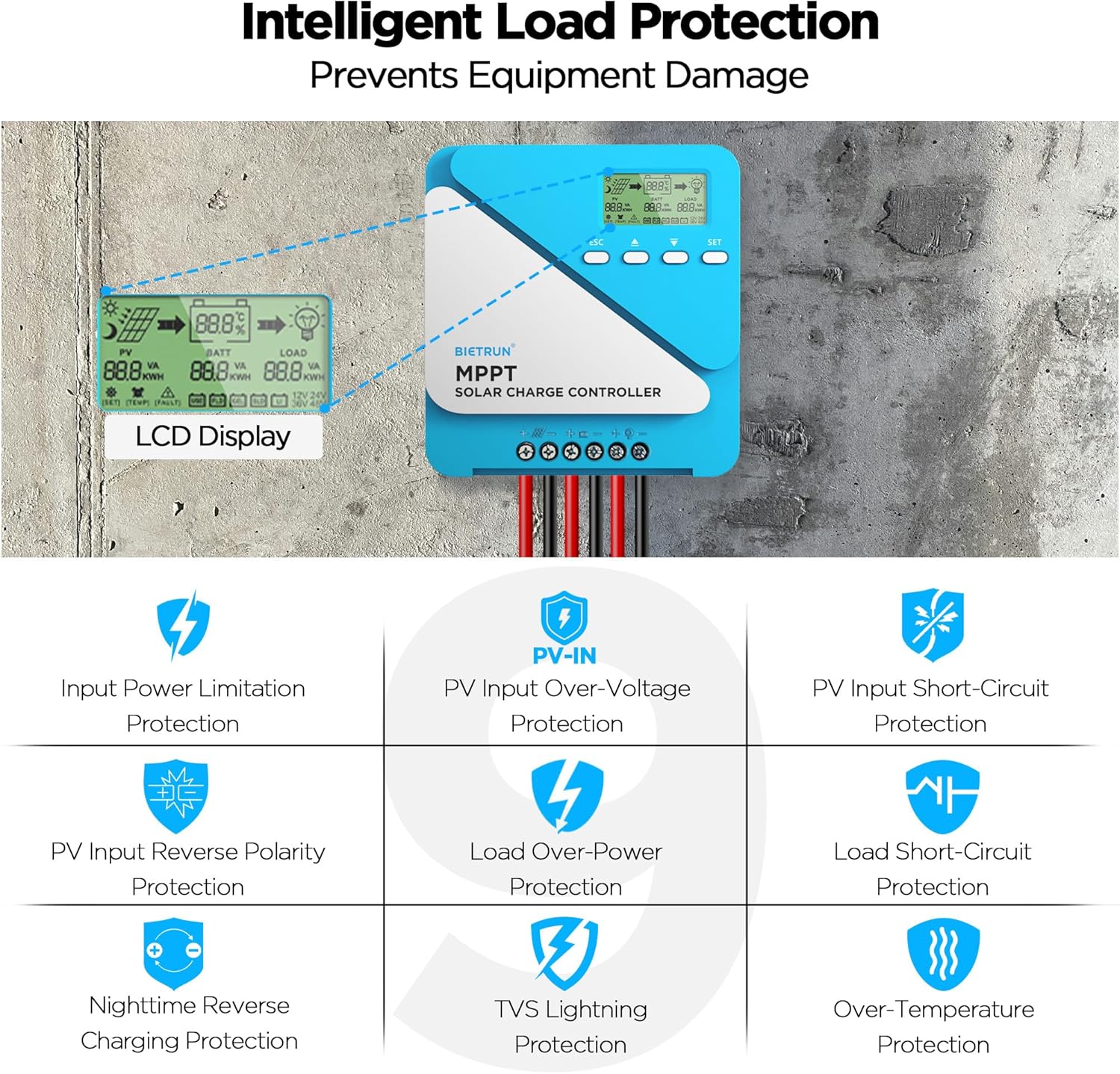
Image: Diagram illustrating the 9-layer intelligent protection features of the controller, including input power limitation, PV over-voltage, PV short-circuit, PV reverse polarity, load over-power, load short-circuit, nighttime reverse charging, TVS lightning, and over-temperature protection.
Technische Daten
| Besonderheit | Spezifikation |
|---|---|
| Nennladestrom | 50 A |
| Ausgangsvolumentage | 12V/24V (Auto Recognition) |
| Max. PV-Eingangsvolumentage | 100 V Leerlaufspannung |
| Nennlaststrom | 20 A |
| Maximale Ausgangsleistung | 600 W (12 V) / 1200 W (24 V) |
| Umwandlungseffizienz | ≤ 98 % |
| MPPT-Tracking-Effizienz | >99 % |
| Wasserdichtigkeit | IP21 |
| USB-Ausgänge | 2 x 5V/3A |
| Produktabmessungen (L x B x H) | 9" x 7.3" x 3" |
| Material | Metall, Kunststoff |
| Anzeigetyp | LCD |
Garantie und Support
For warranty information and technical support, please refer to the documentation included with your purchase or visit the official Bietrun webBewahren Sie Ihren Kaufbeleg als Kaufnachweis für eventuelle Garantieansprüche auf.
If you encounter issues not covered in this manual or require further assistance, please contact Bietrun customer service through their official channels.