
1. Einleitung
Thank you for choosing the Devoko Electric Height-Adjustable Standing Desk. This manual provides detailed instructions for the assembly, operation, and maintenance of your new desk. Please read this manual thoroughly before use to ensure proper function and safety. Keep this manual for future reference.
2. Sicherheitshinweise
- Gewichtsbeschränkung: Überlasten Sie den Schreibtisch nicht. Die maximale Belastbarkeit beträgt 70 kg. Exceeding this limit may cause damage to the desk or personal injury.
- Elektrische Sicherheit: Use the integrated USB-A charging port with caution to avoid electrical hazards. Ensure cables are properly managed to prevent tripping or damage.
- Kinder und Haustiere: Um Unfälle zu vermeiden, sollten Kinder und Haustiere während des Betriebs vom Schreibtisch ferngehalten werden.
- Spielraum: Achten Sie beim Verstellen der Höhe des Schreibtisches darauf, dass sich keine Hindernisse oberhalb oder unterhalb des Schreibtisches befinden.
- Energiequelle: Connect the desk only to a grounded power outlet.
- Wartung: Versuchen Sie nicht, den Motor oder das Steuerungssystem selbst zu zerlegen oder zu reparieren. Wenden Sie sich an den Kundendienst.
3. Packungsinhalt
Please verify that all components are present before beginning assembly. If any parts are missing or damaged, contact Devoko customer support.
- Desktop sections (4 parts, 15mm high-quality particle board)
- Desk frame (2 steel beams, 2 T-shaped legs)
- Control panel with LED display and USB-A port
- Motor and power supply
- Fabric drawer (35x22x10.5 cm)
- Kopfhöreranschluss
- Kabelmanagementfach
- Kabeltülle
- Assembly hardware and tools
- Bedienungsanleitung
4. Aufbau und Montage
The desktop is divided into 4 sections of 15mm high-quality particle board, which simplifies the assembly process. Follow the included graphical instructions for a smooth setup.
- Komponenten auspacken: Nehmen Sie alle Teile vorsichtig aus der Verpackung und legen Sie sie auf eine saubere, weiche Unterlage, um Kratzer zu vermeiden.
- Montieren Sie den Rahmen: Attach the two T-shaped legs to the steel beams. Ensure all screws are tightened securely. The frame features a robust double-beam construction (65x45 mm cold-rolled steel alloy) for enhanced stability.
- Desktop-Abschnitte anhängen: Connect the four desktop sections together and then secure them to the assembled frame using the provided hardware.
- Systemsteuerung installieren: Mount the control panel to the underside of the desk in an easily accessible location.
- Motor und Stromversorgung anschließen: Connect the motor to the control panel and then plug the power supply into the control panel.
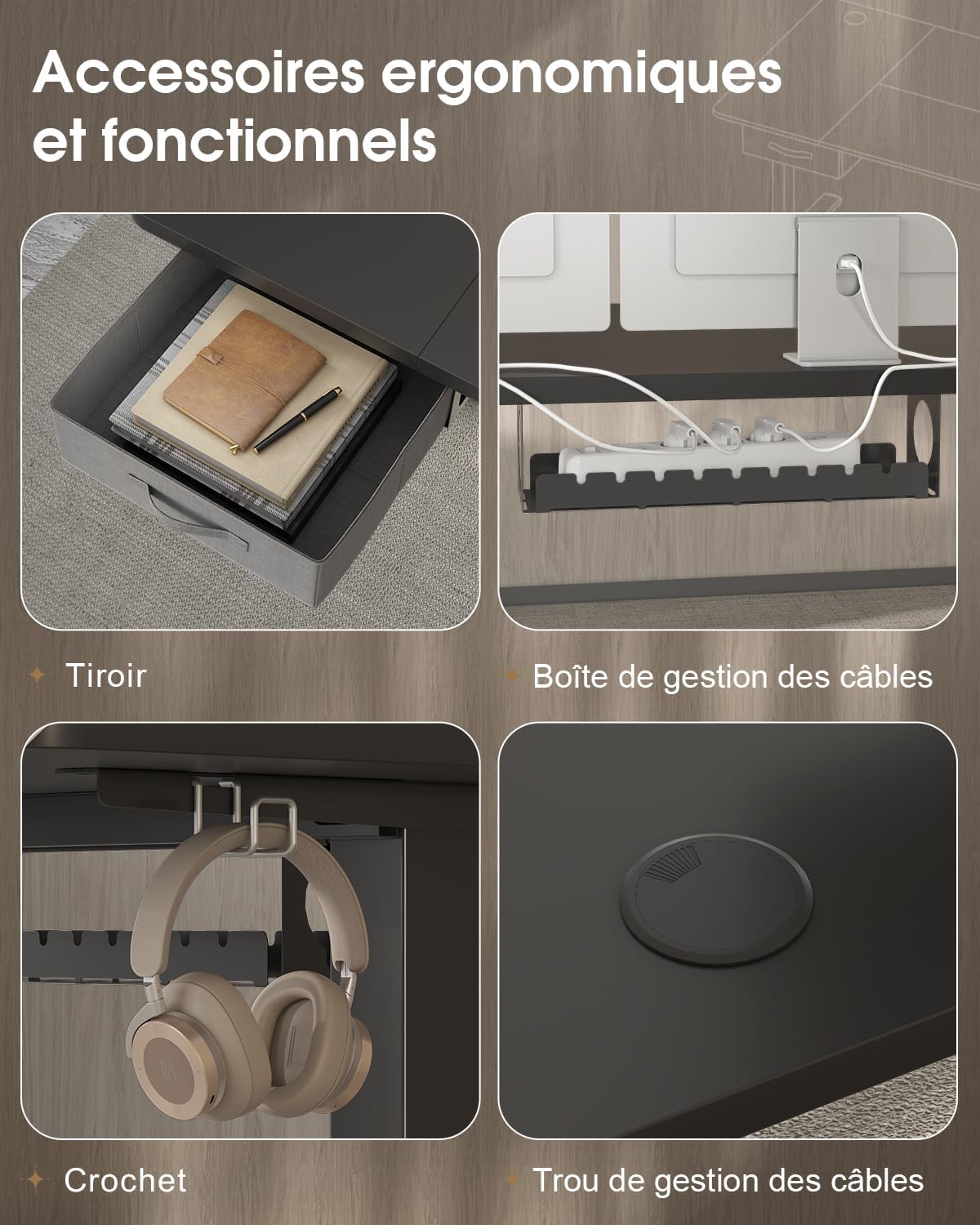
- Zubehör installieren: Attach the fabric drawer, headphone hook, cable management tray, and cable grommet as desired.


5. Bedienungsanleitung
5.1 Bedienfeld vorbeiview
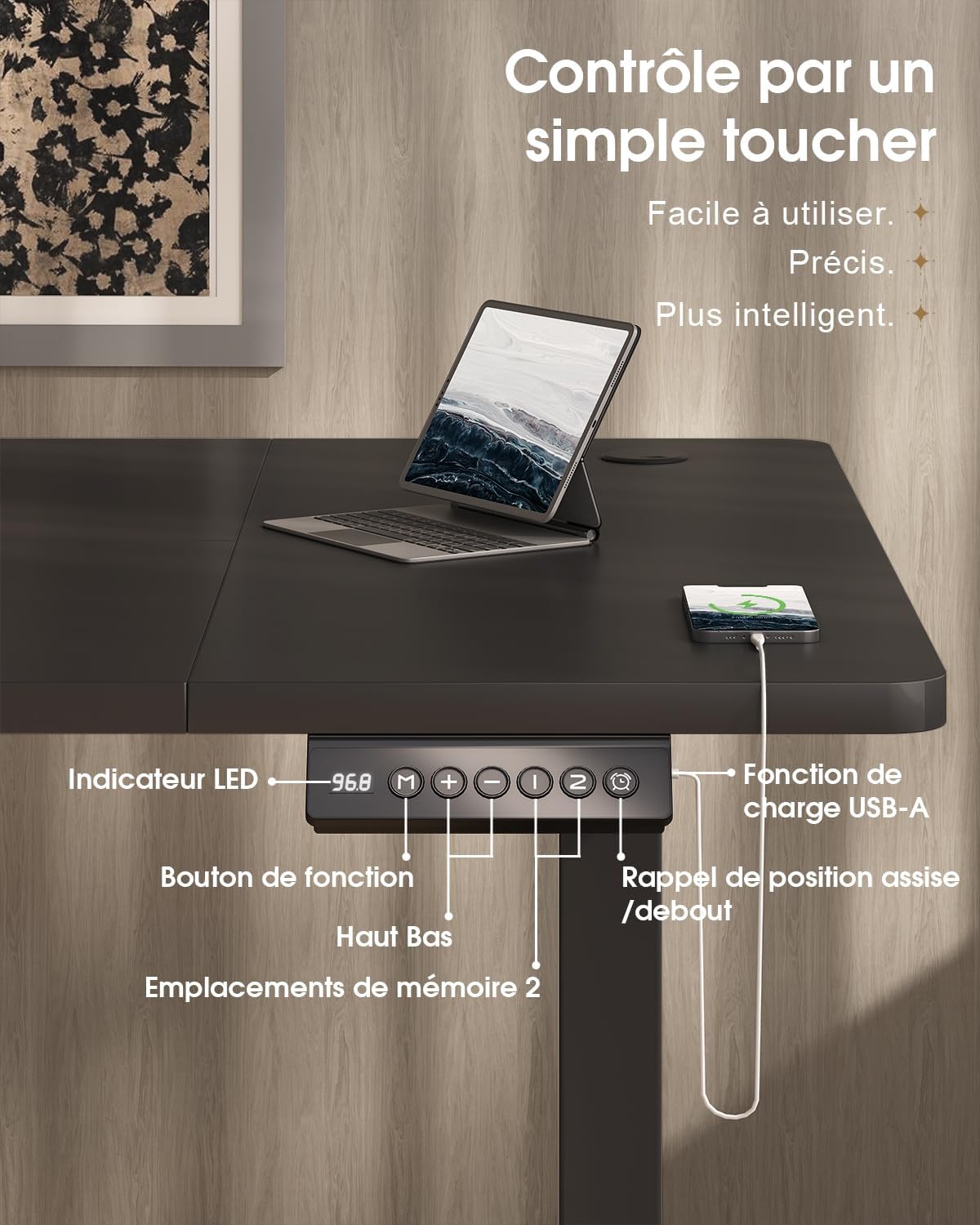
The desk features an intuitive control panel with an LED display for easy height adjustment and memory functions.

5.2 Höhenverstellung
- Auf/Ab-Tasten: Press and hold the 'Up' or 'Down' arrow buttons on the control panel to raise or lower the desk to your desired height. The LED display will show the current height.
- Höhenbereich: The desk can be adjusted smoothly and quietly between 73 cm (sitting height) and 118 cm (standing height).
5.3 Speichervoreinstellungen
Über das Bedienfeld können Sie zwei bevorzugte Höheneinstellungen speichern, um diese schnell anzupassen.
- Speicherposition festlegen: Stellen Sie den Schreibtisch mithilfe der Tasten „Auf“ oder „Ab“ auf die gewünschte Höhe ein.
- Press the 'M' (Memory) button. The LED display will flash.
- Within 3 seconds, press either '1' or '2' to save the current height to that memory position. The LED display will confirm the setting.
- Eine Speicherposition abrufen: Drücken Sie einfach die Taste „1“ oder „2“, um den Schreibtisch automatisch auf die gespeicherte Höhe zu fahren.
5.4 USB-A-Ladeanschluss
A convenient USB-A charging port is integrated into the control panel. Connect your compatible devices, such as smartphones or tablets, for charging. Ensure your device's charging cable is compatible with a USB-A port.
6. Funktionen
The Devoko Electric Height-Adjustable Standing Desk is designed with several ergonomic and functional features to enhance your workspace.
- Elektrische Höhenverstellung: Smooth and quiet (less than 50 dB) motor allows for effortless transitions between sitting and standing positions.
- Robuste Konstruktion: Features a double-beam frame made of 65x45 mm cold-rolled steel alloy, providing exceptional stability and a load capacity of up to 70 kg. All metal parts are powder-coated for durability.
- Integrierte Schublade: A fabric drawer (35x22x10.5 cm) is included for convenient storage of office supplies, helping to keep your desktop clutter-free.
- Kopfhörerhaken: A side-mounted hook provides a dedicated spot for your headphones, keeping them within reach and off the desk surface.
- Kabelmanagementsystem: Includes a cable management tray and a cable grommet to organize and conceal power cords and other cables, maintaining a tidy and safe workspace.
- USB-A-Ladeanschluss: Built-in port on the control panel for easy charging of your electronic devices.

7. Wartung
Regular maintenance will help prolong the life and performance of your Devoko standing desk.
- Reinigung: Wischen Sie die Schreibtischoberfläche und den Rahmen mit einem weichen, fusselfreien Tuch ab.amp Mit einem Tuch abwischen. Vermeiden Sie die Verwendung von scharfen Chemikalien oder Scheuermitteln, die die Oberfläche beschädigen könnten.
- Verbindungen prüfen: Überprüfen Sie regelmäßig alle Schrauben und Bolzen auf festen Sitz. Ziehen Sie sie gegebenenfalls nach.
- Kabelmanagement: Ensure cables are neatly organized and not pinched or strained, especially during height adjustments.
- Motorpflege: Avoid spilling liquids on the motor or control panel. If the desk is not used for an extended period, unplug it from the power outlet.
8. Fehlerbehebung
If you encounter any issues with your desk, refer to the following common problems and solutions. If the problem persists, contact customer support.
| Problem | Mögliche Ursache | Lösung |
|---|---|---|
| Der Schreibtisch bewegt sich nicht und reagiert nicht auf die Bedienelemente. | Stromkabel getrennt; Motorkabel getrennt; Überlastung. | Check if the power cable is securely plugged into the wall outlet and the desk. Ensure the motor cable is connected. Reduce the load on the desk if it exceeds 70 kg. |
| Der Schreibtisch wackelt ungleichmäßig oder macht ungewöhnliche Geräusche. | Loose connections; uneven weight distribution. | Check and tighten all assembly screws. Redistribute weight evenly on the desktop. |
| Das LED-Display zeigt einen Fehlercode an. | System malfunction; sensor error. | Unplug the desk from the power outlet for 10 minutes, then plug it back in to reset the system. If the error persists, contact customer support. |
| USB-A charging port not working. | Cable issue; device incompatibility. | Try a different USB cable or device. Ensure the desk is powered on. |
9. Spezifikationen
| Besonderheit | Spezifikation |
|---|---|
| Marke | Devoko |
| Modellnummer | 0790 |
| Farbe | Schwarz |
| Desktop-Material | Spanplatte |
| Rahmenmaterial | Steel alloy (65x45 mm cold-rolled steel) |
| Produktabmessungen (L x B x H) | 180 cm x 80 cm x (73-118 cm) |
| Höhenverstellbereich | 73 cm bis 118 cm |
| Tragfähigkeit | 70 kg |
| Geräuschpegel | Weniger als 50 dB |
| Besondere Merkmale | Electric height adjustment, Integrated USB-A port, Cable management, Ergonomic design, 2 Memory presets, Drawer, Headphone hook |
| Artikelgewicht | 30.8 kg |
| Ursprungsland | China |
10. Garantie und Support
For warranty information or technical support, please refer to the purchase documentation or contact Devoko customer service. Keep your proof of purchase for any warranty claims.
Weitere Informationen erhalten Sie im offiziellen Devoko-Shop: Devoko Store