
1. Einleitung
Thank you for choosing the Devoko Electric Height Adjustable Desk. This manual provides detailed instructions for assembly, operation, and maintenance to ensure optimal performance and longevity of your desk. Please read this manual thoroughly before use and retain it for future reference.

Image 1.1: Devoko Electric Height Adjustable Desk (White, 160x80 cm) in a home office environment.
2. Sicherheitshinweise
- Vergewissern Sie sich vor der Verwendung, dass alle Komponenten sicher befestigt sind.
- Halten Sie Kinder und Haustiere während des Betriebs vom Schreibtisch fern.
- Stellen Sie keine Flüssigkeiten direkt auf das Bedienfeld oder in die Nähe von elektrischen Bauteilen.
- Avoid overloading the desk. The maximum load capacity is 70 kg.
- Vor der Reinigung oder Durchführung von Wartungsarbeiten die Stromzufuhr unterbrechen.
- Verwenden Sie nur das mitgelieferte Netzteil.
3. Packungsinhalt
Verify that all parts are present and undamaged. If any parts are missing or damaged, please contact customer support.
- Desk tabletop (160x80 cm, white)
- Electric lifting frame (double beam support)
- Control panel with LED display and USB-A port
- Netzteil und Kabel
- Fabric drawer (removable, 35x22x10.5 cm)
- Cable management box
- Kopfhöreranschluss
- Assembly hardware and tools
- Benutzerhandbuch
4. Aufbau und Montage
Assembly is designed to be straightforward with pre-drilled holes. It typically takes approximately 35 minutes.
- Komponenten auspacken: Entnehmen Sie vorsichtig alle Teile aus der Verpackung.
- Rahmen zusammenbauen: Attach the electric lifting frame components according to the included diagram. Ensure the double beam support is correctly installed for maximum stability.
- Tischplatte anbringen: Secure the tabletop to the assembled frame using the provided screws and pre-drilled holes.
- Zubehör installieren:
- Attach the control panel to your preferred side (left or right).
- Install the fabric drawer underneath the tabletop.
- Mount the headphone hook.
- Position the cable management box as desired.
- Strom anschließen: Plug the power adapter into the desk and then into a wall outlet.

Image 4.1: Simple assembly process with pre-drilled holes, estimated at 35 minutes.

Image 4.2: The desk offers two mounting options for the control panel and accessories, allowing for left or right-hand setup.
5. Bedienungsanleitung
5.1 Bedienfeld vorbeiview

Image 5.1: The intuitive control panel features an LED display, up/down buttons, two memory presets, a function button, a USB-A charging port, and a sit/stand reminder.
- LED-Anzeige: Zeigt die aktuelle Schreibtischhöhe in Zentimetern an.
- Auf/Ab-Tasten: Press and hold to adjust the desk height upwards or downwards.
- Speichervoreinstellungen (1, 2):
- To save a height: Adjust the desk to your desired height, then press the 'M' button followed by '1' or '2'. The display will confirm the setting.
- To recall a height: Press the '1' or '2' button to automatically move the desk to the saved position.
- USB-A-Ladeanschluss: Provides convenient charging for your devices.
- Sit/Stand Reminder: The desk can be programmed to remind you to change positions. Refer to the full manual for detailed programming instructions.
5.2 Height Adjustment Demonstration
Video 5.2: Demonstration of the electric height adjustment feature, showcasing smooth and quiet operation from sitting to standing positions.
The desk features a powerful motor with a lifting speed of 13 mm/s and a noise level of ≤ 50dB, ensuring smooth and quiet transitions between heights.

Image 5.3: Smooth and fluid lifting mechanism with a powerful motor.
6. Funktionen und Vorteile
- Intelligente Steuerung: 6 functional buttons, 2 height presets, USB port, and postural reminder for easy and intuitive use.
- Professional Structure: Extra-large 65mm lifting frame with reinforced metal guides, tested for 50,000 cycles. 15mm thick tabletop with a maximum load of 70kg.
- Ample Workspace: 160x80 cm desk with a removable fabric drawer (35x22x10.5 cm), cable organizer, and hook, ideal for a tidy workspace.
- Leiser Betrieb: Optimized motor with noise below 55dB, suitable for quiet environments.
- Vielseitiges Design: Can be used as a standing desk, folding table, or PC desk, adapting to work, study, and entertainment needs.

Image 6.1: The desk boasts a robust load capacity of up to 70 kg.

Image 6.2: Integrated features like a fabric drawer and headphone hook enhance functionality.

Image 6.3: Ergonomic and functional accessories for an organized workspace.

Image 6.4: Double beam support for enhanced stability and durability.

Image 6.5: Effective cable management system helps maintain a clean and tidy workspace.
7. Wartung
- Reinigung: Wischen Sie die Schreibtischoberfläche mit einem weichen,amp Tuch. Vermeiden Sie Scheuermittel oder aggressive Chemikalien.
- Inspektion: Überprüfen Sie regelmäßig alle Schrauben und Verbindungen auf festen Sitz.
- Kabelmanagement: Ensure cables are neatly organized and not pinched by moving parts.
- Motorpflege: Der Elektromotor ist wartungsfrei. Versuchen Sie nicht, ihn zu öffnen oder zu schmieren.
8. Fehlerbehebung
| Problem | Mögliche Ursache | Lösung |
|---|---|---|
| Der Schreibtisch bewegt sich nicht. | Stromkabel nicht angeschlossen; Überlastung; Motorfehler. | Überprüfen Sie die Stromanschlüsse. Reduzieren Sie die Belastung auf dem Schreibtisch. Ziehen Sie den Netzstecker für 10 Sekunden und stecken Sie ihn dann wieder ein, um das System zurückzusetzen. |
| Der Schreibtisch wackelt ungleichmäßig oder macht ungewöhnliche Geräusche. | Loose connections; obstruction; uneven weight distribution. | Überprüfen Sie alle Schrauben und Verbindungen. Entfernen Sie alle Hindernisse. Verteilen Sie das Gewicht gleichmäßig. |
| Speichervoreinstellungen funktionieren nicht. | Voreinstellungen wurden nicht korrekt gespeichert. | Re-save the desired height by pressing 'M' then '1' or '2'. |
| USB-Anschluss lädt nicht. | Gerät nicht kompatibel; Kabelproblem; Stromversorgungsproblem. | Ensure device is compatible. Try a different USB cable. Check if desk has power. |
9. Spezifikationen
| Besonderheit | Detail |
|---|---|
| Marke | Devoko |
| Modell | 0790 |
| Farbe | Weiß |
| Technische Daten | 160 x 80 x 73-118 cm (Length x Width x Height) |
| Material | Wood (Tabletop), Metal (Frame) |
| Besondere Merkmale | Height Adjustable, Multifunction, Memory Presets, USB Port, Cable Management |
| Artikelgewicht | 24.7 kg |
| Maximale Tragfähigkeit | 70 kg |
| Hubgeschwindigkeit | 13 mm/s |
| Geräuschpegel | ≤ 50dB |
| Anzahl der Schubladen | 1 (fabric, removable) |
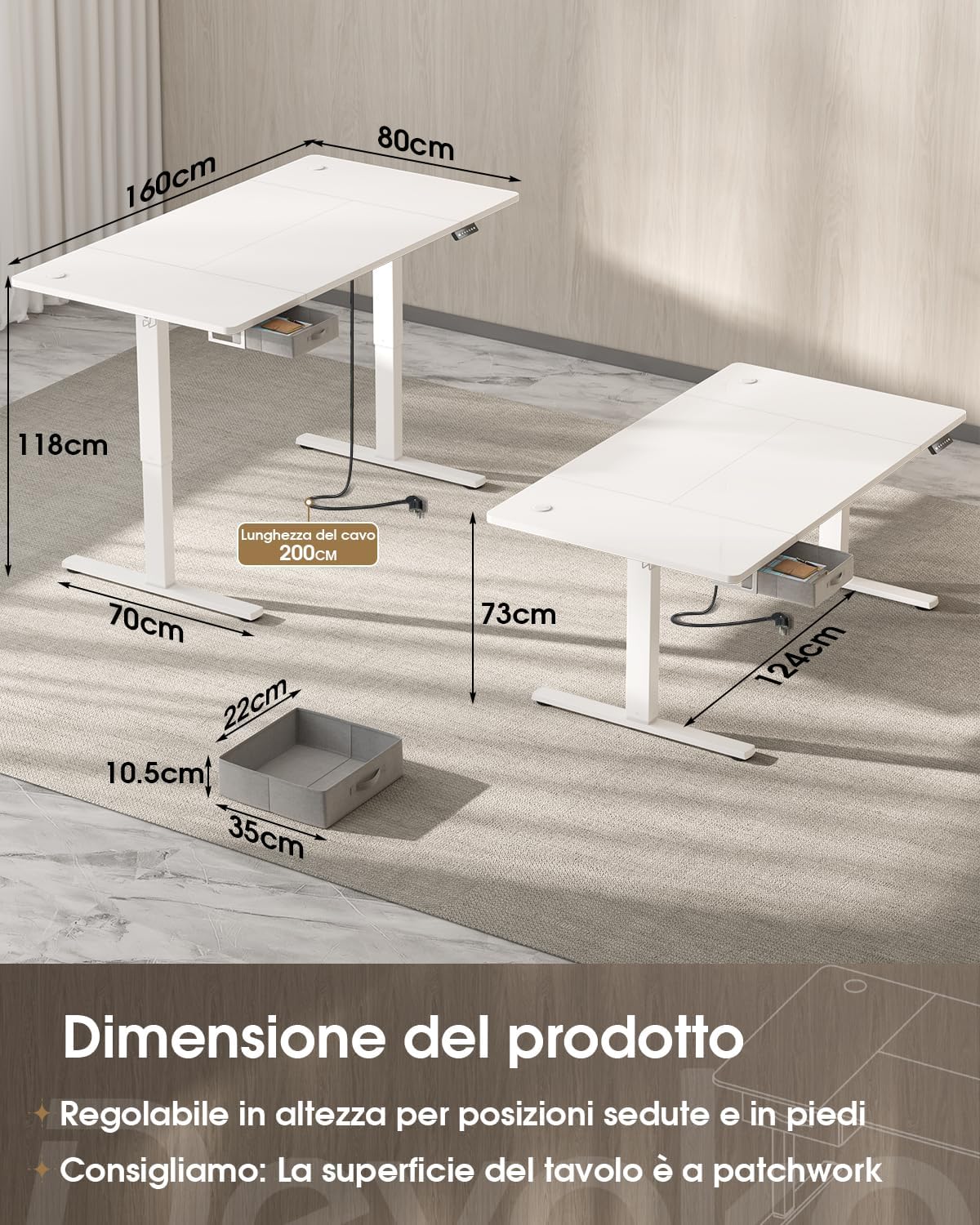
Image 9.1: Product dimensions and height adjustment range.

Image 9.2: Drawer dimensions and load capacity details.
10. Garantie und Support
10.1 Garantieinformationen
This Devoko product is covered by a standard manufacturer's warranty. Please refer to the warranty card included in your package for specific terms and conditions, or visit the official Devoko website for more details. Keep your proof of purchase for warranty claims.
10.2 Kundendienst
For any questions, technical assistance, or warranty claims, please contact Devoko customer support through the retailer where you purchased the product or visit the official Devoko webWebsite:
- Online-Hilfe: Besuchen Sie den Devoko Store auf Amazon
- E-Mail: Beachten Sie die Angaben auf Ihrer Produktverpackung oder die offizielle Kennzeichnung. webHier finden Sie die aktuellste Kontakt-E-Mail-Adresse.