
Einführung
This manual provides comprehensive instructions for the installation and operation of your BRIKSMAX 2.0 LED Light Kit, specifically designed for the LEGO Icons 10351 Sherlock Holmes Book Nook set. Following these guidelines will help you successfully integrate the lighting system and enhance your LEGO model's display.

Image 1: The LEGO Sherlock Holmes Book Nook model illuminated by the BRIKSMAX LED Light Kit.
Packungsinhalt
Bitte überprüfen Sie vor Beginn der Installation, ob alle unten aufgeführten Komponenten in Ihrem Paket enthalten sind:
- LED Light Kit (various light types and quantities)
- Papieranweisungen
- Benutzerhandbuch
- AA Battery Box (batteries not included)
- USB-Stromkabel
- Erweiterungskarte
- Building Block Type Battery Box
- Assorted Light Bricks (e.g., 1x4 Light Brick - Warm White, 1x2 Light Brick - Warm White)
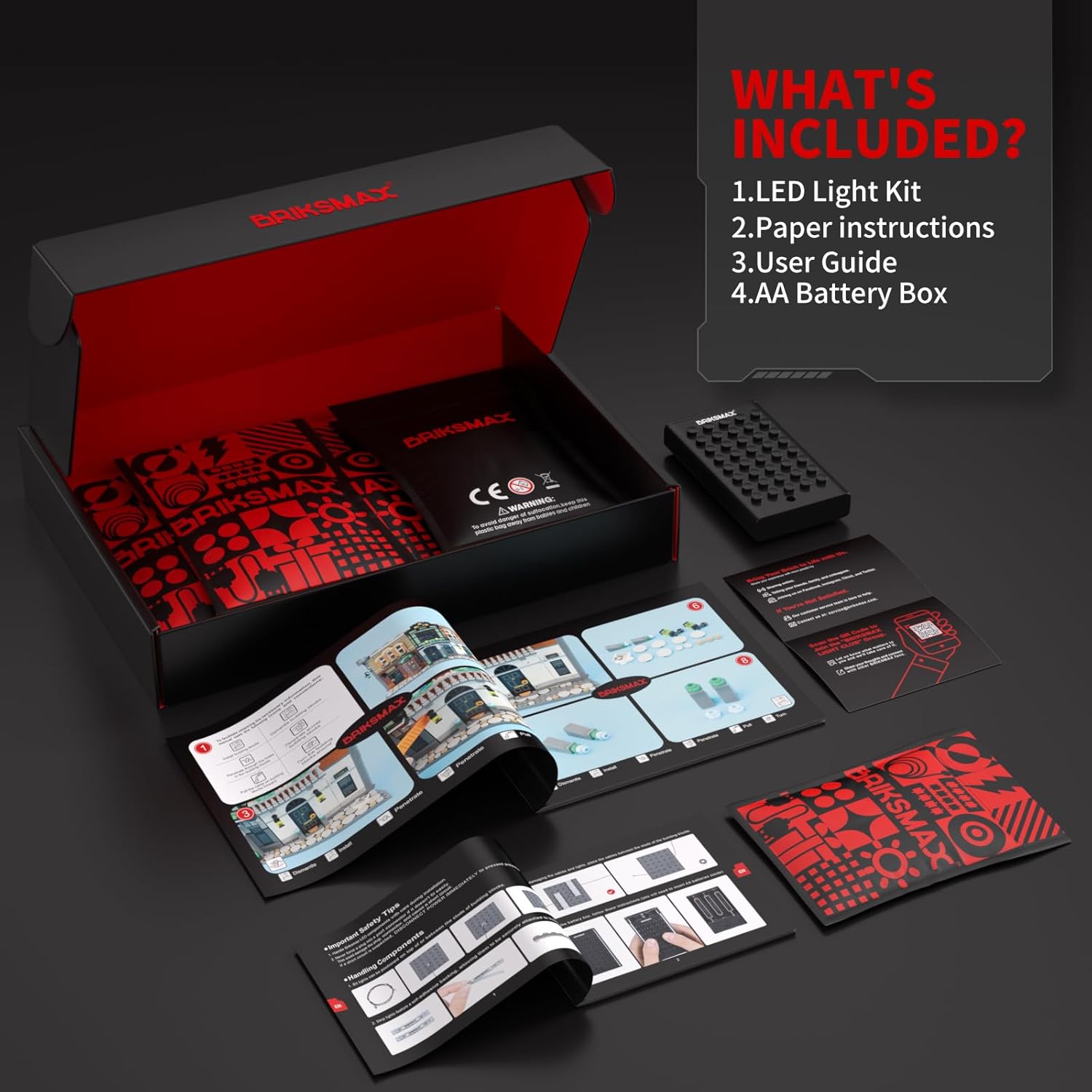
Image 2: All components included in the BRIKSMAX LED Light Kit.
Setup und Installation
The BRIKSMAX 2.0 Light Kit is designed for integration with your LEGO Icons 10351 Sherlock Holmes Book Nook. Follow the detailed paper instructions provided in your kit for step-by-step guidance. Key aspects of the installation include:
- Kabelmanagement: Utilize the newly designed wire organizer parts to conceal wires effectively. This prevents breakage and ensures a neat, integrated appearance within your LEGO model.
- Komponentenintegration: Lights and expansion boards are designed to fit within the existing brick structure, minimizing exposed components for a cleaner aesthetic.
- Flexible Platzierung: Independent accessories allow for flexible installation. You can adjust the placement of light points to achieve desired display effects.

Abbildung 3: Beispielample of wire management using BRIKSMAX organizer parts.
Refer to the included paper instructions for specific brick removal and light placement details. Ensure all connections are secure to prevent intermittent lighting.
Bedienungsanleitung
Once the light kit is fully installed and connected, you can power it on using either the USB cable or the AA Battery Box.
- USB-Stromversorgung: Connect the provided USB cable to the light kit's expansion board and then to a compatible USB power source (e.g., a USB wall adapter, power bank, or computer USB port).
- Batterieleistung: Insert the required AA batteries (not included) into the AA Battery Box. Connect the battery box to the light kit's expansion board.
The lights will illuminate upon connection to a power source. There are no additional switches on the light kit itself; power is controlled by connecting or disconnecting the power source.

Image 4: Visualizing the LEGO model with lights on and off.
Wartung
To ensure the longevity and optimal performance of your BRIKSMAX LED Light Kit, consider the following maintenance tips:
- Reinigung: Gently dust the LED components and wires with a soft, dry cloth. Avoid using liquid cleaners directly on the electrical components.
- Handhabung: When moving or disassembling your LEGO model, handle the light kit components carefully to avoid bending or breaking wires.
- Lagerung: If storing the model for an extended period, disconnect the power source (remove batteries or unplug USB cable) to prevent battery drain or potential damage.
Fehlerbehebung
If you encounter any issues with your BRIKSMAX LED Light Kit, please refer to the following common solutions:
- Lichter gehen nicht an:
- Ensure the power source (USB cable or battery box) is correctly connected and functional.
- Überprüfen Sie bei Verwendung von Batterien, ob diese richtig eingelegt sind und ausreichend geladen sind.
- Verify all wire connections to the expansion board and individual lights are secure.
- Individual Lights Not Working:
- Check the specific wire connection for the non-functional light.
- Inspect the wire for any visible damage or kinks.
- Flackernde Lichter:
- Stellen Sie sicher, dass alle Verbindungen fest und nicht locker sind.
- If using battery power, low battery charge can cause flickering. Replace batteries if necessary.
Sollten diese Schritte das Problem nicht beheben, wenden Sie sich bitte an den Kundendienst.
Technische Daten
| Besonderheit | Detail |
|---|---|
| Marke | BRIKSMAX |
| Modellnummer | 10351 (BX761) |
| Material | Plastik |
| Lichtquellentyp | LED |
| Anzahl der Lichtquellen | Multiple individual LEDs (e.g., 19 total as per kit contents) |
| Bandtage | 5 Volt (DC) |
| Stromquelle | USB or AA Battery Box (Batteries not included) |
| Montage erforderlich | Ja |
| Verwendung im Innen- und Außenbereich | Innenbereich |
| Artikelgewicht | 180 Gramm (6.3 Unzen) |
| Technische Daten | 6.5 x 4.72 x 1.57 Zoll |
| Vom Hersteller empfohlenes Alter | Ab 8 Jahren |
Garantie und Support
BRIKSMAX LED lighting kits are manufactured using safe and reliable materials. We are committed to providing quality products and support.
- Beschädigte oder fehlende Teile: If you receive a kit with damaged or missing components, please contact us directly for a replacement.
- Kundendienst: For any questions, concerns, or assistance with installation and operation, please reach out to BRIKSMAX customer support. Refer to the contact information provided in your product packaging or on the official BRIKSMAX webWebsite.