
Pinmoco G700412K-RST
Pinmoco TV Stand User Manual
Model: G700412K-RST
1. Einleitung
Thank you for choosing the Pinmoco TV Stand. This entertainment center is designed to accommodate TVs up to 47 inches, offering a stylish and functional solution for your living room or bedroom. Its open-shelf design promotes air circulation for electronics and provides ample storage for media devices and accessories. This manual provides essential information for assembly, usage, and maintenance to ensure safe and optimal performance of your TV stand.
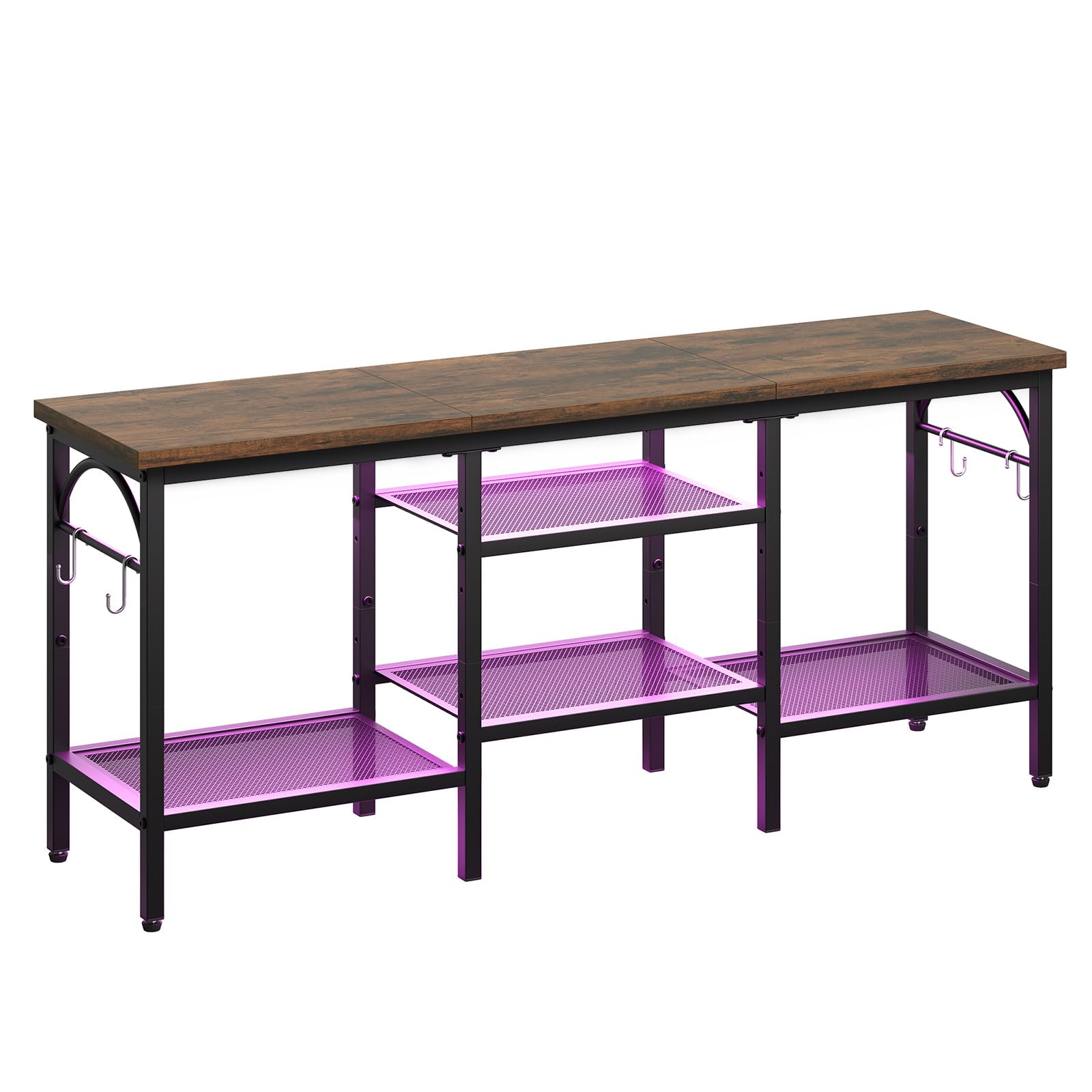
Figure 1: Pinmoco TV Stand (Rustic Brown)
2. Sicherheitshinweise
Bitte lesen und verstehen Sie alle Anweisungen, bevor Sie dieses Produkt zusammenbauen und verwenden. Die Nichtbeachtung dieser Anweisungen kann zu Verletzungen oder Schäden am Produkt führen.
- Bewahren Sie alle Kleinteile und Verpackungsmaterialien außerhalb der Reichweite von Kindern auf.
- Ensure all connections are secure before placing any items on the stand.
- Do not overload the shelves. Refer to the Specifications section for weight limits.
- Place the TV stand on a flat, stable, and level surface to prevent tipping.
- Avoid exposing the stand to direct sunlight or extreme humidity to prolong its lifespan.
- Stellen oder klettern Sie nicht auf den Fernsehständer.
- Verwenden Sie für die Montage ausschließlich die mitgelieferten Teile.
3. Packungsinhalt
Prüfen Sie vor der Montage, ob alle unten aufgeführten Komponenten vorhanden und unbeschädigt sind. Sollten Teile fehlen oder beschädigt sein, wenden Sie sich bitte an den Kundendienst.
- Deckplatte (Holz)
- Metallrahmenkomponenten
- Mesh Shelves (2 large, 2 small)
- Verstellbare Füße
- Hooks (4 pieces)
- Montagezubehör (Schrauben, Inbusschlüssel)
- Bedienungsanleitung
4. Aufbau und Montage
Assembly typically takes 30-45 minutes and requires an Allen wrench (provided). Follow these general steps:
- Teile auspacken und identifizieren: Nehmen Sie alle Teile vorsichtig aus der Verpackung. Legen Sie sie auf eine saubere, weiche Unterlage, um Kratzer zu vermeiden. Prüfen Sie anhand der Teileliste, ob alle Teile vorhanden sind.
- Montieren Sie den Hauptrahmen: Connect the vertical metal frame components using the provided screws and Allen wrench. Ensure all connections are finger-tight at this stage.
- Regale anbringen: Insert the mesh shelves into their designated slots within the frame. Secure them with screws. The two larger shelves typically form the bottom tier, and the two smaller shelves form the middle tier.
- Montage der oberen Abdeckung: Place the wooden top panel onto the assembled frame. Secure it using the appropriate screws.
- Haken anbringen: Secure the four hooks to the side frames as desired for additional storage.
- Alle Schrauben festziehen: Once all components are in place, systematically tighten all screws to ensure the stand is stable and secure. Do not overtighten.
- Füße anpassen: Install the adjustable feet on the bottom of the stand. Adjust them as needed to level the stand on uneven surfaces.
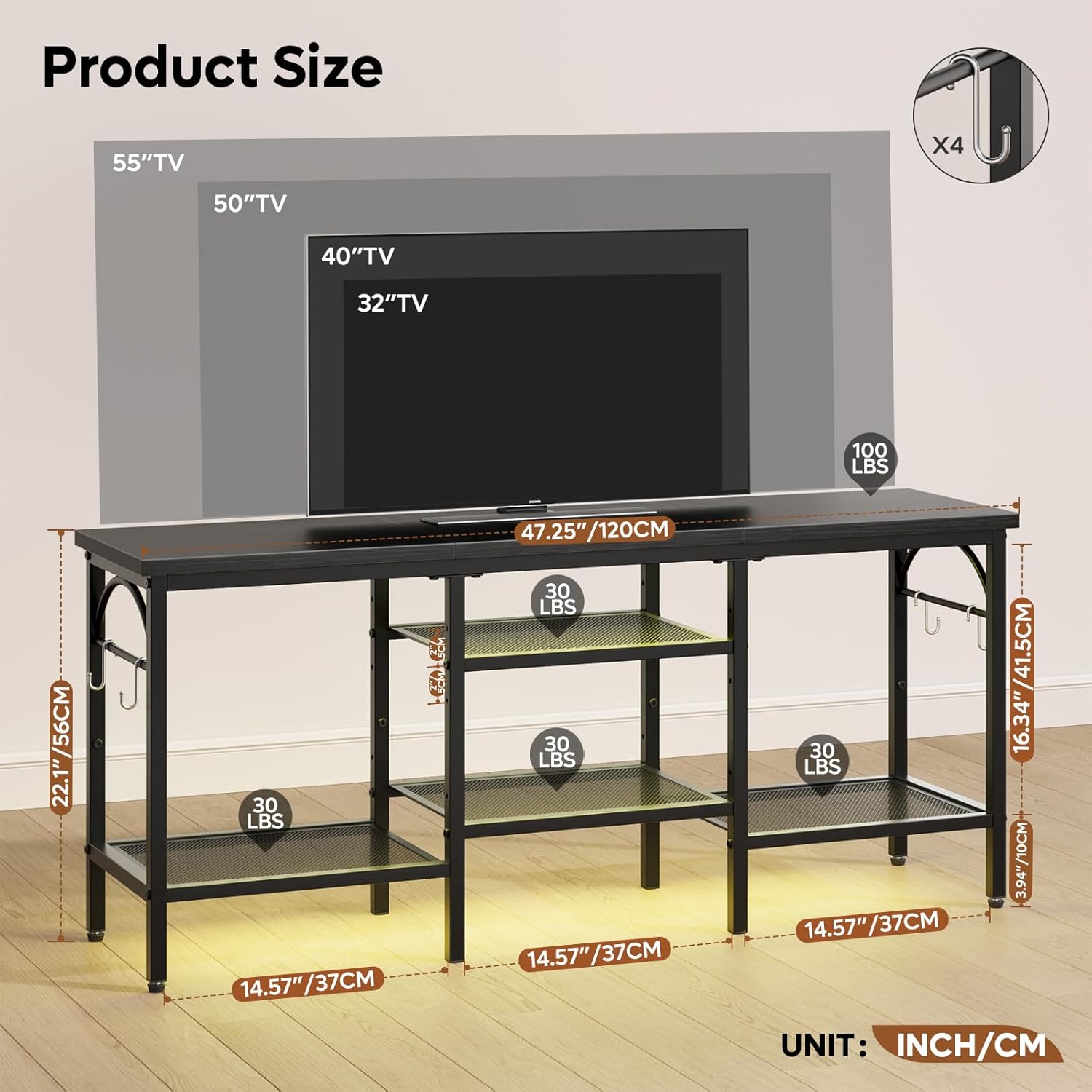
Abbildung 2: Produktabmessungen und Gewichtskapazitäten
5. Nutzung
This TV stand is designed for versatile use in various rooms. Follow these guidelines for optimal use:
- TV-Platzierung: Carefully place your TV on the top panel. Ensure the TV's base fits securely within the stand's dimensions. This stand is suitable for TVs up to 47 inches.
- Media Device Organization: Utilize the open mesh shelves to store game consoles (e.g., Xbox, PlayStation), media players, soundbars, and other electronic devices. The open design helps prevent overheating.
- Kabelmanagement: The open structure allows for easy routing and management of cables, helping to keep your entertainment area tidy.
- Zubehöraufbewahrung: Use the side hooks for hanging headphones, remote controls, or other small accessories. The lower shelves can also store books, DVDs, or decorative items.

Figure 3: TV Stand in use with various media devices
6. Wartung
Regelmäßige Pflege trägt dazu bei, das Aussehen und die Funktionalität Ihres TV-Ständers zu erhalten.
- Reinigung: Wischen Sie Oberflächen mit einem weichen, damp Mit einem Tuch abwischen. Vermeiden Sie aggressive Chemikalien oder Scheuermittel, da diese die Oberfläche beschädigen können.
- Abstauben: Regale und Rahmen regelmäßig abstauben, um Ablagerungen zu vermeiden.
- Hardwareprüfung: Überprüfen Sie regelmäßig alle Schrauben und Verbindungen, um sicherzustellen, dass sie fest sitzen. Ziehen Sie sie gegebenenfalls nach.
- Umweltschutz: While designed for durability, avoid prolonged exposure to extreme temperatures or moisture.
7. Fehlerbehebung
| Problem | Mögliche Ursache | Lösung |
|---|---|---|
| Der Ständer ist wackelig/instabil. | Schrauben sind locker; unebene Oberfläche. | Ensure all screws are tightened. Adjust the leveling feet on the bottom of the stand. Move to a flat surface. |
| Teile fehlten beim Zusammenbau. | Verpackungsfehler. | Double-check all packaging materials. Contact customer support with your model number and a description of the missing part. |
| TV does not fit on the stand. | TV size exceeds stand capacity. | This stand is designed for TVs up to 47 inches. Verify your TV's dimensions against the stand's top panel dimensions. |
8. Spezifikationen
| Besonderheit | Detail |
|---|---|
| Marke | Pinmoco |
| Modellnummer | G700412K-RST |
| Material | Wood (top panel), Metal (frame, shelves) |
| Farbe | Rustic Brown (wood), Black (metal) |
| Technische Daten | 47 x 12 x 22 Zoll (Länge x Breite x Höhe) |
| Artikelgewicht | 18.5 Pfund |
| Kompatibilität mit TV-Größen | Bis zu 47 Zoll |
| Besondere Merkmale | Open storage shelves, Soundbar shelf, 4 hooks, Adjustable feet |
| Montage erforderlich | Ja |
9. Garantie und Support
Specific warranty information for the Pinmoco TV Stand G700412K-RST is not provided in this manual. For warranty details, product support, or to inquire about replacement parts, please refer to the product packaging or contact Pinmoco customer service directly through their official webWebsite oder den Händler, bei dem das Produkt gekauft wurde.
Ask a question about this manual
Ask about setup, troubleshooting, compatibility, parts, safety, or missing instructions. Manuals+ will review the question and use this page’s manual context to help answer it.