
Einführung
The ATK VXE Dragonfly R1 Wireless Gaming Mouse is engineered for high-performance gaming, offering a lightweight design, advanced sensor technology, and versatile connectivity. This manual provides detailed instructions for setting up, operating, and maintaining your R1 gaming mouse to ensure optimal performance.

Bild: Oben view of the ATK VXE Dragonfly R1 Wireless Gaming Mouse in black, showcasing dank seiner ergonomischen Form und Tastenanordnung.
Packungsinhalt
Bitte überprüfen Sie, ob alle Artikel in Ihrem Paket vorhanden sind:
- ATK VXE Dragonfly R1 Wireless Gaming Mouse
- USB-C Lade-/Datenkabel
- 2.4-GHz-Funkempfänger (USB-Dongle)
- Benutzerhandbuch (dieses Dokument)
- Nonstandard Battery (pre-installed)
Aufstellen
1. Aufladen der Maus
Before first use, it is recommended to fully charge the mouse. Connect the supplied USB-C cable to the mouse's charging port and the other end to a USB power source (e.g., computer USB port, USB wall adapter).
2. Konnektivitätsoptionen
The ATK VXE Dragonfly R1 supports multiple connection modes:
- 2.4 GHz Wireless: For optimal gaming performance. Insert the 2.4GHz USB receiver into an available USB port on your computer. The mouse should automatically connect.
- Bluetooth: For general use and compatibility with various devices. Activate Bluetooth pairing mode on the mouse (refer to operating instructions for specific button combinations) and select "ATK VXE R1" from your device's Bluetooth settings.
- Kabelgebunden (USB-C): Schließen Sie die Maus mithilfe des USB-C-Kabels direkt an Ihren Computer an. In diesem Modus wird die Maus auch aufgeladen.

Image: Diagram illustrating the Tri-Mode connectivity options: Bluetooth, 2.4GHz wireless, and wired USB-C connection for the ATK VXE Dragonfly R1 mouse.
Bedienungsanleitung
1. Ein-/Ausschalten
Locate the power switch on the underside of the mouse. Slide it to the "ON" position to power on and "OFF" to power off.
2. DPI-Anpassung
The mouse features adjustable DPI settings. Press the DPI button (usually located on the underside or top of the mouse, depending on the model) to cycle through preset DPI levels. An indicator light may change color to show the current DPI setting.
3. Programmierbare Makrotasten
The ATK VXE Dragonfly R1 includes programmable macro keys. To customize these keys, download and install the official ATKGEAR software from the manufacturer's website. The software allows you to assign functions, macros, and adjust other mouse settings.
Hauptmerkmale
- Leichtes Design (48 g): The R1 mouse is designed for agility and comfort during extended gaming sessions.
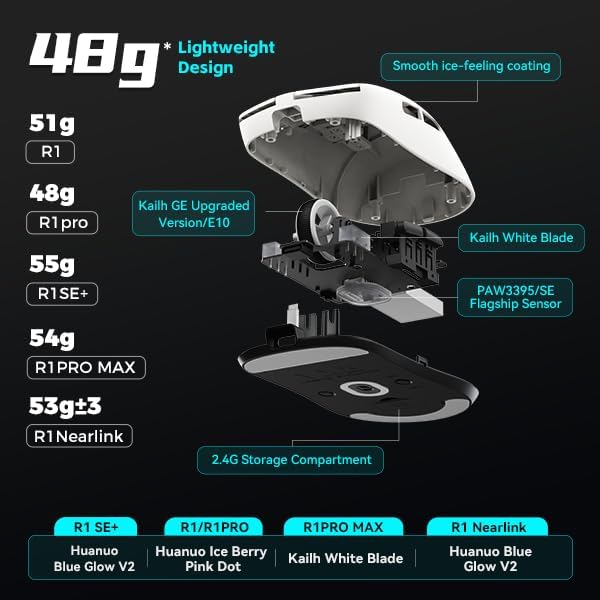
Abbildung: Explosionszeichnung view of the ATK VXE Dragonfly R1 mouse highlighting its lightweight internal components and showing weight comparisons for different R1 series models.
- PAW3395/SE Flagship Sensor: Equipped with a high-end optical sensor for precise tracking and accuracy, essential for competitive gaming.
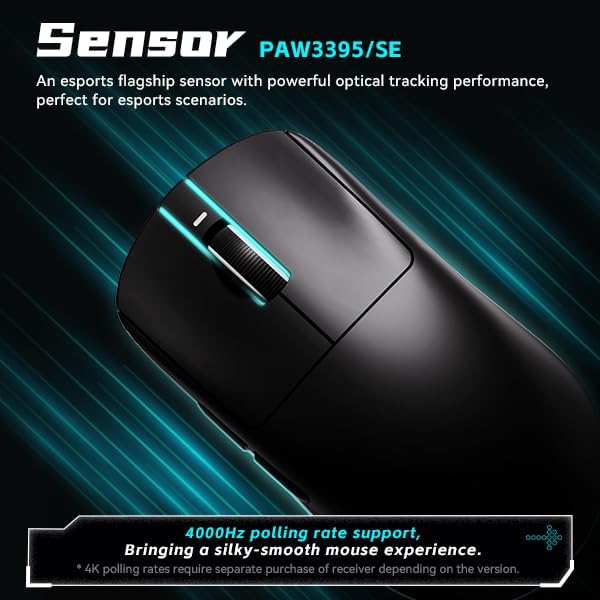
Image: Close-up of the ATK VXE Dragonfly R1 mouse, emphasizing the PAW3395/SE sensor and indicating 4000Hz polling rate support.
- Smart Speed X Transmission Technology: VXE's proprietary wireless technology ensures ultra-low latency and enhanced signal stability, even in environments with interference.

Image: Depiction of the ATK VXE Dragonfly R1 mouse with text highlighting "Smart Speed X" wireless transmission technology for low latency.
- Nordic/BEKEN(compx)/Hisilicon Nearlink MCU: Features a flagship-level chip for powerful performance, low power consumption, and improved interference resistance.

Image: Graphic showing the ATK VXE Dragonfly R1 mouse and its MCU, emphasizing 4K polling rate capability for both office and gaming.
- ATK Micro Switches (Kailh White Blade / Ice Berry Pink Dot): Designed for a consistent click feel and long lifespan.
- Kailh White Blade: 100 Million Click Lifespan, balanced feel.
- Ice Berry Pink Dot: 90 Million Click Lifespan, soft bounce feel.

Image: Detailed illustration comparing Kailh White Blade and Ice Berry Pink Dot micro switches, showing their click lifespan and feel characteristics.
- Smooth Ice-Feeling Coating: A dirt-resistant and easy-to-clean surface that provides a comfortable and grippy feel.

Image: Visual representation of the smooth ice-feeling coating on the ATK VXE Dragonfly R1 mouse, contrasting smooth and matte textures available on different R1 series models.
Wartung
- Reinigung: Wischen Sie die Mausoberfläche mit einem weichen, trockenen Tuch ab. Bei hartnäckigem Schmutz verwenden Sie ein leicht feuchtes Tuch.amp cloth with mild soap can be used, ensuring no liquid enters the mouse. The "Ice-Feel" coating is designed to be dirt-resistant and easy to clean.
- Batteriepflege: Um die Batterielebensdauer zu verlängern, vermeiden Sie häufiges vollständiges Entladen der Maus. Laden Sie die Maus auf, sobald der Batteriestand niedrig ist. Bewahren Sie die Maus bei längerer Nichtbenutzung an einem kühlen, trockenen Ort auf.
- Sensorwartung: Für eine genaue Abtastung muss der optische Sensor an der Unterseite der Maus sauber und frei von Staub und Schmutz sein.
Fehlerbehebung
- Maus reagiert nicht:
- Stellen Sie sicher, dass die Maus eingeschaltet ist.
- Prüfen Sie den Akkustand und laden Sie den Akku gegebenenfalls auf.
- For 2.4GHz wireless, ensure the USB receiver is securely plugged in and within range.
- Stellen Sie bei Bluetooth-Verbindungen sicher, dass Bluetooth auf Ihrem Gerät aktiviert und die Maus gekoppelt ist.
- Um drahtlose Probleme auszuschließen, versuchen Sie, eine Verbindung über ein USB-C-Kabel herzustellen.
- Inconsistent tracking:
- Reinigen Sie den optischen Sensor an der Unterseite der Maus.
- Stellen Sie sicher, dass Sie die Maus auf einer geeigneten Oberfläche (z. B. einem Mauspad) verwenden.
- Check for software updates for the mouse driver or ATKGEAR software.
- Verbindungsprobleme:
- Move the mouse closer to the 2.4GHz receiver or Bluetooth device.
- Avoid sources of strong electromagnetic interference (e.g., Wi-Fi routers, other wireless devices).
- Re-pair the Bluetooth connection or re-insert the 2.4GHz receiver.
Technische Daten
| Besonderheit | Detail |
|---|---|
| Modell | R1 |
| Maße | 6.3 x 4.72 x 2.36 Zoll (Verpackung) |
| Artikelgewicht | 7 ounces (approx. 48g for mouse only) |
| Sensor | PAW3395/SE Optical |
| Konnektivität | Bluetooth, 2.4-GHz-Funkverbindung, USB-C-Kabelverbindung |
| Abfragerate | Up to 4000Hz (requires separate receiver for some versions) |
| Mikroschalter | Kailh White Blade (100M clicks) / Ice Berry Pink Dot (90M clicks) |
| Beschichtung | Smooth Ice-Feeling |
| Batterie | Nicht standardmäßige Batterie (im Lieferumfang enthalten) |
| Hersteller | ATKGEAR |

Image: Detailed table outlining specifications for various models within the VXE Dragonfly R1 series, including dimensions, coating, sensor, chip, polling rate, battery life, weight, microswitches, scroll wheel, mouse feet, and connection methods.
Garantie und Support
For warranty information and technical support, please refer to the official ATKGEAR website or contact their customer service. Specific warranty terms may vary by region and retailer. Keep your proof of purchase for warranty claims.
Manufacturer: ATKGEAR