
Della 048-OPAC-9HB
DELLA 14,000 BTU Portable Air Conditioner Benutzerhandbuch
Model: 048-OPAC-9HB | Brand: Della
1. Einleitung und Sicherheitshinweise
Thank you for choosing the DELLA 14,000 BTU Portable Air Conditioner. This manual provides important information for the proper installation, operation, and maintenance of your unit. Please read it thoroughly before use and keep it for future reference.
Wichtige Sicherheitshinweise:
- Always connect the unit to a grounded 115 Volt, 60 Hz power outlet.
- Betreiben Sie das Gerät nicht mit beschädigtem Kabel oder Stecker.
- Stellen Sie sicher, dass das Gerät auf einer ebenen, stabilen Oberfläche steht, um ein Umkippen zu verhindern.
- Maintain adequate clearance around the unit for proper airflow.
- Blockieren Sie keine Luftein- und -auslässe.
- Ziehen Sie den Stecker aus der Steckdose, bevor Sie das Gerät reinigen oder Wartungsarbeiten durchführen.
- Halten Sie Kinder und Haustiere während des Betriebs vom Gerät fern.
2. Produktüberschreitungview
The DELLA 14,000 BTU Portable Air Conditioner is a versatile 4-in-1 unit offering cooling, heating, fan, and dehumidification functions. It is designed to provide comfort in rooms up to 400 square feet.

Figure 2.1: The DELLA 14,000 BTU Portable Air Conditioner, shown with its remote control and a smartphone displaying the Della+ app interface.
Hauptmerkmale:
- Kühlleistung: 14,000 BTU ASHRAE (9,800 BTU SACC) for effective cooling.
- Heizleistung: 11,669 BTU for supplemental heating.
- Abdeckungsbereich: Cools or heats rooms up to 400 sq.ft.
- Luftentfeuchter: Entfernt bis zu 68 Pints Feuchtigkeit pro Tag.
- Leiser Betrieb: Arbeitet mit einem niedrigen Geräuschpegel von 49 dB(A).
- Intelligente Steuerung: Compatible with Alexa and WiFi via the Della+ app for remote control and Geo Fencing.
- Lüftergeschwindigkeiten: Three adjustable fan speeds.
- Auto-Swing: Automatic air swing for even distribution.
- Portabilität: Equipped with casters and side handles for easy movement.
- Filter: Removable and washable double-layer filter.
3. Einrichtung
3.1 Auspacken
Carefully remove the air conditioner from its packaging. Retain the original packaging materials for future storage or transport. Ensure all components are present: the portable air conditioner unit, remote control, and window kit.
3.2 Fensterkit-Montage
The adjustable 3-section sealing board adapts to both horizontal and vertical windows, ensuring a snug fit and maximum efficiency.
- Schließen Sie den Abluftschlauch an die Rückseite des Klimageräts an.
- Remove the cap from the window vent kit and connect it to the exhaust hose.
- Install the sealing board into your window frame, adjusting its length to fit securely.

Figure 3.1: Damage-free installation steps for the exhaust hose and window kit. Step 1: Slide hose into the back of the AC unit. Step 2: Attach exhaust hose to sealing board port. Step 3: Install sealing board to window frame.
3.3 Platzierung der Einheiten
Place the unit near a window for exhaust hose ventilation. Ensure there is at least 20 inches of space around the unit for proper air circulation. The unit's compact size (17.3 x 13.2 x 26.2 inches) and casters allow for flexible placement.
4. Bedienungsanleitung
4.1 Systemsteuerung
The unit features a top-mounted LED display control panel with soft-touch controls for easy operation.
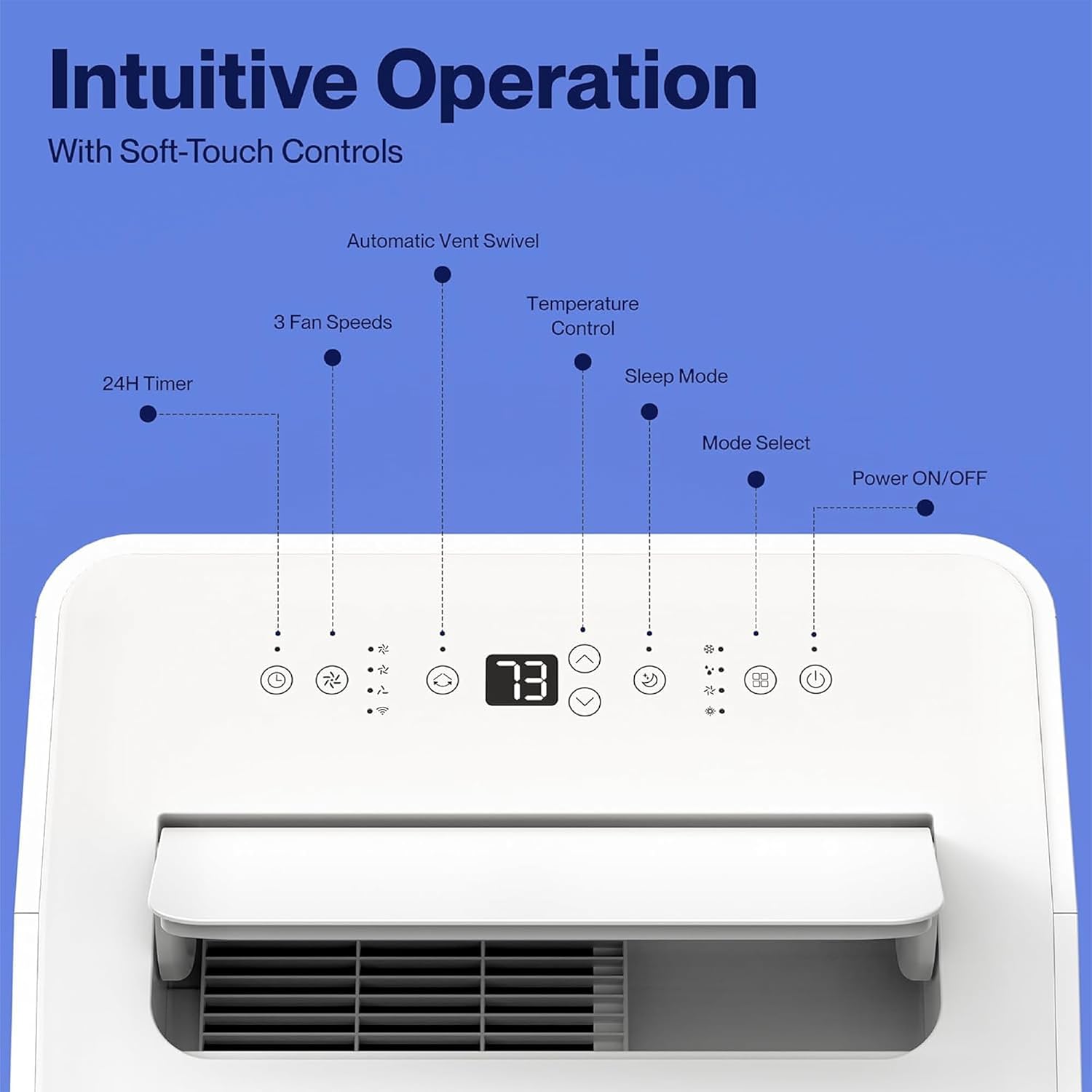
Figure 4.1: The control panel features buttons for Power ON/OFF, Mode Select, Sleep Mode, Temperature Control, 3 Fan Speeds, 24H Timer, and Automatic Vent Swivel.
4.2-Fernbedienung
Eine Fernbedienung ist im Lieferumfang enthalten, um die Bedienung aus der Ferne bequem zu ermöglichen.
4.3 Della+ App & WiFi Connectivity
Control your unit from anywhere using the free Della+ app on your smartphone. The unit is compatible with Alexa and Google Assistant.
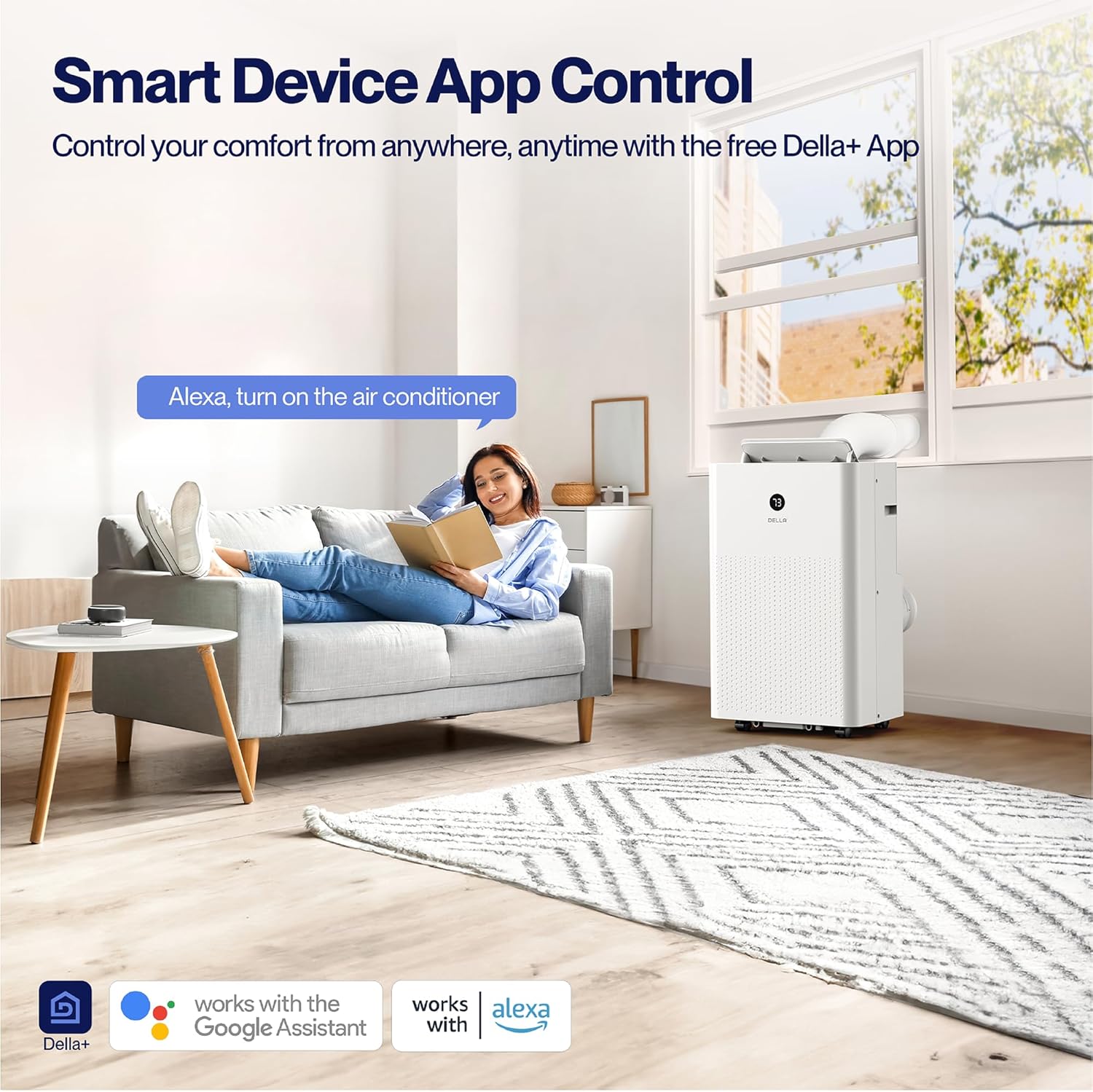
Figure 4.2: Smart Device App Control allows you to manage your unit's settings remotely.
Geo Fencing Function:
Utilize the Geo Fencing feature to automatically activate or deactivate the unit based on your mobile device's location. This allows the AC to turn on as you approach home, ensuring a comfortable environment upon arrival.
Video 4.1: This video demonstrates how to set up and customize the Geo Location function using the Della+ app, allowing the unit to activate based on your proximity to a preset location.
4.4-Betriebsmodi
The unit offers four primary operating modes:
- Kühlmodus: Provides cooling with an adjustable temperature range of 61°F (16°C) to 90°F (32°C).
- Wärme-Modus: Utilizes a built-in heat pump to warm your space quickly and efficiently.
- Gebläsemodus: Circulates air with three adjustable fan speeds.
- Trockenmodus (Luftentfeuchter): Removes excess moisture from the air, up to 68 pints/day.
4.5 Timer and Sleep Mode
- 24-Stunden-Timer: Programmieren Sie das Gerät so, dass es sich innerhalb eines 24-Stunden-Zeitraums automatisch ein- oder ausschaltet.
- Schlafmodus: Optimizes settings for quiet and energy-efficient operation during sleep.
5. Wartung
5.1 Filterreinigung
The unit features a removable and washable double-layer filter. Regular cleaning is essential for optimal performance and air quality.
- Ziehen Sie den Stecker der Klimaanlage aus der Steckdose.
- Locate and remove the filter from the unit.
- Waschen Sie den Filter mit warmem Seifenwasser. Spülen Sie ihn gründlich aus.
- Lassen Sie den Filter vollständig an der Luft trocknen, bevor Sie ihn wieder in das Gerät einsetzen.
5.2 Water Disposal
The unit is designed with a self-evaporate system, which minimizes the need for frequent drainage. However, manual drainage may be required, especially in high humidity conditions.

Figure 5.1: Easy water disposal options include the self-evaporate system, a water full indicator, and manual drainage ports.
- When the water full indicator illuminates, the unit will stop operating.
- Suchen Sie den Abflussanschluss an der Unterseite des Geräts.
- Place a shallow pan or connect a drain hose (not included) to the port.
- Entfernen Sie den Ablassstopfen, damit das Wasser abfließen kann.
- Replace the drain plug securely once drainage is complete.
5.3 Speicherung
Before storing the unit for an extended period, ensure it is completely drained of water and the filter is clean and dry. Store in a cool, dry place, preferably in its original packaging.
6. Fehlerbehebung
If you encounter issues with your DELLA portable air conditioner, refer to the table below for common problems and solutions.
| Problem | Mögliche Ursache | Lösung |
|---|---|---|
| Das Gerät lässt sich nicht einschalten | No power supply; Power cord unplugged; Water tank full. | Check power connection; Plug in securely; Drain water tank. |
| Das Gerät kühlt/heizt nicht effektiv. | Air filter dirty; Exhaust hose blocked/disconnected; Room too large; Doors/windows open. | Clean air filter; Check hose connection/clearance; Ensure room size is within capacity; Close doors/windows. |
| Gerät ist laut | Gerät steht nicht auf einer ebenen Fläche; Luftfilter verschmutzt; Lüfter blockiert. | Auf einer ebenen Fläche aufstellen; Luftfilter reinigen; auf Verstopfungen prüfen. |
| Wasserleck | Drain plug loose; Unit tilted; Drain hose not properly connected. | Secure drain plug; Ensure unit is level; Check drain hose connection. |
7. Spezifikationen
| Attribut | Detail |
|---|---|
| Modellnummer | 048-OPAC-9HB |
| Kühlleistung (ASHRAE) | 14,000 BTU |
| Kühlleistung (SACC) | 9,800 BTU |
| Heizleistung | 11,669 BTU |
| Abdeckungsbereich | Bis zu 400 qm |
| Kapazität des Luftentfeuchters | 68 Pints / Tag |
| Geräuschpegel | 49 dB(A) |
| Abmessungen (L x B x H) | 17.3 x 13.2 x 26.2 Zoll |
| Gewicht | 63.9 Pfund |
| Bandtage | 115 Volt |
| Länge des Netzkabels | 70.8 Zoll |
| Abgasschlauchlänge | 47 Zoll |
8. Garantie und Support
Garantieinformationen:
This DELLA Portable Air Conditioner comes with a 1 Jahr Garantie ab Kaufdatum. Bitte bewahren Sie Ihren Kaufbeleg für Garantieansprüche auf.
Kundendienst:
For any questions, technical assistance, or warranty inquiries, please contact Della Customer Support. 24/7 Kundensupport steht Ihnen gerne zur Verfügung.
Besuchen Sie die Della Store Für weitere Informationen und Produktressourcen.
Ask a question about this manual
Ask about setup, troubleshooting, compatibility, parts, safety, or missing instructions. Manuals+ will review the question and use this page’s manual context to help answer it.