
Einführung
Thank you for choosing the HUANUO Electric Standing Desk with Drawers. This manual provides detailed instructions for the assembly, operation, and maintenance of your new height-adjustable desk. Please read this manual thoroughly before assembly and use to ensure safe and efficient operation.
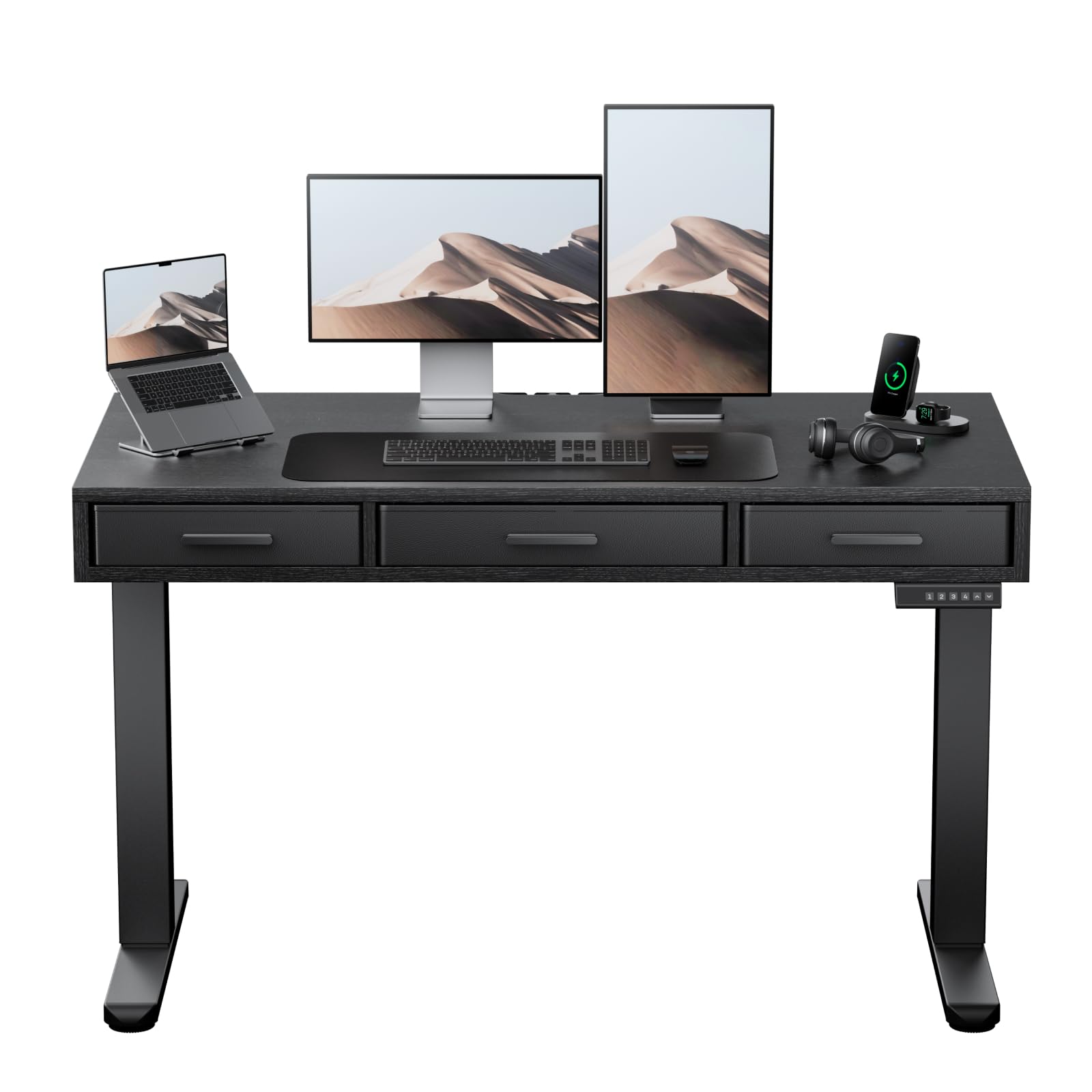
Image: The HUANUO Electric Standing Desk with Drawers, featuring a black desktop and frame, integrated drawers, and a control panel.
Sicherheitshinweise
Um Verletzungen und Schäden am Produkt zu vermeiden, beachten Sie bitte die folgenden Sicherheitsrichtlinien:
- Gewichtsbeschränkung: Überschreiten Sie nicht die maximale Gewichtskapazität von 176 Pfund (80 kg)Überlastung kann zu Instabilität und Schäden führen.
- Montage: Assembly is recommended for 2 Personen. Ensure all components are securely fastened according to the instructions.
- Platzierung: Place the desk on a stable, level surface.
- Betrieb: Keep hands and objects clear of moving parts during height adjustment. Avoid sudden or excessive force when operating the desk.
- Kinder und Haustiere: Um Unfälle zu vermeiden, sollten Kinder und Haustiere während des Betriebs vom Schreibtisch ferngehalten werden.
- Leistung: Verwenden Sie ausschließlich das mitgelieferte Netzteil. Trennen Sie die Stromversorgung vor Reinigungs- oder Wartungsarbeiten.
- Inspektion: Regularly inspect the desk for any signs of wear, damage, or loose connections. Do not use if damaged.
Packungsinhalt
Bitte prüfen Sie vor Beginn der Montage, ob alle Teile vorhanden und unbeschädigt sind. Sollten Teile fehlen oder beschädigt sein, wenden Sie sich bitte an den Kundendienst.
- Desktop (48" x 24")
- Elektrische Hubsäulen (Beine)
- Querträger-/Rahmenkomponenten
- Control Panel with Memory Settings
- Netzteil und Kabel
- Stoffschubladen (3 Stück)
- Assembly Hardware (screws, bolts, allen wrenches)
- Kabelmanagementsystem
Einrichtung und Montage
Follow these steps to assemble your HUANUO Electric Standing Desk. A detailed assembly video is provided below for visual guidance.
Montage-Videoanleitung
Video: A step-by-step visual guide demonstrating the assembly process for the HUANUO Electric Standing Desk with Drawers.
Schritt-für-Schritt-Montage
- Den Desktop zusammenbauen: Attach the desktop sections together using the provided dowels and screws. Ensure they are aligned correctly.
- Montieren Sie den Rahmen: Connect the crossbar to the lifting columns (legs) using the specified bolts. Ensure the frame is stable.
- Desktop am Rahmen befestigen: Carefully place the assembled desktop onto the frame. Secure it using the designated screws. Ensure the desk frame remains balanced during this step to prevent tipping.
- Antriebsstange einbauen: Insert and secure the transmission rod between the two lifting columns. This rod synchronizes the movement of the legs.
- Attach Drawers: Assemble the fabric drawers and slide them into their designated slots under the desktop. Secure any necessary drawer components.
- Kabel anschließen: Connect the power cable to the control panel and the power adapter. Ensure all motor cables are securely connected to the control box.
- Kabelmanagement: Utilize the included cable management system to organize and secure all wires, ensuring a tidy workspace.

Bild: Nahaufnahme view of the desk's three spacious fabric drawers, designed for organized storage.
Bedienungsanleitung
Your HUANUO Electric Standing Desk features an intuitive control panel for easy height adjustment and memory settings.
Bedienungsvideoanleitung
Video: Demonstrating the electric height adjustment and memory preset functions of the HUANUO Standing Desk.
Bedienfeldfunktionen

Image: The convenient control panel with LED display, buttons for custom height settings (1-4), and up/down arrows for precise adjustment.
- Auf/Ab-Tasten: Verwenden Sie die Nach oben (▲) Und Runter (▼) arrows to manually adjust the desk height. The current height is displayed on the LED screen.
- Speichervoreinstellungen (1, 2, 3, 4): Your desk features four programmable height settings. To save a height:
- Stellen Sie den Schreibtisch mithilfe der Auf-/Ab-Tasten auf die gewünschte Höhe ein.
- Press and hold one of the memory buttons (1, 2, 3, or 4) until the display flashes or beeps, indicating the height is saved.
- Antikollisionssystem: The desk is equipped with an anti-collision system that automatically stops and slightly reverses movement if it encounters an obstacle during adjustment. This feature helps prevent damage and injury.

Image: A user standing comfortably at the HUANUO electric standing desk, illustrating the benefits of height adjustment for improved posture and reduced strain.
Funktionen überview
The HUANUO Electric Standing Desk is designed with user comfort and functionality in mind.
- Three Spacious Fabric Drawers: Integrated into the desktop, these drawers provide convenient storage for office essentials, helping to keep your workspace organized and clutter-free. The large central drawer measures 17.1" L x 9.5" D x 3" H, and two smaller side drawers are 13.1" L x 9.5" D x 3" H.
- C-Clamp Montierungskompatibilität: The desk features an extended rear edge, making it compatible with C-clamp monitor mounts. This allows for easy attachment of monitor arms to optimize your screen setup.
- Robuste Konstruktion: Built with a solid carbon steel frame and thicker legs, the desk ensures stability and durability, supporting up to 176 lbs. It has undergone rigorous 50,000-cycle lift testing for long-lasting performance.
- Leiser Betrieb: The electric motor operates quietly, ensuring minimal disruption in your work environment.
- Kabelmanagementsystem: Slots are integrated onto the back edge of the desk to help manage and organize cables, contributing to a clean and efficient workspace.

Image: The desk's design allows for easy attachment of C-clamp monitor mounts, enhancing workspace ergonomics.

Image: Detail of the desk's thick carbon steel frame, highlighting its robust construction for enhanced stability and durability.
Wartung
Proper maintenance will extend the life and performance of your standing desk.
- Reinigung: Wischen Sie die Tischplatte und den Rahmen mit einem weichen, fusselfreien Tuch ab.amp Mit einem Tuch abwischen. Vermeiden Sie aggressive Chemikalien oder Scheuermittel, die die Oberfläche beschädigen könnten.
- Schubladenpflege: Die Stoffschubladen können mit einem milden Reinigungsmittel und Wasser punktuell gereinigt werden. Anschließend vollständig an der Luft trocknen lassen.
- Kabelmanagement: Überprüfen Sie regelmäßig, ob alle Kabel sicher verlegt sind und nicht eingeklemmt oder verheddert sind.
- Befestigungsmaterial: Überprüfen Sie gelegentlich alle Schrauben und Bolzen auf festen Sitz. Ziehen Sie sie gegebenenfalls nach.
- Motor & Mechanism: Keep the lifting mechanism free from dust and debris. Do not lubricate the motor or lifting columns unless specifically instructed by the manufacturer.
Fehlerbehebung
Sollten Sie Probleme mit Ihrem Schreibtisch haben, beachten Sie bitte die folgenden häufig auftretenden Probleme und Lösungen:
| Problem | Mögliche Ursache | Lösung |
|---|---|---|
| Der Schreibtisch bewegt sich nicht und reagiert nicht auf die Bedienelemente. | Power cable disconnected, motor cables loose, control panel malfunction. | Check all power and motor connections. Ensure the power outlet is functional. Try resetting the desk (refer to specific reset procedure if available, or unplug for 30 seconds and replug). |
| Der Schreibtisch wackelt ungleichmäßig oder macht ungewöhnliche Geräusche. | Uneven load, loose fasteners, obstruction in lifting mechanism. | Distribute weight evenly on the desktop. Check and tighten all assembly fasteners. Inspect for any obstructions under the desk. |
| Height memory settings are not saving or recalling correctly. | Fehlerhafter Speichervorgang, vorübergehende Störung. | Ensure you hold the memory button until the display confirms saving. Try resetting the desk. |
| Das Antikollisionssystem aktiviert sich häufig. | Obstruction, sensitivity setting (if adjustable). | Stellen Sie sicher, dass sich keine Gegenstände im Bewegungsbereich des Schreibtisches befinden. |
If the problem persists after attempting these solutions, please contact HUANUO customer support for further assistance.
Technische Daten
| Besonderheit | Detail |
|---|---|
| Marke | HUANUO |
| Modellnummer | HNESD167B-US |
| Desktop-Abmessungen | 48" W x 24" D (121.9 cm x 60.9 cm) |
| Höhenverstellbereich | 28.3" bis 46.5" (71.9 cm bis 118.1 cm) |
| Maximale Gewichtskapazität | 176 kg |
| Material | Carbon Steel Frame, Engineered Wood Desktop |
| Anzahl der Schubladen | 3 (Stoff) |
| Besondere Merkmale | Electric Adjustable Height, 4 Memory Height Settings, One-Touch Lifting, Anti-Collision System, C-Clamp Mount Compatible, Cable Management System |
| Farbe | Schwarz |
| Montage erforderlich | Ja (2 Personen empfohlen) |
| UL-zertifiziert | Ja |
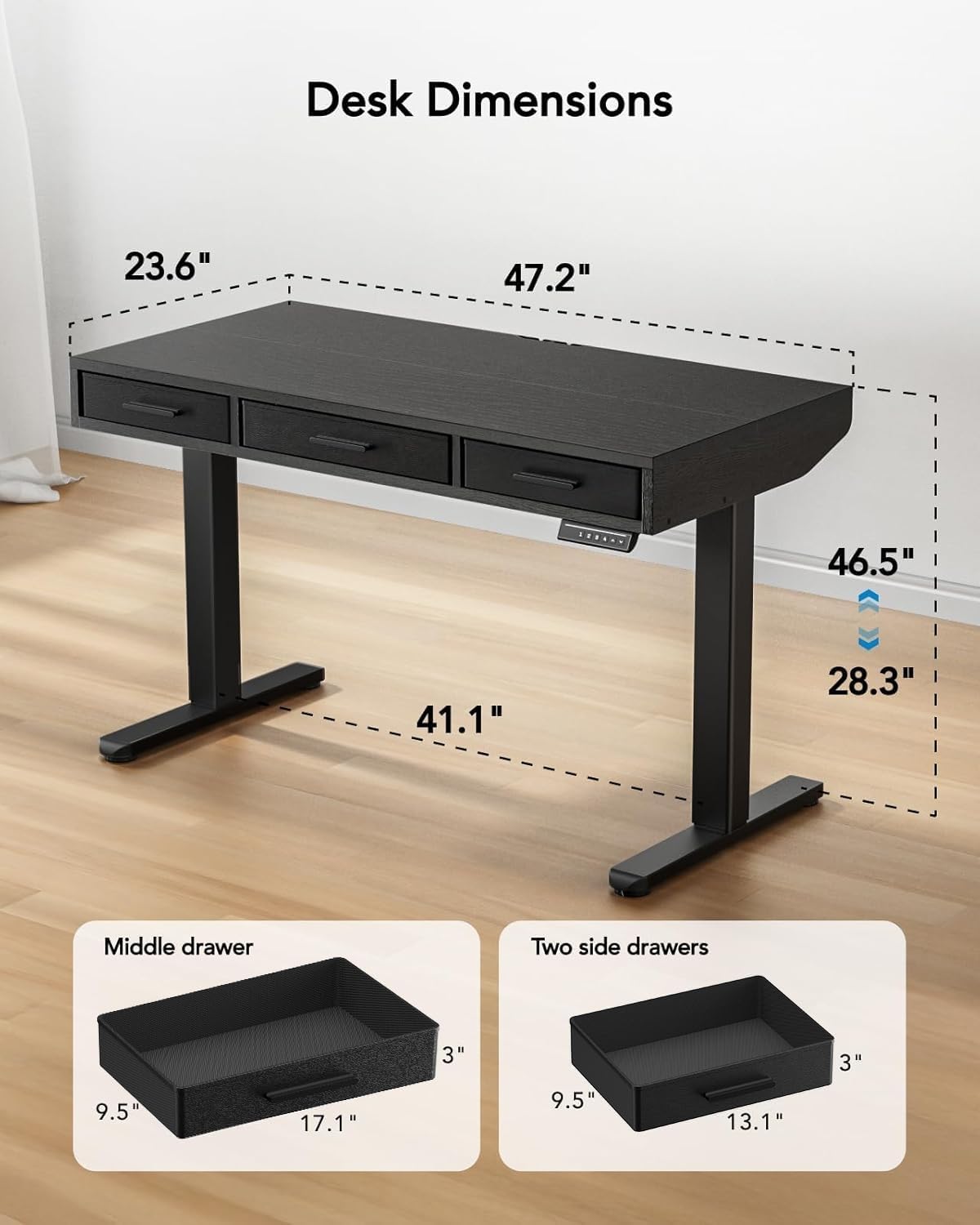
Image: Detailed diagram illustrating the dimensions of the desk, including height range (28.3"-46.5") and desktop size (47.2"x23.6").
Garantie und Support
For warranty information, technical support, or to report missing/damaged parts, please contact HUANUO customer service. Refer to your purchase documentation for specific contact details or visit the official HUANUO webWebsite.
Online-Hilfe: Visit the HUANUO Store on Amazon