
Einführung
Vielen Dank für Ihren Einkauf.asing the MAGIC JOHN Selfie Stick Tripod. This versatile device combines a selfie stick and a stable tripod, featuring Bluetooth 5.2 connectivity for remote control. Designed for ease of use and portability, it's ideal for capturing photos, videos, vlogs, and live streams. This manual will guide you through the setup, operation, and maintenance of your new device.
Produkteigenschaften
- Automatic 1-Second Deployment: Equipped with a unique automatic pop-up mechanism, the tripod legs deploy instantly when placed vertically on a surface, eliminating manual setup time.
- 8-Stage Extendable Pole (30.5cm to 150cm): Adjust the height from a compact 30.5cm for portability to an extended 150cm for wide-angle shots and group photos.
- Advanced Bluetooth 5.2 Remote: Features the latest Bluetooth 5.2 chip for faster pairing, stable connection up to 10 meters, and improved power efficiency for longer battery life. The remote is detachable for convenient use.
- 180° Flexible Rotation & Stable Base: The phone holder supports 180-degree rotation and tilt, allowing for diverse shooting angles. The wide tripod base with anti-slip rubber feet and aviation-grade aluminum alloy construction ensures excellent stability on various terrains.
- Kaltschuhhalterung: Integrated cold shoe allows for attachment of accessories like LED lights or microphones, enhancing your content creation capabilities.
- Leichtes und kompaktes Design: Folds down to just 30.5cm, making it easy to carry in a backpack for travel and outdoor activities.
Installationshandbuch
1. Aufklappen des Stativs
The MAGIC JOHN Selfie Stick Tripod features an automatic deployment mechanism. Simply hold the stick vertically and place it on a flat surface. The tripod legs will automatically extend and lock into position.

Image: Automatic 1-second deployment of the tripod legs. Place the stick vertically on a surface, and the legs will pop out.
2. Befestigung Ihres Smartphones
- Gently pull apart the spring-loaded phone holder clamps.
- Insert your smartphone into the holder, ensuring it is securely gripped by both clamps.
- Adjust the phone's position to ensure balance and desired orientation (horizontal or vertical).

Image: The phone holder mechanism, demonstrating its compatibility with various smartphone models (iPhone, Galaxy, Google) and accessories such as fill lights and microphones.
3. Koppeln der Bluetooth-Fernbedienung
- Ensure the remote control is charged (if applicable) and powered on.
- Gehen Sie auf Ihrem Smartphone zu den Bluetooth-Einstellungen und aktivieren Sie Bluetooth.
- Suchen nach available devices. The remote will typically appear as "MAGIC JOHN" or a similar identifier.
- Select the device to pair. Once paired, the indicator light on the remote will confirm connection.

Image: The detachable Bluetooth remote control, highlighting its ergonomic design and effective operating range of up to 10 meters.
Bedienungsanleitung
1. Extending and Retracting the Pole
- To extend: Gently pull the top section of the pole upwards. It will extend in stages.
- To retract: Push the extended sections back down into the main body until fully collapsed.

Image: The selfie stick tripod extended to its maximum height of 150cm, demonstrating its 8-stage adjustable pole for various shooting perspectives.
2. Adjusting the Angle and Orientation
- The phone holder can rotate 180 degrees horizontally and tilt for optimal viewing and shooting angles. Loosen the adjustment knob (if present) or simply rotate the holder to your desired position.
- Ensure the phone is securely tightened in the holder after adjustment.
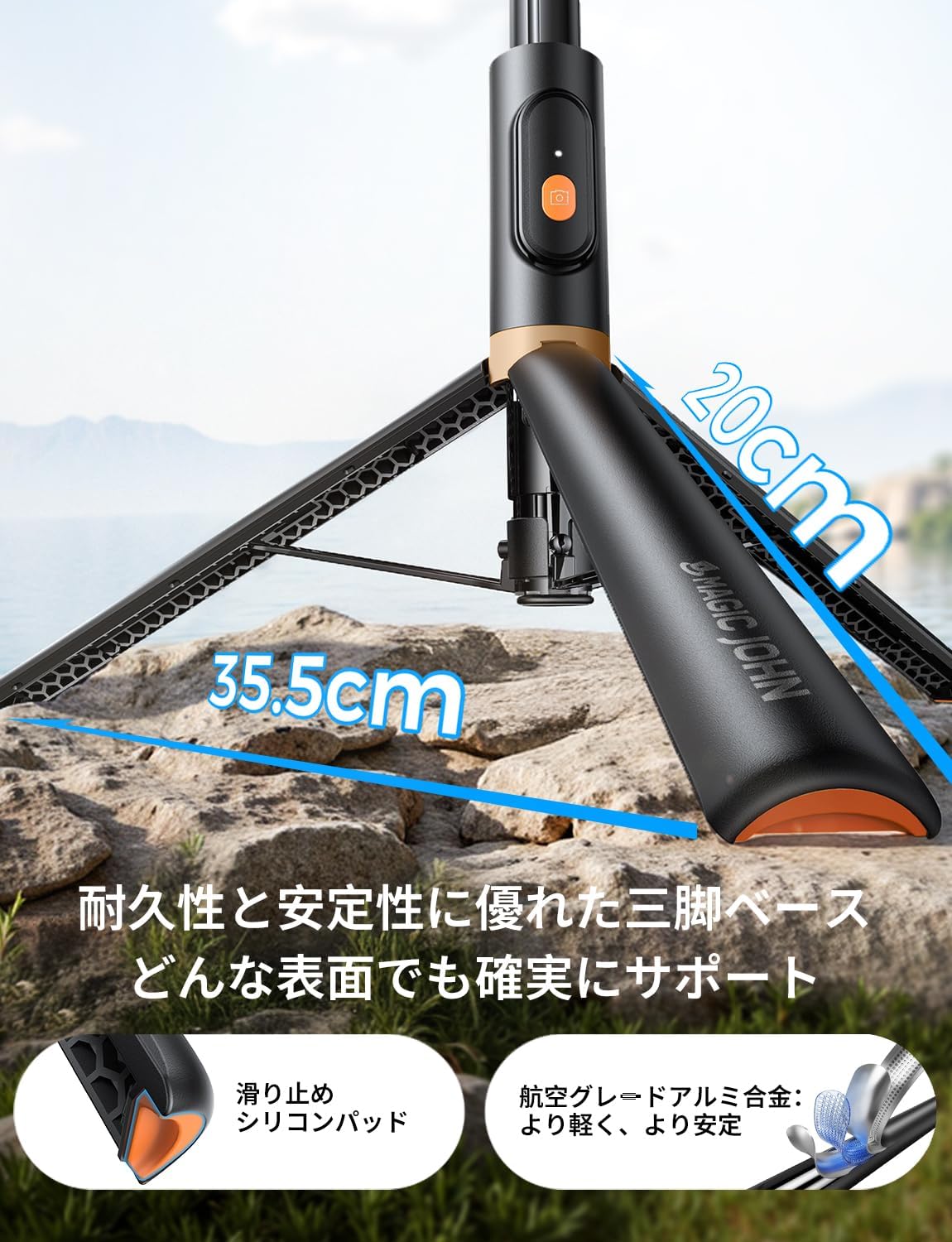
Image: The phone holder's flexible 180-degree rotation and tilt capabilities, along with the integrated cold shoe mount for attaching external accessories like LED lights or microphones.
3. Using the Bluetooth Remote
- Sobald die Kopplung hergestellt ist, öffnen Sie die Kamera-App Ihres Smartphones.
- Press the button on the Bluetooth remote to trigger the shutter and take a photo or start/stop video recording.
Wartung
- Reinigung: Reinigen Sie das Selfie-Stick-Stativ mit einem weichen, trockenen Tuch. Vermeiden Sie die Verwendung von scharfen Chemikalien oder scheuernden Materialien.
- Lagerung: Store the device in a cool, dry place away from direct sunlight and extreme temperatures. Ensure it is fully retracted and the remote is securely stored in its designated slot.
- Batteriepflege (Fernbedienung): If the remote uses a replaceable battery, ensure it is inserted correctly. If rechargeable, charge it regularly to maintain battery health.
Fehlerbehebung
- Fernbedienung verbindet sich nicht:
- Stellen Sie sicher, dass die Fernbedienung eingeschaltet ist und über ausreichend Batterie verfügt.
- Check your phone's Bluetooth settings to ensure Bluetooth is enabled and the remote is paired. Try unpairing and re-pairing the device.
- Make sure the remote is within the 10-meter operating range.
- Tripod Legs Not Deploying Automatically:
- Ensure the stick is placed perfectly vertical on a flat, stable surface.
- Check for any obstructions or debris in the leg mechanism.
- Stabilitätsprobleme:
- Stellen Sie sicher, dass die Stativbeine vollständig ausgezogen und verriegelt sind.
- Stellen Sie das Stativ auf eine ebene, stabile Fläche. Vermeiden Sie unebenen Untergrund.
- Do not overload the phone holder with accessories beyond its capacity.
Technische Daten
| Besonderheit | Beschreibung |
|---|---|
| Marke | MAGIC JOHN |
| Modellnummer | Y2 |
| Farbe | Schwarz |
| Produktabmessungen (T x B x H) | 30 x 30 x 310 mm (gefaltet) |
| Produktgewicht | 0.28 kg |
| Maximale Auszugslänge | 150 cm |
| Min Folded Length | 30.5 cm |
| Erweiterung Stages | 8 Sekundentages |
| Bluetooth-Version | 5.2 |
| Reichweite der Fernbedienung | Bis zu 10 Meter |
| Kompatible Geräte | Smartphones (iPhone, Android), Cameras, Video Cameras |
| Material | Aluminiumlegierung in Luftfahrtqualität |
| Ursprungsland | China |
Garantie und Support
MAGIC JOHN is committed to providing high-quality products and excellent customer service.
- Qualitätsgarantie: This product comes with a 180-day quality guarantee.
- Free Exchange Service: Enjoy a 180-day free exchange service for any manufacturing defects.
- Kundendienst: Unser Kundendienst steht Ihnen rund um die Uhr für Fragen und Unterstützung zur Verfügung.
- Rückgaberecht: We offer a 30-day unconditional return policy.

Bild: Überview of MAGIC JOHN's customer support, including 24H customer support, 30-day unconditional return, and 180-day quality guarantee.