
1. Einleitung
This manual provides essential instructions for setting up, operating, maintaining, and troubleshooting your HONOR 400 5G smartphone. Please read this guide thoroughly to ensure proper use and to maximize the performance of your device.
The HONOR 400 is a powerful 5G smartphone featuring a 6.55-inch AMOLED display, a Qualcomm Snapdragon 7 Gen 3 processor, 12GB of RAM, and 512GB of internal storage. It operates on Android 15 and is equipped with a 5300mAh battery, a 200MP main camera, and dual-SIM capabilities.
2. Lieferumfang
Upon unboxing your HONOR 400 smartphone, verify that all items are present:
- HONOR 400 5G Smartphone
- USB-Kabel
- (Other accessories such as a charger, SIM ejector tool, or protective case may vary by region and package contents.)
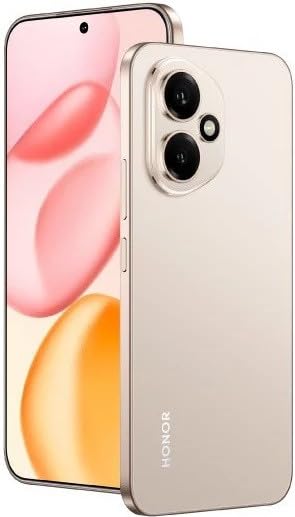
Abbildung 2.1: The HONOR 400 5G Smartphone. This image displays the device's sleek design and the main screen.
3. Gerät überview
Familiarize yourself with the physical components of your HONOR 400 smartphone.
3.1-Vorderseite View
- Anzeige: 6.55-inch AMOLED screen with 1264 x 2736 pixels resolution.
- Frontkamera: 50 MP, f/2.0 (wide) for selfies and video calls.
- Hörmuschel: Located at the top edge of the display.
An illustration of the front view would typically show the display, front camera, and earpiece.
3.2 Rückseite View
- Hauptkamerasystem:
- 200 MP, f/1.9 (wide), 1/1.4", PDAF, OIS
- 12 MP, f/2.2, 112° (ultrawide), AF
- Blitz: LED-Blitzlicht für Aufnahmen bei schwachem Licht.
- HONOR Logo: Markenidentifikation.
An illustration of the rear view would typically highlight the camera module and brand logo.
3.3 Seite Views und Ports
- Netzschalter: Typischerweise auf der rechten Seite, dient zum Ein-/Ausschalten und zum Aktivieren/Deaktivieren des Geräts.
- Lautstärketasten: Typically on the right side, above the power button, for adjusting volume.
- USB-Typ-C-Anschluss: Befindet sich unten und dient zum Laden und zur Datenübertragung.
- SIM-Kartenfach: Location varies, typically on the side or bottom, for inserting Nano-SIM cards.
- Microphones & Speakers: Strategically placed for calls and audio output.
Illustrations of the device's sides would show the placement of buttons, ports, and the SIM tray.
4. Einrichtung
4.1 Einlegen von SIM-Karten
- Suchen Sie das SIM-Kartenfach auf Ihrem Gerät.
- Führen Sie das SIM-Auswurfwerkzeug (falls vorhanden) in die kleine Öffnung neben dem Fach ein und drücken Sie vorsichtig, bis das Fach herausspringt.
- Place your Nano-SIM card(s) into the designated slots on the tray. The HONOR 400 supports Dual-SIM (Nano-SIM + ESIM OR Nano-SIM + Nano-SIM). Ensure the gold contacts face downwards.
- Setzen Sie die Schublade vorsichtig wieder in das Telefon ein.
An image demonstrating SIM card insertion would be helpful here.
Wichtig: Vor dem Kaufasing, verify network compatibility with your service provider. This device supports GSM networks (2G, 3G, 4G LTE, and 5G SA/NSA) but does not support CDMA networks.
4.2 Ersteinrichtungs- und Installationsassistent
- Halten Sie den Ein-/Ausschalter gedrückt, bis das HONOR-Logo erscheint.
- Follow the on-screen instructions to complete the initial setup, which includes selecting your language, connecting to Wi-Fi, setting up your Google account, and configuring security features.
5. Bedienung Ihres Geräts
5.1 Android 15 Betriebssystem
Your HONOR 400 runs on Android 15, offering a user-friendly interface and access to a vast ecosystem of applications via the Google Play Store. Navigate using gestures or on-screen buttons, customize your home screen, and manage notifications.
5.2 Grundfunktionen
- Anrufe tätigen: Tippen Sie auf das Telefonsymbol, geben Sie die Nummer ein und tippen Sie auf die Anruftaste.
- Senden von Nachrichten: Use the Messaging app to send SMS/MMS.
- Surfen im Internet: Öffnen Sie ein web browser (e.g., Chrome) to access the internet via Wi-Fi or mobile data.
- App-Verwaltung: Download, install, and uninstall apps from the Google Play Store.
5.3 Kameranutzung
The HONOR 400 features a versatile camera system:
- Rückfahrkamera: Utilize the 200 MP main sensor for high-resolution photos and the 12 MP ultrawide lens for expansive shots. Features include PDAF and Optical Image Stabilization (OIS).
- Frontkamera: The 50 MP wide-angle front camera is ideal for selfies and video conferencing.
- Videoaufnahme: Capture videos in up to 4K resolution at various frame rates (30, 60, 120 fps).
A diagram of the camera interface or tips for photography modes could be included here.
5.4 Konnektivität
Your device supports multiple connectivity options:
- 5G/4G LTE: Hochgeschwindigkeits-Mobilfunkdatenverbindung.
- W-lan: Stellen Sie eine Verbindung zu drahtlosen Netzwerken her, um auf das Internet zuzugreifen.
- Bluetooth: Lässt sich mit kabellosen Kopfhörern, Lautsprechern und anderen Geräten koppeln.
- USB Typ C: For charging and connecting to a computer for data transfer.
6. Wartung
6.1 Batteriepflege
- The HONOR 400 is equipped with a 5300mAh non-removable battery.
- Um die Lebensdauer des Akkus zu verlängern, vermeiden Sie extreme Temperaturen und häufiges vollständiges Entladen des Akkus.
- Use the provided USB cable and a compatible charger for optimal charging.
6.2 Softwareaktualisierungen
Regularly check for and install software updates to ensure your device has the latest features, security patches, and performance improvements. You can usually find this option in your phone's Settings menu under "System & updates" or "About phone."
6.3 Reinigung Ihres Geräts
Reinigen Sie Bildschirm und Gehäuse Ihres Telefons mit einem weichen, fusselfreien Tuch. Vermeiden Sie aggressive Chemikalien oder Scheuermittel.
7. Fehlerbehebung
This section addresses common issues you might encounter with your HONOR 400 smartphone.
7.1 Gerät lässt sich nicht einschalten
- Stellen Sie sicher, dass der Akku geladen ist. Schließen Sie das Telefon mindestens 15 Minuten lang an ein Ladegerät an, bevor Sie versuchen, es wieder einzuschalten.
- Try a forced restart by holding the Power button for an extended period (e.g., 10-15 seconds).
7.2 Probleme mit der Netzwerkverbindung
- Prüfen Sie, ob Ihre SIM-Karte richtig eingelegt ist.
- Vergewissern Sie sich, dass die mobilen Daten in den Einstellungen Ihres Telefons aktiviert sind.
- Starten Sie Ihr Gerät neu.
- Confirm with your service provider that your plan is active and there are no network outages in Ihrer Nähe.
- Ensure your device is compatible with your network's frequencies (GSM only, no CDMA).
7.3 Abstürzende oder einfrierende Apps
- Schließen Sie die App und öffnen Sie sie erneut.
- Löschen Sie den Cache und die Daten der App unter Einstellungen > Apps.
- Stellen Sie sicher, dass die App auf die neueste Version aktualisiert ist.
- Starten Sie Ihr Telefon neu.
7.4 Langsame Leistung
- Schließen Sie unnötige Hintergrund-Apps.
- Cache leeren und temporär files.
- Ensure you have sufficient free storage space (512GB internal storage).
- Starten Sie Ihr Gerät regelmäßig neu.
8. Spezifikationen
| Besonderheit | Detail |
|---|---|
| Modellname | Ehre 400 |
| Betriebssystem | Android 15.0 |
| Prozessor | Qualcomm SM7550-AB Snapdragon 7 Gen 3 (4 nm), Octa-Core (1x 2.63 GHz Cortex-A715 & 3x 2.4 GHz Cortex-A715 & 4x 1.8 GHz Cortex-A510) |
| RAM | 12 GB |
| Interner Speicher | 512 GB (nicht erweiterbar) |
| Anzeige | 6.55 Inches AMOLED, 1B colors, 1264 x 2736 pixels |
| Rückfahrkamera | 200 MP (wide, OIS) + 12 MP (ultrawide) |
| Frontkamera | 50 MP (Weitwinkel) |
| Auflösung der Videoaufnahme | 4K (30, 60, 120 fps) |
| Batteriekapazität | 5300 Milliamp Hours (non-removable) |
| SIM Karte | Dual-SIM (Nano-SIM + eSIM ODER Nano-SIM + Nano-SIM) |
| Konnektivität | 5G, GSM, LTE, Wi-Fi, Bluetooth, USB Type-C |
| Maße | 156.5 x 74.6 x 7.3 mm (6.16 x 2.94 x 0.29 Zoll) |
| Gewicht | 202 Gramm (6.49 Unzen) |
| Farbe | Desert Gold (as per product listing, actual color may vary by variant) |
9. Garantie und Support
9.1 Herstellergarantie
The HONOR 400 smartphone comes with a 1 Jahre HerstellergarantieDiese Garantie deckt Material- und Verarbeitungsfehler bei normalem Gebrauch ab. Bitte bewahren Sie Ihren Kaufbeleg für Garantieansprüche auf.
For specific terms and conditions of the warranty, please refer to the warranty card included with your product or visit the official HONOR support webWebsite.
9.2 Kundendienst
For further assistance, technical support, or service inquiries, please contact HONOR customer support through their official webWebsite oder die Kontaktinformationen, die auf Ihrer Produktverpackung angegeben sind.
You can typically find support resources, FAQs, and contact details on the official HONOR webWebsite: www.hihonor.com