
1. Einführung und Endeview
The Electro-Voice EVOLVE 90 Portable PA System is designed to deliver high-quality audio performance for various applications, including bands, musicians, DJs, and AV rental companies. This system combines an 18-inch powered subwoofer with a column array speaker to provide a wide frequency response and high sound pressure level (SPL) output in a compact and portable design.
Zu den Hauptmerkmalen gehören:
- 2000W of Class-D Amplification for powerful sound.
- Custom Waveguides for wide coverage, ensuring sound reaches the entire audience.
- Advanced 6-channel mixer with onboard DSP, offering presets, EQ, and effects for precise sound control.
- Bluetooth audio streaming and control capabilities for wireless convenience.
- Connectivity options to link two EVOLVE 50Ms via RJ45 cable for expanded setups.
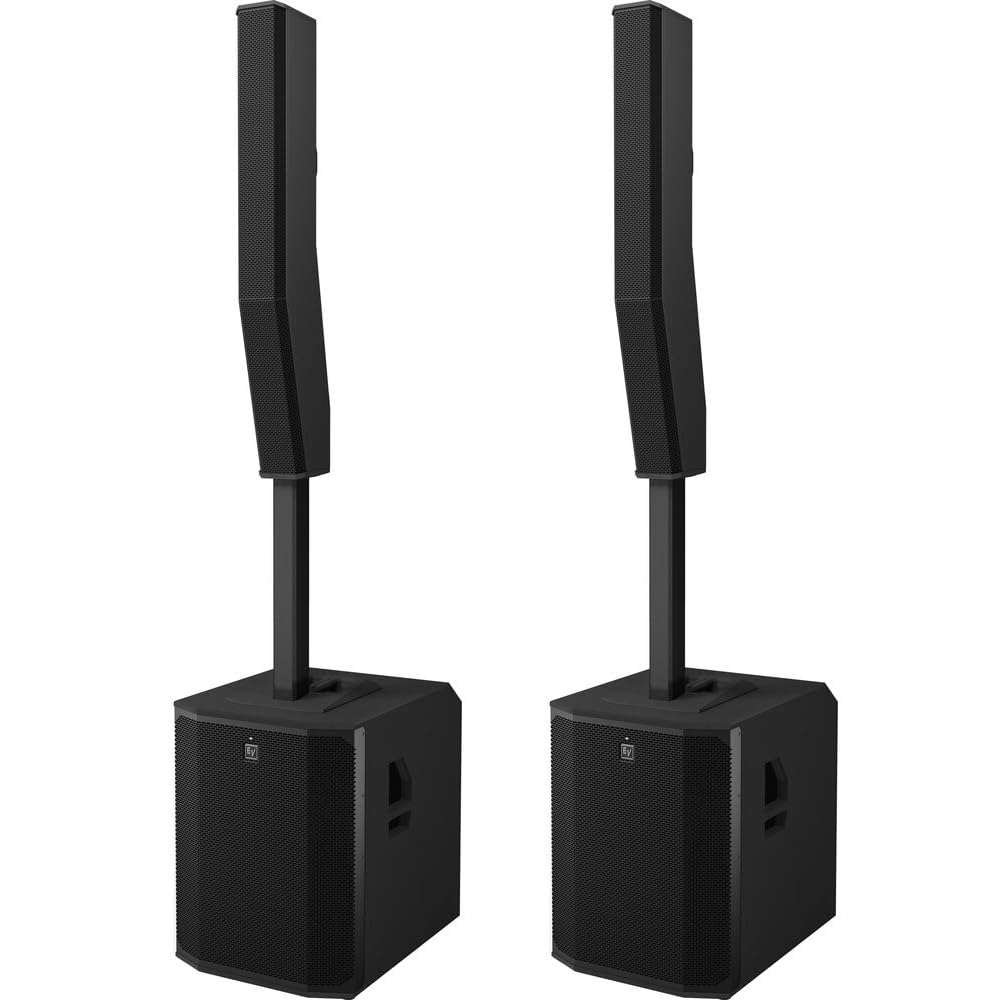
Figure 1: The Electro-Voice EVOLVE 90 Portable PA System, fully assembled.
2. Lieferumfang
Upon unpacking your EVOLVE 90 system, ensure all components are present:
- EVOLVE 90 Active Subwoofer
- EVOLVE 90 Column Speaker Array
- Magnetically Locking Mounting Pole
- Netzkabel (x2)
- Carry Bag for Column Array and Pole
3. Einrichtungsanweisungen
Setting up your EVOLVE 90 system is designed for simplicity and speed. Follow these steps for proper assembly:
- Positionieren Sie den Subwoofer: Place the EVOLVE 90 subwoofer on a stable, flat surface in your desired location. Ensure adequate space around the unit for ventilation and cable connections.
- Insert the Mounting Pole: Locate the magnetically locking mounting pole. Insert the bottom end of the pole into the designated hole on the top surface of the subwoofer. The magnetic mechanism will secure the pole in place.
- Attach the Column Array: Carefully place the EVOLVE 90 column speaker array onto the top of the mounting pole. The audio connection between the subwoofer and the column array is established automatically via internal cabling within the pole, eliminating the need for external speaker cables.
- Strom anschließen: Connect the provided power cord to the subwoofer's power inlet and then to a suitable AC power outlet.

Figure 2: Subwoofer top panel with pole mount.

Figure 3: EVOLVE 90 column array speaker.
4. Bedienungsanleitung
Once the system is set up, you can begin operation:
- Einschalten: Press the power button located on the subwoofer's rear panel to turn on the system. The system will perform a self-test, and indicators will illuminate.
- Eingangsanschlüsse: Connect your audio sources (microphones, instruments, media players) to the appropriate input channels on the subwoofer's integrated mixer. The mixer supports XLR, 1/4" Instrument, RCA, and Bluetooth inputs.
- Pegel anpassen: Use the gain controls for each channel to set appropriate input levels. Monitor the level indicators to avoid clipping.
- Master-Lautstärke: Adjust the master volume control to achieve the desired overall sound level.
5. Bluetooth-Konnektivität
The EVOLVE 90 system supports Bluetooth audio streaming and control via a compatible mobile device.
- Bluetooth aktivieren: Aktivieren Sie Bluetooth auf Ihrem Mobilgerät.
- Verbindungsmodus: On the EVOLVE 90 mixer, activate Bluetooth pairing mode. Refer to the display or indicator lights for confirmation.
- Gerät verbinden: On your mobile device, select "EVOLVE 90" from the list of available Bluetooth devices. Once connected, you can stream audio wirelessly to the PA system.
- Fernbedienung: Download the official Electro-Voice control application for your mobile device to remotely manage mixer settings, DSP functions, and system parameters.
6. Advanced Mixer Features
The integrated 6-channel mixer provides comprehensive control over your audio. It includes onboard Digital Signal Processing (DSP) with various presets, EQ, and effects to optimize your sound for different environments and performances.

Figure 4: EVOLVE 90 subwoofer rear panel with mixer controls.
- DSP-Voreinstellungen: Utilize the factory or user-defined DSP presets to quickly adapt the system's sound characteristics to specific applications (e.g., Music, Speech, Live).
- Entzerrung (EQ): Adjust the multi-band EQ for each channel and the master output to fine-tune the tonal balance.
- Auswirkungen: Apply built-in effects such as reverb and delay to enhance vocals and instruments.
- Kanalrouting: Configure input routing and output mixes as needed for complex setups.
7. Wartung
To ensure the longevity and optimal performance of your EVOLVE 90 system, follow these maintenance guidelines:
- Reinigung: Regularly wipe down the exterior surfaces with a soft, dry cloth. For stubborn dirt, use a slightly damp Mit einem Tuch und milder Seife abwischen und anschließend gründlich trocknen. Scheuermittel und Lösungsmittel vermeiden.
- Belüftung: Ensure that the subwoofer's ventilation ports are clear of obstructions to prevent overheating.
- Lagerung: When not in use, store the system in a dry, temperature-controlled environment. Use the provided carry bag for the column array and pole to protect them during transport and storage.
- Kabelinspektion: Überprüfen Sie regelmäßig alle Kabel auf Verschleiß oder Beschädigungen. Beschädigte Kabel müssen umgehend ausgetauscht werden.
8. Fehlerbehebung
If you encounter issues with your EVOLVE 90 system, consult the following common troubleshooting steps:
- Kein Strom:
- Check if the power cord is securely connected to both the subwoofer and the AC outlet.
- Prüfen Sie, ob die Steckdose funktionsfähig ist.
- Ensure the power switch on the subwoofer is in the 'ON' position.
- Kein Ton:
- Confirm that the column array is properly seated on the mounting pole.
- Check all input cable connections.
- Ensure input channel gains and master volume are turned up.
- Verify that the correct input source is selected on the mixer.
- Verzerrter Klang:
- Reduce input gain levels to prevent clipping.
- Reduzieren Sie die Gesamtlautstärke.
- Check for damaged cables or faulty audio sources.
- Probleme mit der Bluetooth-Verbindung:
- Ensure Bluetooth is enabled on both the EVOLVE 90 and your mobile device.
- Move your mobile device closer to the EVOLVE 90 to improve signal strength.
- Versuchen Sie, das Gerät zu entkoppeln und anschließend erneut zu koppeln.
9. Spezifikationen
| Besonderheit | Spezifikation |
|---|---|
| Marke | Elektro-Stimme |
| Modellnummer | EVOLVE90-SB-US |
| Subwoofer-Treiber | 18 Zoll |
| Column Array Drivers | Eight 4.7 inch drivers |
| Amplifizierung | 2000 W Klasse-D |
| Frequenzgang | 28 Hz to 20 kHz (System) |
| Maximaler Schalldruck | 134 dB |
| Konnektivitätstechnologie | Bluetooth |
| Anzahl der Kanäle | 6 |
| Audioeingang | XLR, 1/4" Instrument, RCA, Bluetooth, RJ45 |
| Kompatible Geräte | Desktop, MP3 Player, Smartphone, Tablet, Television |
| Artikelabmessungen (L x B x H) | 17.9 x 13.8 x 24.4 Zoll (Subwoofer) |
| Artikelgewicht | 70.75 Pounds (Subwoofer) |
| Gehäusematerial | Neodymium, rugged plywood, composite, aluminum |
10. Garantie und Support
The Electro-Voice EVOLVE 90 Portable PA System comes with a Begrenzte 3-Jahres-HerstellergarantieBitte bewahren Sie Ihren Kaufbeleg für Garantieansprüche auf.
For technical support, service, or further inquiries, please visit the official Electro-Voice webBesuchen Sie die Website oder wenden Sie sich an den Kundendienst. Detaillierte Kontaktinformationen finden Sie in der Regel auf der Website des Herstellers. webWebsite oder in der Produktverpackung.