
GNCC GC3-2P
GNCC GC3-2P 1080P Indoor Security Camera Instruction Manual
Model: GC3-2P
Einführung
The GNCC GC3-2P Indoor Security Camera provides reliable home monitoring with 1080P Full HD video, motion detection, two-way audio, and night vision capabilities. Designed for easy installation and integration with smart home systems, this camera helps you keep an eye on your home, pets, or loved ones. It connects exclusively to 2.4GHz Wi-Fi networks and offers flexible storage options including local microSD card storage and optional cloud services.
Lieferumfang
Upon unboxing your GNCC GC3-2P Indoor Security Camera, you should find the following components:
- GNCC GC3 Indoor Camera Unit
- Stromkabel (2 m)
- Netzteil
- Wall Mounting Kit (screws, anchors, adhesive)
- Bedienungsanleitung
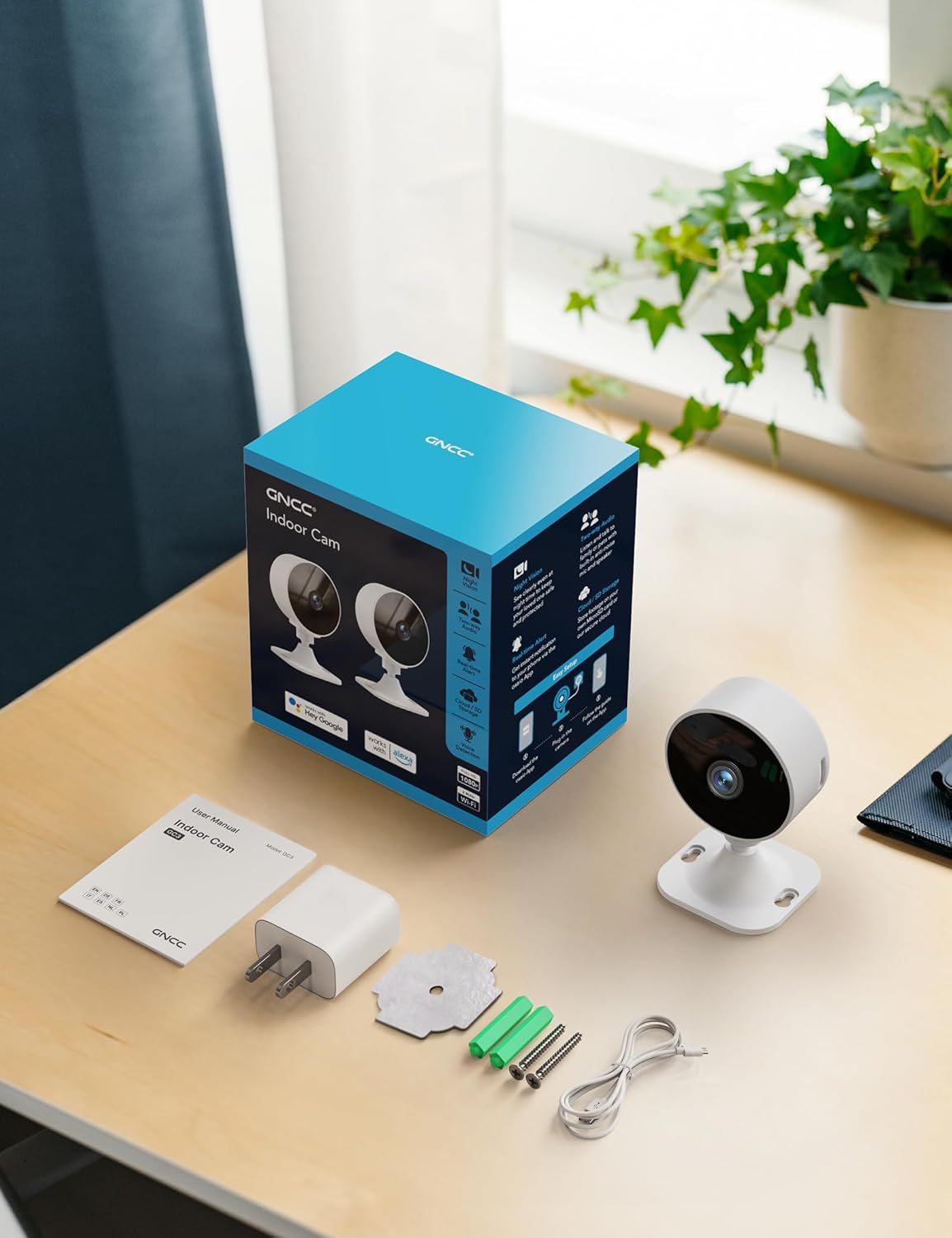
Image: All components included in the GNCC GC3-2P Indoor Security Camera package.
Produkt überview
The GNCC GC3-2P camera is a compact and versatile indoor security solution. It features a 1080P Full HD lens for clear video, infrared night vision for monitoring in low-light conditions, and a built-in microphone and speaker for two-way audio communication. The camera's base allows for flexible manual rotation to adjust the viewing angle. It supports both local microSD card storage (up to 128GB, not included) and cloud storage options.

Bild: Überview of the GNCC Indoor Camera's main features.
Hauptmerkmale:
- 1080P Full HD-Video: Erfasst klare und detaillierte Lebensmitteltage.
- 2.4-GHz-WLAN-Konnektivität: Connects to your home network for remote access. (Note: 5GHz Wi-Fi is not supported.)
- Infrarot Nachtsicht: Provides clear black-and-white images in darkness up to 15 meters.
- Bewegungs- und Geräuscherkennung: Sendet Echtzeit-Benachrichtigungen an Ihr Smartphone.
- Zweiwege-Audio: Allows for listening and speaking through the camera.
- Flexible Lagerung: Supports microSD card (up to 128GB) and optional cloud storage.
- Manuelle Drehung: Easily adjust the camera angle by hand.
- Intelligente Integration: Compatible with Alexa-enabled devices.

Image: Clear Night Vision for Peaceful Nights.

Image: Two-Way Audio Lets You Speak in Real Time.
Installationsanweisungen
Follow these steps to set up your GNCC GC3-2P Indoor Security Camera:
- Einschalten: Connect the provided 2m power cord to the camera's USB-C port and plug the power adapter into a wall outlet. The camera will power on and a red indicator light will flash, indicating it's ready for connection.
- Laden Sie die App herunter: Download the "OsaiO" app from the Google Play Store or Apple App Store. You can scan the QR code provided on the product packaging for quick access.
- Erstellen/Anmelden: Open the OsaiO app and create a new account or log in if you already have one.
- Gerät hinzufügen: In the app, tap the '+' icon to add a new device. Follow the on-screen instructions to select your camera model.
- Mit WLAN verbinden: Ensure your smartphone is connected to a 2.4GHz Wi-Fi network. The camera only supports 2.4GHz Wi-Fi. If your router combines 2.4GHz and 5GHz, ensure your phone is on the 2.4GHz band during setup. Bring the camera close to the router for optimal initial connection. Enter your Wi-Fi password into the app.
- QR-Code scannen: The app will generate a QR code. Hold your camera up to your phone screen to scan the QR code. You will hear a confirmation sound from the camera once it successfully scans.
- Fertigstellung: Once connected, the camera's indicator light will turn solid white. You can then name your device and begin monitoring.
- Montage (Optional): The camera can be placed on any flat surface. For wall or ceiling mounting, use the provided mounting kit (screws, anchors, or adhesive) to secure the base, then attach the camera. The camera head can be manually rotated to achieve the desired viewing-Winkel.

Image: App-guided setup process for the GNCC Indoor Camera.
Bedienungsanleitung
Live View und Überwachung:
Once your camera is set up and connected, open the OsaiO app to access the live feed. You can view real-time video from anywhere with an internet connection.

Image: Real-time monitoring remote live view auf einem Smartphone.
Bewegungs- und Geräuscherkennung:
The camera is equipped with AI-powered motion and sound detection. When activity is detected, you will receive instant notifications on your smartphone via the OsaiO app. You can customize alert sensitivity and schedules within the app settings.

Image: Motion & Sound Detection with AI-Powered Alerts.
Zweiwege-Audio:
Use the two-way audio feature to communicate with people or pets in the camera's vicinity. Tap the microphone icon in the live view to speak, and ensure your phone's volume is up to hear responses. Remember to remove any protective film from the camera's microphone and allow microphone access in the app.
Storage Options and Playback:
Die Kamera unterstützt zwei Speichermethoden:
- MicroSD-Karte: Insert a microSD card (up to 128GB, not included) into the designated slot on the camera for local storage of recordings.
- Cloud-Speicher: An optional subscription service is available for cloud storage, providing convenient backup and access to your recordings.
Zu view aufgenommenes footage, navigate to the playback section in the OsaiO app. You can browse events by date and time.

Image: Playback Ready with SD Card or Cloud Backup options.
Smart Home Integration (Alexa):
The GNCC GC3-2P camera is compatible with Amazon Alexa. To integrate:
- Open the Alexa app and log in.
- Tap "More" in the lower right corner, then choose "Skills & Games."
- Tap the search icon and search for "OsaiO."
- Tap "OSAIo" and click "ENABLE TO USE."
- Sign in to your OsaiO account.
- Tap "Authorize" and then "Close."
- Tap "Cancel" and return to the home page.
You can now use voice commands like "Alexa, show the office camera" to view den Live-Feed auf kompatiblen Alexa-Geräten.
Video: Instructions on how to connect the GNCC camera to Alexa for voice control.
Privacy Mode and Sharing:
- Datenschutzmodus: Activate privacy mode in the app to turn off the camera with a single tap, ensuring no recordings or sharing occur.
- Familienfreigabe: Share camera access with up to 3 family members through the app, allowing multiple users to monitor the feed.

Image: Advanced operating features including privacy and sharing.
Wartung
- Reinigung: Reinigen Sie Objektiv und Gehäuse der Kamera vorsichtig mit einem weichen, trockenen Tuch. Vermeiden Sie die Verwendung von scharfen Chemikalien oder scheuernden Materialien.
- Firmware-Updates: Regularly check the OsaiO app for available firmware updates to ensure your camera has the latest features and security enhancements.
- Platzierung: Stellen Sie sicher, dass die Kamera an einem stabilen Ort aufgestellt ist, fern von direkter Sonneneinstrahlung, Wärmequellen und Feuchtigkeit.
Fehlerbehebung
- Kamera stellt keine Verbindung zum WLAN her:
- Stellen Sie sicher, dass Ihr WLAN-Netzwerk mit 2.4 GHz arbeitet. Die Kamera unterstützt kein 5-GHz-Netzwerk.
- Überprüfen Sie, ob das WLAN-Passwort in der App korrekt eingegeben wurde.
- Platzieren Sie die Kamera während der Einrichtung näher an Ihrem WLAN-Router.
- Reset the camera using the reset button on the back and try the setup process again.
- Keine Bewegungs-/Geräuschalarme:
- Check the app's settings to ensure motion and sound detection are enabled.
- Passen Sie die Empfindlichkeitsstufen für die Erkennung in der App an.
- Vergewissern Sie sich, dass App-Benachrichtigungen auf Ihrem Smartphone aktiviert sind.
- Schlechte Zwei-Wege-Audioqualität:
- Remove any protective film from the camera's microphone.
- Ensure the OsaiO app has microphone access permissions on your phone.
- Increase your phone's volume.
- Prüfen Sie, ob sich in der Nähe des Mikrofons oder des Lautsprechers der Kamera Hindernisse befinden.
- Probleme bei der Videowiedergabe:
- Ensure a microSD card is properly inserted and formatted, or that your cloud storage subscription is active.
- Check your internet connection stability for cloud playback.
Technische Daten
| Besonderheit | Spezifikation |
|---|---|
| Modellname | GC3-2P |
| Verwendung im Innen- und Außenbereich | Innenbereich |
| Auflösung der Videoaufnahme | 1080p |
| Konnektivitätsprotokoll | Wi-Fi (nur 2.4 GHz) |
| Konnektivitätstechnologie | Verdrahtet |
| Stromquelle | Kabelgebundene Elektrik |
| Nachtsichtbereich | 15 Meter |
| Speicheroptionen | MicroSD (up to 128GB), Cloud Storage (optional subscription) |
| Controllertyp | Amazon Alexa |
| Montagetyp | Tischhalterung |
| Artikelabmessungen (L x B x H) | 2.56 x 2.76 x 3.54 Zoll |
| Artikelgewicht | 5.4 Unzen |
| Farbe | Weiß |
Garantie und Support
The GNCC GC3-2P Indoor Security Camera comes with a 12 Monate Garantie from the manufacturer, Kalado. For technical support, troubleshooting assistance, or warranty claims, please refer to the contact information provided in your product packaging or visit the official GNCC webWebsite.
Manufacturer: Kalado
E-Mail: ic.support@gncchome.com
Ask a question about this manual
Ask about setup, troubleshooting, compatibility, parts, safety, or missing instructions. Manuals+ will review the question and use this page’s manual context to help answer it.