
1. Einleitung
The BLUETTI Elite 100 V2 is a compact and powerful portable power station designed to provide reliable energy for various applications, including camping, emergencies, and home backup. With a 1024Wh capacity and 1800W AC output (2700W Power Lifting), it can power up to 11 devices simultaneously. This model is 35% smaller than previous versions, making it highly portable with a hidden handle for easy transport. It features optimized solar charging, allowing a full charge in 7 hours with the included 200W solar panel.
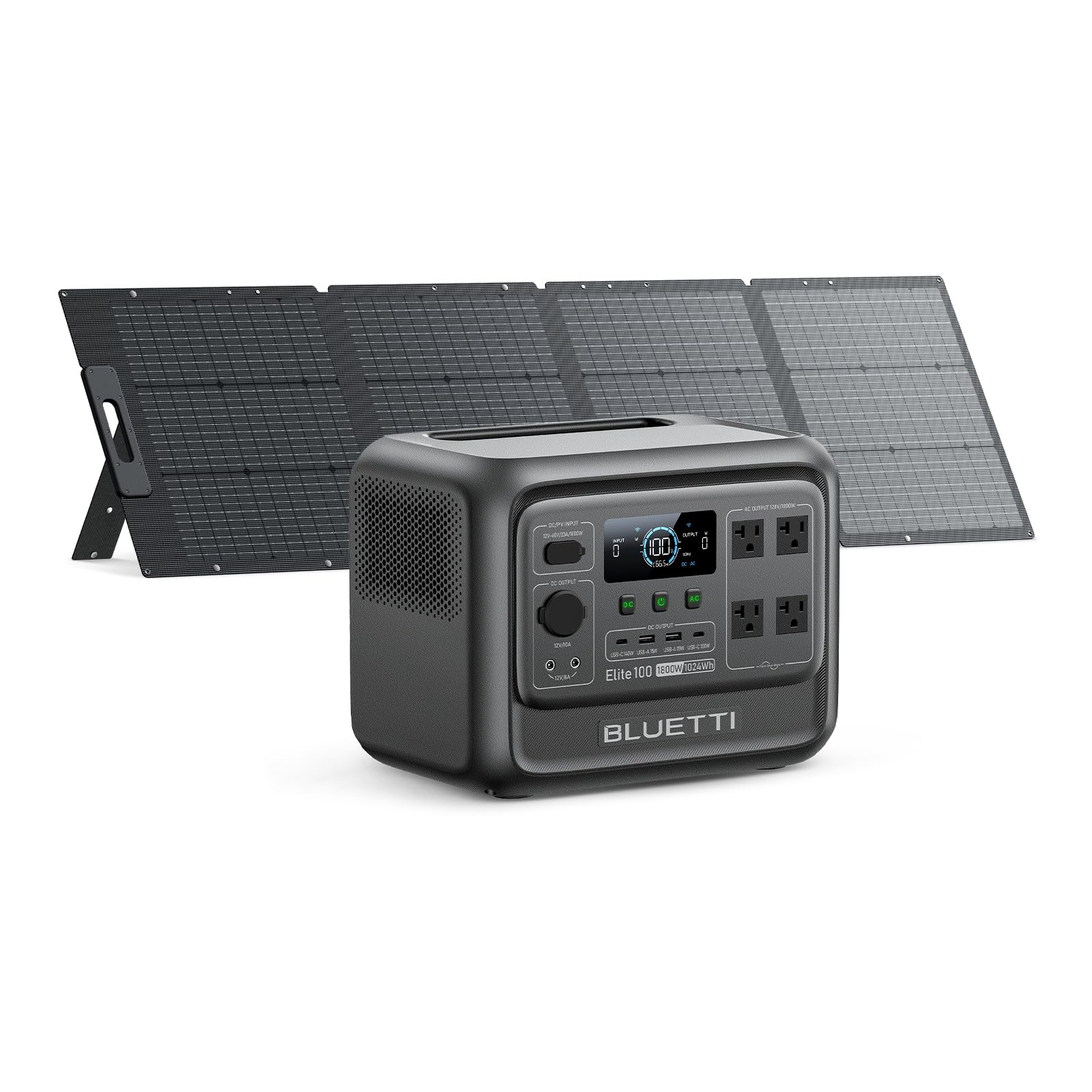
Abbildung 1: Vorderseite view of the BLUETTI Elite 100 V2 Portable Power Station.
2. Lieferumfang
Upon unboxing your BLUETTI Elite 100 V2, you will find the following items:
- BLUETTI Elite 100 V2 Tragbares Kraftwerk
- 200W Solar Panel (ships separately)
- AC-Ladekabel
- Solar-Ladekabel
- Erdungsschraube
- Bedienungsanleitung
Optional accessories that may be purchased separately include a USB-C to USB-C Cable, Car Charging Cable, and Lead-acid Battery Charging Cable.
Video 1: Ein Unboxing und mehrview of the BLUETTI Elite 100 V2, detailing the contents of the package and optional accessories.
3. Produktüberschreitungview
3.1. Kompaktes Design
The Elite 100 V2 is engineered for portability, weighing 25 lbs and featuring compact dimensions of 12.6"L x 8.5"W x 9.8"H. Its design includes a hidden handle for easy one-handed transport, making it convenient for various outdoor and indoor uses.

Abbildung 2: Seite view of the BLUETTI Elite 100 V2, illustrating its compact size and dimensions.
3.2. Power Output and Capacity
Equipped with a 1024Wh capacity, the Elite 100 V2 solar generator delivers a robust 1800W AC output, with a Power Lifting capability of 2700W. This allows it to handle a wide range of devices and appliances.

Abbildung 3: Vorderseite view of the BLUETTI Elite 100 V2, highlighting its display and various output ports.
3.3. Versatile Ports
The power station features 11 output ports to accommodate multiple devices:
- 4 x 1800-W-Wechselstromsteckdosen
- 2 x USB-A 15W Max ports
- 2 x USB-C 140W Max ports
- 2 x DC5521 12V/8A Max ports
- 1 x Car Port 12V/10A

Abbildung 4: Ausführlich view of the BLUETTI Elite 100 V2's output ports.
3.4. Unterbrechungsfreie Stromversorgung (USV)
The Elite 100 V2 offers a reliable UPS function with a switching time of less than 10ms. This ensures that sensitive electronics like WiFi routers and PCs remain powered during outages, preventing data loss and interruptions.

Figure 5: The BLUETTI Elite 100 V2 acting as an Uninterruptible Power Supply for a workstation.
3.5. Geräuscharmer Betrieb
Designed for minimal noise, the Elite 100 V2 operates at a library-level 30dB, ensuring a quiet environment whether used indoors or outdoors.
4. Einrichtung
4.1. Anfangsgebühr
Before first use, fully charge your BLUETTI Elite 100 V2 using the provided AC charging cable. This ensures optimal battery performance and longevity.
4.2. Anschluss des Solarmoduls
If using the 200W solar panel, connect it to the DC/PV input port on the power station using the solar charging cable. Ensure the solar panel is positioned to receive maximum sunlight for efficient charging.

Figure 6: A BLUETTI solar panel connected to the power station for solar charging.
5. Bedienungsanleitung
5.1. Aufladen der Powerstation
Der Elite 100 V2 unterstützt mehrere Lademethoden:
- AC-Wandladung: Connect the AC charging cable to a standard wall outlet. The unit supports up to 1200W Max AC Input, allowing 0-80% charge in approximately 45 minutes.
- Solarladung: Connect compatible solar panels (up to 1000W Max PV Input) to the DC/PV input port. A full charge can be achieved in about 70 minutes under optimal sunlight conditions.
- Aufladen im Auto: Use the optional Car Charging Cable with a 560W Charger 1 (sold separately) for up to 6X faster charging on the go, reaching a full charge in approximately 1.8 hours.
- Doppeltes Laden: Combine AC and solar input for simultaneous charging, maximizing charging speed and efficiency.
5.2. Geräte mit Strom versorgen
To power your devices, simply plug them into the appropriate AC outlets, USB ports, or DC ports. Ensure the total wattage of connected devices does not exceed the power station's continuous output capacity.
5.3. UPS Functionality
For Uninterruptible Power Supply (UPS) functionality, connect the power station to a wall outlet and then plug your devices into the power station's AC outlets. In the event of a power outage, the Elite 100 V2 will automatically switch to battery power within 10ms, providing seamless power to your connected devices.
5.4. App-Steuerung
Manage and monitor your power station using the BLUETTI mobile application. The app allows you to:
- Receive battery alerts and real-time status updates.
- Lademodi anpassen (Standard, Leise, Turbo, Benutzerdefiniert).
- Enable or disable System Switch Recovery for output status upon restart.
Video 2: A demonstration of the BLUETTI Elite 100 V2 in various usage scenarios, including camping and home backup.
6. Wartung
Um die Langlebigkeit und optimale Leistung Ihres BLUETTI Elite 100 V2 zu gewährleisten, befolgen Sie bitte diese Wartungsrichtlinien:
- Regelmäßige Reinigung: Keep the power station clean and free from dust and debris. Use a dry, soft cloth for cleaning.
- Lagerung: Lagern Sie das Gerät an einem kühlen, trockenen Ort, geschützt vor direkter Sonneneinstrahlung und extremen Temperaturen. Stellen Sie sicher, dass der Akku vor längerer Lagerung mindestens 50 % geladen ist.
- Batteriezustand: For best battery health, fully discharge and recharge the unit at least once every 3-6 months.
- Überladung vermeiden: Do not exceed the rated output power to prevent damage to the unit and connected devices.
7. Fehlerbehebung
Sollten Sie Probleme mit Ihrem BLUETTI Elite 100 V2 haben, beachten Sie bitte die folgenden gängigen Schritte zur Fehlerbehebung:
- Gerät lässt sich nicht einschalten: Stellen Sie sicher, dass der Akku geladen ist. Falls nicht, schließen Sie ihn an eine Stromquelle an und versuchen Sie, ihn aufzuladen.
- Keine Ausgabe von den Ports: Verify that the specific output (AC, DC, USB) is enabled. Check the display for any error codes.
- Überlastschutz: If an overload occurs, the unit will shut down. Disconnect some devices and restart the power station.
- Ladeprobleme: Check all cable connections. For solar charging, ensure panels are clean and receiving adequate sunlight.
For persistent issues, consult the full user manual or contact BLUETTI customer support.
8. Spezifikationen
| Besonderheit | Spezifikation |
|---|---|
| Marke | BLUETTI |
| Modellname | BLUETTI Elite 100 V2 |
| Wastage (Battery Capacity) | 1024 Wattstunden |
| Ausgang Wattage (Laufen) | 1800 Watt |
| Wat startentage (Peak) | 2700 Watt |
| Bandtage (Wechselstromausgang) | 110 Volt (Wechselstrom) |
| Stromquelle | Solarbetrieben |
| Kraftstoffart | Elektrisch |
| Empfohlene Verwendung | Camping, Emergencies, Backup Power |
| Artikelgewicht | 25 Pfund |
| Technische Daten | 12.6 Zoll L x 8.5 Zoll B x 9.8 Zoll H |
| Material | Lithium Iron Phosphate, Steel/Aluminum, Plastic/Rubber |
| Im Lieferumfang enthaltene Komponenten | BLUETTI Elite 100 V2, 200W Solar panel (shipped separately), AC/Solar charging cable, grounding screw, user manual |
9. Garantie und Support
The BLUETTI Elite 100 V2 is sold by Bluetti. For any product-related inquiries, technical assistance, or warranty claims, please contact Bluetti customer support directly. Protection plans are available for purchase to extend coverage beyond the standard warranty period.
- 4-Jahres-Schutzplan: Erhältlich zum Kauf.
- Rundumschutz: Monatlicher Plan, der berechtigte vergangene und zukünftige Käufe abdeckt.