
Einführung
This manual provides comprehensive instructions for the LogiLink AA0187 2.4GHz Wireless Gaming Controller. It covers setup, operation, maintenance, troubleshooting, and technical specifications. Please read this manual carefully before using the device to ensure proper functionality and longevity.

Image: The LogiLink AA0187 wireless gaming controller, shown with its included USB-A receiver and USB-C adapter.
Installationsanweisungen
1. Einlegen der Batterie
- Suchen Sie das Batteriefach auf der Rückseite des Controllers.
- Öffnen Sie die Batterieabdeckung.
- Legen Sie zwei AAA-Batterien ein und achten Sie dabei auf die richtige Polarität (+/-).
- Schließen Sie die Batterieabdeckung fest.

Bild: Eine detaillierte view of the controller's back, highlighting the battery compartment for AAA batteries.
2. Anschließen des Empfängers
The LogiLink AA0187 controller uses a 2.4 GHz wireless connection via a USB receiver.
- Identify the appropriate USB port on your device (PC, Android TV box, PS3).
- For devices with a standard USB-A port, plug the USB-A receiver directly into the port.
- For devices with a USB-C port (e.g., some Android smartphones/tablets), attach the included USB-C adapter to the USB-A receiver, then plug the adapter into the USB-C port. Ensure your Android device supports OTG (On-The-Go) functionality.
- Das System sollte die notwendigen Treiber automatisch erkennen und installieren.
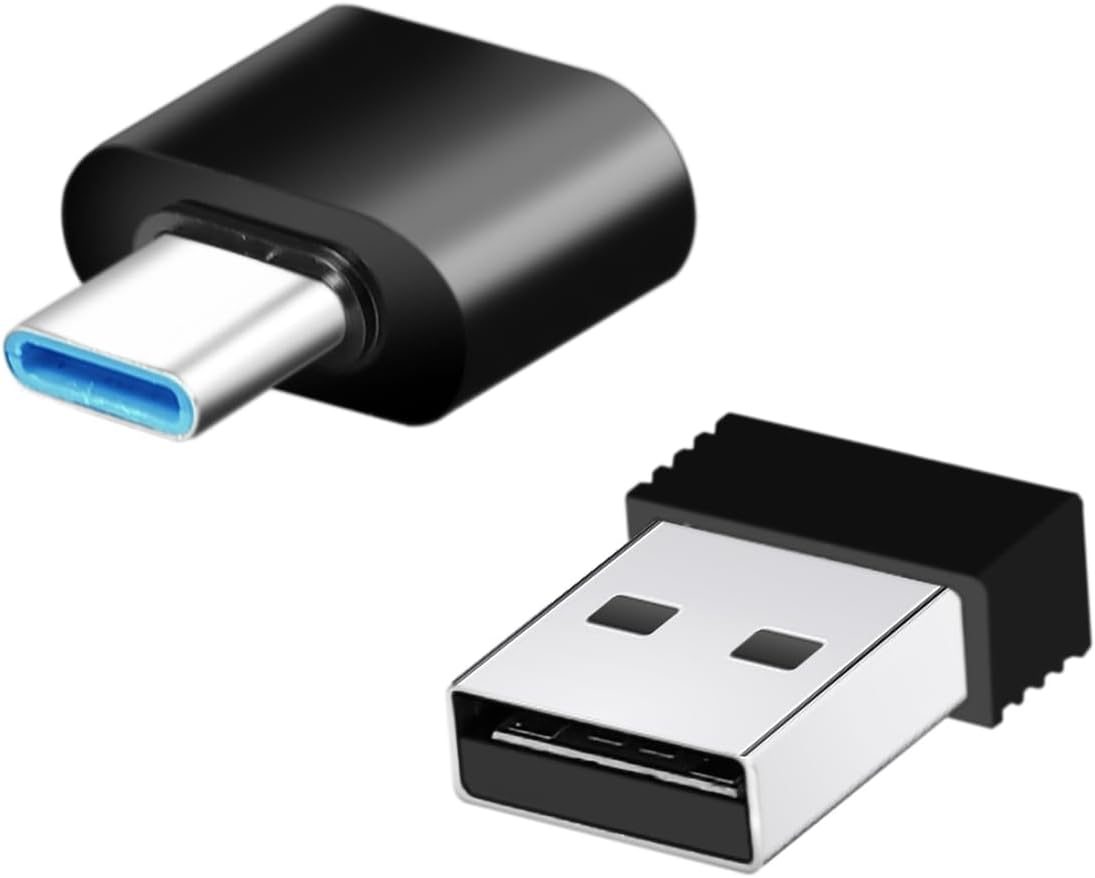
Image: The USB-A wireless receiver and the USB-C adapter, used for connecting the controller to various devices.
3. Einschalten des Controllers
Once batteries are installed and the receiver is connected, press the MODUS button on the controller to power it on. The Power LED indicator should illuminate, indicating a successful connection.
Bedienungsanleitung
Controller-Layout
Image: A diagram illustrating the various buttons and components of the LogiLink AA0187 controller, including joysticks, D-pad, function buttons, and shoulder buttons.
- Steuerkreuz (D-Pad): Für Richtungseingaben.
- Function Buttons (A, B, X, Y): Primäre Aktionsschaltflächen.
- Right/Left Rocker (Analog Joysticks): For precise 360° movement and camera control.
- Start Knopf: Wird typischerweise verwendet, um Spiele zu pausieren oder auf Menüs zuzugreifen.
- Auswahlknopf: Wird häufig für sekundäre Funktionen oder zur Menünavigation verwendet.
- MODE-Taste: Powers the controller on/off and may switch operating modes (if applicable).
- L1/R1-Tasten: Shoulder buttons, often used for actions like aiming or switching items.
- L2/R2-Tasten: Trigger buttons, often used for actions like firing or accelerating.
- LED-Anzeigen: Show power status and connection mode.
Grundlegende Verwendung
Once connected, the controller functions as a standard input device for compatible games and applications. Refer to your game's specific control settings for optimal configuration.
Wartung
- Reinigung: Reinigen Sie den Controller mit einem weichen, trockenen Tuch. Vermeiden Sie die Verwendung von scharfen Chemikalien oder Scheuermitteln.
- Lagerung: Store the controller in a dry place away from direct sunlight and extreme temperatures. Remove batteries if the controller will not be used for an extended period to prevent leakage.
- Batteriepflege: Replace batteries when the controller's performance degrades or the power indicator shows low battery. Dispose of used batteries responsibly according to local regulations.
Fehlerbehebung
- Controller verbindet sich nicht:
- Stellen Sie sicher, dass die Batterien richtig eingelegt sind und ausreichend geladen sind.
- Vergewissern Sie sich, dass der USB-Empfänger fest mit dem Gerät verbunden ist.
- Versuchen Sie, den Empfänger an einen anderen USB-Anschluss anzuschließen.
- For Android devices, confirm OTG support and that the USB-C adapter is correctly used.
- Drücken Sie die MODUS button on the controller to attempt reconnection.
- Input lag or unresponsive buttons:
- Prüfen Sie den Batteriestand und tauschen Sie die Batterie gegebenenfalls aus.
- Ensure the controller is within the 8-meter wireless range of the receiver.
- Minimieren Sie Störungen durch andere drahtlose 2.4-GHz-Geräte.
- Controller wird vom Spiel nicht erkannt:
- Stellen Sie sicher, dass der Controller angeschlossen und eingeschaltet ist.
- Check the game's settings for controller support and configuration options.
- Restart the game or the device.
Technische Daten
| Modellnummer | AA0187 |
| Verbindungstyp | 2.4-GHz-WLAN |
| Drahtlose Reichweite | Up to 8 meters (in open area) |
| Frequenzbereich | 2408–2470 MHz |
| Max. Übertragungsleistung | 3.21 mW |
| Stromversorgung | 2x AAA-Batterien |
| Kompatibilität | Windows PC, Android smartphones/tablets/TV boxes/Smart TVs (Android requires OTG support), PlayStation 3 |
| Joysticks | Non-slip 360° analog joysticks |
| Mitgeliefertes Zubehör | 1x USB-A Receiver, 1x USB-C Adapter |
| Abmessungen (ca.) | 15.7 cm (Breite) x 9.2 cm (Höhe) x 6.2 cm (Tiefe) |
| Gewicht ca.) | 109 g (ohne Batterien) |

Image: The controller shown with its approximate dimensions and icons indicating compatibility with Windows, Android, TV-Box, and PS3.
Garantie und Support
Informationen zur Garantie und zum technischen Support finden Sie in der mit Ihrem Kauf gelieferten Dokumentation oder auf der offiziellen LogiLink-Website. webBewahren Sie Ihren Kaufbeleg für Garantieansprüche auf.
For further assistance, you may contact LogiLink customer service through their official channels.