1. Einleitung
The Generic BM4070 LCD Digital Multimeter is a high-precision LCR tester designed for accurate electrical measurements in both field and laboratory settings. It features a clear LCD display for easy data reading, fast response times, and a compact, lightweight design for portability. This device is equipped with multiple functions for professional electrical testing, making it suitable for a wide range of applications.
2. Sicherheitshinweise
WARNING: To avoid electric shock, do not touch the meter's probes or exposed circuits during measurement. Always ensure the device is properly configured for the measurement type before connecting to a circuit. Do not attempt to measure voltages or currents exceeding the device's specified limits.
- Always inspect the test leads for damage before use.
- Stellen Sie sicher, dass die Batterie richtig eingesetzt ist und über ausreichend Ladung verfügt.
- Do not operate the meter in wet environments or when your hands are wet.
- Refer to the specifications section for maximum input values.
3. Produktüberschreitungview
The BM4070 Digital Multimeter is designed for ease of use and clear readings. Below is an illustration of the device and its key components.
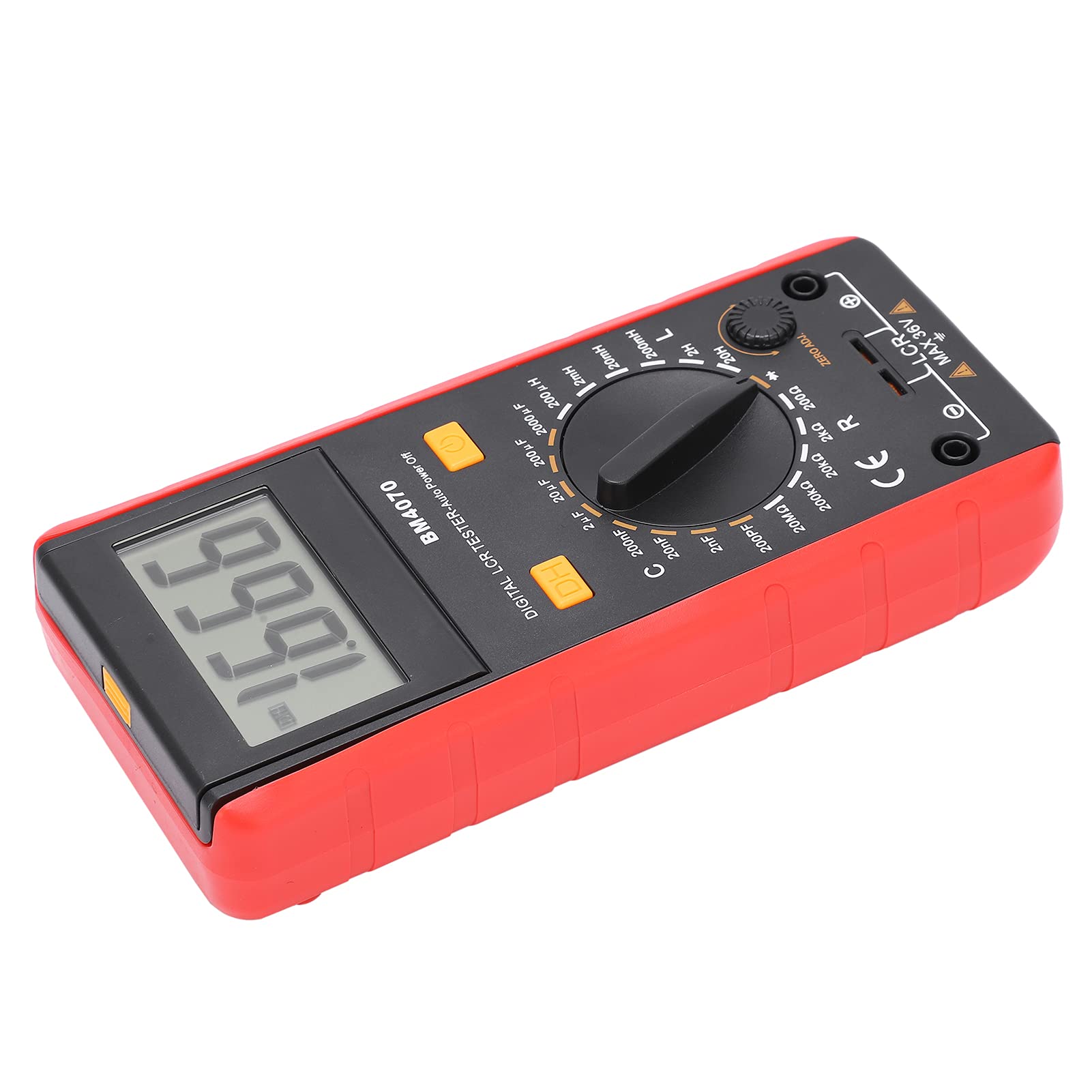
Abbildung 1: Vorderseite view of the Generic BM4070 LCD Digital Multimeter, showing the LCD display, rotary switch, and function buttons.

Figure 2: Close-up of the BM4070's high-definition LCD display, showing a clear numerical reading.
Schlüsselkomponenten:
- LCD Anzeige: Zeigt Messwerte und Indikatoren an.
- Drehschalter: Used to select measurement functions (Capacitance C, Inductance L, Resistance R) and ranges.
- DH-Taste: Data Hold function to freeze the current reading on the display.
- Netzschalter: Schaltet das Gerät ein oder aus.
- Eingangsbuchsen: Messleitungen anschließen.
- Null-Einstellknopf: For zero adjustment, typically used for resistance measurements to compensate for lead resistance.

Figure 3: Bottom section of the multimeter showing the input jacks and the LCR MAX 36V safety marking.
4. Einrichtung
4.1 Einlegen der Batterie
- Suchen Sie das Batteriefach auf der Rückseite des Multimeters.
- Using a screwdriver, carefully open the battery cover.
- Insert one 9V 6F22 battery, ensuring correct polarity. (Battery not included)
- Bringen Sie die Batterieabdeckung wieder an und sichern Sie sie mit der Schraube.
4.2 Anschließen der Testleitungen
- Stellen Sie sicher, dass das Multimeter ausgeschaltet ist.
- Insert the black test lead into the common (COM) input jack.
- Insert the red test lead into the appropriate input jack for your measurement (e.g., for LCR measurements, use the designated LCR input).
5. Bedienungsanleitung
5.1 Ein-/Ausschalten
Drücken Sie die Netzschalter (usually marked with a circle and a vertical line) to turn the multimeter on. Press it again to turn the device off.
5.2 Auswahl der Messfunktion
Drehen Sie den zentralen Drehschalter to select the desired measurement function (C for Capacitance, L for Inductance, R for Resistance) and the appropriate range. Start with a higher range if the value is unknown to prevent overloading.
5.3 Durchführung von Messungen
- After selecting the function and range, connect the test leads to the component you wish to measure.
- For resistance measurements, you may need to use the ZERO ADJ. knob to zero out the resistance of the test leads before connecting to the component.
- Lesen Sie den auf dem LCD-Bildschirm angezeigten Messwert ab.
5.4 Datenhaltefunktion
Drücken Sie die DH Button to freeze the current reading on the display. Press it again to release the hold function and resume live readings.
6. Wartung
- Halten Sie das Multimeter sauber und trocken. Verwenden Sie ein weiches, trockenes Tuch.amp Zum Reinigen ein Tuch verwenden; keine Scheuermittel oder Lösungsmittel verwenden.
- Bewahren Sie das Gerät an einem kühlen, trockenen Ort fern von direkter Sonneneinstrahlung und extremen Temperaturen auf.
- Wenn das Gerät längere Zeit nicht benutzt wird, sollte die Batterie entfernt werden, um ein Auslaufen zu verhindern.
- Regularly check the test leads for any signs of wear or damage. Replace them if necessary.
7. Fehlerbehebung
If you encounter issues with your BM4070 multimeter, refer to the following common problems and solutions:
- Das Gerät lässt sich nicht einschalten: Prüfen Sie, ob die Batterie korrekt eingesetzt ist und ausreichend geladen ist. Tauschen Sie die Batterie gegebenenfalls aus.
- Es wird kein Messwert oder „OL“ angezeigt: Ensure the test leads are properly connected to the component and the correct measurement function and range are selected. 'OL' (Overload) indicates the measured value exceeds the selected range; switch to a higher range.
- Ungenaue Messwerte: Check for proper test lead connection. Ensure the ZERO ADJ. knob is correctly set for resistance measurements. Verify the component is functioning correctly.
Wenn das Problem weiterhin besteht, wenden Sie sich an den Kundendienst.
8. Spezifikationen
| Besonderheit | Spezifikation |
|---|---|
| Artikeltyp | Multimeter |
| Modell | BM4070 |
| Material | ABS |
| Stromversorgung | 1x9V 6F22 Battery (not included) |
| Sampling-Rate | 3 mal pro Sekunde |
| Betriebsumgebung | 0℃ bis 40℃ |
| Speicherumgebung | -10℃ bis 50℃ |
| Messgenauigkeit | 0.1mm (General) |
| Kapazitätsbereich | 200pF ~ 200μF (±2.5%+5), 2000μF (±5.0%+5) |
| Induktivitätsbereich | 200uH (±3.0%+5), 2mH ~ 2H (±2%+5), 20H (±5%+5) |
| Niedrige Lautstärketage Anzeige | Battery symbol indication |
9. Packungsinhalt
Folgende Artikel sind in Ihrem Produktpaket enthalten:

Figure 4: Contents of the BM4070 package, including the multimeter, test clips, manual, and tool bag.
- Multimeter x 1 (Battery not included)
- Test Clips x 2
- Bedienungsanleitung x 1
- Werkzeugtasche x 1
10. Garantie und Support
Specific warranty and support information is not provided in the product details. Please refer to the retailer or manufacturer's webAuf der Webseite finden Sie Einzelheiten zu Garantieleistungen und Kundendienstoptionen.

