
Einführung
This manual provides detailed instructions for the assembly, operation, and maintenance of your Pinmoco 42" Reversible Gaming Desk. Please read thoroughly before use to ensure proper setup and safe operation.
Sicherheitshinweise
- Bauen Sie den Schreibtisch stets gemäß der beiliegenden Anleitung zusammen.
- Stellen Sie sicher, dass der Schreibtisch ordnungsgemäß am Boden verankert ist, um ein Umkippen zu verhindern.
- Do not place heavy objects on the desk that could exceed its weight limit.
- Keep all electrical components (LED lights, power outlets) away from liquids.
- Ensure all screws are securely tightened before using the desk.
Packungsinhalt

The image above shows the various components included in your package, laid out for easy identification prior to assembly. Please verify all parts are present and undamaged.
- Desktop-Panels (L-förmige Abschnitte)
- Regal für Monitorständer
- Metallrahmenkomponenten
- Under-desk Storage Shelf
- RGB LED Light Strip with Controller
- Built-in Power Outlets with USB Ports
- Headset-Haken
- Foldable Cup Holder
- Montagezubehör (Schrauben, Bolzen, Inbusschlüssel)
- Adjustable Leveling Pads
Technische Daten
| Besonderheit | Detail |
|---|---|
| Marke | Pinmoco |
| Form | L-Shaped (Corner) |
| Technische Daten | 41.93"T x 32.36"B x 36.02"H |
| Farbe | Carbonfaser Schwarz |
| Stil | Modern |
| Grundmaterial | Metall |
| Top-Materialtyp | Wood (P2 Particleboard) |
| Ausführung | Wood (Carbon Fiber Texture) |
| Besondere Merkmale | Carbon Fiber, Cup Holder & Headset Hook, LED Light, Monitor Stand, Reversible Gaming Desk |
| Artikelgewicht | 39.57 Pfund |
| Anzahl der Regale | 1 (Under-desk storage) |
| Erforderliche Montage | Ja |

This image provides a visual representation of the desk's dimensions and weight capacities for various sections, ensuring you can plan your setup effectively.
Montageanleitung
Follow these step-by-step instructions carefully to assemble your Pinmoco Gaming Desk. It is recommended to have a second person for assistance during certain steps to ensure stability and ease of assembly.
Generalversammlung vorbeiview
Video: Corner Computer Desk Assembling Instruction. This video demonstrates the assembly process for a corner computer desk, including attaching frame parts and securing panels.
Video: Installation Video of Upgrade Corner Desk. Watch this video for a visual guide on installing the corner desk, focusing on structural components.
Video: Installation for Small Gaming Desk with Monitor Stand. This video provides installation steps specifically for a small gaming desk with a monitor stand.
Reversible Layout
The L-shaped design allows for flexible assembly, positioning the longer or shorter side to suit your space. Refer to the manual's diagrams for specific configurations to match your room layout.
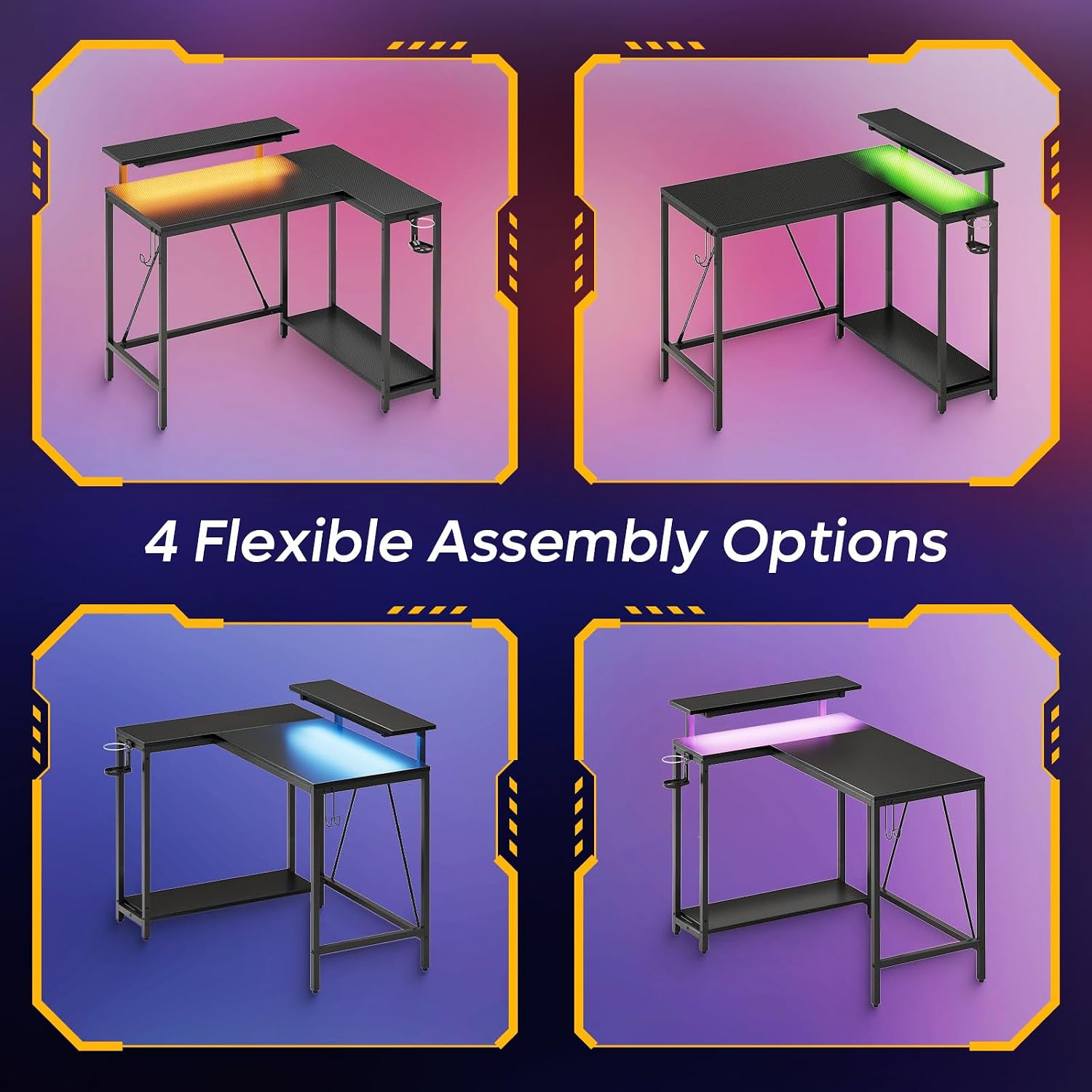
This image illustrates the four flexible assembly options for the L-shaped desk, allowing users to configure it for left or right-hand use.
Bedienungsanleitung & Funktionen
Ergonomischer Monitorständer
The adjustable monitor stand elevates your screen to eye level, promoting better posture and reducing neck and spine strain during long sessions. Place your monitor directly on the stand for optimal viewKomfort.

This image highlights the ergonomic benefits of the adjustable monitor stand, showing improved posture for users.
RGB-LED-Beleuchtung
The integrated RGB LED lighting offers 7 primary colors and 20 dynamic modes. Use the included control panel to customize the lighting to your preference, enhancing your gaming or work atmosphere.
Video: Pinmoco LED Gaming Desk with Monitor Stand. This official video showcases the LED lighting features and monitor stand of the Pinmoco gaming desk.
Multi-Function Storage Space
The desk includes a practical under-desk storage shelf for files, books, or a PC tower. A convenient headset hook and foldable cup holder are also provided, ensuring easy access to accessories and beverages.
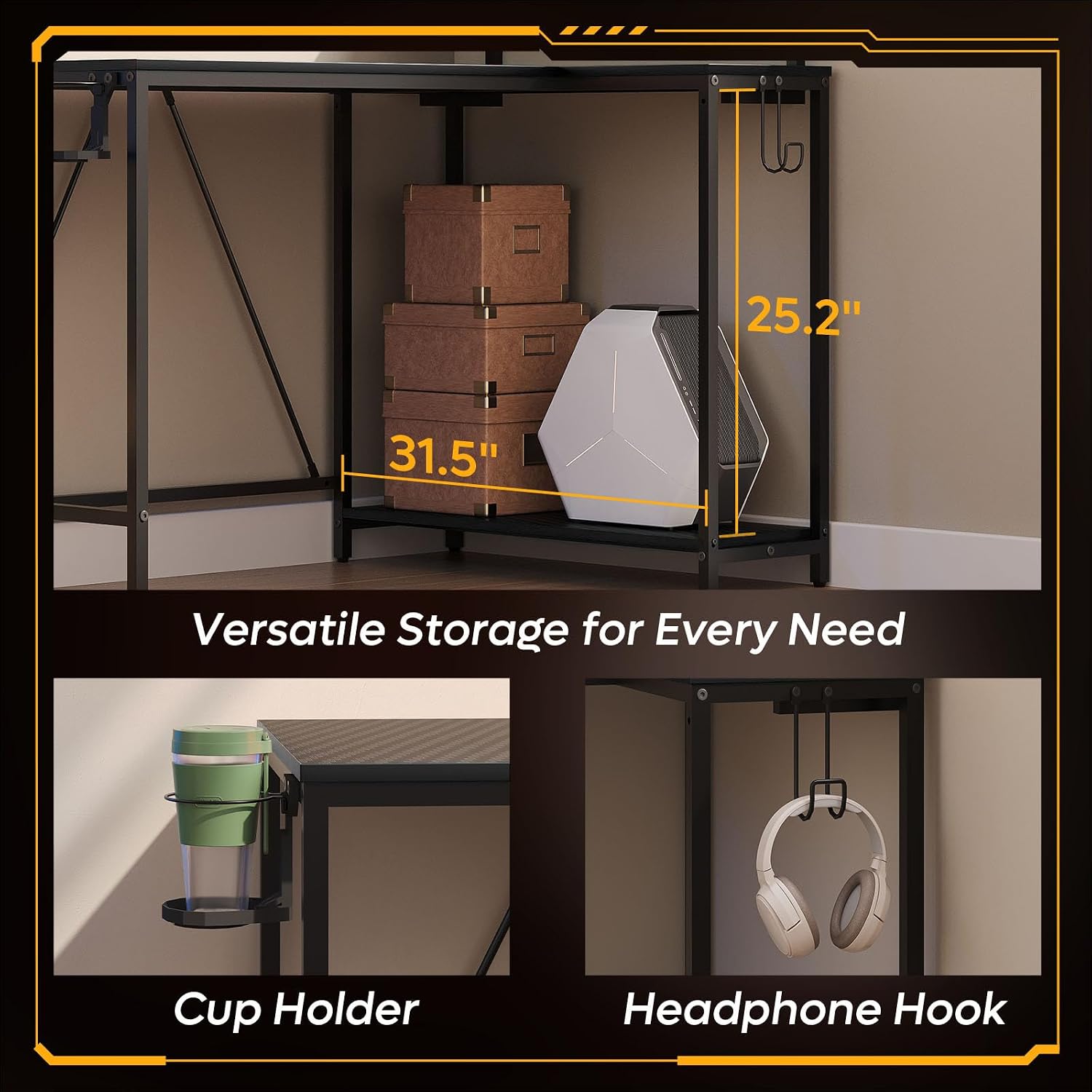
This image details the versatile storage options, including an under-desk shelf, cup holder, and headphone hook.

A close-up of the foldable cup holder, designed for easy access to beverages.

A close-up of the headset hook, providing a dedicated space for headphones.
Video: Gaming Desk with Multi-shelf. This video demonstrates the multi-shelf storage, headphone holder, and cup holder features of a gaming desk.
Integrierte Steckdosen
The desk features built-in power outlets and USB charging ports for convenient power access for your devices, keeping your workspace tidy and organized.
This image shows the integrated power outlets and USB charging ports on the desk for easy device connectivity.
Wartung
Reinigung
- Wischen Sie Oberflächen mit einem weichen, damp Tuch.
- Avoid harsh chemicals or abrasive cleaners that could damage the finish.
Pflege
- Regularly check and tighten all screws and connections to maintain stability.
- Keep the desk away from direct sunlight and extreme temperatures to prevent warping or fading.
- Avoid placing hot items directly on the desktop without protective coasters.
Fehlerbehebung
Stabilitätsprobleme
- Stellen Sie sicher, dass alle Schrauben fest angezogen sind.
- Verify the desk is on a level surface. Use the adjustable leveling pads on the feet to stabilize the desk on uneven floors.

This image shows the adjustable leveling pads on the desk legs, which can be used to stabilize the desk on uneven surfaces.
LED-Leuchten funktionieren nicht
- Check if the LED light strip's power cable is securely connected to the power source and the desk's integrated power unit.
- Ensure the power source is active and the wall outlet is functioning.
- Verify the LED strip is correctly attached and all connections are firm.
Garantie und Support
Garantieinformationen
This product comes with a limited warranty. Please refer to the original purchase documentation or contact Pinmoco customer support for specific terms and conditions regarding your warranty.
Kundenservice
If you encounter missing parts, bent components, or require any assistance with your Pinmoco Gaming Desk, please contact Pinmoco customer support. We are committed to providing parts replacement or upgrade service to ensure your satisfaction.
Visit the Pinmoco Store for more information: Pinmoco Direct