
1. Einleitung
This manual provides comprehensive instructions for the safe and effective use of your OnePlus Watch 3. Please read this manual thoroughly before operating the device and retain it for future reference. The OnePlus Watch 3 is a sophisticated smartwatch designed to integrate seamlessly into your daily life, offering advanced health monitoring, fitness tracking, and smart connectivity features.

Figure 1: The OnePlus Watch 3 in Black Steel, showcasing its round display and textured fluoroelastomer band.
2. Einrichtung
2.1 Auspacken und Erstaufladung
Upon unboxing your OnePlus Watch 3, ensure all components are present: the smartwatch, charging cable, and quick start guide. Before first use, fully charge the device using the provided charging cable. Connect the magnetic end of the cable to the charging pins on the back of the watch and the USB end to a compatible power adapter.

Abbildung 2: Rückseite view of the OnePlus Watch 3, highlighting the charging pins and health sensors.
2.2 Koppeln mit Ihrem Smartphone
- Download the OHealth app from your smartphone's app store (Google Play Store).
- Stellen Sie sicher, dass Bluetooth auf Ihrem Smartphone aktiviert ist.
- Öffnen Sie die OHealth-App und folgen Sie den Anweisungen auf dem Bildschirm, um ein neues Gerät hinzuzufügen.
- Select 'OnePlus Watch 3' from the list of available devices.
- Bestätigen Sie den Kopplungscode, der sowohl auf Ihrer Uhr als auch auf Ihrem Smartphone angezeigt wird.
3. Bedienung des Geräts
3.1 Grundlegende Navigation
- Touch-Screen: Durch Wischen nach links/rechts oder nach oben/unten navigieren Sie durch Menüs und Bildschirme. Tippen Sie, um Elemente auszuwählen.
- Krone: Rotate the crown to scroll through lists or adjust settings. Press the crown to return to the watch face or open the app drawer.
- Untere Taste: Customizable shortcut button, typically used for quick access to fitness tracking or health checks.

Figure 3: The front of the OnePlus Watch 3, illustrating the interactive display and physical crown for navigation.
3.2 Anpassen von Zifferblättern
The OnePlus Watch 3 offers a variety of pre-installed watch faces and allows for further customization through the OHealth app. You can also set personal photos as watch faces for a personalized touch.

Figure 4: A personalized watch face on the OnePlus Watch 3, demonstrating customization options.
4. Gesundheits-Tracking
The OnePlus Watch 3 is equipped with advanced sensors for comprehensive health monitoring. Data is synchronized with the OHealth app for detailed analysis and insights.
- Herzfrequenz-Überwachung: Kontinuierliche Herzfrequenzmessung über den ganzen Tag.
- Blutsauerstoffmessung (SpO2): Misst den Sauerstoffsättigungsgrad im Blut.
- Schlaf-Tracking: Überwacht den Schlaftages (Deep, Light, REM) and provides a sleep score, including sleep breathing risk detection.
- Stressüberwachung: Assesses stress levels based on heart rate variability.
- Arterial Stiffness: Provides insights into vascular health.
- Zyklusverfolgung: Helps track menstrual cycles for women.

Figure 5: The OnePlus Watch 3 showing various health metrics on its display.
5. Workout Tracking
The watch supports over 100 professional-level tracking modes, providing detailed metrics for various activities. GPS is integrated for accurate outdoor activity tracking.
- GPS Navigation: Supports Beidou, GPS, Galileo, GLONASS, and QZSS for precise location tracking during outdoor workouts.
- Aktivitätsverfolgung: Erfasst Schritte, Distanz, Kalorienverbrauch und aktive Minuten.
- Fat Burning Evaluation: Provides insights into your workout effectiveness for fat burning.

Figure 6: The OnePlus Watch 3 being used during a cycling activity, demonstrating its fitness tracking capabilities.
6. Design & Build Quality
The OnePlus Watch 3 features a premium design with durable materials for everyday wear.
- Fall: 43mm polished stainless steel case.
- Displayschutz: Sapphire Crystal for enhanced scratch resistance.
- Band: Comfortable fluoroelastomer band.
- Wasserbeständigkeit: IP68 and 5 ATM rating, suitable for swimming and daily water exposure.
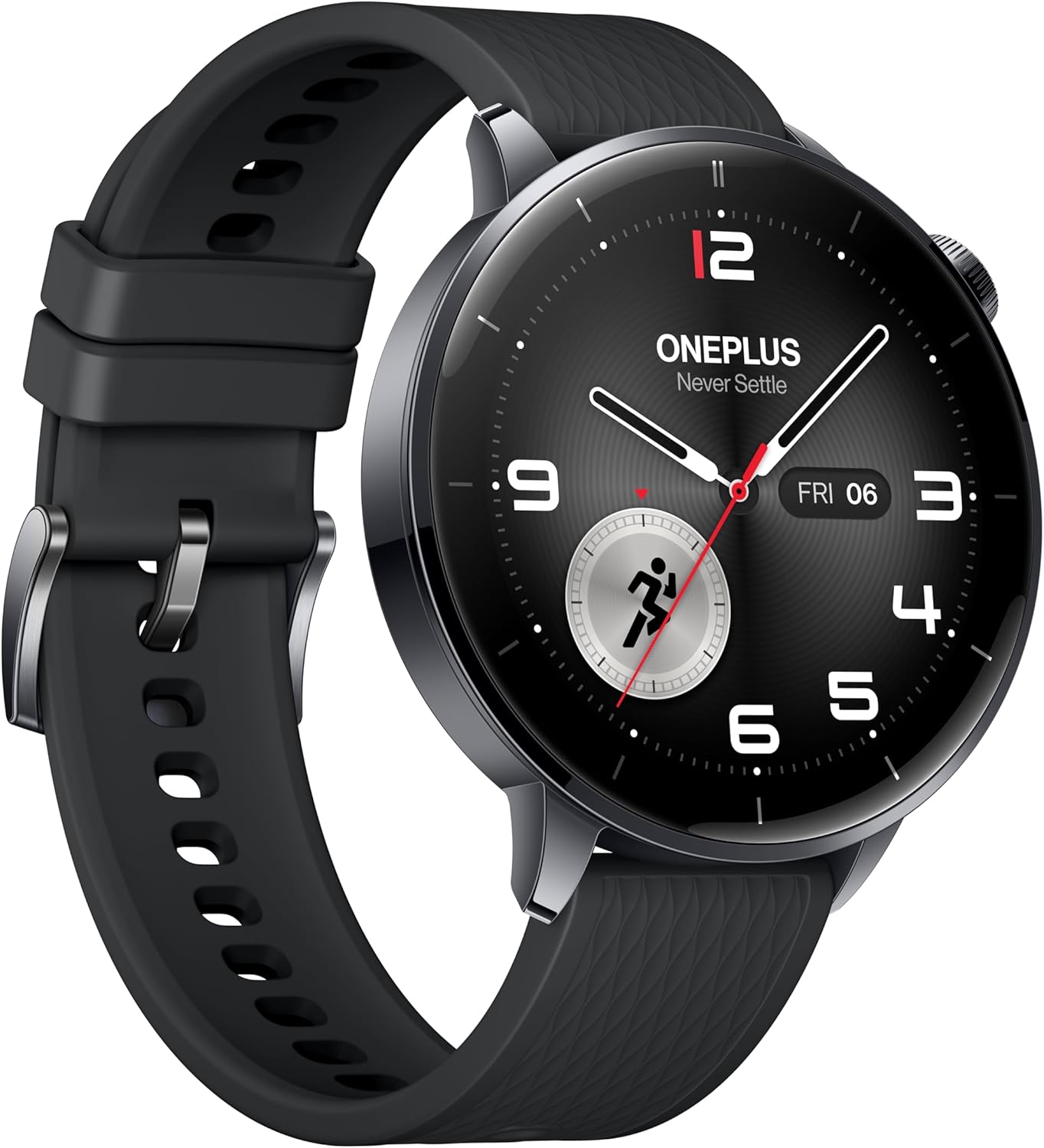
Abbildung 7: Seitenansichtfile of the OnePlus Watch 3, showcasing its polished stainless steel case and integrated crown.
7. Technische Daten
| Besonderheit | Spezifikation |
|---|---|
| Modell | OnePlus Watch 3 (43mm Black Steel) |
| Anzeige | 1.32-inch AMOLED, Round Face |
| Betriebssystem | WearOS 5 (at launch) |
| Prozessor | Snapdragon W5 Gen 1 |
| RAM | 2 GB |
| Lagerung | 32 GB |
| Batteriekapazität | 345mAh (up to 60 hours in Smart Mode) |
| Laden | VOOC Quick Charging |
| Konnektivität | Bluetooth, Wi-Fi (5G/2.4G, 802.11 a/b/g/n), NFC |
| GPS | Beidou, GPS, Galileo, GLONASS, QZSS |
| Wasserbeständigkeit | IP68, 5 ATM |
| Gewicht (ohne Gurt) | 49.7g |
| Materialien | Polished Stainless Steel Case, Sapphire Crystal, Fluoroelastomer Band |
8. Batterieleistung
The OnePlus Watch 3 offers exceptional battery life for a WearOS smartwatch, providing up to 60 hours of use in Smart Mode. Power-saving features can extend this significantly.

Figure 8: The OnePlus Watch 3 highlighting its impressive 60-hour battery life in Smart Mode.
9. Anzeige
The 1.32-inch AMOLED display provides vibrant colors and excellent readability, even in bright sunlight. The display is protected by Sapphire Crystal for durability.
Figure 9: A close-up of the OnePlus Watch 3's vibrant AMOLED display.
10. Konnektivität
The watch offers robust connectivity options for seamless integration with your digital ecosystem.
- Bluetooth: For connecting to your smartphone and compatible accessories like earbuds.
- W-lan: Enables faster app downloads and updates from the Play Store.
- NFC: Supports Google Wallet for contactless payments.

Figure 10: The OnePlus Watch 3's app drawer, illustrating the range of applications available.
11. Software (Wear OS 5.0)
Running on Wear OS 5.0, the OnePlus Watch 3 provides a smooth and feature-rich user experience with access to a wide range of Google apps and services.
- Google Play Apps: Download and install your favorite apps directly from the watch.
- Google Wallet: Convenient contactless payments.
- Google Assistant: Voice-activated assistant for quick tasks and information.
- Dual OS: Combines Wear OS for smart features with an RTOS-based system for power efficiency in core functions.
12. Smartphone App (OHealth)
The OHealth app serves as the central hub for managing your OnePlus Watch 3, providing detailed health and fitness data, watch face customization, and device settings.
- Gesundheitseinblicke: Comprehensive summaries and tips based on your prolonged usage data.
- Trainingsaufzeichnungen: Detailed logs of your fitness activities, including maps, heart rate zones, and elevation data.
- Geräteverwaltung: Control watch settings, notifications, and app installations.
13. Wartung
To ensure the longevity and optimal performance of your OnePlus Watch 3, follow these maintenance guidelines:
- Reinigung: Regularly wipe the watch and band with a soft, damp Tuch. Vermeiden Sie aggressive Chemikalien.
- Wassereinwirkung: While water-resistant, avoid prolonged submersion in saltwater or exposure to high-pressure water. Rinse with fresh water after swimming.
- Laden: Use only the original charging cable. Keep charging contacts clean and dry.
- Lagerung: Bewahren Sie die Uhr an einem kühlen, trockenen Ort auf, wenn Sie sie nicht verwenden.
14. Fehlerbehebung
If you encounter any issues with your OnePlus Watch 3, try the following common solutions:
- Uhr schaltet sich nicht ein: Stellen Sie sicher, dass die Uhr vollständig aufgeladen ist.
- Kopplungsprobleme: Ensure Bluetooth is on, the watch is in pairing mode, and the OHealth app is updated. Try restarting both devices.
- Ungenaue Gesundheitsdaten: Achten Sie darauf, dass die Uhr eng am Handgelenk sitzt. Reinigen Sie die Sensoren regelmäßig.
- Schlechte GPS-Genauigkeit: Stellen Sie sicher, dass Sie sich an einem offenen Ort mit klarem Himmel befinden. view.
- App crashes/slowness: Restart the watch. Ensure all apps and Wear OS are updated.
For persistent issues, refer to the online support resources or contact OnePlus customer service.
15. Garantie und Support
Your OnePlus Watch 3 comes with a limited manufacturer's warranty. Please refer to the warranty card included in your product packaging for specific terms and conditions. For technical support, FAQs, and additional resources, visit the official OnePlus support webWebsite oder wenden Sie sich an den Kundendienst.