
1. Produktüberschreitungview
The WESECUU Light Bulb Security Camera offers comprehensive home surveillance with easy installation. Designed for both indoor and outdoor use, this camera provides a 360° panoramic view, motion tracking, and AI detection for enhanced security.
- Mühelose Installation: Screws into a standard light bulb socket, requiring no drilling or complex wiring.
- 360 ° Panorama View & Auto Motion Tracking: Provides full-area coverage and automatically follows detected movement.
- Intelligente KI-Erkennung: Distinguishes between people and other movements to reduce false alerts.
- Zweiwege-Audio: Features a built-in speaker and microphone for real-time communication.
- 24/7 Day & Night Monitoring: Ensures continuous surveillance in various lighting conditions.

2. Packungsinhalt
Bitte überprüfen Sie, ob alle Artikel in Ihrem Paket vorhanden sind:
- WESECUU Light Bulb Security Camera
- Bedienungsanleitung (dieses Dokument)
3. Einrichtungsanweisungen
3.1 Physische Installation
The camera is designed for simple installation into a standard E27/E26 light bulb socket.
- Ensure the power to the light socket is turned off at the circuit breaker before installation.
- Carefully screw the WESECUU Light Bulb Security Camera into the light bulb socket until it is secure. Do not overtighten.
- Turn the power back on at the circuit breaker. The camera will power on and initiate its startup sequence.
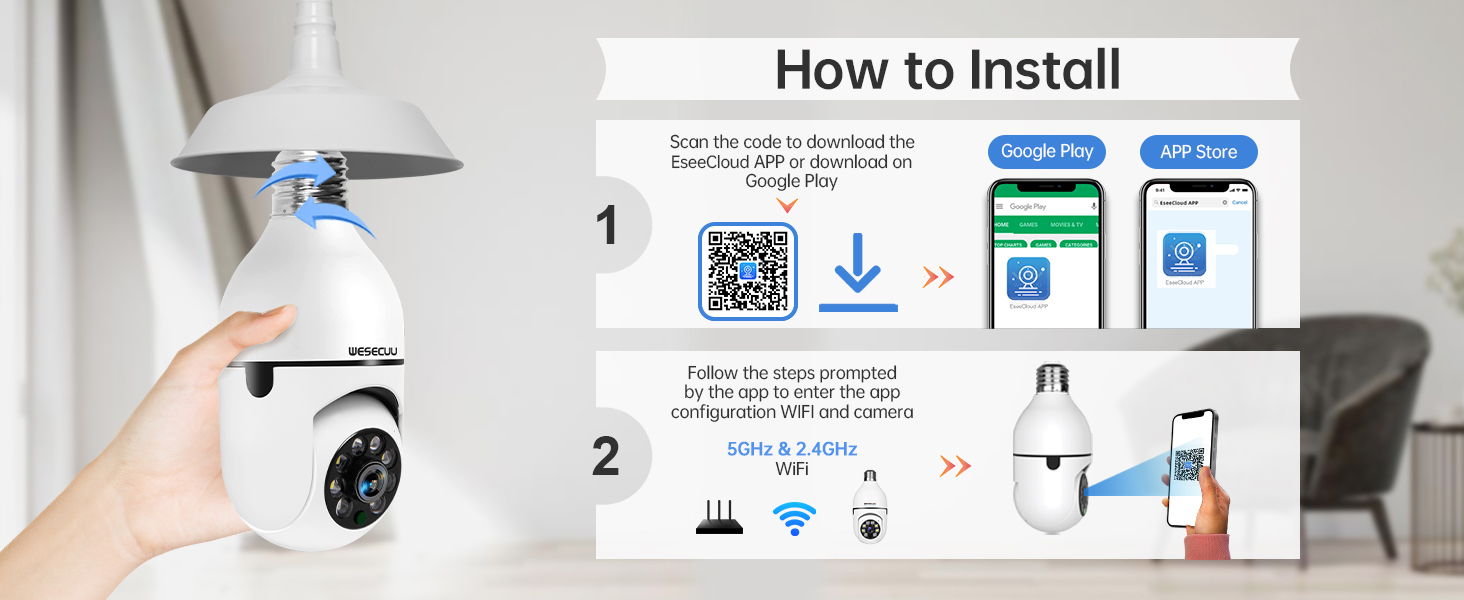
3.2 App-Download und Kamerakopplung
To operate your camera, you need to download the EseeCloud APP and pair the device.
- Download the EseeCloud APP from the Google Play Store or Apple App Store. You can also scan the QR code provided in the installation image below or visit http://www.e-seenet.com/download/indexm.php?p=tjesee.
- Open the EseeCloud APP and create an account or log in.
- Follow the in-app instructions to add your new camera. Ensure your smartphone is connected to a 2.4GHz or 5GHz Wi-Fi network during the pairing process. The camera supports both 2.4GHz and 5GHz Wi-Fi.
- Once successfully paired, you can access the live feed and camera settings through the app.
4. Bedienungsanleitung
4.1 Live View und Wiedergabe
Access the EseeCloud APP to view den Live-Feed Ihrer Kamera. Sie können auch erneutview aufgenommenes footage from the SD card (if installed) or cloud storage (if subscribed).

4.2 Bewegungserkennung und -verfolgung
The camera features advanced motion detection and automatic tracking. When motion is detected, the camera will pan and tilt to follow the subject, ensuring continuous coverage. Alerts will be sent to your smartphone.

4.3 AI Detection Alerts
The integrated AI technology helps differentiate between human movement and other sources of motion, such as pets or passing vehicles, reducing irrelevant notifications.

4.4 Zwei-Wege-Audio
Utilize the two-way audio feature to communicate through the camera. This allows you to speak to visitors, deter intruders, or comfort pets remotely.

4.5 Nachtsicht
The camera provides both full-color night vision and infrared night vision modes for clear monitoring in low-light conditions.

4.6 Speichermöglichkeiten
The camera supports local storage via an SD card (16-128GB, not included) and offers optional cloud storage plans for continuous recording and advanced features.

5. Wartung
To ensure optimal performance and longevity of your WESECUU Light Bulb Security Camera, follow these maintenance guidelines:
- Linsenreinigung: Gently wipe the camera lens with a soft, dry microfiber cloth to remove dust or smudges. Avoid abrasive cleaners.
- Stromversorgung: Ensure the camera receives a stable power supply. Avoid frequent power interruptions.
- Firmware-Updates: Regularly check the EseeCloud APP for available firmware updates to ensure your camera has the latest features and security enhancements.
- Umgebungsbedingungen: While designed for outdoor use, avoid direct exposure to extreme weather conditions if possible, and ensure the light socket is weather-protected.
6. Fehlerbehebung
If you encounter issues with your WESECUU Light Bulb Security Camera, refer to the following common solutions:
- Kamera stellt keine Verbindung zum WLAN her:
- Stellen Sie sicher, dass Ihr WLAN-Netzwerk mit 2.4 GHz oder 5 GHz arbeitet und stabil ist.
- Überprüfen Sie, ob das WLAN-Passwort in der App korrekt eingegeben wurde.
- Move the camera closer to your Wi-Fi router during setup.
- Starten Sie Ihren Router und die Kamera neu.
- Kein Bild oder schwarzer Bildschirm:
- Check if the camera is properly powered on and the light socket has power.
- Ensure the camera lens is not obstructed.
- Starten Sie die Kamera neu, indem Sie die Stromzufuhr zur Steckdose unterbrechen und wieder einschalten.
- Bewegungserkennung funktioniert nicht:
- Check motion detection settings in the EseeCloud APP.
- Ensure the detection sensitivity is set appropriately.
- Verify that notification permissions are enabled for the app on your smartphone.
- Schlechte Bildqualität:
- Reinigen Sie das Kameraobjektiv.
- Für eine optimale Bildschärfe, insbesondere bei Farbnachtsicht, ist eine ausreichende Beleuchtung sicherzustellen.
- Prüfen Sie Ihre Internetverbindungsgeschwindigkeit, da eine langsame Verbindung die Streaming-Qualität beeinträchtigen kann.

Figure 10: Visual comparison demonstrating the superior clarity of WESECUU's 3MP resolution compared to other standard resolutions.
7. Spezifikationen
| Besonderheit | Spezifikation |
|---|---|
| Modellnummer | TP-8052BW3 |
| Marke | WESECUU |
| Verwendung im Innen- und Außenbereich | Im Freien |
| Konnektivitätstechnologie | Kabellos (Wi-Fi) |
| Konnektivitätsprotokoll | Wi-Fi (2.4 GHz & 5 GHz) |
| Stromquelle | Kabelgebundene Elektrik |
| Auflösung der Videoaufnahme | 4K |
| Montagetyp | Deckenmontage |
| Besonderheit | Einstellbar |
| Kompatible Geräte | Amazon Alexa |
| Controllertyp | Amazon Alexa |
| Produktabmessungen (L x B x H) | 1 x 1 x 1 Zoll |
| Artikelgewicht | 7.2 Unzen (0.21 Kilogramm) |
8. Garantieinformationen
For detailed warranty information, please refer to the warranty card included with your product packaging or visit the official WESECUU webDie Garantiebedingungen können je nach Region und Kaufdatum variieren.
9. Kundendienst
If you require further assistance or have questions not covered in this manual, please contact WESECUU customer support:
- Kunden-Hotline: +1-888-9716718
- Arbeitszeit: Pacific Standard Time 6:00 PM - 3:00 AM, Monday to Friday
- Online-Hilfe: Visit the official WESECUU webWebsite mit häufig gestellten Fragen, Hilfestellungen und Kontaktformularen.