
1. Einleitung
Thank you for choosing the ANRAN Q04 Solar Security Camera and ANRAN F2M3 Solar Door Light Security Camera. This manual provides detailed instructions for the setup, operation, and maintenance of your new security devices. Please read this manual thoroughly before installation and retain it for future reference.
These devices are designed to provide reliable outdoor surveillance with the convenience of solar power and wireless connectivity.
2. Produktüberschreitungview
The ANRAN Q04 and F2M3 are advanced solar-powered security solutions. The Q04 is a pan-tilt camera, while the F2M3 integrates a security camera with a motion-activated light.

Image 2.1: ANRAN Q04 Solar Security Camera (left) and ANRAN F2M3 Solar Door Light Security Camera (right).
2.1 Hauptmerkmale
- Solarenergie: Both cameras feature integrated solar panels for continuous charging. The F2M3 includes a 3W solar panel and a 5000 mAh battery.
- Kabellose Verbindung: Connects to 2.4GHz WiFi for remote access and control.
- 2K-Auflösung: Provides clear 3MP video footagTag und Nacht.
- Zweiwege-Audio: Eingebautes Mikrofon und Lautsprecher für Echtzeitkommunikation.
- ANRAN Q04 Specifics:
- 355° Pan & 90° Tilt for wide area surveillance.
- Three Night Vision Modes: Smart, Color, and Infrared.
- ANRAN F2M3 Specifics:
- Integrated Wall Light: 200-lumen brightness.
- PIR Detection & Motion Activated Light: Light turns on when motion is detected.
- 70db Siren for deterrence.
3. Einrichtung und Installation
Both ANRAN cameras are designed for simple and easy installation.

Image 3.1: The ANRAN Q04 camera features simple installation, requiring no separate solar panel setup.

Image 3.2: The ANRAN F2M3 camera is easily mounted to an exterior wall.
3.1 Montageort
- Wählen Sie einen Standort mit ample direct sunlight exposure for optimal solar charging.
- Ensure the camera is within range of your 2.4GHz WiFi network. Hinweis: 5-GHz-WLAN wird nicht unterstützt.
- Mount the camera at a height that provides the desired viewing angle and security coverage.
3.2 Installationsschritte
- Laden Sie den Akku auf: Before initial use, fully charge the camera's internal battery using a USB power adapter (not included) for several hours.
- Laden Sie die ANRAN-App herunter: Suchen nach "ANRAN" in your mobile app store (iOS or Android) and download the application.
- Ein Konto erstellen: Öffnen Sie die ANRAN-App und folgen Sie den Anweisungen auf dem Bildschirm, um ein neues Benutzerkonto zu erstellen.
- Gerät hinzufügen: In the app, tap the "+" icon to add a new device. Select your camera model (Q04 or F2M3) and follow the in-app pairing instructions. This typically involves scanning a QR code on the camera or connecting to a temporary WiFi hotspot created by the camera.
- Montieren Sie die Kamera: Use the provided mounting bracket and screws to securely attach the camera to your chosen outdoor location. Ensure the solar panel is positioned to receive maximum sunlight.
4. Bedienungsanleitung
Control and monitor your ANRAN cameras using the ANRAN mobile application.
4.1 Live View und Aufzeichnung
- Öffnen Sie die ANRAN-App und wählen Sie Ihre Kamera aus. view das Live-Feed.
- Record video or capture screenshots directly from the live view Schnittstelle.
4.2 Pan and Tilt (ANRAN Q04 Only)

Image 4.1: The ANRAN Q04 camera offers 355° pan and 90° tilt for comprehensive area coverage.
Aus dem Leben view of your Q04 camera, use the on-screen controls to remotely adjust the camera's viewSchwenkwinkel (355° horizontale Schwenkung, 90° vertikale Neigung).
4.3 Nachtsichtmodi
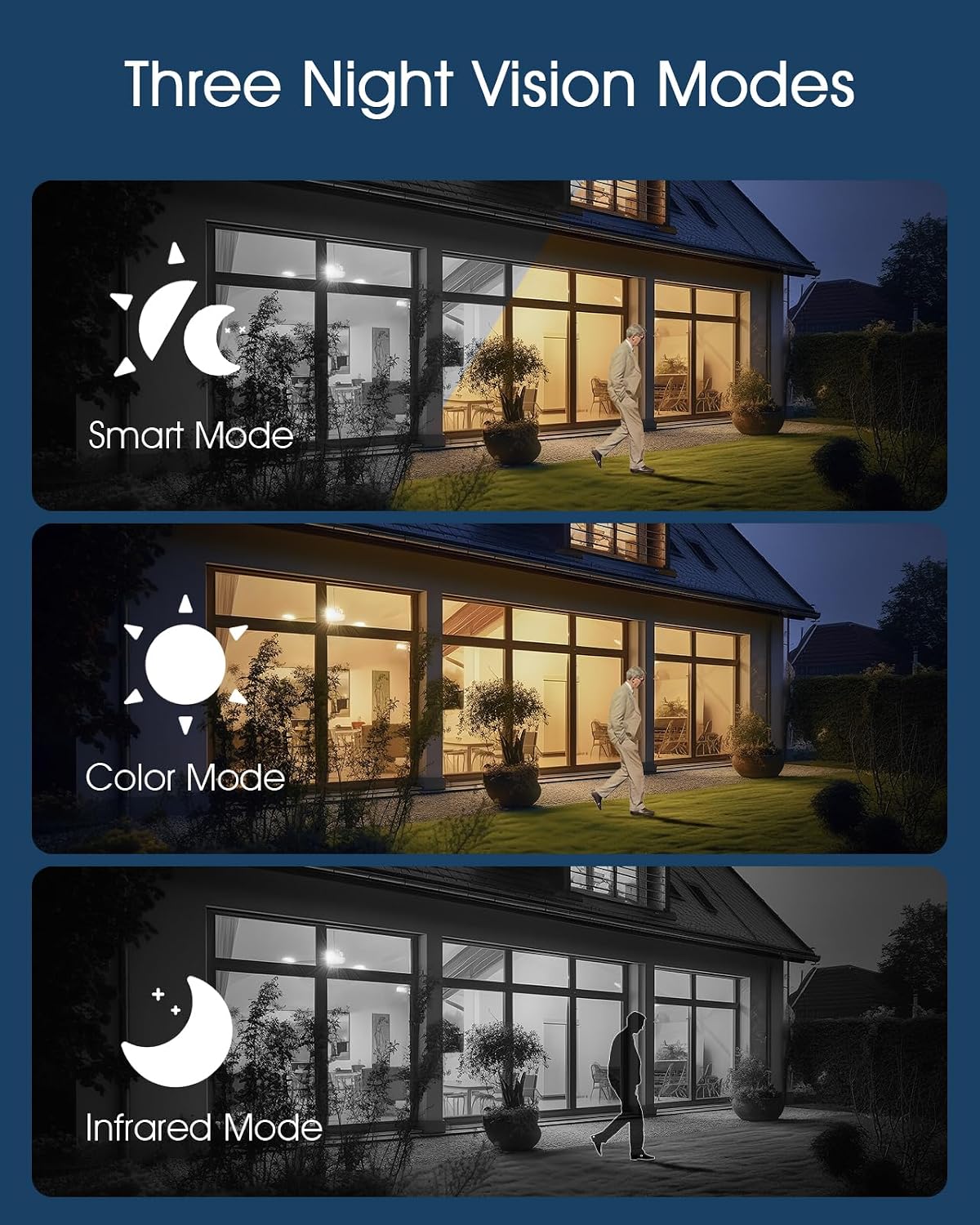
Image 4.2: The camera supports Smart, Color, and Infrared night vision modes for various low-light conditions.
The ANRAN Q04 camera offers three night vision modes, configurable in the app settings:
- Smart-Modus: Schaltet automatisch zwischen Infrarot- und Farbnachtsicht um, je nach erkannter Bewegung oder Lichtverhältnissen.
- Farbmodus: Utilizes built-in spotlights to provide full-color video in low-light environments.
- Infrarotmodus: Nutzt Infrarot-LEDs für Schwarzweißvideos in völliger Dunkelheit.
4.4 Zwei-Wege-Audio

Image 4.3: Engage in real-time two-way audio communication through the ANRAN app.
Verwenden Sie das Mikrofonsymbol in der App, um über den Lautsprecher der Kamera zu sprechen und den Ton über das Mikrofon der Kamera zu hören.
4.5 Bewegungserkennung und Benachrichtigungen

Image 4.4: The F2M3 camera features PIR detection, motion-activated light, siren, and sends notifications.
Both cameras feature motion detection. The F2M3 camera also includes a PIR sensor for more accurate human detection and a motion-activated light and siren.
- Configure motion detection sensitivity and alert preferences in the ANRAN app.
- Erhalten Sie Push-Benachrichtigungen auf Ihr Smartphone, sobald eine Bewegung erkannt wird.
- For the F2M3, the integrated light will activate upon motion detection, and the siren can be triggered manually or automatically via app settings.
5. Wartung
Proper maintenance ensures optimal performance and longevity of your ANRAN security cameras.
5.1 Wirkungsgrad der Solarmodule

Image 5.1: Advanced solar technology ensures efficient charging for continuous security.
- Regularly inspect the solar panel for dirt, dust, or debris.
- Reinigen Sie die Oberfläche des Solarmoduls vorsichtig mit einem weichen, fusselfreien Tuch.amp cloth to ensure maximum sunlight absorption. Avoid abrasive cleaners.
- Ensure no obstructions (e.g., tree branches, leaves) are blocking sunlight from reaching the panel.
5.2 Batteriemanagement
- The cameras are designed for continuous operation through solar charging. However, in prolonged periods of low sunlight, the battery level may decrease.
- Monitor the battery status via the ANRAN app. If the battery level is consistently low, consider temporarily repositioning the camera to a sunnier spot or manually charging it via USB.
6. Fehlerbehebung
If you encounter issues with your ANRAN cameras, refer to the following common solutions:
- Kamera verbindet sich nicht mit WLAN:
- Stellen Sie sicher, dass Ihr WLAN-Netzwerk auf 2.4 GHz arbeitet.
- Prüfen Sie, ob sich die Kamera in Reichweite Ihres WLAN-Routers befindet.
- Überprüfen Sie, ob das in der App eingegebene WLAN-Passwort korrekt ist.
- Starten Sie Ihren Router und die Kamera neu.
- Schlechte Videoqualität:
- Überprüfen Sie Ihre Internetverbindungsgeschwindigkeit.
- Stellen Sie sicher, dass das Kameraobjektiv sauber und frei von Flecken oder Schmutz ist.
- Akku lädt nicht:
- Vergewissern Sie sich, dass das Solarpanel täglich mehrere Stunden direktes Sonnenlicht erhält.
- Reinigen Sie die Oberfläche des Solarpanels.
- Ensure the ambient temperature is within the operating range for battery charging.
- Bewegungserkennung funktioniert nicht:
- Check motion detection settings in the ANRAN app (sensitivity, detection zones).
- Stellen Sie sicher, dass keine physischen Hindernisse die Sicht der Kamera blockieren. view or the PIR sensor (F2M3).
7. Spezifikationen
| Besonderheit | Spezifikation |
|---|---|
| Modell | ANRAN Q04, ANRAN F2M3 |
| Auflösung | 2K (3 MP) |
| Konnektivität | 2.4-GHz-WLAN (IEEE 802.11b/g/n) |
| Stromquelle | Integriertes Solarpanel, wiederaufladbarer Akku |
| F2M3 Solar Panel | 3W |
| F2M3 Battery Capacity | 5000 mAh |
| Q04 Pan/Tilt Range | 355° Schwenken, 90° Neigen |
| Nachtsicht | Infrared, Color, Smart Modes |
| Audio | Zwei-Wege-Audio |
| F2M3 Light Brightness | 200 Lumen |
| F2M3 Siren | 70 dB |
| ASIN | B0FDW9C9CK |
| Datum der ersten Verfügbarkeit | 11. April 2025 |
8. Garantie und Support
ANRAN products are designed for reliability and performance. For warranty information, please refer to the specific terms provided at the time of purchase or visit the official ANRAN webWebsite.
For technical support, troubleshooting assistance, or any questions regarding your ANRAN Q04 or F2M3 cameras, please contact ANRAN customer service through the ANRAN app or the official ANRAN support channels. You can often find contact information on the ANRAN website or within the app's 'Help' or 'About Us' sections.
Bitte halten Sie Ihre Produktmodell- und Kaufdetails bereit, wenn Sie den Support kontaktieren.