
Pinmoco L103880Y-YBLK
Pinmoco 70 Inch High Gloss TV Stand
Gaming Entertainment Center with LED Lights
Model: L103880Y-YBLK
1. Einleitung
Vielen Dank für Ihren Einkauf.asing the Pinmoco 70 Inch High Gloss TV Stand. This entertainment center is designed to provide a sleek, modern, and functional solution for your media and gaming setup. Featuring a high-gloss finish, integrated RGB LED lighting, and ample storage, it enhances any living space while keeping your devices organized.
Please read this manual thoroughly before assembly and use to ensure proper setup, operation, and maintenance of your new TV stand.
2. Sicherheitshinweise
- Um Kratzer zu vermeiden, montieren Sie das Gerät immer auf einer weichen, sauberen Oberfläche.
- Vor Gebrauch sicherstellen, dass alle Schrauben und Befestigungselemente fest angezogen sind. Regelmäßig überprüfen und gegebenenfalls nachziehen.
- Do not exceed the maximum weight capacity of 100 lbs (45 kg) for the top surface and 33 lbs (15 kg) for each shelf.
- Kleinteile und Verpackungsmaterialien von Kindern und Haustieren fernhalten, um Erstickungsgefahren zu vermeiden.
- Stellen oder klettern Sie nicht auf den Fernsehständer.
- Stellen Sie den TV-Ständer auf eine ebene und stabile Fläche, um ein Umkippen zu verhindern.
- For LED lights, use only the provided power adapter. Do not expose LED components to water or excessive moisture.
- If any parts are missing or damaged, do not attempt to assemble. Contact customer support immediately.
3. Packungsinhalt
Before beginning assembly, verify that all parts listed below are present and undamaged. If anything is missing or damaged, please contact Pinmoco customer support.
- P2 Board Panels (various sizes for top, sides, bottom, and dividers)
- Tempered Glass Shelves (adjustable)
- LED-Lichtleiste mit Fernbedienung und Netzteil
- Montagezubehör (Schrauben, Dübel, Exzenterverbinder usw.)
- Assembly Tools (basic tools may be included, but a screwdriver is generally required)
- Bedienungsanleitung (dieses Dokument)
4. Montage und Einrichtung
Assembly of the Pinmoco TV Stand is designed to be straightforward. Follow the step-by-step instructions provided in the separate assembly guide included with your package. Ensure you have adequate space and a clean, soft surface to prevent damage during assembly.
Wichtige Montagepunkte:
- Panel-Anschluss: Securely connect all P2 board panels using the provided hardware. Do not overtighten screws.
- Glass Shelf Installation: The tempered glass shelves are adjustable to 3 different heights within the open compartments. Insert the shelf pins into the desired holes before placing the glass shelves.
- LED-Lichtinstallation: Carefully attach the LED light strip to the designated areas, typically along the inner edges of the compartments. Connect the light strip to the power adapter and plug it into a standard electrical outlet.
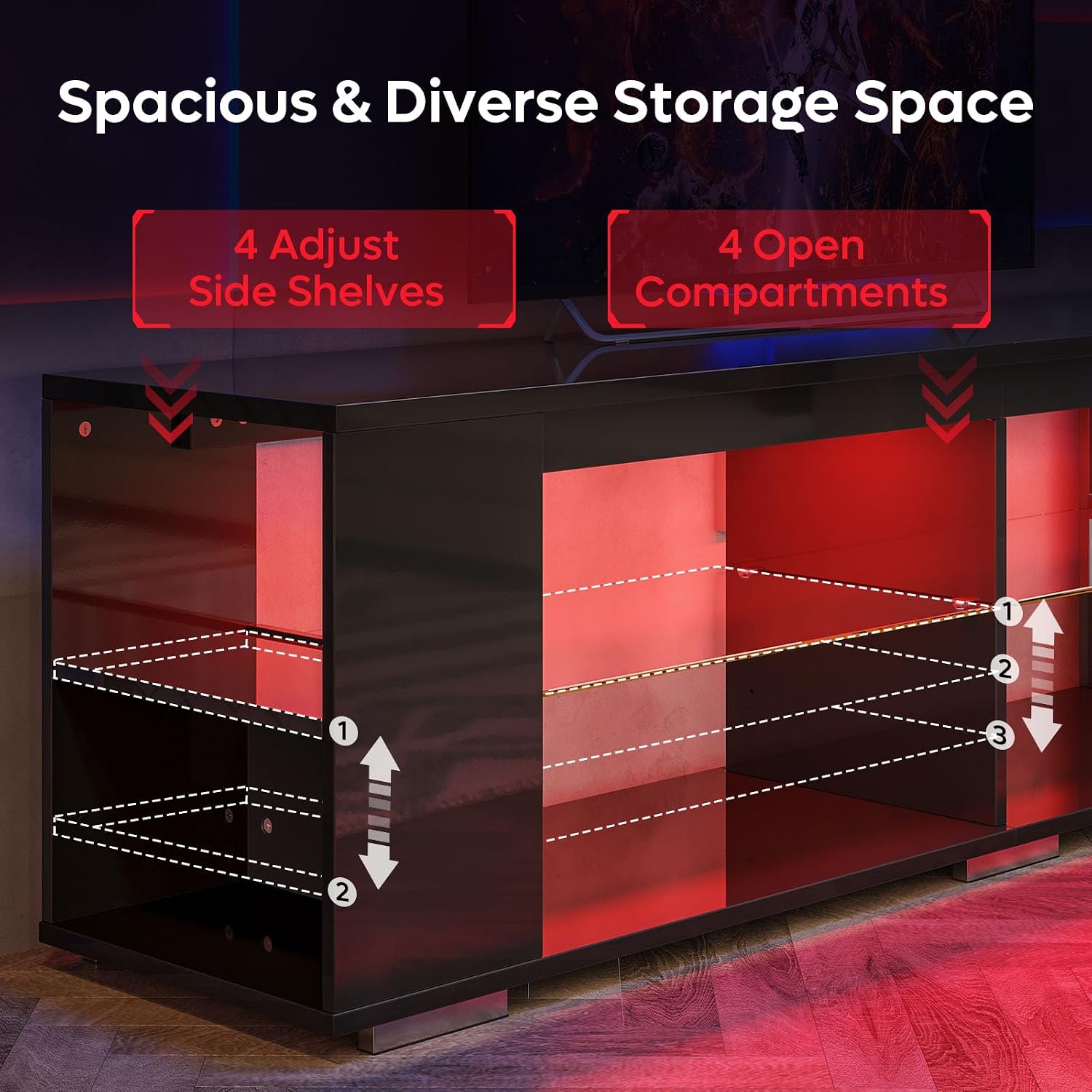
Figure 4.1: Illustration of adjustable glass shelves and open compartments, highlighting the 3-height adjustment options.

Figure 4.2: Detailed dimensions and weight capacities for the TV stand, including the top surface (100 lbs) and individual shelves (33 lbs).
5. Bedienung der LED-Leuchten
Your Pinmoco TV Stand features integrated RGB LED lighting with remote control for customizable ambiance.
Fernbedienungsfunktionen:
- Netzschalter: Turns the LED lights On/Off.
- Farbauswahl: Choose from 7 distinct colors (e.g., Red, Green, Blue, White, Yellow, Cyan, Purple).
- Modusauswahl: Cycle through 22 dynamic lighting modes (e.g., fade, jump, strobe, flash).
- Helligkeitsanpassung: Die Lichtintensität erhöhen oder verringern.
- Geschwindigkeitsanpassung: Bei dynamischen Modi kann die Geschwindigkeit der Lichtübergänge angepasst werden.
Ensure the remote control has working batteries and is pointed towards the LED receiver for optimal operation.
6. Wartung
Die richtige Pflege gewährleistet die Langlebigkeit und das Aussehen Ihres TV-Ständers.
- Reinigung: Wischen Sie Oberflächen mit einem weichen, damp cloth. Avoid abrasive cleaners or harsh chemicals that may damage the high-gloss finish. For glass shelves, use a glass cleaner.
- Verschüttungen: Verschüttete Flüssigkeiten sofort aufwischen, um Flecken oder Beschädigungen des Holzmaterials zu vermeiden.
- Sonneneinstrahlung: Vermeiden Sie längere direkte Sonneneinstrahlung, da diese mit der Zeit zu Ausbleichen oder Verfärbungen führen kann.
- Hardwareprüfung: Überprüfen Sie regelmäßig alle Schrauben und Befestigungselemente, um sicherzustellen, dass sie fest sitzen. Ziehen Sie sie gegebenenfalls nach.
7. Fehlerbehebung
| Problem | Mögliche Ursache | Lösung |
|---|---|---|
| Die LED-Leuchten schalten sich nicht ein. |
|
|
| Fernbedienung reagiert nicht. |
|
|
| Der Ständer wirkt wackelig oder instabil. |
|
|
8. Spezifikationen
| Marke | Pinmoco |
| Modellnummer | L103880Y-YBLK |
| Material | Wood (P2 Board), Tempered Glass |
| Farbe | Black (High Gloss Finish) |
| Produktabmessungen (L x B x H) | 71 x 15 x 20 Zoll (180.34 x 38.1 x 50.8 cm) |
| Artikelgewicht | 74 Pfund (33.57 kg) |
| Tragfähigkeit (Oberfläche) | 100 kg |
| Tragfähigkeit (pro Regalboden) | 33 kg |
| Besonderheit | Adjustable Shelves, RGB LED Lights with Remote Control |
| ASIN | B0FF4D989M |
| GTIN | 00810187172915 |

Figure 8.1: The Pinmoco 70 Inch High Gloss TV Stand, showcasing sein schlankes Design und die integrierte LED-Beleuchtung.
9. Garantie und Support
Pinmoco stands behind the quality of its products. For specific warranty information regarding your 70 Inch High Gloss TV Stand, please refer to the warranty card included with your purchase or contact the seller directly.
For technical support, missing parts, or any questions regarding assembly or operation, please contact Pinmoco Direct customer service through the platform where you made your purchase or visit the official Pinmoco store page.
Verkäufer: Pinmoco Direct
Wir empfehlen Ihnen, Ihren Kaufbeleg als Kaufnachweis für eventuelle Garantieansprüche aufzubewahren.
Ask a question about this manual
Ask about setup, troubleshooting, compatibility, parts, safety, or missing instructions. Manuals+ will review the question and use this page’s manual context to help answer it.