
Blukar K9129
Blukar K9129 Wiederaufladbarer Scheinwerferamp Bedienungsanleitung
Modell: K9129
Einführung
Vielen Dank, dass Sie sich für den wiederaufladbaren Blukar K9129-Stirnkopf entschieden haben.ampDieses Handbuch enthält wichtige Informationen für die sichere und effiziente Verwendung Ihres Kopfreinigers.ampBitte lesen Sie diese Anleitung vor der Inbetriebnahme sorgfältig durch und bewahren Sie sie zum späteren Nachschlagen auf.
Produkt überview
Hauptmerkmale
- Zwei Farbtemperaturen: Features both white and warm light options for various environments.
- Mehrere Beleuchtungsmodi: Offers 12 modes, including standard and motion sensor modes, with XPG White, XPG Warm, COB White, XPG+COB White, COB Red, and COB Red Strobe.
- Bewegungssensorsteuerung: Allows hands-free operation by waving your hand within 15cm.
- USB-C wiederaufladbar: Built-in 1200mAh battery provides up to 30 hours of runtime on a single charge.
- Dimmbare Helligkeit: Stepless dimming from 100% to 30% with memory function.
- Verstellbar und komfortabel: 45° verstellbar lamp head and a comfortable, washable elastic headband.
- IPX5 Wasserdicht: Designed to resist water splashes from all angles.
Packungsinhalt
- Blukar K9129 Headlamp
- USB-C-Ladekabel
- Helmet Clips (4x)
- Benutzerhandbuch (dieses Dokument)
Aufstellen
1. Erstes Aufladen
Vor dem ersten Gebrauch den Ladekopf vollständig aufladen.ampSchließen Sie das mitgelieferte USB-C-Ladekabel an den Kopfhörer an.amp's charging port and to a USB power source (e.g., AC charger, power bank, computer). The 4 battery indicators will show charging progress. A full charge typically takes 2-3 hours.
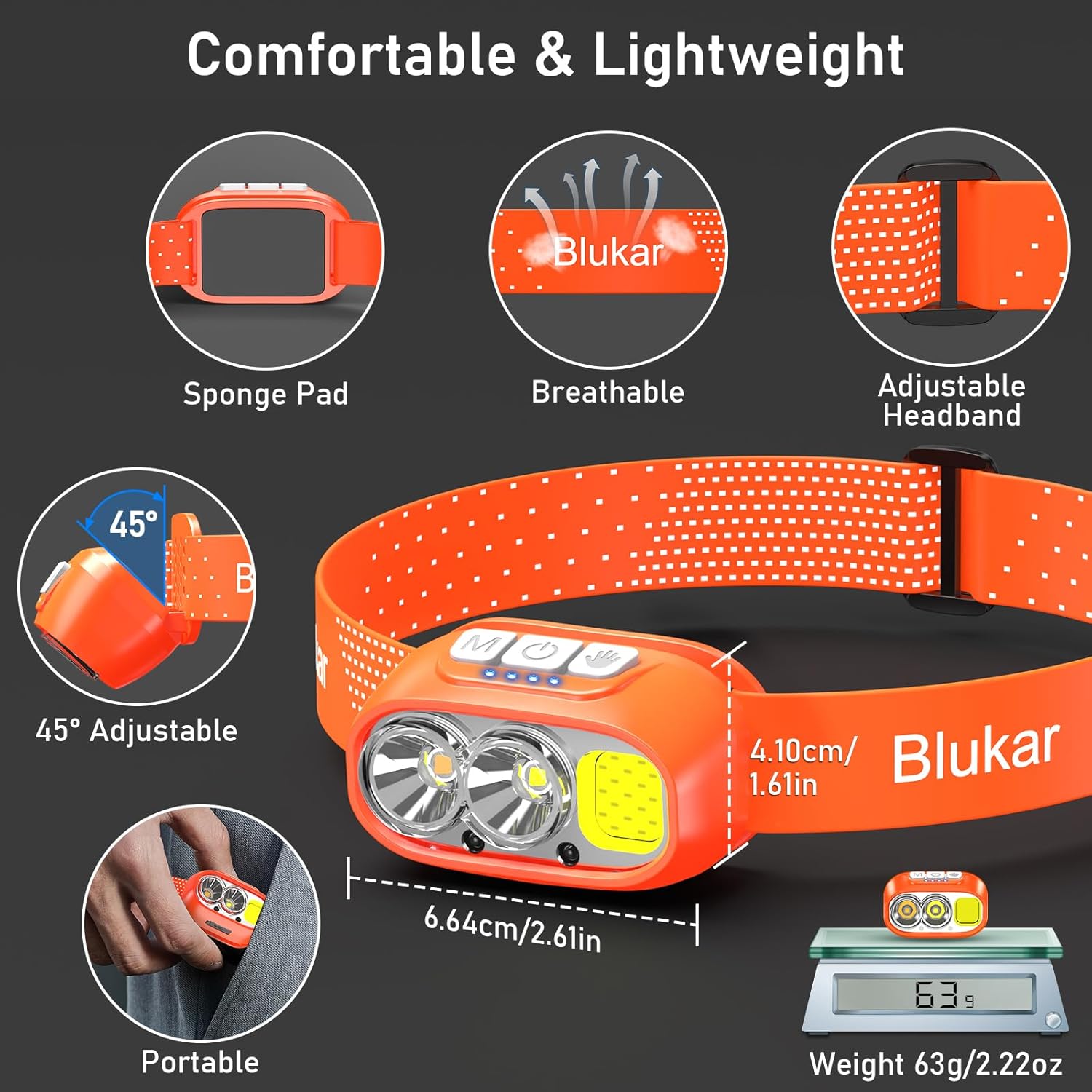
Bild: Der Kopfamp being charged via its USB-C port. It can be connected to various USB power sources like an AC adapter, power bank, or computer.
2. Einstellen des Kopfbandes
The elastic headband is adjustable to fit various head sizes. Adjust the length for a comfortable and secure fit. The headband is also removable and washable for hygiene.

Image: Details of the headlamp's comfortable and lightweight design, showing the adjustable headband, sponge pad, and 45-degree tilt capability.
3. Befestigung an einem Helm (optional)
Use the included 4 helmet clips to securely attach the headlamp to a helmet for a stable fit during activities.
Bedienungsanleitung
Tastenfunktionen

Bild: Nahaufnahme des Kopfesamp's top panel, highlighting the three independent control buttons: 'M' for Normal Mode, a hand icon for Sensor Mode, and a power icon for Power & Dimmer.
- Taste für Normalmodus (M): Short press to cycle through standard lighting modes.
- Sensormodus-Taste (Handsymbol): Short press to activate motion sensor mode (green light indicates activation). Once active, wave your hand within 15cm to turn the light on/off.
- Ein-/Ausschalter und Dimmertaste (Ein-/Ausschaltersymbol):
- Short press to turn the light on/off.
- Long press to adjust brightness steplessly (100%-30%).
- Features a memory function for the last used brightness and mode.
Beleuchtungsmodi
Der Kopfamp offers 12 lighting modes, accessible via the Normal Mode button and Sensor Mode button.

Image: Visual representation of the 12 lighting modes available, including various white light combinations, red light, and sensor modes. It also illustrates the stepless dimming function.
- Standard Modes (6): XPG White Light, XPG Warm Light, COB White Light, XPG+COB White Light, COB Red Light, COB Red Light Strobe.
- Sensor Modes (6): The same 6 modes as above, activated by the Sensor Mode button.
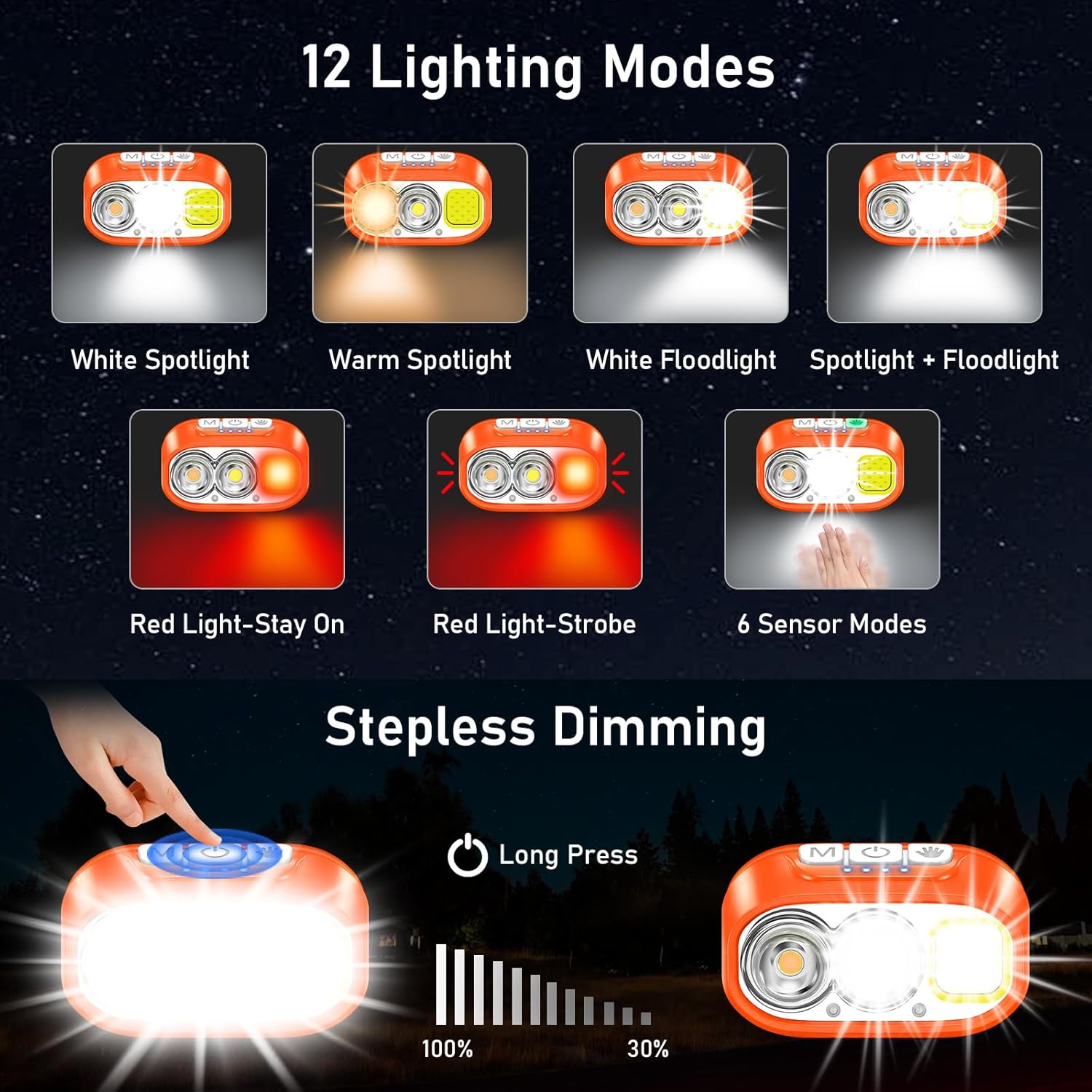
Image: Illustration of the three main light sources: White Light for general use, Warm Light for challenging weather conditions like fog or snow, and Red Light for specialized uses like night fishing or emergency signaling.
Bedienung des Bewegungssensors
To use the motion sensor, press the Sensor Mode button. A green indicator light will illuminate. Once active, simply wave your hand within 15cm (approximately 6 inches) in front of the headlamp to toggle the light on or off without touching the buttons.
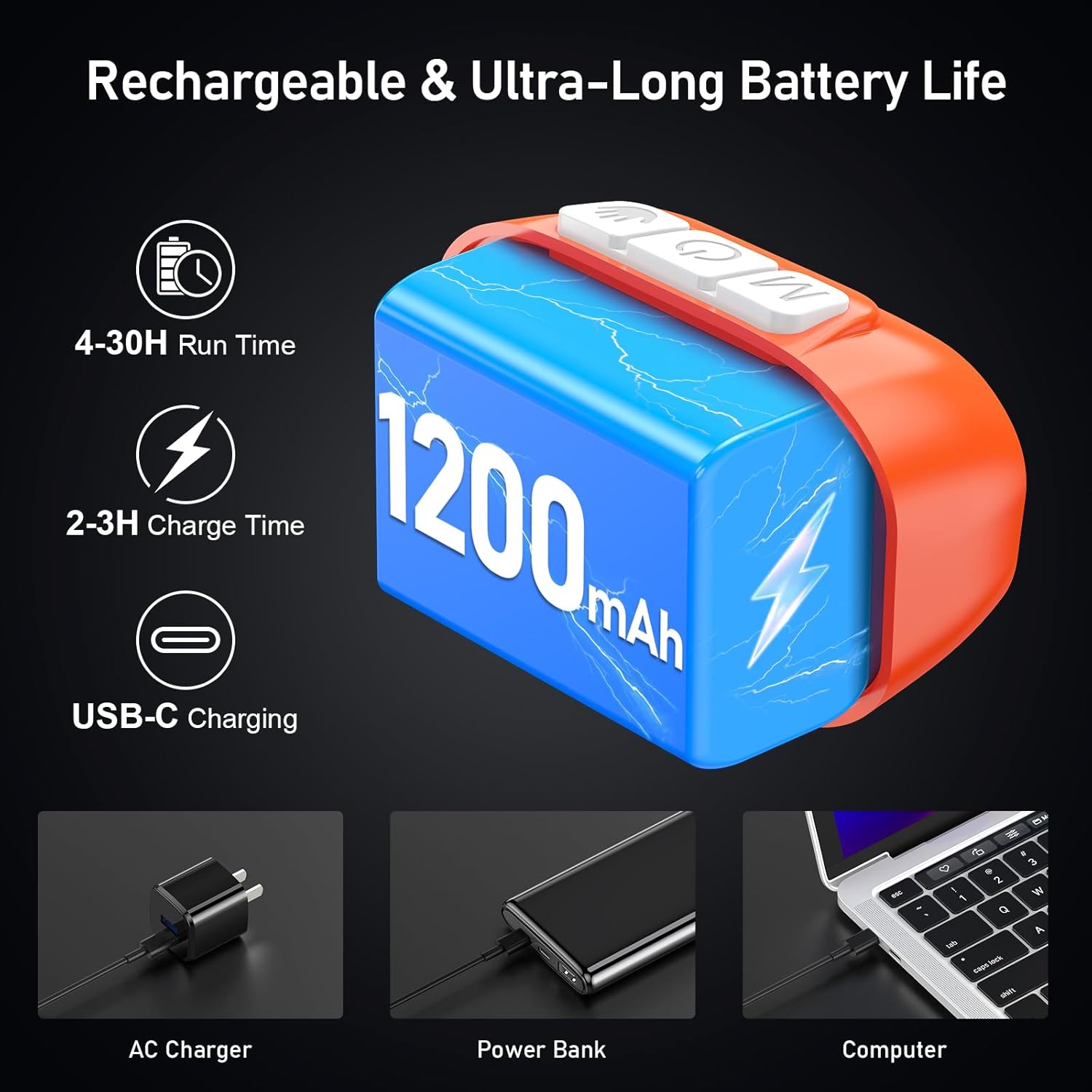
Bild: Eine Person demonstriert den Bewegungssensormodus, indem sie den Kopf dreht.amp on and off with a hand wave while working on a car engine, highlighting the 15cm sensing distance.
Anpassen des Strahlwinkels
Der Kopfamp unit can be tilted up or down by 45° to direct the light precisely where needed.
Bild: Der Kopfamp unit is shown with an arrow indicating its 45-degree adjustable tilt capability.
Wartung
- Reinigung: The elastic headband is removable and washable. Clean the headlamp Körper mit einem weichen, damp Tuch. Keine Scheuer- oder Lösungsmittel verwenden.
- Batteriepflege: Um die Akkulaufzeit zu verlängern, laden Sie den Scheinwerfer auf.amp regularly, even if not in frequent use. Avoid fully discharging the battery for extended periods.
- Lagerung: Bewahren Sie den Kopf aufamp an einem kühlen, trockenen Ort, geschützt vor direkter Sonneneinstrahlung und extremen Temperaturen.
- Wasserbeständigkeit: Der Kopfamp is IPX5 waterproof, meaning it can resist water splashes. Do not submerge the headlamp im Wasser.
Bild: Der Kopfamp is shown with water splashing over it, illustrating its IPX5 waterproof capability, which protects against water jets from any direction.
Fehlerbehebung
| Problem | Mögliche Ursache | Lösung |
|---|---|---|
| Kopflamp turns off unexpectedly in sensor mode. | Sensor reacting to unintended movement or objects. | Switch off the sensor mode if not needed, or ensure no objects are passing within 15cm of the sensor. |
| Kopflamp geht nicht an. | Batterie ist leer. | Laden Sie den Kopf aufamp vollständig unter Verwendung des mitgelieferten USB-C-Kabels. |
| Die Lichtleistung ist schwach. | Low battery or dimming function activated. | Recharge the battery. Long press the Power & Dimmer button to increase brightness. |
| Kopflamp lädt nicht. | Defektes Kabel oder fehlerhafte Stromquelle. | Try a different USB-C cable or a different USB power source. Ensure the cable is securely connected. |
Technische Daten
| Modellnummer | K9129 |
| Marke | Blukar |
| Material | ABS |
| Farbe | Orange |
| Technische Daten | 2.61"T x 1.61"B x 1.38"H |
| Artikelgewicht | 84 Gramm (2.96 Unzen) |
| Batteriekapazität | 1200 mAh |
| Akku-Typ | Lithium Polymer |
| Ladezeit | 2-3 Stunden |
| Laufzeit | Bis zu 4 Stunden (ultraheller Modus), bis zu 30 Stunden (sanfter Lichtmodus) |
| Wasserdichtigkeit | IPX5 |
| Im Lieferumfang enthaltene Komponenten | USB-Kabel |
Garantie und Support
Blukar-Produkte sind auf Zuverlässigkeit und Leistung ausgelegt. Bei Fragen, technischem Support oder Garantieansprüchen wenden Sie sich bitte an den Blukar-Kundendienst über den Händler, bei dem Sie das Produkt erworben haben, oder besuchen Sie die offizielle Blukar-Website. webWebsite.
Bitte bewahren Sie Ihren Kaufbeleg für Garantieansprüche auf.
Ask a question about this manual
Ask about setup, troubleshooting, compatibility, parts, safety, or missing instructions. Manuals+ will review the question and use this page’s manual context to help answer it.