
1. Einleitung
This manual provides detailed instructions for the Loutoc SRC4526 Universal Remote Control, designed for seamless compatibility with Philips Ambilight Smart TVs. Please read this guide thoroughly to ensure optimal use and longevity of your remote control.
1.1 Produktüberschussview
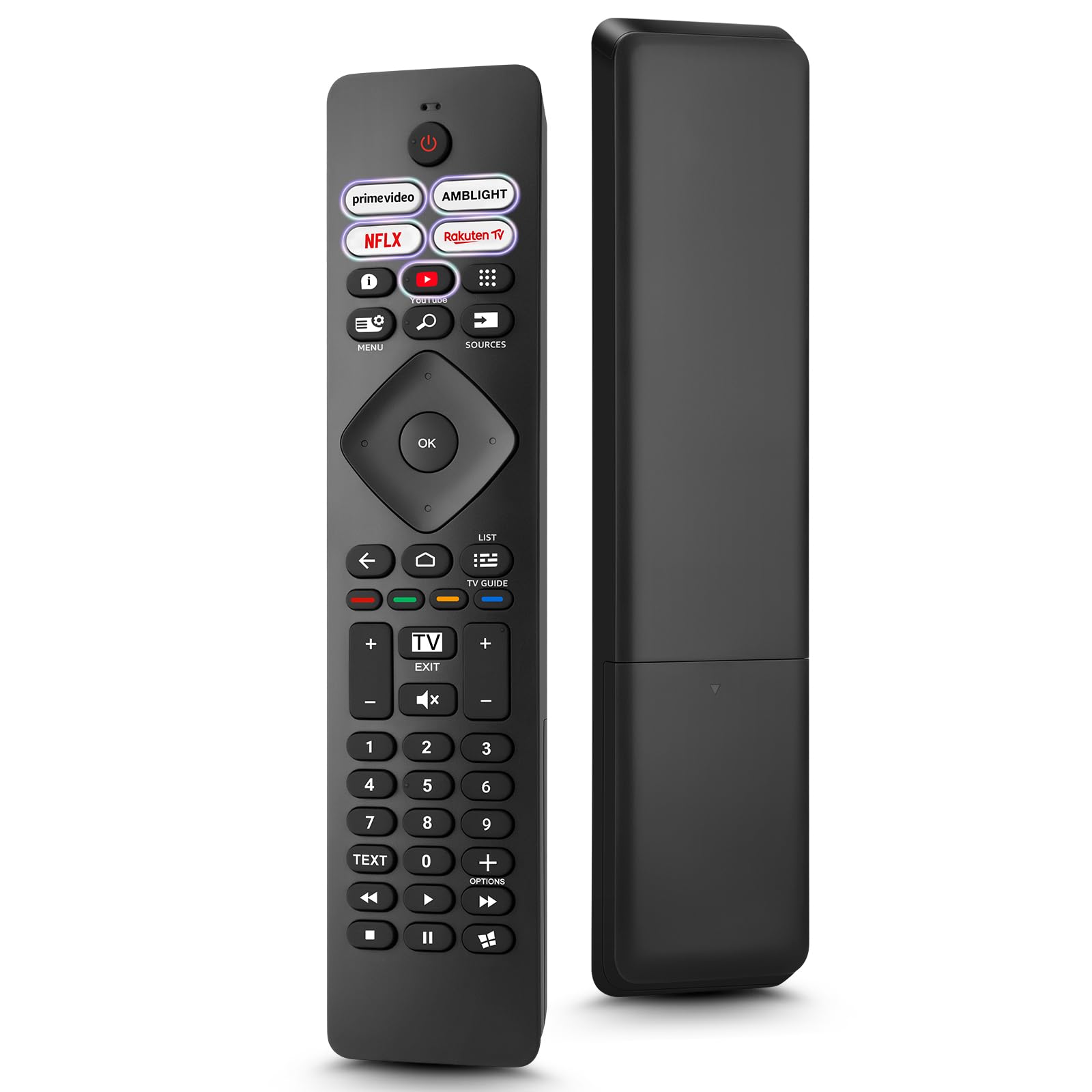
Image: The Loutoc SRC4526 Universal Remote Control, showcasing dank seines ergonomischen Designs und der Tastenanordnung.
1.2 Hauptmerkmale
- Convenient Plug-and-Play: No complex setup or programming required. Simply insert batteries and the remote is ready for use.
- Breite TV-Kompatibilität: Fully compatible with Philips Ambilight TVs, including 4K Ambilight LED, OLED, FHD, and Full Ultra HD models.
- Spezielle Schnellzugriffstasten: Features 5 direct access buttons for popular streaming platforms: Ambilight, Video, NFLX (Netflix), Rakuten TV, and YouTube.
- Zuverlässige Leistung: Offers an effective operating range of 8 meters (26 feet) and an ultra-fast response time of 0.2 seconds.
2. Einrichtung
2.1 Einlegen der Batterie
The Loutoc SRC4526 remote control requires two AAA batteries (not included) for operation.
- Suchen Sie das Batteriefach auf der Rückseite der Fernbedienung.
- Schieben Sie den Batteriefachdeckel auf.
- Legen Sie zwei AAA-Batterien ein und achten Sie darauf, dass die Plus- (+) und Minus- (-) Anschlüsse mit den Markierungen im Batteriefach übereinstimmen.
- Schließen Sie den Batteriefachdeckel fest.
2.2 Erstgebrauch
This remote control is designed for immediate use with compatible Philips Ambilight TVs. No programming or pairing is required. Once batteries are installed, point the remote at your TV and begin operation.
3. Bedienungsanleitung
3.1 Tastenfunktionenview
Refer to the image below for a visual guide to the remote control's buttons and their corresponding functions.

Image: Detailed diagram of the Loutoc SRC4526 remote control, illustrating each button and its primary function.
| Taste | Funktion |
|---|---|
| Leistung | Switches the TV on or off (Standby mode). |
| Prime Video, Ambilight, Netflix, Rakuten TV | Quickly launches the corresponding application. |
| Speisekarte | Opens the Quick Menu with typical TV functions. Hold to show Gaming control bar. |
| Suche | Opens the Search tab on the Home screen. |
| Quellen | Opens or closes the TV's input sources menu. |
| OK | Bestätigt eine Auswahl oder Einstellung. |
| Arrow/Navigation Keys | Navigates up, down, left, or right through menus and options. |
| Zurück | Kehrt zum vorherigen Bildschirm oder Kanal zurück. |
| Heim | Opens the TV's Home menu. |
| Fernsehprogramm | Opens or closes the TV Guide. Long press to open the channel list. |
| Color Keys (Red, Green, Yellow, Blue) | Provides direct selection of on-screen options. The blue key typically opens Help. |
| Lautstärke (+/-) | Regelt die Lautstärke des Fernsehers. |
| Kanal (+/-) | Switches to the next or previous channel. |
| Ausfahrt | Exits current menu/application or returns to live TV. From standby, goes to last viewed-Quelle. |
| Stumm | Schaltet den Fernsehton stumm oder hebt die Stummschaltung auf. |
| Zifferntasten (0-9) | Wählt direkt Fernsehkanäle aus. |
| TEXT | Opens or closes Text/Teletext. |
| Wiedergabesteuerung | Controls media playback: Play, Pause, Stop, Rewind, Fast Forward. |
| Apps | Opens the Apps tab on the Home screen. |
3.2 Ambilight Functionality
For Philips TVs equipped with Ambilight functionality, the dedicated Ambilight button on your remote allows you to control the lighting effects.
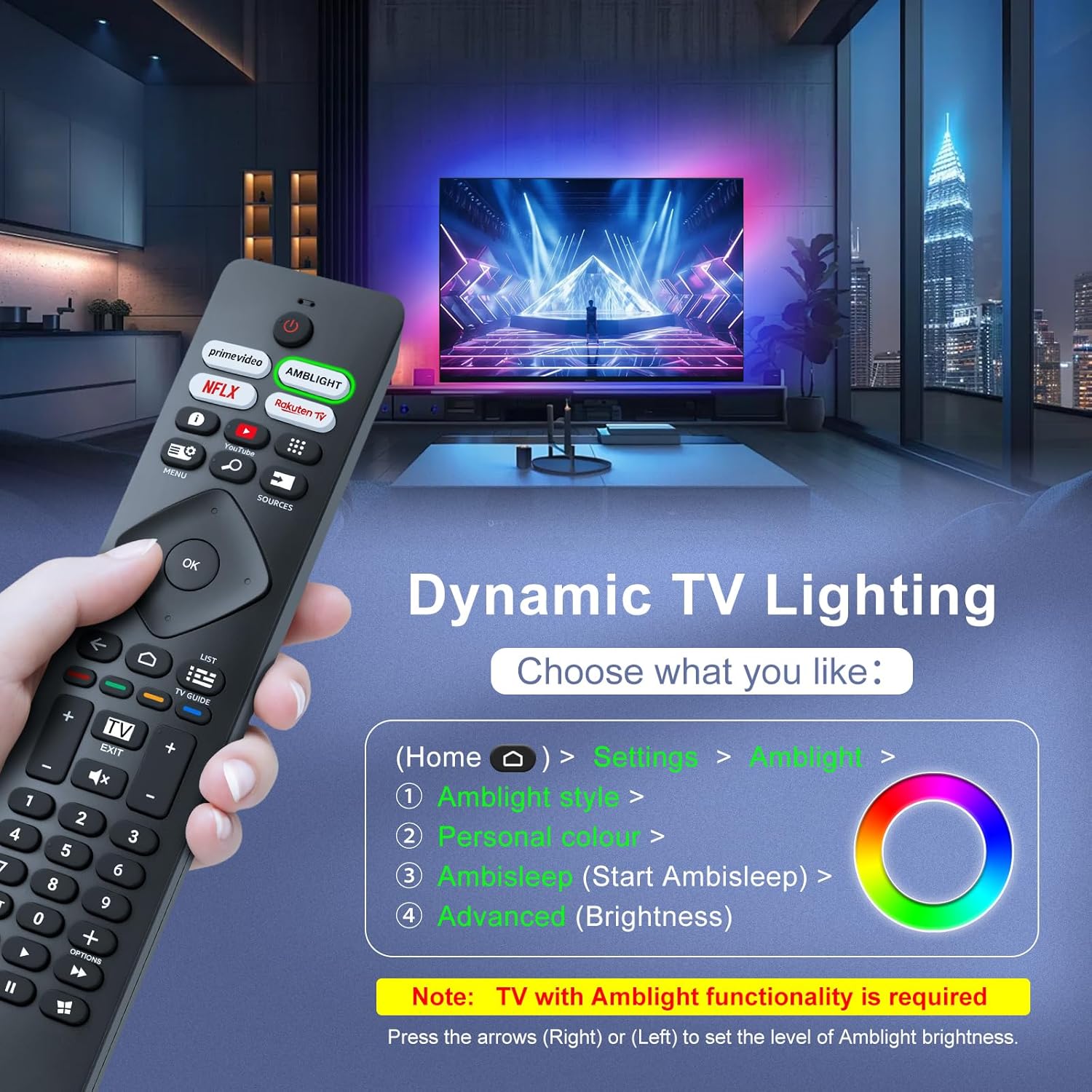
Image: A hand holding the remote control, with an overlay showing Ambilight settings on a TV screen.
After pressing the Ambilight button, you can navigate through the TV's menu to:
- Select different Ambilight display styles.
- Adjust personal color preferences.
- Initiate AmbiSleep mode.
- Adjust Ambilight brightness levels (using the right or left arrow keys).
Note: This feature requires a Philips TV with built-in Ambilight functionality.
4. Wartung
4.1 Reinigung
To clean your remote control, gently wipe it with a soft, dry cloth. Avoid using liquid cleaners, aerosols, or harsh chemicals, as these can damage the remote's surface or internal components.
4.2 Speicherung
Bewahren Sie die Fernbedienung an einem kühlen, trockenen Ort, geschützt vor direkter Sonneneinstrahlung und extremen Temperaturen, auf. Wenn die Fernbedienung längere Zeit nicht benutzt wird, empfiehlt es sich, die Batterien zu entfernen, um ein Auslaufen zu verhindern.
4.3 Batteriepflege
- Ersetzen Sie alle Batterien gleichzeitig; Alte und neue Batterien nicht mischen.
- Verschiedene Batterietypen (z. B. Alkali- und Akkubatterien) dürfen nicht gemischt werden.
- Entsorgen Sie gebrauchte Batterien verantwortungsvoll gemäß den örtlichen Vorschriften.
5. Fehlerbehebung
5.1 Häufige Probleme und Lösungen
- Fernbedienung reagiert nicht:
- Prüfen Sie, ob die Batterien korrekt und mit der richtigen Polarität eingelegt sind.
- Ersetzen Sie die Batterien durch neue AAA-Batterien.
- Stellen Sie sicher, dass sich keine Hindernisse zwischen der Fernbedienung und dem Infrarotempfänger des Fernsehers befinden.
- Stellen Sie sicher, dass Sie sich innerhalb der effektiven Reichweite (bis zu 8 Meter) befinden.
- Bestimmte Tasten funktionieren nicht:
- Clean the remote control, especially around the non-functioning buttons, to remove any dirt or debris.
- If only Ambilight functions are not working, ensure your Philips TV model supports Ambilight.
5.2 Support kontaktieren
If you encounter persistent issues that cannot be resolved with the troubleshooting steps above, please contact Loutoc customer support directly. We aim to respond to all inquiries within 12 working hours.
6. Spezifikationen
| Besonderheit | Detail |
|---|---|
| Marke | Loutoc |
| Modellname | SRC4526-FBA |
| Artikelmodellnummer | SRC4526 |
| Farbe | Schwarz |
| Konnektivitätstechnologie | Infrarot |
| Besondere Merkmale | No programming required, Ergonomic, Lightweight |
| Kompatible Geräte | Television (Philips Ambilight TVs) |
| Maximum Number of Supported Devices | 1 |
| Controllertyp | Tastensteuerung |
| Maximale Reichweite | 8-Meter (26-Füße) |
| Batteriebeschreibung | AAA (2 required, not included) |
| Hersteller | Loutoc |
| Ursprungsland | China |
| Datum der ersten Verfügbarkeit auf Amazon.com.be | 31. August 2025 |
7. Garantie und Support
7.1 Garantieinformationen
This Loutoc remote control comes with a manufacturer's warranty of 30 days from the date of purchase. Please retain your proof of purchase for any warranty claims.
7.2 Kundendienst
For any questions, technical assistance, or warranty inquiries, please contact Loutoc customer support. We are committed to providing timely assistance and will respond to your queries within 12 working hours.