
KNKA APH3000
KNKA APH3000 Luftreiniger – Benutzerhandbuch
Model: APH3000 | Brand: KNKA
This manual provides detailed instructions for the setup, operation, and maintenance of your KNKA APH3000 Air Purifier. Designed for large rooms, this air cleaner features a True HEPA filter, washable pre-filter, AQI display, and Turbo Mode to effectively improve indoor air quality.
1. Produktüberschreitungview
The KNKA APH3000 Air Purifier is engineered to provide clean and fresh air in large spaces up to 2500 sq. ft. It incorporates an advanced 3-stage filtration system to capture various airborne particles and odors, ensuring a healthier living environment.
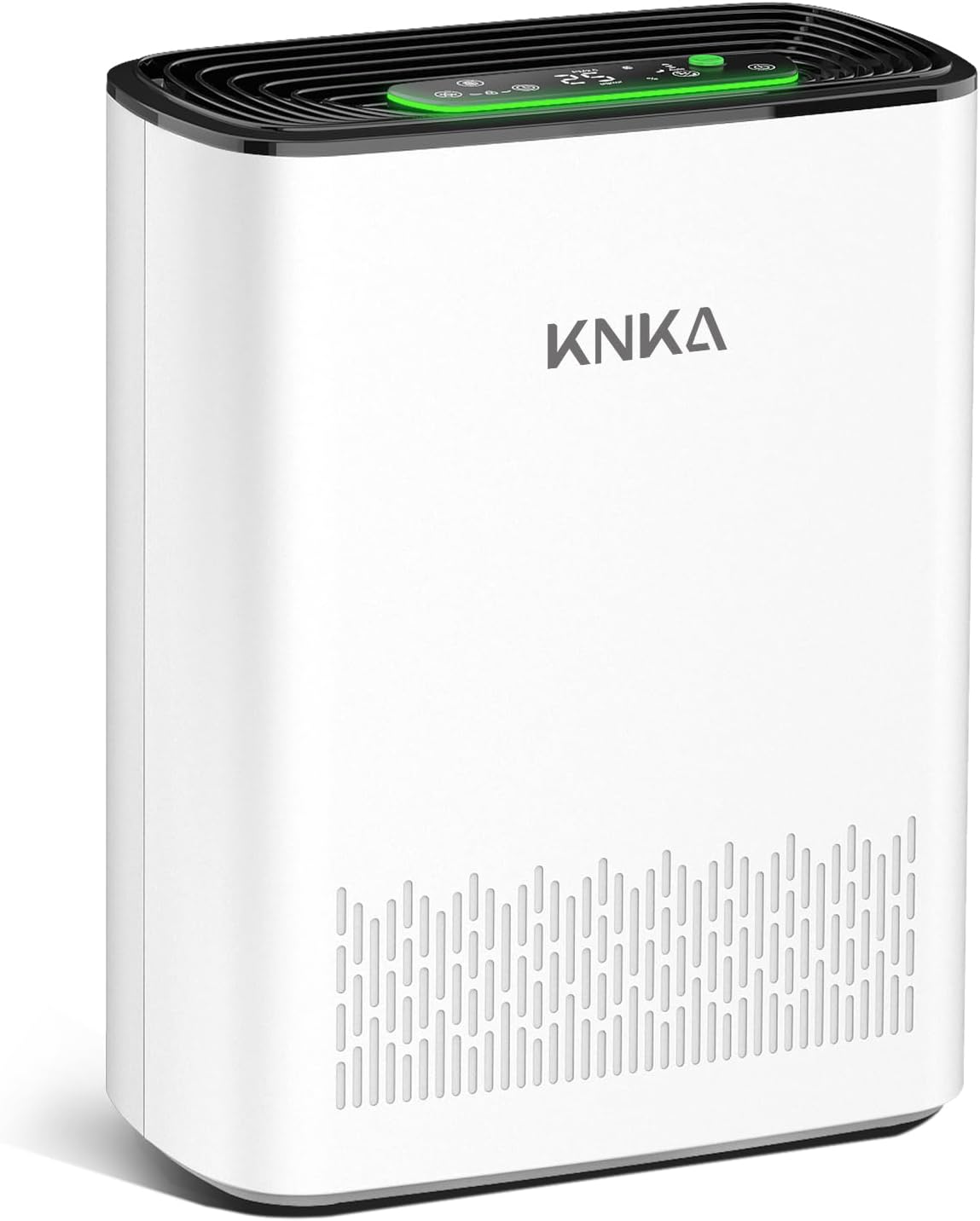
Figure 1: KNKA APH3000 Air Purifier, front view. This image shows the sleek white design of the air purifier with its top control panel and air intake vents.
Hauptmerkmale:
- Großer Abdeckungsbereich: Efficiently purifies air in rooms up to 2500 sq. ft.
- 3-Stage Filtration: Beinhaltet einen waschbaren Vorfilter, einen H13 True HEPA-Filter und einen Aktivkohlefilter.
- AQI Display: Real-time air quality monitoring with color-coded LED indicator.
- Turbo Modus: Provides rapid air purification for quick results.
- Ultra-leiser Schlafmodus: Operates as low as 24dB with optional night light.
- Benutzerfreundliche Steuerung: Touch operation with child lock, filter alert, and timer functions.
- Aromatherapie-Funktion: Compartment for essential oils (oils not included).
2. Einrichtung
2.1 Auspacken und Aufstellen
Carefully remove the air purifier from its packaging. Place the unit on a firm, level surface, ensuring there is at least 15 inches (38 cm) of clearance on all sides for optimal airflow. Avoid placing it near heat sources, direct sunlight, or in areas with high humidity.
2.2 Filterinstallation
The air purifier comes with filters pre-installed, but they may be wrapped in plastic for shipping. Before first use, remove all packaging from the filters.
- Stellen Sie sicher, dass der Luftreiniger vom Stromnetz getrennt ist.
- Locate the back cover of the unit. Gently pull the cover to remove it.
- Remove the plastic packaging from the pre-installed filters (washable pre-filter, H13 True HEPA filter, and activated carbon filter).
- Insert the filters back into the unit in the correct order: first the activated carbon filter, then the HEPA filter, and finally the washable pre-filter. Ensure they are seated properly.
- Bringen Sie die Rückseite wieder sicher an.
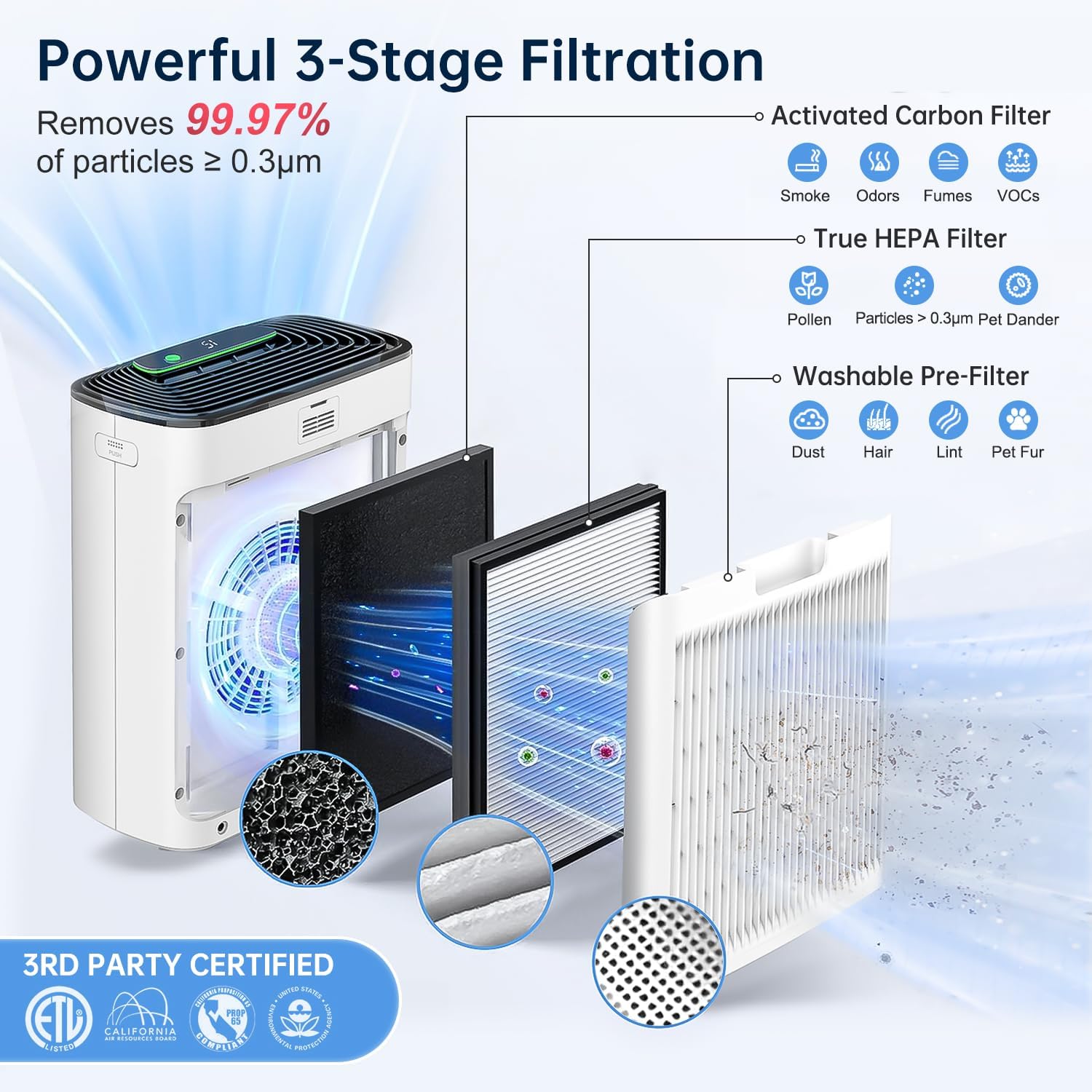
Abbildung 2: Diagramm zur Veranschaulichung des 3-s-Modellstage filtration system. This shows the Activated Carbon Filter, True HEPA Filter, and Washable Pre-Filter layers inside the air purifier.

Figure 3: Close-up of the washable pre-filter, highlighting its reusable design and ease of cleaning.
2.3 Stromanschluss
Stecken Sie das Netzkabel in eine normale Steckdose. Das Gerät ist nun betriebsbereit.
3. Bedienungsanleitung
The control panel is located on the top of the air purifier, featuring touch-sensitive buttons and a digital display.

Abbildung 4: Ausführlich view of the air purifier's control panel, showing various touch buttons for different functions and the PM2.5 display.
3.1 Ein-/Ausschalten
- Drücken Sie die Netzschalter (Symbol: Kreis mit senkrechtem Strich), um das Gerät ein- oder auszuschalten.
3.2 Fan Speed Control & Auto Mode
- Drücken Sie die Taste für die Lüftergeschwindigkeit (Symbol: Ventilatorflügel) repeatedly to cycle through different fan speeds (Low, Medium, High).
- Aktivieren Auto-Modus, press the Fan Speed Button until "Auto" is displayed. In Auto Mode, the fan speed adjusts automatically based on the detected air quality.
- Drücken Sie die Turbo-Taste (green button with "Turbo" text) for maximum purification speed. This mode is ideal for quickly cleaning the air in a room.
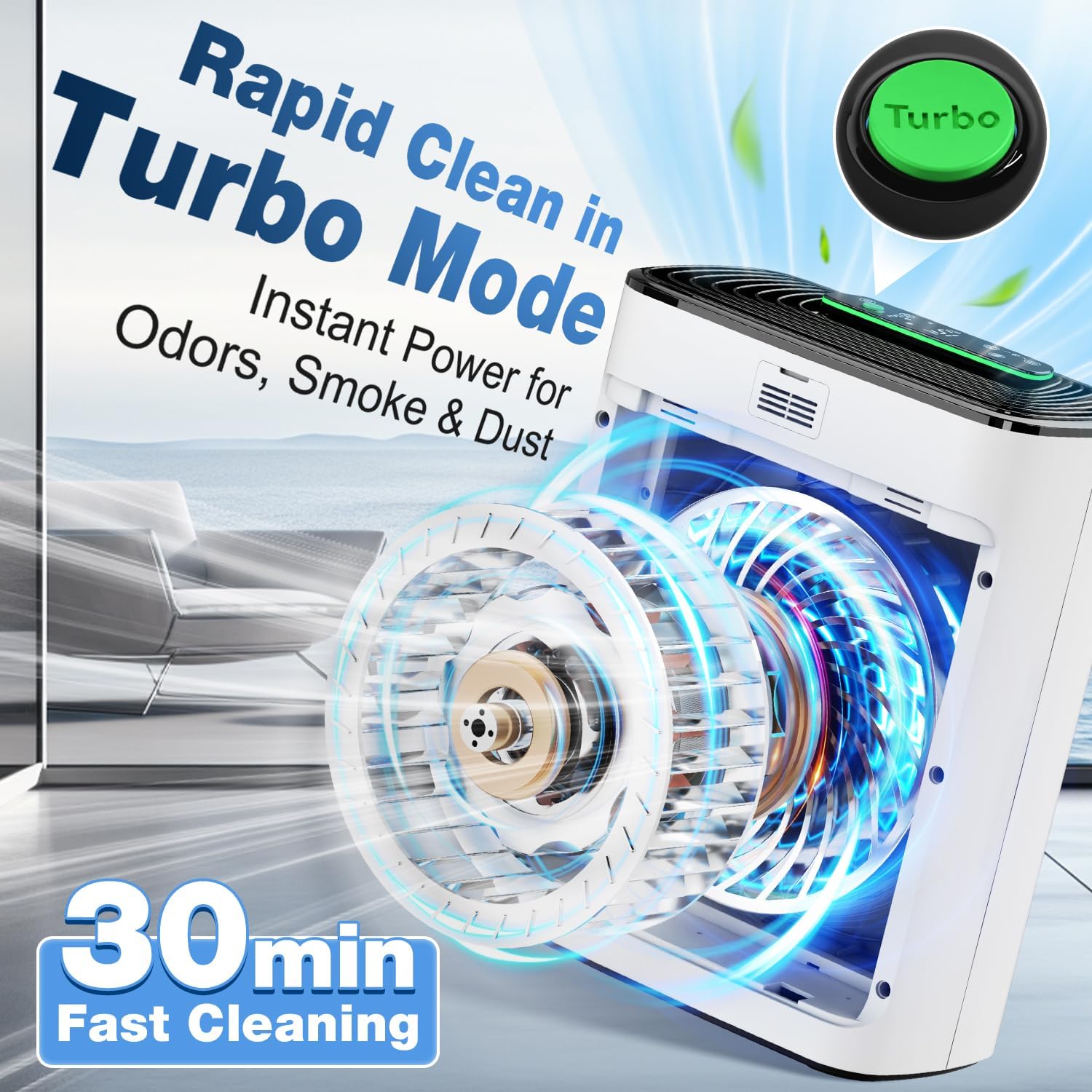
Figure 5: Illustration of the Turbo Mode, showing increased airflow for rapid air purification.
3.3 Real-Time Air Quality Display (AQI)
The built-in air quality sensor monitors the PM2.5 level in your environment and displays it on the LED screen. A color-coded light indicator provides a quick visual reference:
| PM2.5 Level (µg/m³) | Luftqualität | Indikatorfarbe |
|---|---|---|
| 0-12 | Exzellent | Grün |
| 13-35 | Mäßig | Blau |
| 16-55 | Arm | Orange |
| 56+ | Ungesund | Rot |

Figure 6: Visual representation of the real-time PM2.5 detection and color-coded air quality indicator.
3.4 Schlafmodus & Nachtlicht
- Drücken Sie die Schlafmodus-Taste (Symbol: Sichelmond) to activate ultra-quiet operation. In this mode, the fan speed is reduced, and the display lights dim or turn off for an undisturbed sleep environment.
- To adjust the night light brightness or turn off the display completely, press the Lichtsteuertaste (symbol: sun/lightbulb).

Figure 7: An image depicting the air purifier operating in ultra-quiet sleep mode in a bedroom setting, emphasizing its low noise level (24dB).
3.5 Kindersicherung
- Halten Sie die Kindersicherungstaste (Symbol: Vorhängeschloss) for 3 seconds to activate or deactivate the child lock. When activated, the control panel buttons will be unresponsive to prevent accidental changes.
3.6 Timer-Funktion
- Drücken Sie die Timer-Taste (Symbol: Uhr) repeatedly to set the desired operating time (1-12 hours). The unit will automatically turn off after the set time.
3.7 Aromatherapie-Funktion
- Locate the aroma pad compartment on the side of the unit.
- Add a few drops of your preferred essential oil (not included) onto the aroma pad.
- Insert the aroma pad back into the compartment. The air purifier will then diffuse the scent as it operates.
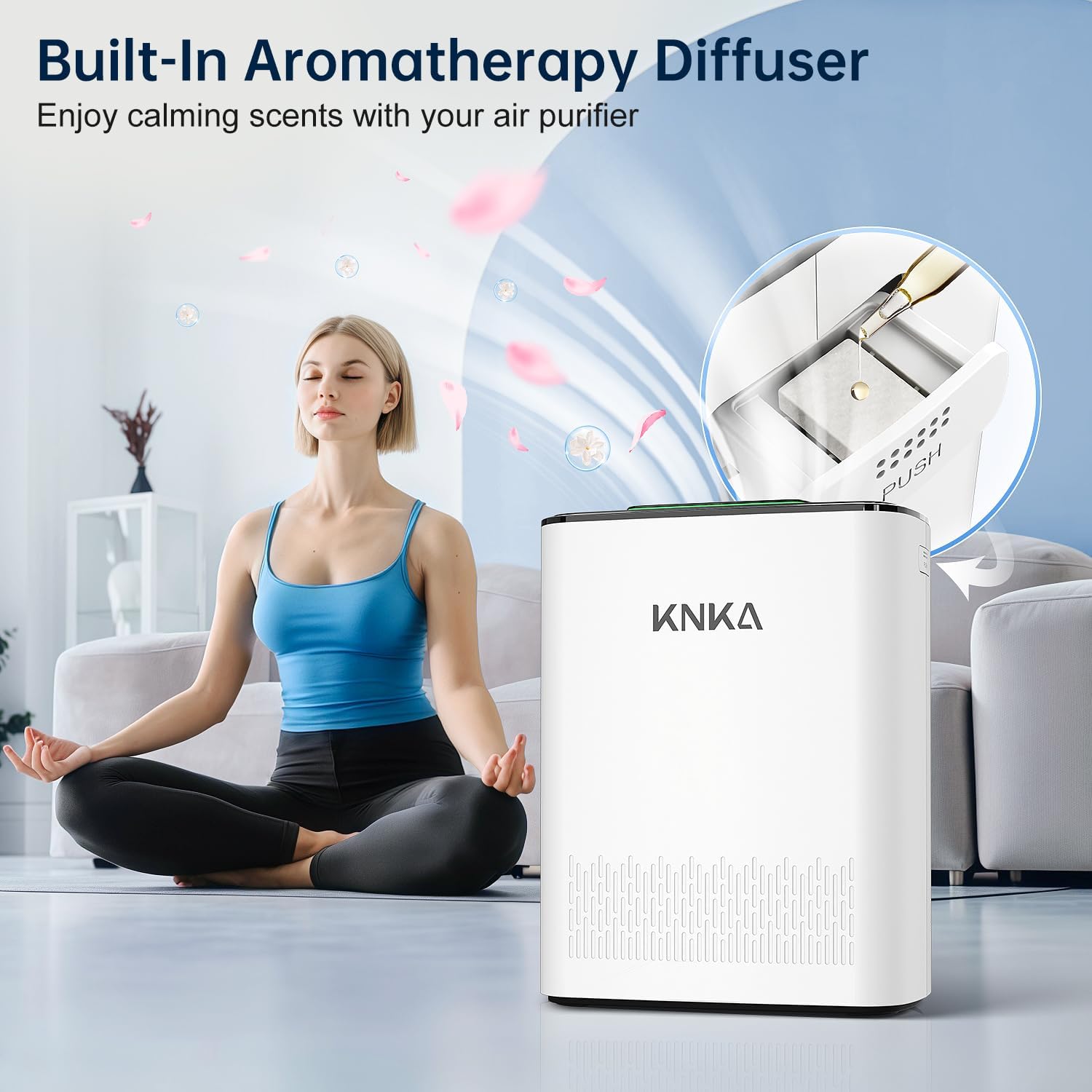
Figure 8: Image showing the built-in aromatherapy diffuser feature, where essential oils can be added to a pad for scent diffusion.
4. Wartung
Regelmäßige Wartung gewährleistet optimale Leistung und verlängert die Lebensdauer Ihres Luftreinigers.
4.1 Filterwechselanzeige
The unit features a built-in filter indicator (symbol: filter icon) that illuminates when it's time to replace the filter. For best results, replace the filter every 3–6 months, depending on usage and air quality.
- To check filter life: Short press the Filter Alert Button.
- To reset filter life after replacement: Long press the Filter Alert Button für 3 Sekunden.
4.2 Filter austauschen
When the filter indicator lights up, follow these steps to replace the filter:
- Trennen Sie den Luftreiniger von der Steckdose.
- Entfernen Sie die hintere Abdeckung.
- Remove the old filter assembly.
- Entsorgen Sie den alten Filter verantwortungsvoll.
- Insert the new filter assembly, ensuring it is properly seated.
- Bringen Sie die hintere Abdeckung wieder an.
- Plug in the air purifier and long press the Filter Alert Button for 3 seconds to reset the filter life indicator.
Compatible filter models: B0DDKMTRXK and B0D9PVNF1K (available on Amazon).
4.3 Reinigung des waschbaren Vorfilters
The pre-filter is designed to be washable to extend its life and maintain efficiency. Clean it regularly, especially if you notice reduced airflow or increased noise.
- Ziehen Sie den Stecker des Luftreinigers.
- Remove the back cover and carefully take out the washable pre-filter.
- Spülen Sie den Vorfilter unter fließendem Wasser ab, bis er sauber ist.
- Allow the pre-filter to air dry completely before reinserting it into the unit. Do not use a dryer or direct heat.
4.4 Reinigung des Luftqualitätssensors
For accurate air quality readings, periodically clean the sensor.
- Open the sensor back cover (use a coin or screwdriver if needed).
- Gently wipe the sensor area with a cotton swab or soft cloth. Using cool air from a hair dryer can improve cleaning.
- Reinstall the sensor cover, turn on the device, and check if it's working properly.
5. Fehlerbehebung
If you encounter any issues with your air purifier, refer to the following common problems and solutions:
| Problem | Mögliche Ursache | Lösung |
|---|---|---|
| Gerät lässt sich nicht einschalten. | Nicht angeschlossen; Stromausfalltage; Kindersicherung aktiviert. | Ensure power cord is securely plugged in. Check power supply. Deactivate child lock by pressing and holding the padlock icon for 3 seconds. |
| Verminderter Luftstrom oder ungewöhnliche Geräusche. | Clogged filters; obstructed air intake/outlet. | Check and clean the washable pre-filter. Replace the HEPA and activated carbon filters if needed. Ensure no objects are blocking the air vents. |
| Die Messwerte zur Luftqualität scheinen ungenau zu sein. | Dirty air quality sensor. | Reinigen Sie den Luftqualitätssensor wie in Abschnitt 4.4 beschrieben. |
| Die Filterkontrollleuchte bleibt auch nach dem Filterwechsel an. | Die Filterlebensdauer wurde nicht zurückgesetzt. | Long press the Filter Alert Button for 3 seconds to reset the filter life. |
If the problem persists after trying these solutions, please contact KNKA customer support for further assistance.
6. Spezifikationen
| Besonderheit | Detail |
|---|---|
| Marke | KNKA |
| Modellnummer | APH3000 |
| Technische Daten | 6.22"T x 11.73"B x 14.92"H |
| Artikelgewicht | 7.9 Pfund |
| Farbe | Weiß |
| Bodenflächenabdeckung | Bis zu 2500 Quadratmeter |
| Filtersystem | 3-Stage (Washable Pre-Filter, H13 True HEPA, Activated Carbon) |
| Geräuschpegel (Schlafmodus) | Bis zu 24 dB |
| Zertifizierungen | CARB Certified, ENERGY STAR |
7. Garantie und Support
For information regarding product warranty, returns, or technical support, please contact KNKA customer service. You can typically find contact details on the product packaging or on the official KNKA webWebsite.
Bitte bewahren Sie Ihren Kaufbeleg als Kaufnachweis für eventuelle Garantieansprüche auf.
For compatible filter models, refer to Section 4.2 or search for B0DDKMTRXK and B0D9PVNF1K on Amazon.
Zugehörige Dokumente - APH3000
 |
KNKA APH3000 Luftreiniger Benutzerhandbuch Umfassendes Benutzerhandbuch für den KNKA APH3000 Luftreiniger, das Einrichtung, Bedienung, Funktionen, Wartung und Reparatur abdeckt. Erfahren Sie, wie Sie Ihren KNKA APH3000 effektiv nutzen und pflegen. |
 |
Honeywell HPA020 True HEPA Luftreiniger: Benutzerhandbuch und Sicherheitshinweise Ausführlicher Leitfaden für den Honeywell HPA020 True HEPA Luftreiniger mit Sicherheitshinweisen, Einrichtung, Bedienung, Filterwechsel, Reinigung, Wartung, FAQs und Garantieinformationen. |
 |
HATHASPACE Smart True HEPA-Luftreiniger 2.0 Benutzerhandbuch User guide for the HATHASPACE Smart True HEPA Air Purifier 2.0, including safety instructions, purification stages, product diagram, operation, maintenance, troubleshooting, specifications, and warranty information. |
 |
Homvana H211 True HEPA-Ersatzfilter - Benutzerhandbuch Detaillierte Informationen zum Homvana H211 True HEPA-Ersatzfilter, einschließlich Sicherheitsrichtlinien, Filtertypen, Austauschanweisungen und Garantieinformationen für Ihren Homvana-Luftreiniger. |
 |
RENPHO RP-AP001 True HEPA-Luftreiniger Benutzerhandbuch Benutzerhandbuch für den RENPHO RP-AP001 True HEPA-Luftreiniger mit Informationen zu Einrichtung, Betrieb, Reinigung, Filterwechsel und Fehlerbehebung. Zu den Funktionen gehören 4-stage-Filterung und leiser Betrieb. |
 |
VISSANI Luftreiniger: Vorbereitende und Bedienungsanleitung Ausführliches Benutzerhandbuch für den VISSANI Luftreiniger, das die Ersteinrichtung, den Filtereinbau, die detaillierte Bedienung aller Funktionen einschließlich Luftqualitätsüberwachung, Lüfterdrehzahlregelung, Timer, Automatikmodus, Schlafmodus und Kindersicherung sowie wichtige Pflege- und Reinigungshinweise umfasst. |
Ask a question about this manual
Ask about setup, troubleshooting, compatibility, parts, safety, or missing instructions. Manuals+ will review the question and use this page’s manual context to help answer it.