
1. Einleitung
Thank you for choosing Bluedee BD-SK900 Computer Speakers. This manual provides essential information for the proper setup, operation, and maintenance of your new speakers. Please read this guide thoroughly before use to ensure optimal performance and longevity of your device. These speakers are designed to deliver high-fidelity audio with versatile connectivity and dynamic RGB lighting for an enhanced audio-visual experience.
2. Packungsinhalt
Bitte überprüfen Sie, ob alle unten aufgeführten Artikel in Ihrem Paket enthalten sind:
- 1x Bluedee Computer Speaker (Pair)
- 1x USB/USB-C Cable
- 1x Schnellstartanleitung
3. Produktmerkmale
The Bluedee BD-SK900 speakers are equipped with advanced features for a superior audio experience:
- High-Fidelity-Stereoklang: Features 2 tweeters, 2 full-range drivers, and 2 passive radiators for clear highs, rich mids, and powerful bass with a 20W output.
- All-in-One Control Knob: A single, intuitive knob allows for play/pause, volume adjustment, lighting control, and switching between connection modes.
- Bluetooth 5.4-Konnektivität: Ensures a stable, low-latency wireless connection for seamless audio streaming. (Note: Requires USB power supply for operation).
- Plug & Play-Design: Connects easily via the included USB/USB-C cable for both audio and power, requiring no additional drivers or software.
- Dynamische RGB-Beleuchtung: Offers 5 distinct RGB lighting modes, including dynamic color-shifting and static single-color glows, controllable via the knob.
- Unique Egg-shaped Acoustic Design: A minimalist and space-saving design (5.1"D x 5"W x 7.2"H) that enhances sound projection.
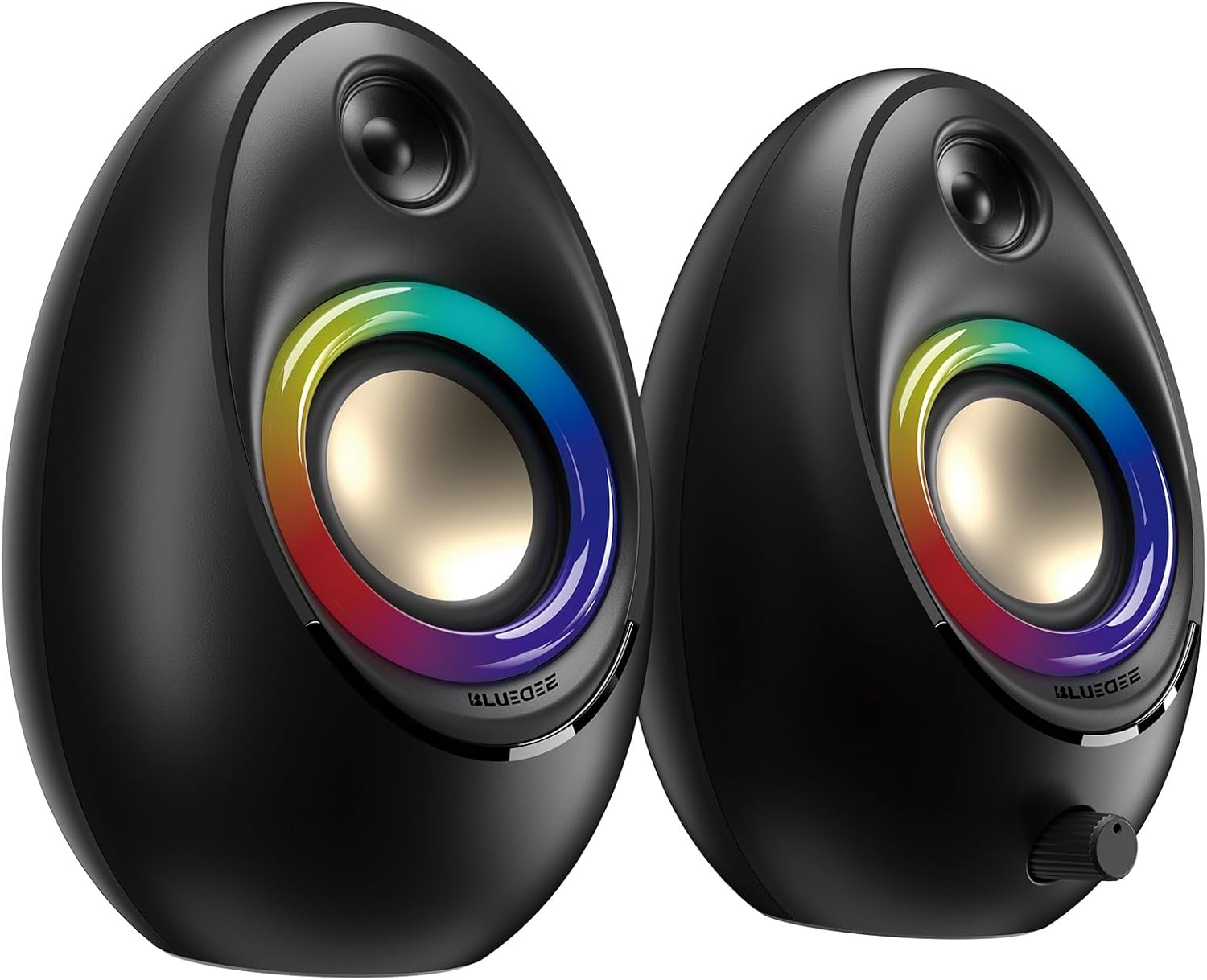
Figure 3.1: Bluedee BD-SK900 Computer Speakers, showcasing ihr Design und ihre RGB-Beleuchtung.

Figure 3.2: Internal acoustic architecture of the Bluedee BD-SK900 speakers.

Figure 3.3: The multi-functional control knob for easy operation.
4. Einrichtungsanweisungen
Follow these steps to set up your Bluedee BD-SK900 speakers:
- Platzierung: Position the two speakers on your desktop or desired surface, ensuring they are spaced appropriately for optimal stereo sound.
- Strom- und Audioanschluss: Use the provided all-in-one USB/USB-C cable. Connect the USB-A or USB-C end to an available port on your computer (desktop, laptop) or a compatible USB power adapter (not included). The speakers will power on automatically.
- Erstverbindung: Upon connecting, the speakers will typically default to USB audio mode. If your computer recognizes the speakers, audio will play directly through them.
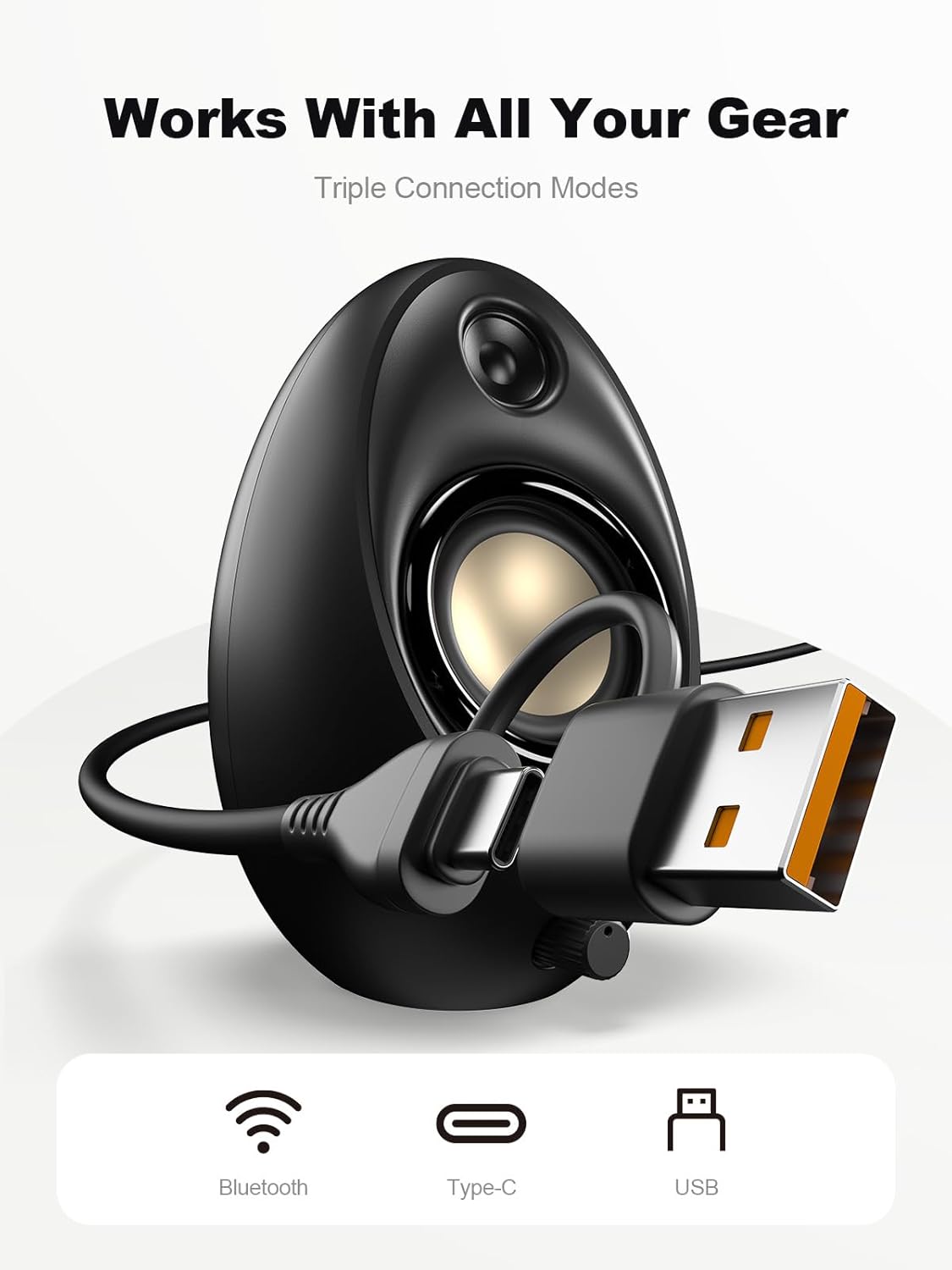
Figure 4.1: Connecting the speakers via USB/USB-C cable.
5. Bedienungsanleitung
5.1 Ein-/Ausschalten
The speakers power on automatically when connected to a USB power source. To power off, disconnect the USB cable.
5.2 Lautstärkeregelung
Rotate the multi-functional knob clockwise to increase volume and counter-clockwise to decrease volume.
5.3 Bluetooth-Kopplung
- Wechseln Sie in den Bluetooth-Modus: Press and hold the multi-functional knob for approximately 2-3 seconds until the speaker indicates Bluetooth mode (e.g., a specific light pattern or audio prompt).
- Bluetooth auf dem Gerät aktivieren: Aktivieren Sie Bluetooth auf Ihrem Smartphone, Tablet oder Laptop und suchen Sie nach verfügbaren Geräten.
- Paar: Select "Bluedee BD-SK900" from the list of devices. Once paired, the speakers will confirm the connection.
5.4 USB/Type-C Connection
When connected via the USB/USB-C cable, the speakers will automatically function as an audio output device for your computer. To switch back to USB mode from Bluetooth, press and hold the multi-functional knob again.
5.5 RGB-Beleuchtungssteuerung
The speakers feature 5 dynamic RGB lighting effects. Briefly press the multi-functional knob to cycle through the available lighting modes. This allows you to customize the ambiance to your preference.

Figure 5.1: Dynamic RGB lighting effects.
6. Fehlerbehebung
If you encounter issues with your Bluedee BD-SK900 speakers, please refer to the following common solutions:
- Kein Ton:
- Ensure the USB/USB-C cable is securely connected to both the speakers and your device/power source.
- Check the volume level on both the speakers (using the knob) and your connected device.
- Überprüfen Sie, ob in den Soundeinstellungen Ihres Computers das richtige Audioausgabegerät ausgewählt ist.
- If using Bluetooth, ensure the speakers are in Bluetooth mode and successfully paired.
- Bluetooth-Verbindungs-/Kopplungsprobleme:
- Ensure the speakers are within the 10-meter Bluetooth range of your device.
- Schalten Sie Bluetooth auf Ihrem Gerät aus und wieder ein und versuchen Sie dann erneut, das Gerät zu koppeln.
- Entfernen Sie das Gerät aus Ihrer Bluetooth-Liste und koppeln Sie es erneut.
- Ensure the speakers are not connected to another device.
- RGB-Lichter funktionieren nicht:
- Stellen Sie sicher, dass die Lautsprecher eingeschaltet sind.
- Briefly press the multi-functional knob to cycle through lighting modes; the lights might be off or in a static mode.
- Verzerrter Ton:
- Reduzieren Sie die Lautstärke sowohl an den Lautsprechern als auch an Ihrem angeschlossenen Gerät.
- Stellen Sie sicher, dass die Audioquelle von guter Qualität ist.
- Prüfen Sie auf mögliche Störungen, falls Sie Bluetooth verwenden.
7. Spezifikationen
| Modellname | BD-SK900 |
| Lautsprechertyp | Computerlautsprecher |
| Konnektivitätstechnologie | Bluetooth, USB |
| Bluetooth-Version | 5.4 |
| Bluetooth-Reichweite | 10 Meter |
| Leistungsabgabe | 20 W |
| Signal-Rausch-Verhältnis | 70 dB |
| Frequenzgang | 20 KHz (Upper limit, typical for full-range) |
| RGB-Beleuchtungsmodi | 5 |
| Kompatible Geräte | Desktop-PC, Laptop, Smartphone, Tablet |
| Produktabmessungen (pro Lautsprecher) | 5.1"T x 5"B x 7.2"H |
| Artikelgewicht | 2.88 Pfund |
| Stromquelle | Corded Electric (USB/Type-C) |

Figure 7.1: Speaker dimensions and design.
8. Wartung
Um die Langlebigkeit und optimale Leistung Ihrer Lautsprecher zu gewährleisten, beachten Sie bitte folgende Wartungshinweise:
- Reinigung: Use a soft, dry cloth to clean the speaker surfaces. Avoid using abrasive cleaners, solvents, or strong chemicals, as they may damage the finish.
- Lagerung: Bei längerer Nichtbenutzung sollten die Lautsprecher an einem kühlen, trockenen Ort, fern von direkter Sonneneinstrahlung und extremen Temperaturen, aufbewahrt werden.
- Handhabung: Behandeln Sie die Lautsprecher mit Sorgfalt. Vermeiden Sie es, sie fallen zu lassen oder starken Stößen auszusetzen.
- Belüftung: Ensure proper ventilation around the speakers to prevent overheating. Do not block any vents.
9. Sicherheitshinweise
Bitte beachten Sie folgende Sicherheitsvorkehrungen:
- Do not expose the speakers to water, moisture, or extreme temperatures.
- Do not attempt to disassemble or modify the speakers. This will void the warranty and may cause damage or injury.
- Keep the speakers away from heat sources, open flames, and direct sunlight.
- Use only the provided USB/USB-C cable for connection.
- Um Gehörschäden vorzubeugen, vermeiden Sie es, über längere Zeiträume bei übermäßig hoher Lautstärke zu hören.
10. Garantie und Support
Bluedee provides comprehensive support for your BD-SK900 Computer Speakers:
- Qualitätsgarantie: Your speakers are covered by a 540-day quality warranty from the date of purchase.
- Lebenslanger Support: Bluedee offers lifetime customer support for this product.
- Kontakt: For any questions, technical assistance, or warranty claims, please contact us via Amazon Messages or refer to the contact details provided in your Quick Start Guide.