
1. Einleitung
This manual provides detailed instructions for the installation, setup, operation, and maintenance of your ATOTOZONE A5L 7-inch Android Double Din Car Stereo. This advanced car stereo system integrates an Android operating system with a suite of features designed to enhance your driving experience, including wireless smartphone integration, advanced audio processing, and comprehensive camera support.
2. Packungsinhalt
Bitte prüfen Sie, ob alle unten aufgeführten Artikel in Ihrer Produktverpackung enthalten sind. Sollten Artikel fehlen oder beschädigt sein, kontaktieren Sie bitte unseren Kundenservice.
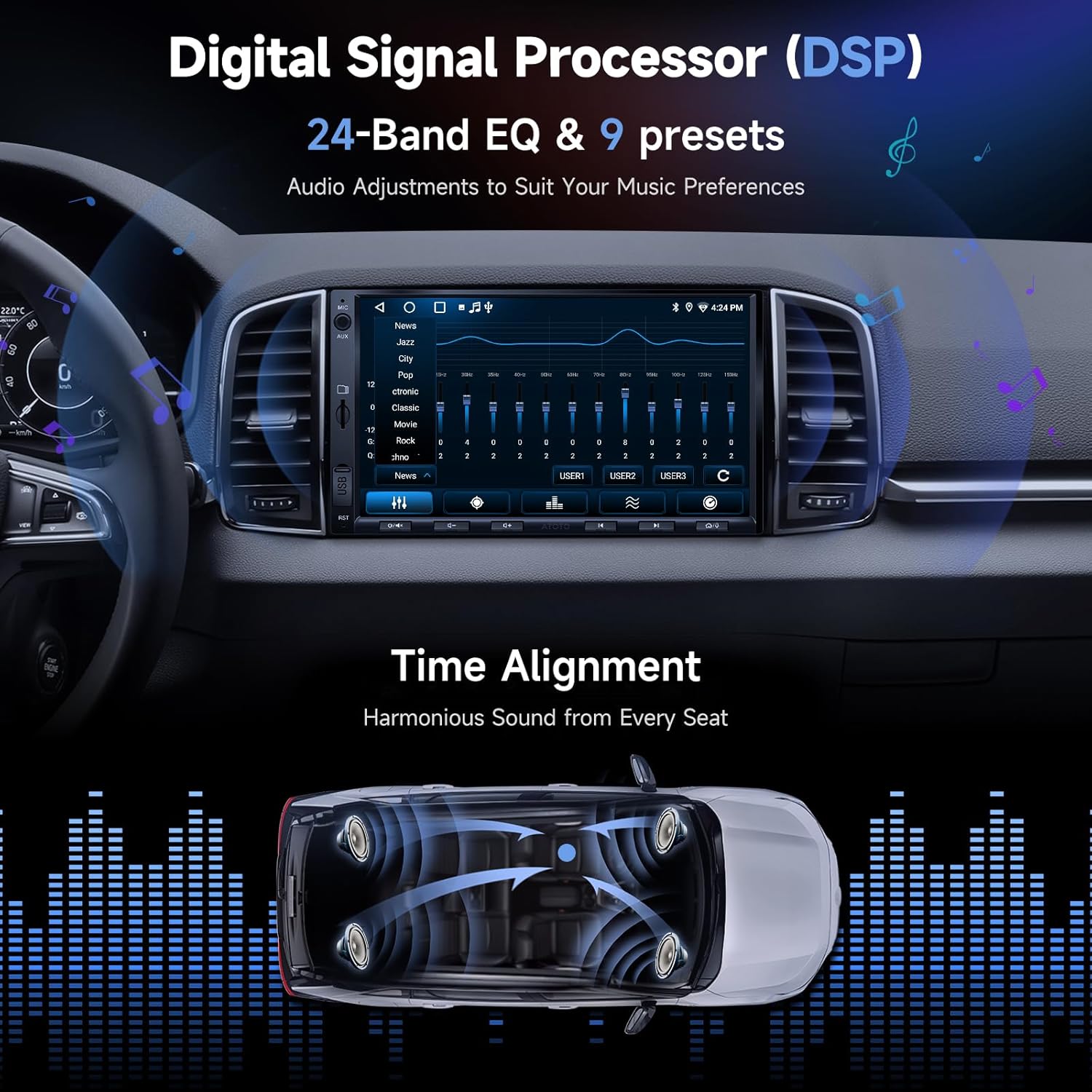
Bild 2.1: Included components for the ATOTOZONE A5L car stereo system. This includes the main car stereo unit, a rear-view camera, a front DVR camera (AC-44P2), a 16-PIN power cable, a rear camera input cable, RCA connectors, USB external storage, a GPS antenna, double-DIN brackets, mounting brackets, mounting screws, an installation frame, and guides.
- ATOTOZONE A5L Autoradio
- Rückseite-View Kamera (AC-HD01LR)
- Front DVR Camera (AC-44P2)
- 16-PIN Power Cable
- Rückfahrkamera-Eingangskabel
- RCA-Anschlusskabel
- USB-Kabel für externe Speichermedien
- GPS-Antenne
- Double-DIN Brackets
- Montagehalterungen
- Befestigungsschrauben
- Einbaurahmen
- Kurzanleitung zu Online-Ressourcen
- Produktpflege – Online-Supportinformationen
3. Produktüberschreitungview
The ATOTOZONE A5L is a 7-inch double DIN car stereo featuring an Android operating system. It is equipped with a Cortex-A53 4-core 1.3GHz processor, 2GB RAM, and 32GB of internal storage, allowing for app downloads and smooth performance. Key features include:
- Betriebssystem: Android OS for versatile app compatibility.
- Anzeige: 7-inch IPS display with 1280x720 resolution, 178° wide viewing angles, and strong light suppression.
- Smartphone-Integration: Wireless and wired Apple CarPlay and Android Auto support.
- Kameras: Includes a 1080P Front DVR Dash Camera (AC-44P2) and a 720P Rear-View Camera (AC-HD01LR) with Live Rear View (LRV), reversing guidelines, waterproofing, and night vision.
- Audio: Built-in Digital Signal Processor (DSP) with a 24-Band EQ and 9 presets, plus a powerful amplifier (Peak 4x45W, RMS 4x24W).
- Konnektivität: Triple internet access methods (WiFi hotspot, Bluetooth tethering, USB sharing), Bluetooth for phone calls and third-party devices.
- KI-Assistent: Integrated DriveChat GenAI Voice Assistant powered by ChatGPT for deep conversations and voice commands.
- Navigation: GPS Tracking via the TrackHU app for real-time vehicle updates and trip management.
4. Installation
Proper installation is crucial for optimal performance and safety. It is recommended to have this unit installed by a qualified professional. Ensure the vehicle's power is disconnected before beginning installation.
4.1. Physikalische Abmessungen

Bild 4.1: Dimensions of the ATOTOZONE A5L head unit. The front panel measures 172mm (6.7-inch) wide by 97mm (3.8-inch) high. The chassis measures 178mm (7-inch) wide by 100mm (3.9-inch) high and 102mm (4-inch) deep, conforming to ISO Standard Double DIN size.
The A5L unit is designed to fit standard double DIN openings. Refer to the provided dimensions to ensure compatibility with your vehicle's dash kit. Extra accessories may be required for specific vehicle installations.
4.2. Schaltplan

Bild 4.2: Comprehensive wiring diagram for the ATOTOZONE A5L. This diagram illustrates connections for the 16-pin power harness (including constant power, accessory, ground, dimmer, and steering wheel key inputs), speaker outputs (front left/right, rear left/right), RCA outputs (front, rear, subwoofer), auxiliary inputs, external microphone input, amplifier turn-on, rear camera input, Bluetooth antenna, Wi-Fi antenna, HDMI, and GPS antenna.
Carefully follow the wiring diagram for all connections. Ensure proper insulation for all wires to prevent short circuits. Incorrect wiring can damage the unit or your vehicle's electrical system.
4.3. Lenkradsteuerung (SWC)

Bild 4.3: Steering Wheel Control (SWC) options. You can connect directly to your vehicle's analog SWC wires, use the dedicated 3.5mm jack for OEM SWC integration (requires a third-party SWC interface), or utilize the optional ATOTOZONE AC-44F8 wireless remote control.
The A5L supports various steering wheel control methods. You can connect directly to your vehicle's analog SWC wires, use the dedicated 3.5mm jack for OEM SWC (may require an adapter), or use an optional ATOTOZONE AC-44F8 wireless remote.
5. Einrichtung
5.1. Erstes Einschalten
After installation, turn on your vehicle's ignition. The unit will boot up. Follow any on-screen prompts for initial language and time zone settings.
5.2. Internetverbindung
The A5L offers three methods for internet access:

Bild 5.1: Internet connectivity options. The ATOTOZONE A5L supports Wi-Fi hotspot for stable and fast connection, Bluetooth tethering for lower power consumption, and USB sharing which also charges your phone slightly. Ensure your car stereo has the latest OTA update for USB tethering support.
- WLAN-Hotspot: Connect to a mobile hotspot or home Wi-Fi network for stable and fast internet.
- Bluetooth-Tethering: Use your smartphone's Bluetooth to share its internet connection. This method consumes less power.
- USB-Freigabe: Connect your smartphone via USB to share its internet. This also provides a slight charge to your phone. Ensure your unit has the latest OTA update for this feature.
5.3. Kabelloses CarPlay & Android Auto
The A5L supports both wireless and wired Apple CarPlay and Android Auto. To set up:

Bild 5.2: Wireless CarPlay and Android Auto functionality. This image displays the user interfaces for both CarPlay and Android Auto on the 7-inch screen, highlighting voice assistant integration (Siri and Google Assistant) for navigation, music, messages, and calls.
- Stellen Sie sicher, dass Bluetooth und WLAN auf Ihrem Smartphone aktiviert sind.
- On the A5L, open the Zlink app (or equivalent CarPlay/Android Auto application).
- Follow the on-screen instructions to pair your phone. For wireless connection, the system will typically use Bluetooth for initial pairing and then switch to Wi-Fi for data transfer.
- Once connected, you can use voice commands (Siri or Google Assistant) for navigation, music, messaging, and calls.
Note: Wi-Fi is not supported for other internet services while Wireless CarPlay or Android Auto is active.
6. Bedienung
6.1. Anzeigefunktionen
The 7-inch IPS display offers clear visuals and supports several functions:

Bild 6.1: Vivid Colors & Wide View on 7-inch IPS Display. This image demonstrates the display's capabilities, including Phone Mirroring (wireless & wired) to cast content from your smartphone, and split-screen functionality to manage two applications simultaneously, such as navigation and music.
- Telefonspiegelung: Cast your smartphone's screen to the car stereo display (wireless and wired). Note that some applications may not be compatible with phone mirroring.
- Geteilter Bildschirm: Run two applications side-by-side, such as navigation and a music player, for enhanced multitasking.
6.2. Audio-Anpassungen
Passen Sie Ihr Audioerlebnis mit dem integrierten digitalen Signalprozessor (DSP) individuell an.

Bild 6.2: Digital Signal Processor (DSP) interface. This image illustrates the 24-Band EQ with 9 presets for precise audio adjustments and the Time Alignment feature, which optimizes sound delivery to create a harmonious listening experience from every seat in the vehicle.
- 24-Band-EQ: Fine-tune audio frequencies with 24 adjustable bands and 9 preset equalization modes to match your preferences.
- Zeitliche Ausrichtung: Adjust the sound delay for each speaker to create a balanced and immersive soundstage, ensuring harmonious sound from every seat.
- Eingebaut AmpReiniger: The unit features a 4x45W Peak / 4x24W RMS amplifier for clear and powerful sound output.
6.3. Kamerasystem
The A5L includes both a front DVR and a rear-view camera for enhanced safety and recording.

Bild 6.3: HD Front DVR Recording & Clear Rear View. This image details the functionality of the included AC-44P2 1080P Front DVR Camera, which offers auto recording, loop recording, file protection, photo capture, and a 156° wide viewing range. It also highlights the AC-HD01LR AHD 720P Rear-View Camera, featuring waterproofing, night vision, Live Rear View (LRV), and dynamic reversing guidelines.
- Front DVR (AC-44P2): Records in 1080P with a 156° wide angle. Features include auto recording, loop recording, and file Schutz.
- Rückseite-View Camera (AC-HD01LR): Provides a clear 720P image with a 140° view. Features Live Rear View (LRV), reversing guidelines, waterproofing, and night vision. The rear camera automatically activates when the vehicle is in reverse.
6.4. DriveChat GenAI Assistant
Engage with the integrated AI assistant for a smarter driving experience.

Bild 6.4: DriveChat: Your AI-Powered Driving Partner by ChatGPT. This image illustrates the AI assistant's capability for smooth, deep conversations and interaction with multiple AI chatbots. It also mentions customizable wake-up words and future updates for agents that monitor road and cabin conditions.
- Sprachbefehle: Use voice commands to open apps, control functions, and engage in conversations without taking your eyes off the road.
- AI Chatbots: Interact with various AI chatbots for information, entertainment, and assistance.
- OTA-Updates: DriveChat receives regular over-the-air updates to add new features and improve functionality.
6.5. GPS-Tracking
Utilize the TrackHU app for vehicle tracking and trip management.

Bild 6.5: GPS Tracking with the TrackHU App. This image demonstrates the TrackHU app's features, including real-time vehicle updates, track playback with speed management, flexible refresh rates, instant alerts for geofence and online/offline status, and accurate positioning using OsmAnd 4-satellite (GPS, GLONASS, Galileo, Beidou) technology.
- Echtzeit-Tracking: Monitor your vehicle's location and status in real-time.
- Track Playback: Review past routes and manage trip data.
- Sofortige Benachrichtigungen: Receive notifications for geofence breaches or changes in online/offline status.
- Genaue Positionierung: Utilizes OsmAnd 4-satellite technology (GPS, GLONASS, Galileo, Beidou) for precise location data.
6.6. Bluetooth-Konnektivität
The A5L's Bluetooth system allows connection to both your phone and other third-party Bluetooth devices.

Bild 6.6: Bluetooth Connectivity and Screen Lock. This image highlights the ability to make phone calls and stream music via Bluetooth. It also shows compatibility with third-party Bluetooth devices like diagnostic scanners (AC-4450, not included) and interior footwell lights (CI-FLT01, not included). Additionally, it illustrates a convenient screen lock feature for privacy, which unlocks when your phone is near.
- Phone Calls & Music Streaming: Connect your phone for hands-free calls and audio playback.
- Third-Party Devices: Connect to devices like Bluetooth OBD2 scanners without interrupting phone functions.
- Bildschirmsperre: A privacy feature that locks the screen when your paired Bluetooth device (phone) is away and unlocks when it's near. This feature may require an OTA update.
7. Wartung
Um die Langlebigkeit und optimale Leistung Ihres ATOTOZONE A5L zu gewährleisten, beachten Sie bitte folgende Wartungshinweise:
- Reinigung: Reinigen Sie das Display und das Gehäuse des Geräts mit einem weichen, trockenen Tuch. Vermeiden Sie Scheuermittel oder Lösungsmittel.
- Software-Updates (OTA): Regularly check for and install Over-The-Air (OTA) firmware updates. These updates provide bug fixes, performance improvements, and new features.
- Kabelmanagement: Stellen Sie sicher, dass alle Kabel fest angeschlossen und nicht eingeklemmt oder übermäßigem Verschleiß ausgesetzt sind.
- Temperatur: Vermeiden Sie es, das Gerät über längere Zeiträume extremen Temperaturen auszusetzen.

Bild 7.1: Product Care and OTA Updates. This image highlights the 12-month product care from purchase, with an option for an additional 6 months upon contacting support. It also emphasizes the commitment to delivering top-notch car stereo systems through regular OTA firmware updates, which address bugs and introduce new features.
8. Fehlerbehebung
If you encounter issues with your ATOTOZONE A5L, refer to the following common troubleshooting steps. For more detailed assistance, consult the online manuals or contact customer support.
| Problem | Mögliche Ursache | Lösung |
|---|---|---|
| Gerät lässt sich nicht einschalten | Falsche Verkabelung; durchgebrannte Sicherung; unzureichende Stromversorgung | Check power connections (Constant, Accessory, Ground). Verify vehicle fuses. Ensure adequate power supply. |
| Keine Tonausgabe | Speaker wires disconnected; Volume too low; Mute activated; Incorrect audio settings | Check speaker wiring. Increase volume. Disable mute. Verify audio output settings (e.g., RCA vs. speaker output). |
| CarPlay/Android Auto verbindet sich nicht | Bluetooth/Wi-Fi off on phone; Zlink app not open; Phone not paired; USB cable issue | Ensure phone's Bluetooth and Wi-Fi are on. Open Zlink app. Re-pair phone. Try a different USB cable for wired connection. |
| Rückkamera zeigt kein Bild an | Rear camera input cable loose; Reverse trigger wire not connected; Camera faulty | Check rear camera input connection. Verify reverse trigger wire (Pink wire) is correctly connected to vehicle's reverse light. |
| Schlechtes GPS-Signal | GPS antenna obstructed; Antenna not properly connected | Ensure GPS antenna is mounted in a clear location (e.g., dashboard, not under metal). Check antenna connection to the unit. |
| Das System ist langsam oder reagiert nicht. | Too many apps running; Low storage; Outdated firmware | Close unnecessary apps. Clear cache. Perform a factory reset if necessary (backup data first). Update firmware via OTA. |
9. Spezifikationen
Detailed technical specifications for the ATOTOZONE A5L car stereo.
| Besonderheit | Detail |
|---|---|
| Marke | ATOTOZONE |
| Modell | A5L |
| Betriebssystem | Android |
| Prozessor | Cortex-A53 4-Kern 1.3 GHz |
| RAM | 2 GB |
| Lagerung | 32 GB |
| Anzeigegröße | 7-Zoll-IPS |
| Bildschirmauflösung | 1280 x 720 |
| Konnektivität | Aux-Anschluss, Bluetooth, USB, WLAN |
| Wireless-Technologie | Bluetooth, FM/AM, Wi-Fi |
| CarPlay / Android Auto | Kabellos und kabelgebunden |
| Front DVR Camera | AC-44P2, 1080P, 156° Wide Angle |
| Rückseite-View Kamera | AC-HD01LR, 720P, 140° View, LRV, Night Vision, Waterproof |
| Audioausgabemodus | Stereo |
| Surround-Sound-Konfiguration. | 4.1 |
| Amplifier-Ausgang | Peak 4x45W, RMS 4x24W |
| Equalizer | 24-Band EQ with 9 presets |
| Kontrollmethode | Push Button, Remote, Touch, Voice |
| Unterstützte Internetdienste | Browser, Google Maps, Netflix, Pandora, Spotify, YouTube |
| Videokodierung | H.264, H.265/HEVC, MPEG-4 |
10. Garantie und Support
ATOTOZONE provides comprehensive product care and support for your A5L car stereo.
- Produktpflege: A 12-month product care period is included from the date of purchase. You can extend this by an additional 6 months by contacting ATOTOZONE customer support.
- Online-Handbücher: Detailed online manuals in various languages are available. Refer to the package details for access information.
- Kundendienst: The ATOTOZONE support team is available around the clock during workdays to assist with any inquiries or issues.
- OTA-Updates: ATOTOZONE is committed to providing regular firmware updates via OTA every few months. These updates address bugs and introduce new features, ensuring long-term value and improved functionality.