
1. Einleitung
Vielen Dank für Ihren Einkauf.asing the LYNCAST N300 Mini Smart Projector. This manual provides essential information for setting up, operating, and maintaining your projector. Please read it thoroughly before use to ensure optimal performance and safety.
The LYNCAST N300 is a portable smart projector featuring Android 13, 1080P native resolution with 4K support, automatic keystone correction, WiFi 6, and Bluetooth 5.4 connectivity. Its 180° rotatable design offers flexible projection angles for various environments.
2. Sicherheitshinweise
- Schauen Sie nicht direkt in die Projektorlinse, wenn der lamp ist eingeschaltet.
- Sorgen Sie für eine ausreichende Belüftung rund um den Projektor, um eine Überhitzung zu vermeiden.
- Verwenden Sie nur das mitgelieferte Netzteil.
- Halten Sie den Projektor von Wasser oder anderen Flüssigkeiten fern.
- Stellen Sie den Projektor nicht auf instabile Oberflächen.
- Versuchen Sie nicht, den Projektor selbst zu zerlegen oder zu reparieren. Wenden Sie sich an qualifiziertes Servicepersonal.
- Außerhalb der Reichweite von Kindern aufbewahren.
3. Packungsinhalt
Überprüfen Sie, ob alle Artikel in Ihrem Paket vorhanden sind:
- LYNCAST N300 Mini Smart Projector
- Netzteil
- HDMI-Kabel
- Fernbedienung
- Benutzerhandbuch (dieses Dokument)
4. Produktüberschreitungview
4.1 Projektorkomponenten
Familiarize yourself with the main components and interfaces of your LYNCAST N300 projector.
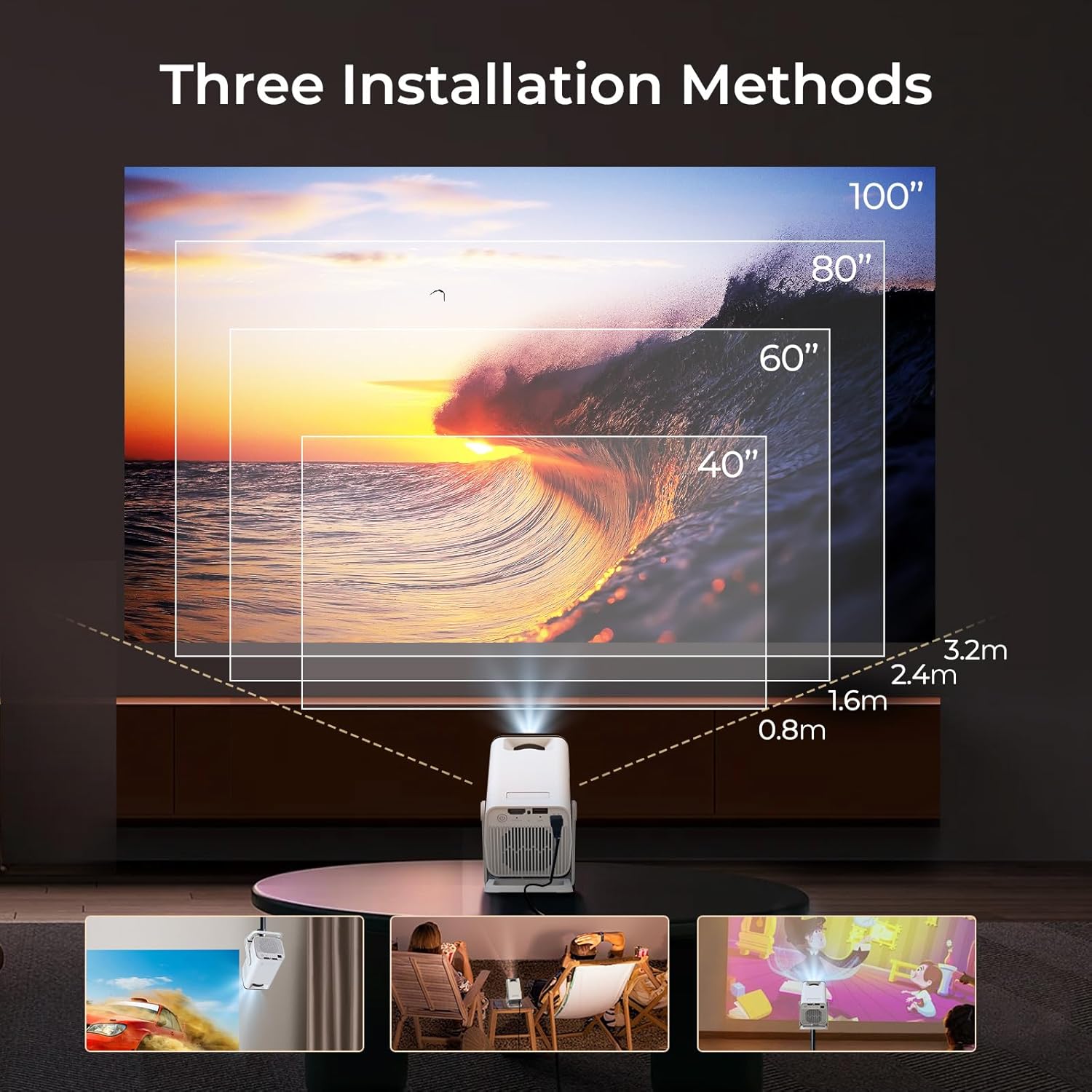
Bild 4.1: Hinteren view of the LYNCAST N300 projector showing HDMI and USB ports.
- Linse: Projiziert das Bild auf den Bildschirm.
- Fokusrad: Manuelle Anpassung der Bildschärfe.
- Netzschalter: Schaltet den Projektor ein/aus.
- HDMI-Anschluss: Connects to external devices like TV sticks, laptops, gaming consoles (PS5), and TV boxes.
- USB-Anschluss: Connects to USB storage devices or charges compatible devices.
- Leistungsaufnahme: Verbindet das Netzteil.
- Lautsprecher: Integrierter Audioausgang.
- Verstellbarer Ständer: Allows for 180° rotation and flexible projection angles.
5. Einrichtung
5.1 Stromanschluss
- Schließen Sie das Netzteil an den Stromeingangsanschluss des Projektors an.
- Stecken Sie das Netzteil in eine Wandsteckdose.
- Drücken Sie den Netzschalter am Projektor oder an der Fernbedienung, um ihn einzuschalten.
5.2 Platzierung und Winkeleinstellung
The LYNCAST N300 features a 180° rotatable design, allowing for versatile placement options.

Bild 5.1: The projector's adjustable stand allows for various projection angles, including ceiling projection.
- Stellen Sie den Projektor auf eine stabile Oberfläche.
- Adjust the projector's angle using its integrated stand to project onto a wall, ceiling, or screen. The stand supports up to 180° rotation.
5.3 Fokuseinstellung
To achieve a clear image, manually adjust the focus.

Bild 5.2: Location of the manual focus wheel on the projector.
- Schalten Sie den Projektor ein und zeigen Sie ein Bild an.
- Rotate the focus wheel located on the side of the projector until the image appears sharp and clear.
5.4 Automatische Trapezkorrektur
The LYNCAST N300 features automatic keystone correction to adjust distorted images caused by angled projection. This feature automatically squares the image.
- The projector will automatically detect and correct vertical keystone distortion.
- If further adjustments are needed, refer to the on-screen display (OSD) settings for manual keystone correction options.
6. Bedienungsanleitung
6.1 Connecting External Devices via HDMI
Connect devices such as TV sticks, laptops, gaming consoles, or TV boxes using an HDMI cable.
- Verbinden Sie ein Ende des HDMI-Kabels mit dem HDMI-Anschluss des Projektors.
- Connect the other end to the HDMI output of your external device.
- Select the HDMI input source from the projector's menu.
6.2 USB-Konnektivität
The USB port allows you to play media files direkt von einem USB-Speichergerät.
- Stecken Sie Ihr USB-Speichergerät in den USB-Anschluss des Projektors.
- Navigate to the media player application on the projector's home screen to browse and play files.
6.3 Drahtlose Konnektivität (WiFi 6 & Bluetooth 5.4)
The projector supports WiFi 6 for faster and more stable internet connection and Bluetooth 5.4 for audio devices.
6.3.1 Mit WLAN verbinden
- Go to the projector's Settings menu.
- Select "Network & Internet" or "WiFi".
- Choose your desired WiFi network and enter the password if prompted.
6.3.2 Verbinden von Bluetooth-Geräten
- Go to the projector's Settings menu.
- Select "Connected Devices" or "Bluetooth".
- Schalten Sie Bluetooth ein und suchen Sie nach verfügbaren Geräten.
- Wählen Sie Ihren Bluetooth-Lautsprecher oder Ihre Kopfhörer zum Koppeln aus.
6.4 Screen Mirroring (Phone Link)
Mirror your iOS or Android device screen to the projector.

Bild 6.1: Screen mirroring from a smartphone to the projector.
6.4.1 For iOS Devices (AirPlay)
- Ensure both your iOS device and the projector are connected to the same WiFi network.
- Öffnen Sie auf Ihrem iOS-Gerät das Kontrollzentrum und tippen Sie auf „Bildschirmspiegelung“.
- Wählen Sie den Projektor aus der Liste der verfügbaren Geräte aus.
6.4.2 For Android Devices (Miracast/Google Cast)
- Ensure both your Android device and the projector are connected to the same WiFi network.
- On your Android device, go to Settings and look for "Cast", "Screen Mirroring", or "Wireless Display". The exact name may vary by device.
- Wählen Sie den Projektor aus der Liste der verfügbaren Geräte aus.
6.5 Using Android 13 Smart Features
The LYNCAST N300 runs on Android 13, providing access to a wide range of applications.

Bild 6.2: Android 13 interface showing pre-installed applications.
- Vorinstallierte Apps: Access popular streaming services like Netflix, YouTube, Prime Video, and Disney+ directly from the home screen.
- App Store: Download and install additional applications from the integrated app store.
- Navigation: Verwenden Sie die Fernbedienung, um durch die Android-Benutzeroberfläche zu navigieren.
7. Wartung
7.1 Reinigung der Linse
- Verwenden Sie ein weiches, fusselfreies Tuch, das speziell für optische Linsen entwickelt wurde.
- Gently wipe the lens to remove dust or smudges. Do not use abrasive cleaners or excessive force.
7.2 Reinigung des Projektorgehäuses
- Wischen Sie die Außenseite des Projektors mit einem weichen, trockenen Tuch ab.
- Verwenden Sie keine flüssigen Reinigungs- oder Lösungsmittel.
7.3 Speicherung
- Wenn Sie den Projektor längere Zeit nicht verwenden, lagern Sie ihn an einem kühlen, trockenen Ort, geschützt vor direkter Sonneneinstrahlung und extremen Temperaturen.
- Consider using the original packaging or a protective case to prevent dust accumulation and damage.
8. Fehlerbehebung
| Problem | Mögliche Ursache | Lösung |
|---|---|---|
| Kein Strom | Stromkabel nicht angeschlossen; Steckdose defekt | Vergewissern Sie sich, dass das Netzkabel fest angeschlossen ist; versuchen Sie es mit einer anderen Steckdose. |
| Kein Bild | Incorrect input source; Loose HDMI cable; Device not powered on | Select correct input source; Check HDMI cable connection; Ensure connected device is powered on. |
| Bild verschwommen | Fokus nicht eingestellt; Projektor zu weit/nah | Adjust the manual focus wheel; Reposition the projector for optimal distance. |
| Kein Ton | Volume too low; Muted; Incorrect audio output selected; Bluetooth device not connected | Lautstärke erhöhen; Stummschaltung aufheben; Audioeinstellungen prüfen; Bluetooth-Gerät erneut verbinden. |
| Fernbedienung funktioniert nicht | Leere Batterien; Blockade zwischen Fernbedienung und Projektor | Batterien austauschen; Sicherstellen, dass eine freie Sichtlinie zum Infrarotempfänger des Projektors besteht. |
| WLAN-Verbindungsprobleme | Incorrect password; Out of range; Router issues | Verify WiFi password; Move projector closer to router; Restart router. |
9. Spezifikationen
| Besonderheit | Detail |
|---|---|
| Marke | LYNCAST |
| Modellname | Netflix VisualCube N300 (X1AA) |
| Betriebssystem | Android 13 |
| Display-Technologie | LED, Laser |
| Native Auflösung | 1920 x 1080 (1080 P) |
| Unterstützte maximale Auflösungen | 3840 Pixels (4K) |
| Kontrastverhältnis | 1000:1 |
| Konnektivitätstechnologie | Bluetooth 5.4, WLAN 6 |
| Hardware-Schnittstelle | HDMI, USB |
| Besondere Merkmale | Automatic Obstacle Avoidance (Auto Keystone), 180° Rotation |
| Kompatible Geräte | Speaker, Game Console, Laptop, Smartphone, Tablet, TV Stick |
| Technische Daten | 10 x 10 x 17 cm |
| Produktgewicht | 770 g |
| Montagetyp | Tischmontage |
10. Garantie und Support
For warranty information and technical support, please refer to the warranty card included in your package or visit the official LYNCAST webBewahren Sie Ihren Kaufbeleg als Kaufnachweis auf.
LYNCAST Official WebWebsite: LYNCAST Brand Store on Amazon
11. Produktvideodemonstration
Sehen Sie sich dieses Video an, um einen visuellen Überblick zu erhalten.view of the LYNCAST N300 Mini Smart Projector's features and usage.
Video 11.1: LYNCAST N300 Projector overview, demonstrating features like Netflix compatibility, portable design, 270° rotation, manual focus, and phone link (screen mirroring).