
FLEXISPOT V9-Max-AR
FLEXISPOT V9-Max-AR Exercise Bike with 2D Desktop User Manual
Model: V9-Max-AR (Exercise Bike with Desk)
1. Einleitung
This manual provides essential information for the safe and effective use of your FLEXISPOT V9-Max-AR Exercise Bike with 2D Desktop. Please read all instructions carefully before assembly and operation. Retain this manual for future reference.
Wichtige Sicherheitsinformationen
- Stellen Sie vor jedem Gebrauch sicher, dass alle Teile sicher befestigt sind.
- Die empfohlene Höchstgewichtsgrenze von 300 Pfund darf nicht überschritten werden.
- Halten Sie Kinder und Haustiere während des Betriebs vom Heimtrainer fern.
- Konsultieren Sie einen Arzt, bevor Sie mit einem neuen Trainingsprogramm beginnen.
- Use the product on a stable, level surface.
2. Produktüberschreitungview und Komponenten
The FLEXISPOT V9-Max-AR is a versatile exercise bike designed for indoor use, featuring an integrated 2D adjustable desktop. It combines a stationary bike with a functional workspace, allowing for simultaneous exercise and productivity.

Figure 2.1: User operating the FLEXISPOT V9-Max-AR Exercise Bike with the desktop in use.
Key features include an 8-level quiet magnetic resistance system, an LCD display for tracking workout metrics, and a robust design supporting up to 300 lbs. The adjustable seat and desktop accommodate various user heights and preferences.
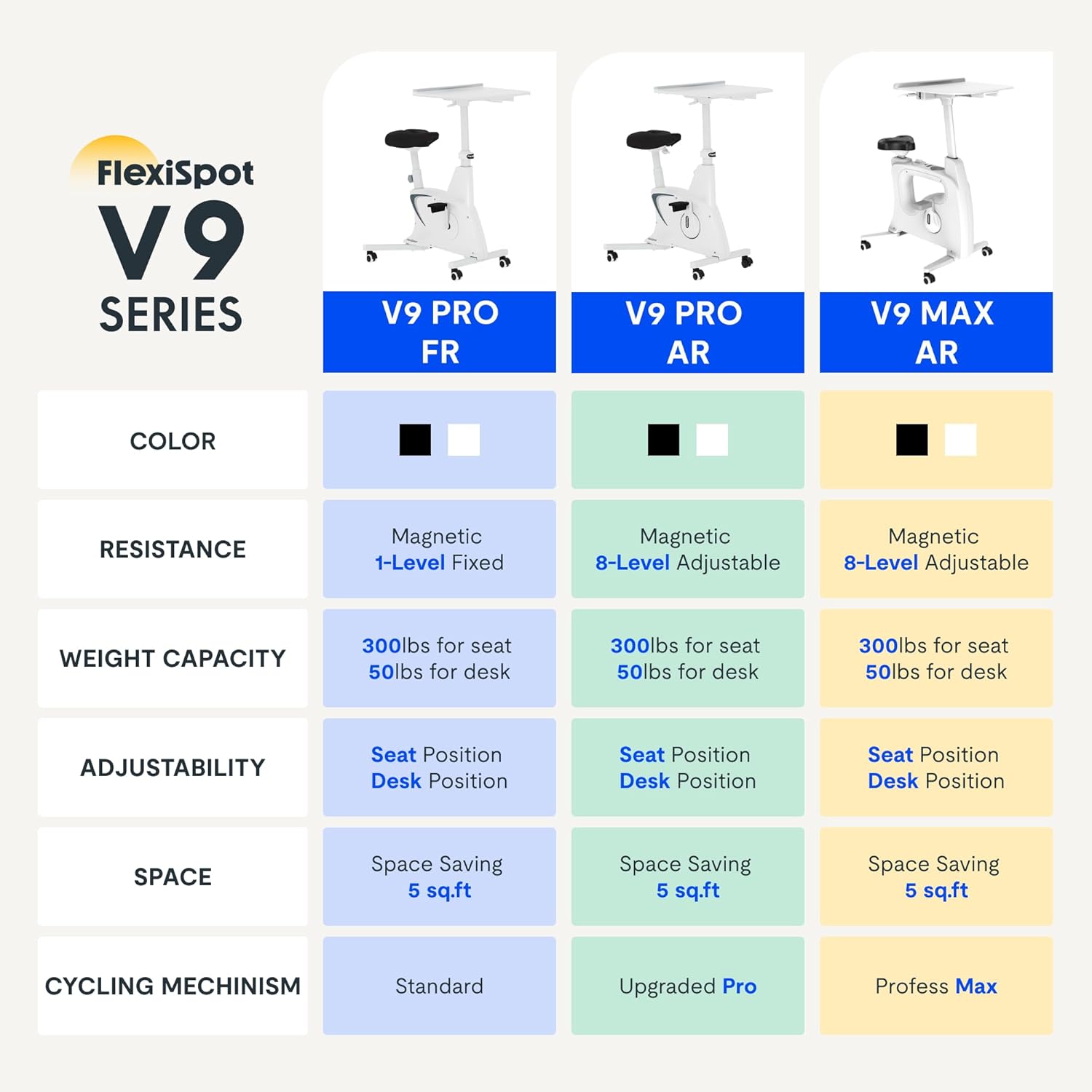
Figure 2.2: Comparison of FlexiSpot V9 series models, highlighting features like resistance and adjustability.
Hauptbestandteile:
- Main Frame with Flywheel and Resistance Mechanism
- Verstellbarer Sitz
- Adjustable Desktop
- Pedale
- LCD-Anzeigekonsole
- Transporträder
3. Aufbau und Montage
The FLEXISPOT V9-Max-AR is designed for quick and straightforward assembly, typically requiring about 10 minutes.
Montageschritte:
- Packen Sie alle Komponenten aus und überprüfen Sie sie anhand der Packliste.
- Attach the front and rear stabilizers to the main frame using the provided screws.
- Montieren Sie die Pedale und achten Sie darauf, dass das linke Pedal gegen den Uhrzeigersinn und das rechte Pedal im Uhrzeigersinn festgezogen wird.
- Mount the seat post and seat onto the main frame, securing them firmly.
- Attach the desktop support column to the main frame.
- Secure the desktop to its support column.
- Insert batteries into the LCD display (batteries not included) and connect the sensor wire.
- Ensure all screws and connections are tightened before first use.

Figure 3.1: Illustration of adjustable components for personalized setup.
4. Bedienungsanleitung
Adjusting Seat and Desktop:
- Sitzhöhe: Use the quick-release lever located on the seat post to adjust the seat to a comfortable height. Ensure your leg has a slight bend at the knee when the pedal is at its lowest point.
- Desktop Height: The desktop can be adjusted vertically. Locate the adjustment lever beneath the desktop and raise or lower the desktop to your desired working height.
- Desktop-Tiefe: The desktop can also be adjusted horizontally (forward/backward) to optimize your working posture.
Widerstandsstufen:
The V9-Max-AR features 8 levels of quiet magnetic resistance. Rotate the resistance knob, located below the desktop, clockwise to increase resistance and counter-clockwise to decrease it.

Figure 4.1: LCD display and resistance control knob.
Verwenden des LCD-Displays:
The built-in LCD display monitors your workout statistics. It tracks:
- Zeit
- Geschwindigkeit
- Distanz
- Kalorienverbrauch
- Total Distance Covered (Odometer)
- Rotationsgeschwindigkeit
Press the button on the display to cycle through different metrics or hold it to reset values (refer to display specific instructions for exact operation).
Using the 2D Desktop:
The spacious desktop (20" x 22.8") is designed to hold a laptop, notebook, mobile phone, or water cup. It provides a stable surface for working or entertainment while exercising.

Figure 4.2: Desktop in use for studying or working.
Portabilität:
Equipped with movable silent wheels, the exercise bike can be easily relocated within your home or office. Simply tilt the bike and roll it to your desired position.
5. Wartung
Regular maintenance ensures the longevity and optimal performance of your FLEXISPOT V9-Max-AR Exercise Bike.
- Reinigung: Wischen Sie das Fahrrad regelmäßig mit einem Tuch ab.amp Mit einem Tuch und mildem Reinigungsmittel reinigen. Scheuermittel und Lösungsmittel vermeiden.
- Inspektion: Überprüfen Sie regelmäßig alle Schrauben, Muttern und beweglichen Teile auf festen Sitz. Ziehen Sie lose Bauteile sofort fest.
- Schmierung: Für das Magnetwiderstandssystem ist keine spezielle Schmierung erforderlich.
- Lagerung: Lagern Sie das Fahrrad an einem trockenen, kühlen Ort, geschützt vor direkter Sonneneinstrahlung und extremen Temperaturen.
6. Fehlerbehebung
In diesem Abschnitt werden häufig auftretende Probleme behandelt, die bei Ihrem Heimtrainer auftreten können.
| Problem | Mögliche Ursache | Lösung |
|---|---|---|
| LCD-Display funktioniert nicht | Die Batterien sind leer oder falsch eingelegt. | Replace batteries (AAA, not included) or ensure correct polarity. |
| Instabiles oder wackeliges Fahrrad | Lose Schrauben oder unebene Oberfläche. | Check and tighten all assembly bolts. Ensure the bike is on a flat, stable surface. |
| Widerstand ändert sich nicht | Problem mit dem Widerstandsmechanismus. | Stellen Sie sicher, dass der Widerstandsknopf richtig eingerastet ist. Sollte das Problem weiterhin bestehen, wenden Sie sich bitte an den Kundendienst. |
| Quietschende oder ungewöhnliche Geräusche | Loose components or friction. | Inspect all connections and tighten any loose parts. Ensure no foreign objects are interfering with moving parts. |
7. Spezifikationen
Detailed specifications for the FLEXISPOT V9-Max-AR Exercise Bike:
- Modell: V9-Max-AR (Exercise Bike with Desk)
- Marke: FLEXISPOT
- Farbe: Schwarz
- Widerstandsmechanismus: Magnetisch
- Anzahl der Widerstandsstufen: 8
- Maximale Gewicht Empfehlung: 300 Pfund
- Produktabmessungen (T x B x H): 37.6" x 23.2" x 47.2"
- Desktop-Abmessungen: Approximately 20" x 22.8"
- Minimum Height (Seat): 29.6 Zoll
- Maximum Height (Overall): 47.2 Inches (desktop height can go up to 47.2")
- Energiequelle: Pedalbetrieben (nicht elektrisch)
- Antriebssystem: Gürtel
- Besonderheit: Adjustable Seat, Adjustable Desktop
- Empfohlene Verwendung: Innenbereich
- Space Occupied: Ungefähr 5 Quadratfuß

Abbildung 7.1: Produktabmessungen.
8. Garantie und Support
FLEXISPOT is committed to providing quality products and customer satisfaction.
- Widerrufsfolgen: Dieses Produkt kann innerhalb von 30 Tagen problemlos zurückgegeben werden. Einzelheiten dazu finden Sie in den Rückgabebestimmungen Ihrer Kaufplattform.
- Garantie: For specific warranty terms and conditions, please refer to the official FLEXISPOT webBesuchen Sie die Website oder kontaktieren Sie direkt deren Kundendienst.
- Kundendienst: For any questions, assistance, or troubleshooting not covered in this manual, please contact FLEXISPOT customer support. Contact information can typically be found on the manufacturer's webWebsite oder Ihre Kaufdokumentation.
9. Weitere Informationen
While no specific official product videos were provided in the product data, users may find helpful assembly or usage guides on the manufacturer's official website or their authorized channels. Always ensure the source is official for accurate information.
Ask a question about this manual
Ask about setup, troubleshooting, compatibility, parts, safety, or missing instructions. Manuals+ will review the question and use this page’s manual context to help answer it.