
Devoko 0501
Devoko Schminktisch mit LED-Spiegel (Modell 0501) - Bedienungsanleitung
Ausführliche Anleitung für Montage, Betrieb und Wartung.
Einführung
Vielen Dank für Ihren Einkauf.asing the Devoko Dressing Table with LED Mirror, Model 0501. This manual provides detailed instructions for the safe assembly, operation, and maintenance of your new dressing table. Please read this manual thoroughly before beginning assembly and retain it for future reference.
Sicherheitshinweise
- Um Kratzer zu vermeiden, montieren Sie das Produkt immer auf einer weichen, sauberen Oberfläche.
- Vor der Montage sicherstellen, dass alle Teile vorhanden und unbeschädigt sind. Die Montage nicht fortsetzen, wenn Teile fehlen oder beschädigt sind.
- Kleinteile und Verpackungsmaterialien von Kindern und Haustieren fernhalten, um Erstickungsgefahren zu vermeiden.
- Alle Schrauben und Befestigungselemente fest anziehen, aber nicht überdrehen.
- Stellen oder setzen Sie sich nicht auf den Schminktisch.
- Verwenden Sie für die Montage ausschließlich die mitgelieferten Teile.
- If using an electric screwdriver, set it to a low torque to avoid damaging the wood.
- The LED mirror is an electrical component. Do not expose it to water or excessive moisture. Disconnect from power before cleaning.
Packungsinhalt
Please verify that all components listed below are included in your package. Refer to the included parts list in your physical manual for specific part numbers and quantities.
- Dressing Table Panels (Desktop, Side Panels, Drawer Components, Shelves)
- LED-Spiegeleinheit
- Montagezubehör (Schrauben, Dübel, Exzenterverbinder usw.)
- Bedienungsanleitung
Tools Recommended (Not Included): Phillips head screwdriver, Electric screwdriver (low torque setting recommended).
Einrichtung und Montage
Follow the step-by-step instructions provided in the physical manual. All parts are numbered for easy identification. It is recommended to have two people for assembly.
Schritte der Generalversammlung:
- Teile auspacken und identifizieren: Carefully unpack all components and lay them out on a protected surface. Match each part to the corresponding number in the parts list.
- Grundstruktur zusammenbauen: Begin by connecting the main desktop panel to the side support panels using the provided hardware.
- Schubladen einbauen: Assemble the drawer boxes and install the drawer slides onto the table frame and drawers. Insert the assembled drawers into their respective slots.
- Attach Shelving Units: Secure the upper and lower shelving units to the main structure as indicated in the manual. Note that the side storage cabinet can be installed on either the left or right side.
- Mount LED Mirror: Carefully attach the LED mirror unit to the designated area on the desktop or back panel. Ensure all electrical connections are secure.
- Abschließendes Anziehen: Once all components are assembled, gently tighten all screws and fasteners to ensure stability. Do not overtighten.

Image 1: Fully assembled Devoko Dressing Table with LED Mirror. This image shows the overall design, including the mirror, drawers, and shelves.
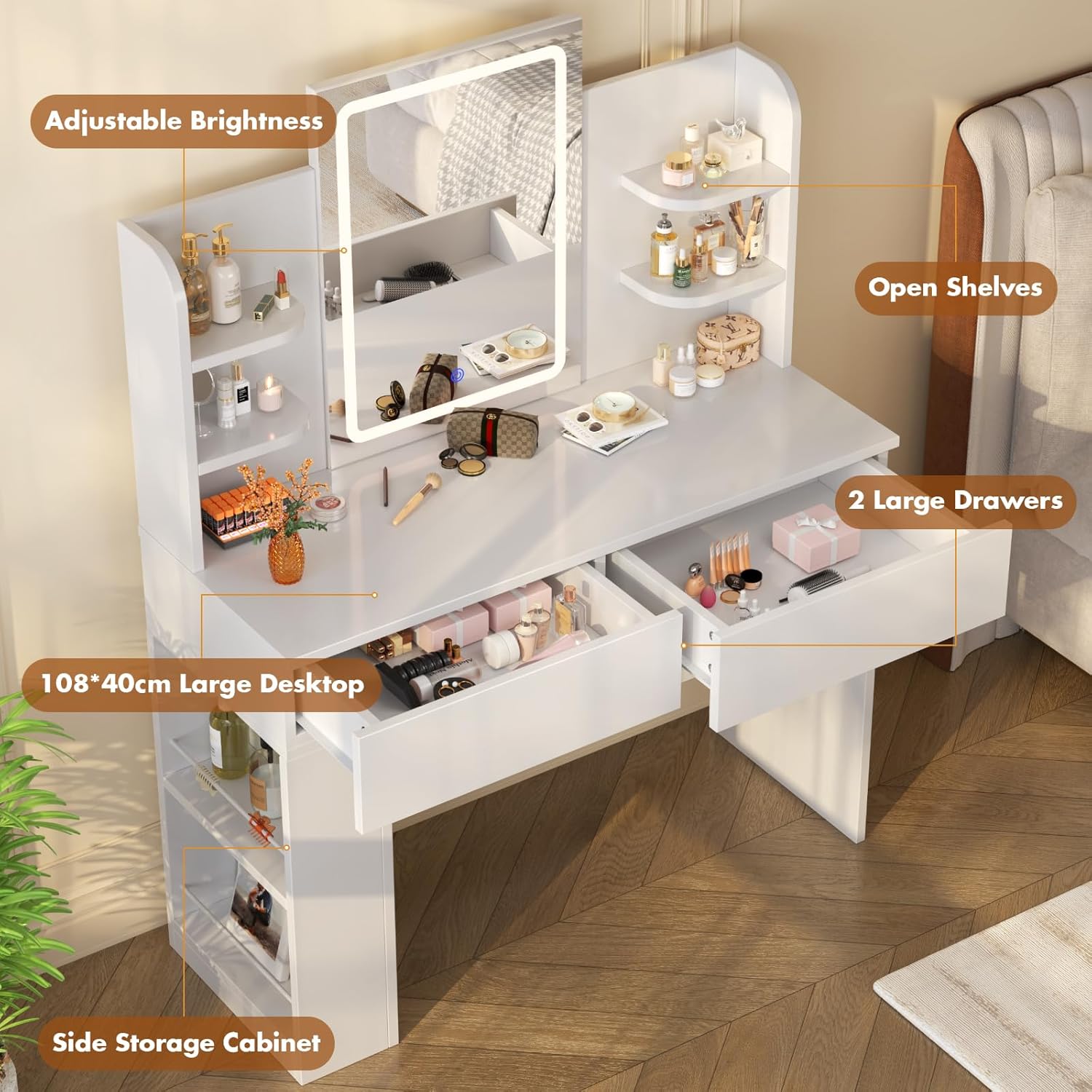
Bild 2: Überview of the Devoko Dressing Table highlighting key features such as adjustable brightness, open shelves, two large drawers, a 108x40cm desktop, and a side storage cabinet.

Image 3: Illustration of the flexible installation for the side storage cabinet, which can be mounted on either the left or right side of the table.
Bedienungsanleitung
Bedienung des LED-Spiegels:
The integrated LED mirror features adjustable lighting with three color modes and brightness control.
- Ein-/Ausschalten: Locate the touch switch on the mirror surface. Tap once to turn the LED lights on or off.
- Lichtfarbe ändern: With the lights on, tap the touch switch repeatedly to cycle through the three light color modes: Cold White, Warm White, and Warm Yellow.
- Helligkeit anpassen: To adjust the brightness, press and hold the touch switch. The brightness will gradually increase or decrease. Release the switch when the desired brightness level is reached.

Image 4: Visual representation of the three distinct lighting effects available on the LED mirror: Cold White, Warm White, and Warm Yellow. The image also indicates that brightness can be adjusted by long-pressing the switch.
Speicherfunktionen:
The dressing table is equipped with various storage options to organize your items.
- Schubladen: Utilize the two large drawers for storing cosmetics, accessories, or personal items.
- Offene Regale: The four open shelves provide easy access and display space for frequently used items or decorative pieces.
- Seitlicher Aufbewahrungsschrank: The integrated side storage offers additional space for taller items or magazines.
Wartung
- Reinigung der Oberfläche: Wischen Sie die Tischoberflächen mit einem Tuch ab.amp Mit einem sauberen, trockenen Tuch abwischen und anschließend sofort wieder abtrocknen. Vermeiden Sie scheuernde Reinigungsmittel oder aggressive Chemikalien, die die Oberfläche beschädigen könnten.
- Reinigung des Spiegels: Use a soft, lint-free cloth and a glass cleaner specifically designed for mirrors. Do not spray cleaner directly onto the mirror; instead, apply it to the cloth first. Ensure the mirror is disconnected from power before cleaning.
- Hardwareprüfung: Überprüfen Sie regelmäßig alle Schrauben und Befestigungselemente, um sicherzustellen, dass sie fest sitzen. Ziehen Sie sie gegebenenfalls nach, um die Stabilität zu gewährleisten.
- Vermeiden Sie direktes Sonnenlicht: Längere Einwirkung direkter Sonneneinstrahlung kann zum Ausbleichen oder zur Beschädigung der Oberfläche führen.
- Vermeiden Sie übermäßige Feuchtigkeit: Keep the dressing table away from areas with high humidity or direct water exposure.
Fehlerbehebung
| Problem | Mögliche Ursache | Lösung |
|---|---|---|
| LED Mirror does not turn on. | Stromkabel nicht angeschlossen oder lose. Steckdose funktioniert nicht. Fehlfunktion des Berührungsschalters. | Ensure the power cable is securely plugged into both the mirror and a working electrical outlet. Testen Sie die Steckdose mit einem anderen Gerät. Wenden Sie sich an den Kundendienst, wenn das Problem nach Überprüfung der Stromversorgung weiterhin besteht. |
| Der Tisch wirkt instabil oder wackelig. | Schrauben oder Befestigungselemente sind locker. Unebener Bodenbelag. | Prüfen und ziehen Sie alle Montageteile fest. Place shims under the table legs if the floor is uneven. |
| Die Schubladen lassen sich nicht leichtgängig öffnen und schließen. | Die Schubladenschienen sind nicht richtig ausgerichtet. Blockierung in der Schubladenschiene. | Recheck drawer slide installation according to the assembly manual. Ensure no items are blocking the tracks. |
Technische Daten
| Besonderheit | Detail |
|---|---|
| Modellnummer | 0501 |
| Marke | Devoko |
| Produktabmessungen (insgesamt) | 15.75"T x 42.52"B x 53.54"H (40 cm T x 108 cm B x 136 cm H) |
| Desktop-Abmessungen | Ungefähr 108 cm x 40 cm |
| Spiegelmaße | 60cm x 45cm (LED integrated) |
| Artikelgewicht | 62.5 Pfund (ca. 28.35 kg) |
| Material | Holzwerkstoff, Glas |
| Farbe | Weiß |
| Montage erforderlich | Ja |
| LED-Lichtfunktionen | 3 Color Modes (Cold White, Warm White, Warm Yellow), Adjustable Brightness |

Image 5: Detailed diagram illustrating the product dimensions in centimeters, including the mirror, desktop, drawers, and side storage.
Garantie und Kundendienst
For warranty information, please refer to the documentation included with your purchase or contact Devoko customer support directly. If you encounter any issues or have questions regarding your Devoko Dressing Table, please reach out to our customer service team for assistance.
Kontaktinformationen: Bitte besuchen Sie die offizielle Devoko-Website. webDie aktuellsten Kontaktdaten des Kundendienstes finden Sie auf unserer Website oder auf Ihrem Kaufbeleg.
Ask a question about this manual
Ask about setup, troubleshooting, compatibility, parts, safety, or missing instructions. Manuals+ will review the question and use this page’s manual context to help answer it.