
1. Einleitung
Thank you for choosing the monTEK Single Monitor Arm with USB (Model: MA1007UCBK). This adjustable monitor desk mount is designed to enhance your workspace ergonomics and efficiency. It supports a wide range of flat or curved screens from 17 to 45 inches, with a maximum load capacity of 35.27 lbs (16 kg), and is compatible with VESA 75x75mm and 100x100mm standards. Featuring full motion adjustments, integrated cable management, and convenient USB 3.0 ports, this monitor arm provides a versatile and clutter-free setup.

Image: monTEK Single Monitor Arm with USB, showcasing sein Design und seine Funktionen.
2. Sicherheitshinweise
- Lesen Sie alle Anweisungen vor der Installation und Verwendung sorgfältig durch.
- Ensure your monitor's weight and VESA pattern are within the specified limits.
- Do not overtighten screws during assembly to avoid damage.
- Always hold the monitor arm horizontally when adjusting spring tension.
- Halten Sie Kinder und Haustiere während der Installation fern.
- Sollten Sie auf Schwierigkeiten stoßen, konsultieren Sie bitte den Abschnitt zur Fehlerbehebung oder wenden Sie sich an den Kundendienst.
3. Produktspezifikationen
| Besonderheit | Detail |
|---|---|
| Marke | monTEK |
| Modell | MA1007UCBK |
| Material | Aluminium |
| Farbe | Schwarz |
| Kompatible Bildschirmgröße | 17" to 45" (Flat or Curved) |
| Maximale Tragfähigkeit | 35.27 kg |
| VESA-Kompatibilität | 75x75mm, 100x100mm |
| Montagetyp | C-Clamp / Öse |
| Tischplattenstärke (C-Clamp/Grommet) | 0.39" - 2" (10-50 mm) |
| Bewegungstyp | Tilt, Swivel, Rotate, Height Adjustment |
| Neigungsbereich | +90° bis -45° |
| Schwenkbereich | ±90° |
| Drehbereich | ±180° |
| Höhenverstellbereich | 8.8" - 20.4" |
| Erweiterungsbereich | 22.6" - 24.5" |
| Integrated Ports | USB 3.0 |

Image: Detailed compatibility and installation requirements for the monitor arm.
4. Installationsanleitung
The monTEK Single Monitor Arm offers two installation methods: C-Clamp and Grommet mounting. All necessary hardware is included.
4.1. Wählen Sie Ihre Montageart

Image: Visual guide for C-Clamp and Grommet mounting, indicating compatible desk thickness.
4.2. Schritt-für-Schritt-Installation
For a comprehensive visual guide, please refer to the installation video below.
Video: Official monTEK Single Monitor Arm Installation Guide. This video demonstrates the complete setup process from mounting the base to attaching the monitor.
- Montieren Sie die Basis: Sichern Sie die gewählte Base (C-Clamp or Grommet) to your desktop according to the instructions provided in the package. Ensure it is tightly fastened to prevent movement.
- Assemble the Arms: Connect the arm segments to the mounted base. Use the provided tools to secure the connections.
- Schließen Sie den Monitor an: Secure the VESA plate to the back of your monitor. Then, slide the monitor with the attached VESA plate onto the arm's mounting head. Ensure the monitor is securely locked in place.

Image: Three easy steps for quick monitor arm installation.
5. Bedienung und Einstellungen
The monTEK monitor arm offers full motion capabilities for optimal viewKomfort.

Bild: Überview of the monitor arm's flexible adjustment ranges.
5.1. Height Adjustment (Spring Tension)
The arm features a built-in spring tension mechanism for effortless height adjustment. If the arm rises or drops unexpectedly, you may need to adjust the tension.
- If the arm rises: Turn the adjustment screw towards the "-" direction (counter-clockwise) to decrease tension.
- If the arm drops: Turn the adjustment screw towards the "+" direction (clockwise) to increase tension.
Note: Always hold the monitor arm horizontally before and during adjustment to prevent sudden movement.

Image: Guide to adjusting the mechanical spring tension.
Video: How to Adjust Your Monitor Arm Spring. This video provides a visual demonstration of adjusting the arm's tension.
Video: Tips for Adjusting Your Monitor Arm and Screen. This video offers additional guidance on fine-tuning your monitor's position.
5.2. Neigen, Schwenken und Drehen
Once the monitor is mounted and tension is adjusted, you can freely manipulate its position:
- Neigung: Adjust the screen angle from +90° to -45° to reduce glare and optimize viewing.
- Schwenken: Rotate the screen horizontally up to ±90° for easy sharing or viewaus verschiedenen Blickwinkeln.
- Drehung: Rotate the screen 360° (±180°) to switch between landscape and portrait modes.
6. Hauptmerkmale
6.1. Integrated USB Ports
The monitor arm's base includes integrated USB 3.0 ports for convenient charging of smartphones, game gear, and high-speed data transfer.
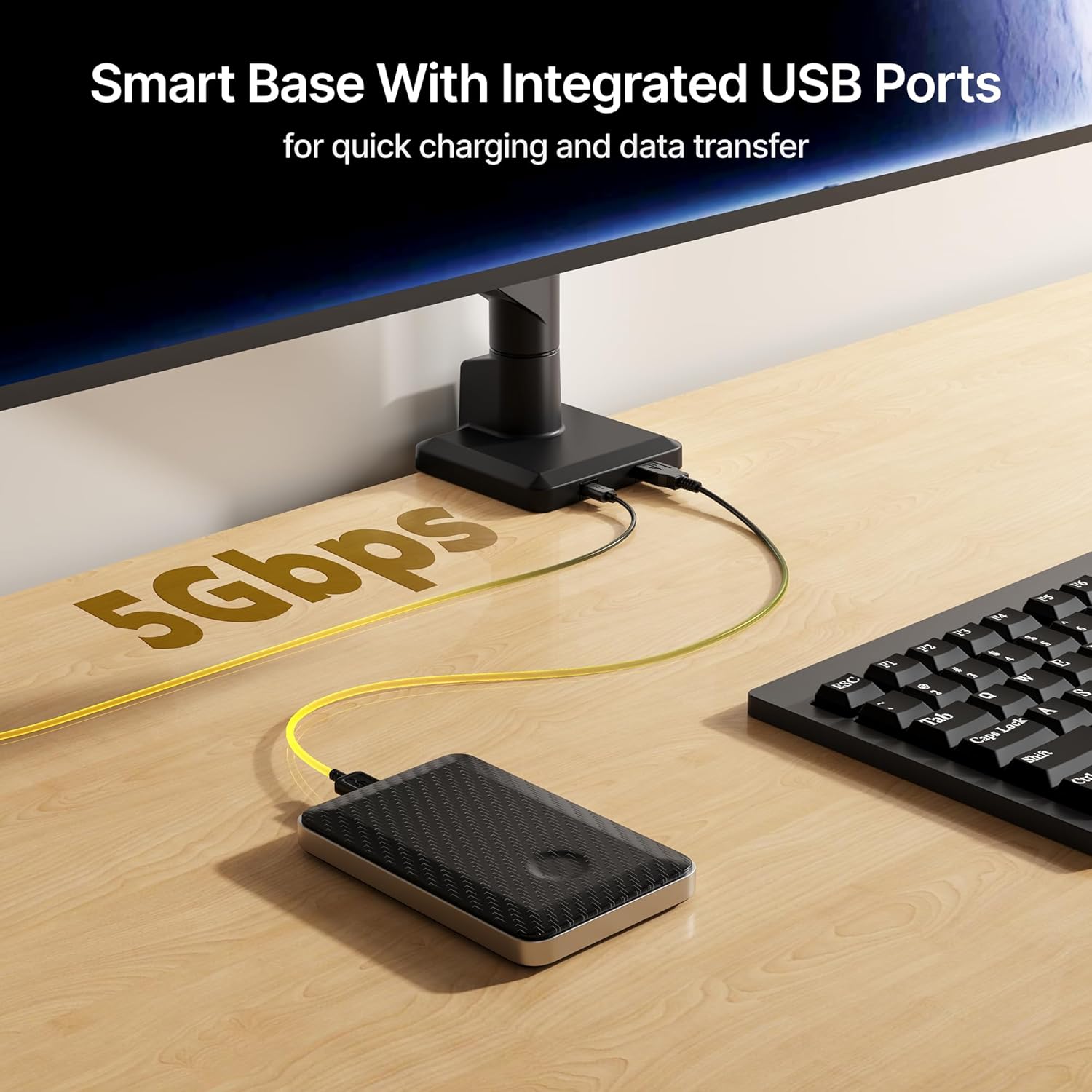
Image: Smart base with integrated USB ports for quick charging and data transfer.
6.2. Kabelmanagement
Keep your workspace tidy and clutter-free with the integrated cable management system. Cables can be routed along the arm to maintain a clean aesthetic.

Image: Demonstrating effective cable management for a tidy desk.
7. Pflege und Wartung
- Überprüfen Sie regelmäßig alle Schrauben und Verbindungen, um sicherzustellen, dass sie fest sitzen.
- Reinigen Sie den Monitorarm mit einem weichen, fusselfreien Tuch.amp Mit einem Tuch abwischen. Vermeiden Sie scheuernde Reiniger oder Lösungsmittel.
- Die maximale Tragfähigkeit von 35.27 lbs (16 kg) darf nicht überschritten werden.
8. Fehlerbehebung
8.1. Monitor Arm Not Staying in Place (Sagging or Rising)
This is typically due to incorrect spring tension for your monitor's weight. Refer to the "Height Adjustment (Spring Tension)" section (5.1) and the videos provided to adjust the tension screw. Remember to hold the arm horizontally during adjustment.
8.2. Monitor Screen Sagging or Stiff Movement
If the screen itself is sagging or feels stiff when tilting, swivel, or rotating, check the tightness of the screws at the VESA plate connection point. Tighten or loosen as needed to achieve desired movement.
9. Garantie und Support
monTEK products are designed for durability and performance. For any questions regarding your monitor mount, please reach out to the monTEK customer support team. Contact information can typically be found on the product packaging or the official monTEK webWebsite.