
1. Einleitung
The UMEIJA OBD2 Scanner with Battery Tester (Model OBD-V620-04) is a comprehensive diagnostic tool designed for vehicles compliant with OBD II protocols. This device allows users to quickly read and clear engine error codes, view live data streams, perform battery tests, and conduct O2/EVAP diagnostics. It is an essential tool for understanding vehicle health and performing maintenance.
2. Produktüberschreitungview
The UMEIJA OBD2 Scanner is a compact and durable device featuring an upgraded microprocessor for fast and accurate results. Its user-friendly interface and plug-and-play design make it accessible for both mechanics and DIY enthusiasts.
Hauptmerkmale:
- Multi-Function Diagnostics: Reads and clears engine error codes, displays live data streams with graphic displays, views freeze frame data, and checks MIL readiness status.
- Breite Fahrzeugkompatibilität: Supports all OBDII protocols (KWP2000, J1850 VPW, ISO9141, J1850 PWM, CAN) for most US (1996+), EU, and Asian (2000+) cars, SUVs, and light trucks.
- Robustes und kompaktes Design: Weighs 9.9 ounces, measures 8.9 x 6.9 x 1.4 inches, and includes a 2.5-foot heavy-duty cable with a standard 16-pin OBD connector.
- Schnelle und präzise Ergebnisse: Upgraded microprocessor ensures real-time vehicle diagnostics.
- Erweiterte Funktionen: Integrated battery tester for monitoring battery life and voltage, plus O2 sensor and EVAP system diagnostics.
- Mehrsprachige Unterstützung: Supports English, German, French, Spanish, Finnish, Dutch, Russian, and Portuguese.

Figure 1: UMEIJA OBD2 Scanner displaying various diagnostic functions including Voltage, Read DTC, O2 Sensor, Clear DTC, EVAP, Vehicle Info, I/M, OBD/EOBD, RT Curve, Freeze, Live Data, and DTC Lib.
3. Einrichtung
- Suchen Sie den OBD2-Anschluss: Der OBD2-Anschluss befindet sich üblicherweise unter dem Armaturenbrett auf der Fahrerseite. Die genaue Position finden Sie in der Bedienungsanleitung Ihres Fahrzeugs.
- Schließen Sie den Scanner an: Plug the 16-pin OBD connector from the scanner into your vehicle's OBD2 port. Ensure a secure connection.
- Einschalten: The scanner will automatically power on once connected to the vehicle's OBD2 port. If it does not, ensure your vehicle's ignition is in the 'ON' position (engine off).
Figure 2: UMEIJA OBD2 Scanner connected to a car's OBD2 port, showing the easy setup process.
4. Bedienungsanleitung
The scanner features intuitive buttons for easy navigation. Use the directional arrows to move through menus and 'OK' to confirm selections. 'ESC' is used to go back.
Grundlegende Navigation:
- Pfeiltasten: Navigate up, down, left, or right through menu options.
- OK-Taste: Eine Auswahl bestätigen oder ein Untermenü aufrufen.
- ESC-Taste: Exit the current screen or return to the previous menu.
- DTC-Taste: Directly access Diagnostic Trouble Code functions.
- BAT-Taste: Directly access Battery Test functions.
5. Diagnosefunktionen
5.1. Reading and Clearing DTCs (Diagnostic Trouble Codes)
- From the main menu, select 'OBD/EOBD' or press the 'DTC' button.
- Choose 'Read DTC' to view current, pending, or permanent trouble codes. The scanner will display the code and its definition.
- To clear codes, select 'Clear DTC'. Confirm your choice when prompted. This will turn off the Check Engine Light.
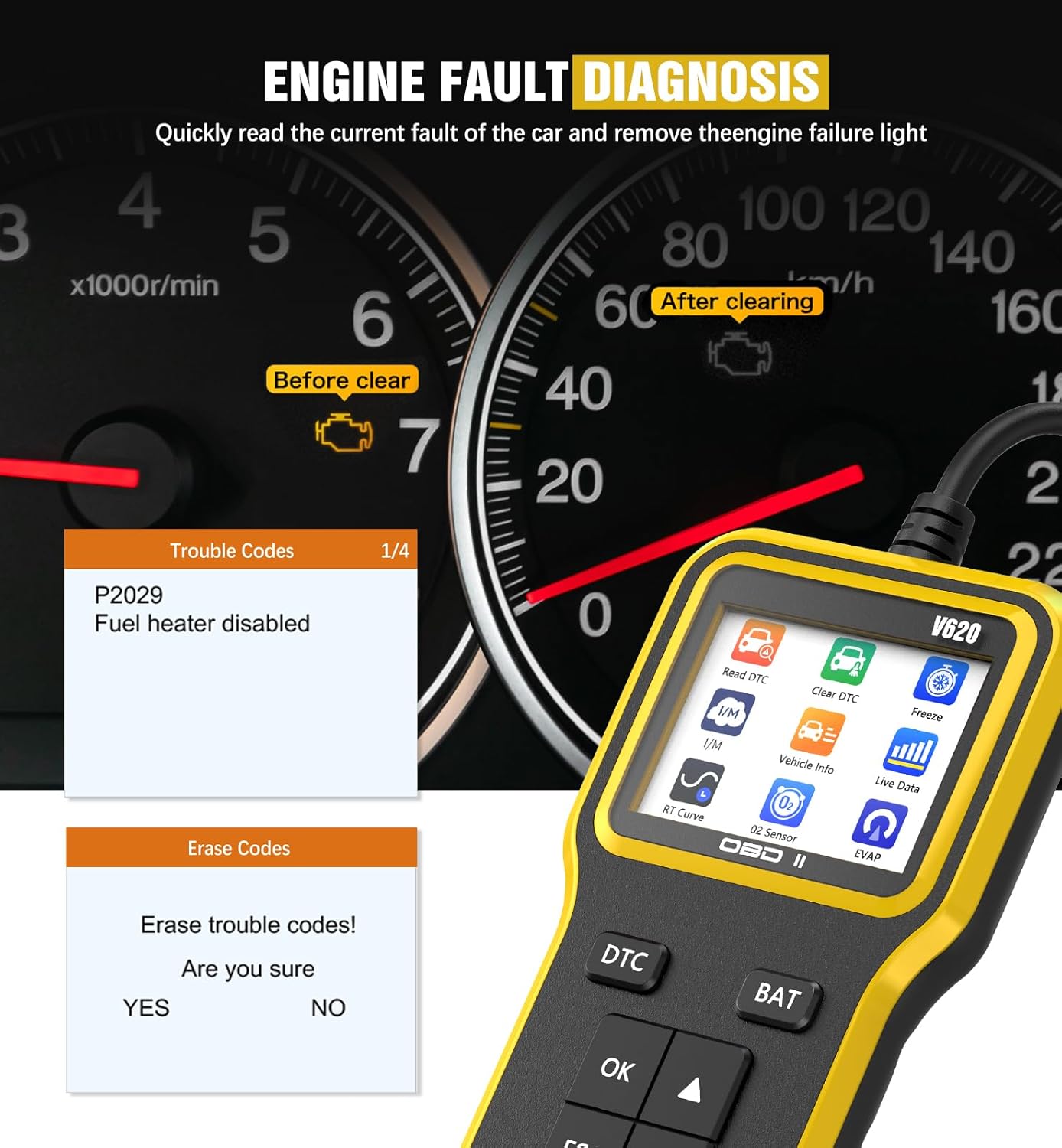
Figure 3: UMEIJA OBD2 Scanner displaying engine fault codes (e.g., P02029) and the option to erase them, indicating a successful diagnosis and clearing process.
5.2. Live-Datenstrom
- From the main menu, select 'Live Data' or navigate to the 'Data Stream' option.
- The scanner will display real-time sensor data from your vehicle, such as RPM, speed, coolant temperature, and more.
- Verwenden Sie die Pfeiltasten, um durch die verschiedenen Datenparameter zu scrollen.

Figure 4: UMEIJA OBD2 Scanner displaying multiple real-time data streams, including FUEL SYS, LOAD_PCT, ECT, SHRFT, LONGFT, FRP, MAP, RPM, SPEED, and SPARKADV, providing a comprehensive view of vehicle performance.
5.3. Batterietest
- From the main menu, select 'Battery' or press the 'BAT' button.
- Der Scanner zeigt den aktuellen Akkustand an.tage, helping you assess the battery's health.
5.4. O2 Sensor and EVAP System Diagnostics
- Navigate to the 'O2 Sensor' or 'EVAP' options from the main menu.
- These functions allow for advanced diagnostics related to oxygen concentration, fuel injection control, and evaporative emission systems, contributing to improved fuel efficiency and reduced emissions.
6. Fehlerbehebung
- Scanner lässt sich nicht einschalten:
- Verify the OBD2 connector is securely plugged into the vehicle's port.
- Stellen Sie sicher, dass die Zündung des Fahrzeugs in der Position „EIN“ steht (Motor aus).
- Überprüfen Sie die Batteriespannung des Fahrzeugs.tage using the scanner's battery test function. A low battery might prevent the scanner from powering on.
-
Ask a question about this manual
Ask about setup, troubleshooting, compatibility, parts, safety, or missing instructions. Manuals+ will review the question and use this page’s manual context to help answer it.