
1. Einleitung
Thank you for choosing the Herdio HE-802WBT 8-Inch Outdoor Bluetooth Speakers. This manual provides essential information for the safe and efficient use of your speakers, including setup, operation, maintenance, and troubleshooting. Please read this manual thoroughly before installation and operation, and retain it for future reference.
2. Sicherheitshinweise
- Energiequelle: Verwenden Sie ausschließlich das mitgelieferte Netzteil. Stellen Sie sicher, dass die Spannung des Netzteilstage matches the speaker's requirements.
- Wassereinwirkung: While these speakers are IP44 waterproof, they are designed to withstand rain and splashes, not submersion. Do not immerse the speakers in water.
- Platzierung: Install speakers securely using the provided brackets. Ensure the mounting surface can support the weight of the speakers.
- Belüftung: Blockieren Sie keine Lüftungsöffnungen. Sorgen Sie für ausreichende Luftzirkulation um die Lautsprecher herum.
- Reinigung: Vor der Reinigung die Stromzufuhr unterbrechen. Ein weiches, trockenes Tuch verwenden. Flüssige Reiniger oder Sprays vermeiden.
- Wartung: Versuchen Sie nicht, dieses Produkt selbst zu warten. Überlassen Sie alle Wartungsarbeiten qualifiziertem Servicepersonal.
- Temperatur: Avoid exposing speakers to extreme temperatures or direct sunlight for extended periods.
3. Packungsinhalt
Überprüfen Sie, ob alle Artikel in Ihrem Paket vorhanden sind:
- 1 x Aktivlautsprecher
- 1 x Passivlautsprecher
- 1 x Netzteil
- 1 x Bedienungsanleitung (dieses Dokument)
- 1 x Speaker Cable (5 meters)
- Montagehalterungen und Hardware

Image: Contents of the Herdio HE-802WBT speaker package, including active and passive speakers, power adapter, speaker cable, and mounting hardware.
4. Produktüberschreitungview und Funktionen
The Herdio HE-802WBT speakers are designed for outdoor use, offering robust sound and durable construction. Key features include:
- Bluetooth 5.3-Konnektivität: Provides a stable wireless connection up to 65 feet (20 meters) in open areas, compatible with all Bluetooth-enabled devices.
- TWS-Kopplung (True Wireless Stereo): Allows two active speakers to pair wirelessly for a stereo sound experience, with a range of up to 10 meters in open space.
- Wasserdichtigkeitsklasse IP44: Marine-grade ABS housing and rustproof grille protect against rain, splashes, and humidity, ensuring durability in outdoor environments.
- Versatile Swivel Brackets: Heavy-duty, 180° adjustable brackets enable precise sound positioning for optimal coverage.
- Hohe Ausgangsleistung: 600W maximum output (for a pair) delivers clear stereo sound suitable for large areas over 1000 sq ft (100 m²).
- Reset-Taste: Located on the back of the master unit for restoring default settings.

Image: Herdio outdoor speakers installed near a swimming pool, highlighting their IP44 waterproof design suitable for patio and pool areas.

Image: A family enjoying music in a living space, demonstrating the Bluetooth 5.3 wireless connectivity of the speakers, controlled via a smartphone.
5. Installation
5.1 Lautsprecherplatzierung
For optimal sound projection, place active speakers approximately 8 feet (2.4 meters) apart, slightly above ear level. Passive speakers can be positioned further away (within 16.4 feet / 5 meters) but must connect to the active unit. These speakers are ideal for large areas such as conference rooms, gyms, auditoriums, churches, commercial venues, spacious backyards, and patios.

Image: Herdio speakers installed on a house exterior, illustrating sound coverage for a large outdoor space, indicating suitability for areas over 1000 sq ft.
5.2 Verdrahtungsanweisungen
The system includes one active speaker and one passive speaker. The active speaker requires power and connects to your Bluetooth device. The passive speaker connects to the active speaker via the supplied speaker cable.
- Connect the power adapter to the active speaker.
- Identify the positive (+) and negative (-) terminals on both speakers. The red wire connects to the positive (+) terminal, and the black wire connects to the negative (-) terminal.
- Press the release tab on the push-in terminal block, insert the speaker wire, and release the tab to secure the connection. Ensure all connections are secure and wires are not loose.

Image: A wiring diagram illustrating the connection of the active speaker to a power adapter and a Bluetooth device, and the passive speaker to the active speaker via a speaker cable.

Image: A four-panel illustration detailing speaker installation: optimal placement, wiring instructions for the push-in terminal block, how to place speakers onto brackets, and how to mount and adjust the speakers.
5.3 Montage
The speakers come with adjustable wall mount brackets for flexible installation.
- Securely fix the bracket to your desired wall type using appropriate screws (not included).
- Mount the speaker onto the bracket.
- Adjust the speaker orientation using the large plastic knobs on the side to direct sound where desired. The brackets allow for 180° adjustment.
- For outdoor longevity, tilt the speakers slightly downwards to prevent water accumulation.
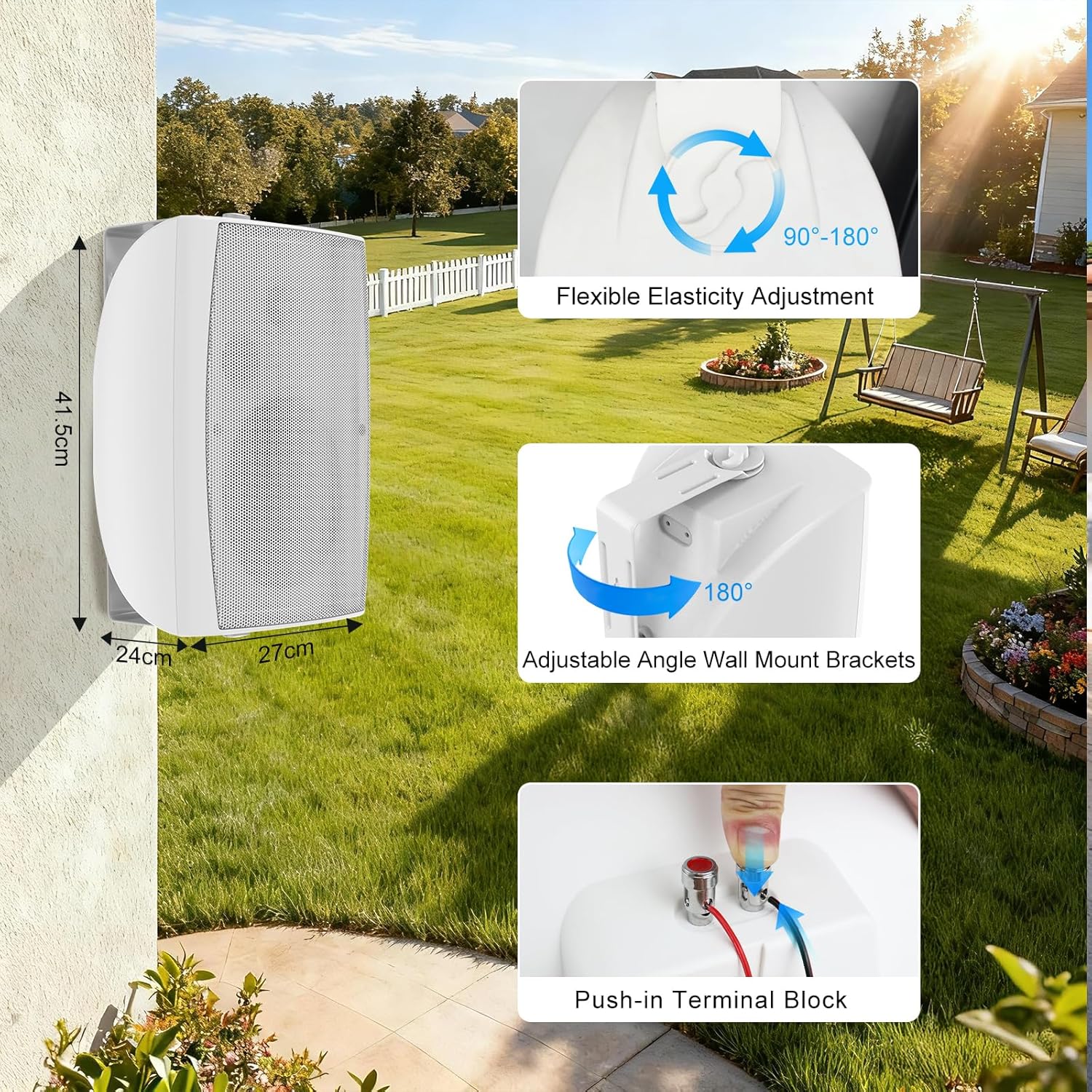
Image: A visual guide showing the speaker's dimensions, the 180-degree adjustable angle wall mount brackets, and a close-up of the push-in terminal block for wiring.

Image: A three-step guide demonstrating simple and secure installation: (1) Fixing the bracket securely, (2) Mounting the speaker, and (3) Adjusting the speaker orientation.
6. Bedienungsanleitung
6.1 Bluetooth-Kopplung
- Stellen Sie sicher, dass der aktive Lautsprecher eingeschaltet ist.
- On your Bluetooth-enabled device (smartphone, tablet, PC), go to the Bluetooth settings.
- Suchen nach available devices and select "Herdio HE-802WBT" to connect.
- Once connected, you will hear an audible confirmation, and the Bluetooth indicator light on the speaker will stabilize.
6.2 TWS (True Wireless Stereo) Kopplung
To achieve true wireless stereo sound with two active speakers:
- Ensure both active speakers are powered on and not connected to any other Bluetooth device.
- On the back of one active speaker (the master unit), locate and press the TWS button.
- The speakers will automatically search for and pair with each other. A successful TWS connection will be indicated by an audible prompt.
- Once TWS paired, connect your Bluetooth device to the master speaker as described in Section 6.1.

Image: A diagram showing two active speakers and two passive speakers, with one active speaker connected to a power adapter and a Bluetooth device, and the TWS pairing button highlighted for connecting multiple speaker sets.
6.3 Reset-Funktion
To restore the speakers to their factory default settings, press and hold the TWS/Reset button on the back of the master unit for 3 seconds.
6.4 Lautstärkeregelung
The volume of the speakers is controlled directly by your connected Bluetooth device.
7. Pflege und Wartung
- Reinigung: Verwenden Sie ein weiches,amp cloth to wipe the speaker surfaces. Avoid harsh chemicals or abrasive cleaners.
- Wetterschutz: While waterproof, regular inspection for debris or blockages in the grille is recommended. In extreme weather conditions (e.g., heavy storms, prolonged freezing temperatures), consider temporary indoor storage if possible to maximize lifespan.
- Verbindungen: Überprüfen Sie regelmäßig alle Kabelverbindungen, um sicherzustellen, dass sie sicher und korrosionsfrei sind.
8. Fehlerbehebung
In der folgenden Tabelle finden Sie häufig auftretende Probleme und deren Lösungen:
| Problem | Ursache | Aktion |
|---|---|---|
| KEINE STROMVERSORGUNG | Power connection might be loose. Das Netzteil ist möglicherweise beschädigt. |
Check if power adapter is falsely wired to power connector. Überprüfen Sie, ob die Betriebsanzeige leuchtet. |
| HAS POWER BUT NO SOUND | Wrong positive and negative connection. Speaker wiring might be loose. |
Make sure the speaker red (+) connect to amplifier red (+) and the black (-) to the black (-). Check the speaker wiring is falsely wired or not. |
| HAS POWER BUT BLUETOOTH NOT CONNECT | Power connection might be loose. Das Netzteil ist möglicherweise beschädigt. |
Check if power adapter is falsely wired to power connector. Überprüfen Sie, ob die Betriebsanzeige leuchtet. |

Image: A troubleshooting guide detailing common issues like no power, power but no sound, and power but no Bluetooth connection, along with their causes and recommended actions.
9. Technische Daten
| Besonderheit | Spezifikation |
|---|---|
| Produktmodell | HE-802WBT |
| Bluetooth-Version | Bluetooth 5.3 |
| Maximale Leistung | 2 * 300W (600W total for a pair) |
| Nennleistung | 2 * 80 W |
| Empfindlichkeit | 88 dB |
| Wasserdichtigkeit | IP44 |
| Frequenzgang | 30 Hz – 27 kHz |
| Impedanz | 8 Ohm |
| Audioenergie | AC 100-240V or DC 19V3 |
| Tieftöner | 8" Injection Molded PP ConeButy Rubber Surround |
| Hochtöner | 1" PET Dome |
| Artikelabmessungen (T x B x H) | 10.63"T x 17.72"B x 9.45"H (ca. 27 cm x 45 cm x 24 cm) |
| Artikelgewicht | 13.18 Kilograms (for the pair) |

Image: A table summarizing the technical specifications of the Herdio HE-802WBT speakers, including model, Bluetooth version, power, sensitivity, waterproof rating, frequency response, impedance, audio power, woofer, and tweeter details.

Image: A diagram showing the length, width, and height dimensions of the Herdio HE-802WBT speaker in both inches and centimeters.
10. Garantieinformationen
Dieses Produkt wird mit einem Eingeschränkte GarantieDie genauen Garantiebedingungen entnehmen Sie bitte der in Ihrer Verpackung enthaltenen Garantiekarte oder kontaktieren Sie den Herdio-Kundendienst.


