
MUBVIEW Glocke J7
MUBVIEW Bell J7 2K Drahtlose Video-Türklingelkamera mit Gong – Benutzerhandbuch
Modell: Bell J7
1. Einleitung
Dieses Handbuch enthält detaillierte Anweisungen für die Installation, den Betrieb und die Wartung Ihres MUB.VIEW Bell J7 2K Wireless Video Doorbell Camera with Chime. Please read this manual thoroughly before using the product to ensure proper function and safety. This device is designed to enhance your home security with advanced features like 2K video, motion detection, and two-way audio.
2. Lieferumfang
Vergewissern Sie sich vor der Installation, dass alle Komponenten vorhanden sind:
- Camera Doorbell x1
- Glockenspiel x1
- Benutzerhandbuch x1
- Ladekabel x1
- Battery x3
- Other Accessories (screws, anchors, screwdriver)

Image: Contents of the MUBVIEW Bell J7 package, including the doorbell, chime, and installation tools.
3. Produktüberschreitungview
Familiarize yourself with the main parts of your video doorbell and chime:
Türklingelkamera
- 2K Camera Lens: Nimmt Videos in hoher Auflösung auf.
- PIR Bewegungs-Sensor: Erkennt menschliche Bewegungen.
- Mikrofon: Für die bidirektionale Audiokommunikation.
- Lautsprecher: Für Zwei-Wege-Audiokommunikation und Sirene.
- Klingelknopf: Aktiviert den Gong und versendet Benachrichtigungen.
- Micro USB-C Port: Zum Laden des internen Akkus.
- Reset-Taste: Zum Zurücksetzen des Geräts.
- Micro-SD-Kartensteckplatz: For local video storage (up to 128GB, card not included).
- Anti-Theft Button: Triggers an alarm if the doorbell is removed from its mount.
Drahtloses Glockenspiel
- Lautsprecher: Gibt einen Türklingelton von sich.
- Lautstärkeregelung: Regelt die Lautstärke des Klingeltons.
- Tonauswahl: Changes chime melody.
- Energiequelle: Batteriebetrieben für flexible Platzierung.

Bild: Vorderseite view der MUBVIEW Bell J7 doorbell and chime.
4. Einrichtung
Befolgen Sie diese Schritte, um Ihr MUB einzurichten.VIEW Bell J7 doorbell camera:
4.1 Aufladen der Türklingel
- Before first use, fully charge the doorbell camera using the provided USB charging cable.
- The charging port is located on the side of the doorbell, protected by a rubber flap.
- Eine vollständige Ladung hält je nach Nutzung bis zu 180 Tage.
4.2 App-Installation und WLAN-Verbindung
- Laden Sie die CloudEdge or MUBVIEW app from your smartphone's app store (Apple App Store or Google Play Store).
- Registrieren Sie sich für ein Konto oder melden Sie sich an, falls Sie bereits eines besitzen.
- Stellen Sie sicher, dass Ihr Smartphone mit einem 2.4 GHz Wi-Fi-Netzwerk. The doorbell is not compatible with 5GHz Wi-Fi.
- In the app, select "Add Device" and choose "Smart Video Doorbell".
- Follow the on-screen prompts to connect the doorbell to your Wi-Fi network. This typically involves scanning a QR code displayed on your phone with the doorbell camera.
- Sobald die Verbindung hergestellt ist, können Sie Ihrem Gerät einen Namen geben und die Einrichtung abschließen.
4.3 Montage der Türklingel
The doorbell can be mounted using screws or strong adhesive tape (not included for all mounting types).
- Attach the mounting bracket to your desired location on the wall or door frame. Ensure it is at an appropriate height for optimal viewing.
- Secure the bracket using the provided screws and anchors.
- Slide the doorbell camera into the mounting bracket until it clicks securely into place.
- For added security, a small screw can be inserted from the bottom of the bracket into the doorbell to prevent easy removal.

Image: Installation of the MUBVIEW Bell J7 doorbell camera onto its mounting bracket.
5. Bedienungsanleitung
5.1 Live View und Zwei-Wege-Audio
- Öffnen Sie die MUBVIEW app to access the live video feed from your doorbell camera.
- Use the microphone icon in the app to enable two-way audio and speak with visitors at your door.
- The voice changer feature can be activated for added privacy and security.

Image: Demonstrating two-way audio and voice message functionality via the app.
5.2 Bewegungserkennung und Benachrichtigungen
- The doorbell features advanced PIR motion and human detection to minimize false alarms.
- Bei Bewegungserkennung erhalten Sie umgehend Push-Benachrichtigungen auf Ihr Smartphone.
- Adjust motion detection sensitivity and set custom motion zones within the app to suit your environment.

Image: Smartphone notification for human detection from the doorbell camera.
5.3 Nachtsicht
- The doorbell camera automatically switches to IR night vision in low-light conditions.
- Enhanced night vision provides clear images up to 33 feet.
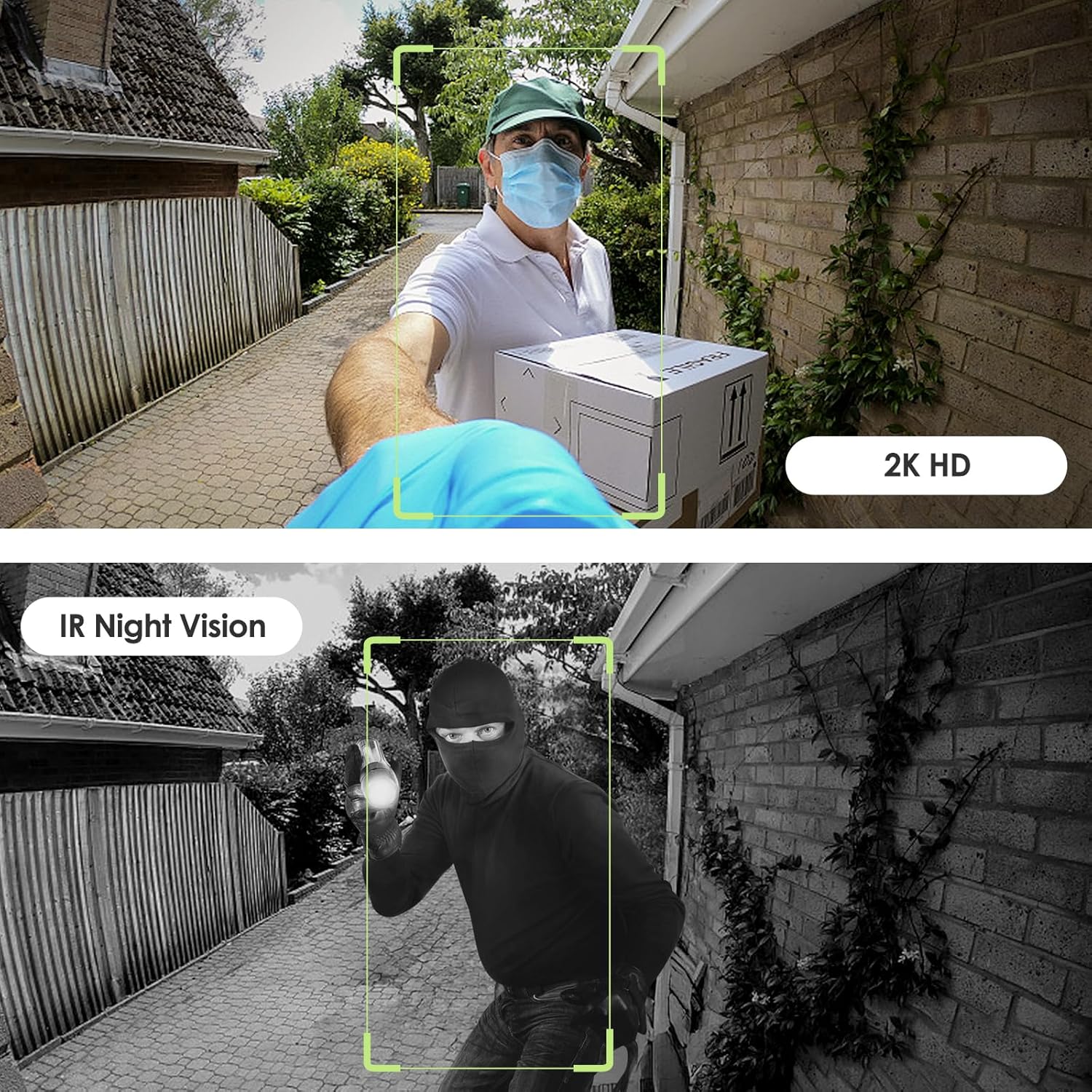
Image: Day and night vision capabilities of the MUBVIEW Bell J7 doorbell.
5.4 Videospeicher
- Micro SD Karte: Insert a micro SD card (up to 128GB, not included) into the designated slot for local storage of recorded footage.
- Cloud-Speicher: Enjoy 7-day free cloud loop storage. Optional premium cloud storage plans are available for extended storage and features.

Image: Multiple storage options: local Micro SD card and cloud service.
6. Funktionen
- 2K Full HD-Auflösung: Bietet klare und detaillierte Videos.
- 145°-Weitwinkelobjektiv: Bietet ein breites view vor Ihrer Haustür.
- Batteriebetrieben: Ensures easy, wire-free installation.
- 2.4-GHz-WLAN-Konnektivität: Stable and reliable wireless connection.
- IP65-Wetterbeständigkeit: Built to withstand various outdoor conditions (rain, heat, hail, sun, dust).
- Anti-Diebstahl-Alarm: Siren sounds if the doorbell is tampmit.
- Stimmenverzerrer: Enhances privacy during two-way audio.
- Pre-Recorded Voice Messages: Respond quickly with custom messages.
- Familienfreigabe: Supports up to 15 online users and 20 user accounts.
- Kompatibilität: Funktioniert mit Alexa und Google Assistant.

Bild: Überview of MUBVIEW Bell J7 features.
7. Wartung
7.1 Laden der Batterie
The doorbell is powered by rechargeable batteries. Monitor the battery level through the app and recharge as needed. The battery life can extend up to 180 days on a single charge, depending on activity and settings.
7.2 Reinigung
Wischen Sie die Kameralinse und die Außenseite der Türklingel mit einem weichen, fusselfreien Tuch ab.amp cloth to remove dust and debris. Avoid using harsh chemicals or abrasive materials that could damage the device.
7.3 Witterungsbeständigkeit
Die MUBVIEW Bell J7 is IP65 weather-resistant, designed to endure various outdoor conditions. However, extreme weather conditions may still impact performance or battery life.

Image: IP65 Weather Resistance of the MUBVIEW Bell J7 doorbell.
8. Fehlerbehebung
| Ausgabe | Mögliche Lösung |
|---|---|
| Die Türklingel verbindet sich nicht mit dem WLAN. | Ensure your Wi-Fi is 2.4GHz. Move the doorbell closer to your router during setup. Reset the doorbell and try again. |
| Häufige Fehlalarme durch Bewegungserkennung | Adjust the motion detection sensitivity in the app. Set custom motion zones to exclude busy areas or moving foliage. |
| Schlechte Videoqualität | Check your Wi-Fi signal strength in the app. Ensure the camera lens is clean and free from obstructions. |
| Kurze Akkulaufzeit | Reduzieren Sie die Empfindlichkeit der Bewegungserkennung oder die Frequenz der Live-Übertragung. view access. Ensure the doorbell is fully charged. |
| Anti-theft alarm not working | Ensure the anti-theft feature is enabled in the app settings. Check if the doorbell is properly seated in its mounting bracket, activating the tampäh Taste. |
9. Spezifikationen
- Modellname: Glocke J7
- Auflösung der Videoaufnahme: 2K
- Konnektivitätstechnologie: Drahtlos (2.4-GHz-WLAN)
- Energiequelle: Batteriebetrieben (3 A-Batterien im Lieferumfang enthalten)
- Verwendung im Innen- und Außenbereich: Im Freien
- Wasserbeständigkeit: IP65 Wasserdicht
- Besondere Merkmale: 2-Way Audio, Built-In Light, HD Resolution, Image Sensor, Motion Sensor, Voice Changer, Anti-Theft Alarm
- Kompatible Geräte: Smartphone (via CloudEdge/MUBVIEW App)
- Produktabmessungen: 1.37 x 5.27 x 2.2 Zoll
- Artikelgewicht: 15.4 Unzen
10. Garantie und Support
MUBVIEW is committed to providing quality products and customer satisfaction. For any inquiries or support needs, please refer to the following:
- Kundendienst: Available via Call Service (9AM-5PM EST) and Online Email.
- Widerrufsfolgen: 30-day Amazon return policy applies.
- Schutzpläne: Optional können 2-Jahres- und 3-Jahres-Schutzpläne erworben werden.
For detailed contact information, please visit the official MUBVIEW webBesuchen Sie die Website oder beachten Sie die in der Produktverpackung angegebenen Kontaktdaten.

Bild: MUBVIEW Customer Service details.
Ask a question about this manual
Ask about setup, troubleshooting, compatibility, parts, safety, or missing instructions. Manuals+ will review the question and use this page’s manual context to help answer it.