
Einführung
Welcome to the user manual for your new HP OMEN 16-ae0002TX Gaming Laptop. This document provides essential information to help you set up, operate, maintain, and troubleshoot your device. Designed for high-performance gaming and demanding tasks, this laptop features a 14th Gen Intel Core i7 processor, NVIDIA GeForce RTX 4060 graphics, 16GB DDR5 RAM, and a 1TB SSD, all presented on a vibrant 16.1-inch FHD 165Hz display.
1. Ersteinrichtung
1.1 Unpacking Your Laptop
Nehmen Sie alle Komponenten vorsichtig aus der Verpackung. Stellen Sie sicher, dass folgende Teile vorhanden sind:
- HP OMEN 16-ae0002TX Gaming Laptop
- Netzteil
- Netzkabel
- Benutzerhandbuch (dieses Dokument)
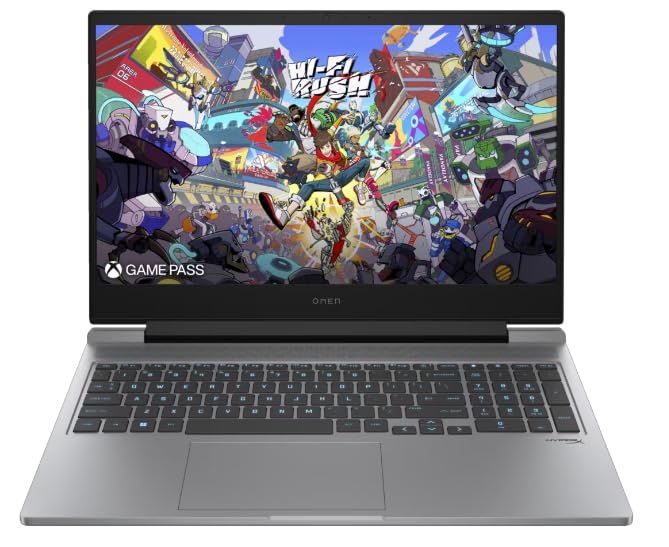
Figure 1: HP OMEN 16-ae0002TX Gaming Laptop overview.
1.2 Anschließen des Netzteils
- Schließen Sie das Netzkabel an das Netzteil an.
- Stecken Sie das Netzteil in eine Wandsteckdose.
- Connect the adapter's output plug to the power port on your laptop.
Es wird empfohlen, den Laptop vor der ersten Benutzung vollständig aufzuladen.
1.3 Erster Start und Windows-Einrichtung
Press the power button located on the laptop chassis. The laptop will boot up, and you will be guided through the Windows 11 Home setup process. Follow the on-screen instructions to configure your operating system, network settings, and user account.
1.4 Externe Geräte anschließen
Your HP OMEN laptop provides various ports for connecting external devices:
- USB-Anschlüsse: Für Mäuse, Tastaturen, externe Speichermedien und andere USB-Geräte.
- HDMI-Anschluss: Zum Anschluss an externe Bildschirme oder Fernseher.
- Audiobuchse: Für Kopfhörer oder externe Lautsprecher.
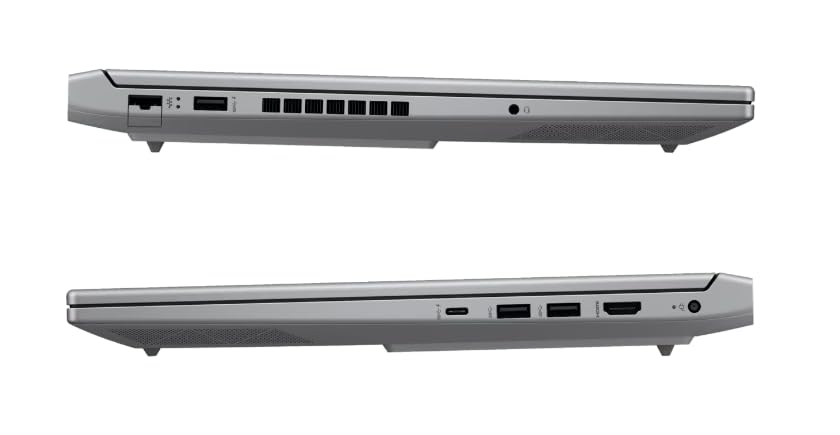
Abbildung 2: Seite view Darstellung der verfügbaren Anschlüsse.
2. Bedienung Ihres Laptops
2.1 Ein-/Ausschalten und Schlafmodus
- Einschalten: Drücken Sie die Einschalttaste.
- Abschalten: Klicken Sie in Windows auf die Schaltfläche „Start“ und wählen Sie dann „Ein/Aus“ > „Herunterfahren“.
- Schlafmodus: Schließen Sie den Deckel oder wählen Sie im Startmenü „Ein/Aus“ > „Ruhezustand“.
2.2 Tastatur und Touchpad
The laptop features a 1-zone RGB backlit full-size keyboard with HyperX tactile feedback for an enhanced gaming and typing experience. The integrated touchpad supports multi-touch gestures for navigation.
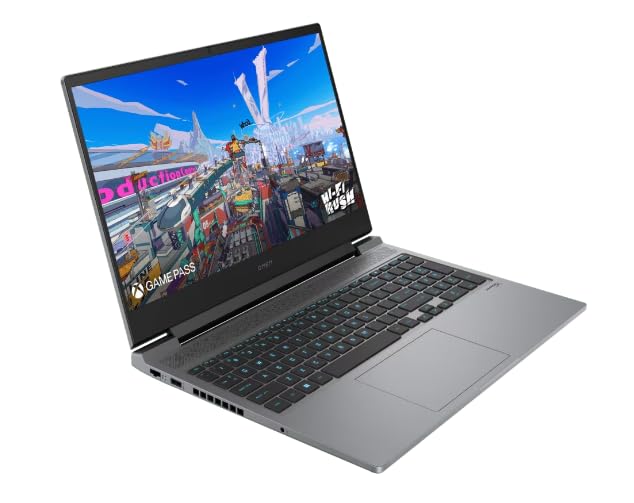
Abbildung 3: Layout von Tastatur und Touchpad.
2.3 Anzeigefunktionen
The 16.1-inch FHD (1920 x 1080) IPS display offers a 165Hz refresh rate and 7ms response time, providing smooth and responsive visuals for gaming and multimedia. Adjust brightness and display settings through Windows display options.
2.4 Netzwerk- und Drahtlosverbindungen
- W-lan: Connect to wireless networks via the Windows network settings.
- Bluetooth: Koppeln Sie Bluetooth-fähige Geräte wie Kopfhörer, Mäuse oder Gamecontroller.
2.5 HP True Vision 1080p FHD Camera
The integrated 1080p FHD webcam is suitable for video calls, online meetings, and streaming. Ensure proper lighting for optimal image quality.
3. Wartung und Pflege
3.1 Allgemeine Reinigung
- Bildschirm: Benutzen Sie ein weiches, fusselfreies Tuch, dampMit Wasser oder einem Bildschirmreiniger abspülen. Scharfe Chemikalien vermeiden.
- Tastatur und Gehäuse: Use a soft cloth. For dust, use compressed air.
- Vor der Reinigung unbedingt sicherstellen, dass der Laptop ausgeschaltet und vom Stromnetz getrennt ist.
3.2 Batteriepflege
The laptop is equipped with a Lithium Ion battery. To maximize battery lifespan:
- Vermeiden Sie extreme Temperaturen.
- Lassen Sie den Akku nicht häufig vollständig entladen.
- Wenn Sie den Laptop über einen längeren Zeitraum lagern, stellen Sie sicher, dass der Akku auf etwa 50 % geladen ist.
3.3 Softwareaktualisierungen
Regularly update your Windows operating system, drivers, and HP software to ensure optimal performance, security, and compatibility. These updates often include performance enhancements and bug fixes.
4. Fehlerbehebung bei häufigen Problemen
This section addresses common issues you might encounter. For more complex problems, refer to the HP support webWebsite.
4.1 Stromversorgungsprobleme
- Laptop lässt sich nicht einschalten: Stellen Sie sicher, dass das Netzteil fest mit dem Laptop und einer funktionierenden Steckdose verbunden ist. Prüfen Sie, ob die Kontrollleuchte des Netzteils leuchtet.
- Akku wird nicht aufgeladen: Verify the power adapter connection. Try a different outlet.
4.2 Anzeigeprobleme
- Kein Bild auf dem Bildschirm: Stellen Sie sicher, dass der Laptop eingeschaltet ist. Versuchen Sie, einen externen Monitor anzuschließen, um zu überprüfen, ob das Problem am Display des Laptops liegt.
- Flackerndes oder verzerrtes Bild: Aktualisieren Sie Ihre Grafiktreiber. Passen Sie die Bildwiederholfrequenz in den Windows-Einstellungen an.
4.3 Verbindungsprobleme
- WLAN-Verbindung wird nicht hergestellt: Prüfen Sie, ob WLAN in den Windows-Einstellungen aktiviert ist. Starten Sie Ihren Router und Ihren Laptop neu.
- Bluetooth-Gerät kann nicht gekoppelt werden: Stellen Sie sicher, dass sich das Bluetooth-Gerät im Kopplungsmodus befindet und in Reichweite ist. Überprüfen Sie die Bluetooth-Einstellungen Ihres Laptops.
5. Produktspezifikationen
| Besonderheit | Spezifikation |
|---|---|
| Marke | HP |
| Modellname | HP laptopOMEN (ae0002tx) |
| Prozessor | 14th Gen Intel® Core™ i7-14650HX (up to 5.2 GHz) |
| RAM-Speicher | 16 GB DDR5 (maximal 32 GB) |
| Lagerung | 1 TB SSD (Solid-State-Drive) |
| Grafikkarte | NVIDIA GeForce RTX 4060 (8 GB GDDR6 Dedicated) |
| Anzeige | 16.1-inch FHD (1920 x 1080) IPS, 165Hz, 7ms, 300 nits |
| Betriebssystem | Windows 11 Home |
| Tastatur | 1-zone RGB Backlit, HyperX tactile feedback |
| WebNocken | HP True Vision 1080p FHD |
| Konnektivität | WLAN, Bluetooth |
| Häfen | USB (Total: 1), HDMI (Total: 1) |
| Abmessungen (Länge x Breite x Dicke) | 30L x 25W x 6Th Centimeters |
| Artikelgewicht | 1.9 Kilogramm |
| Akku-Typ | Lithium Ion (2.6 Watt Hours) |
6. Garantieinformationen
Your HP OMEN 16-ae0002TX Gaming Laptop comes with an onsite warranty. Please retain your proof of purchase for warranty claims. For detailed terms and conditions, refer to the warranty card included with your product or visit the official HP support webWebsite.
7. Kundendienst
For technical assistance, service, or further inquiries, please contact HP customer support:
- Hersteller / Importeur: HP India Sales Pvt. Ltd., 24 Salarpuria Arena, Hosur Main Road, Adugodi, Bangalore-560030
- Online-Hilfe: Besuchen Sie die offizielle HP-Kundendienst WebWebsite für Treiber, Handbücher und Anleitungen zur Fehlerbehebung.