
1. Einleitung
Thank you for choosing the THOMSON WS902DUO Cosy Bookshelf Speakers. These active stereo speakers deliver a powerful 150W audio experience with deep bass from two 10 cm woofers. They offer versatile connectivity options including Bluetooth 5.3, Optical, HDMI (ARC), RCA, and USB playback. The included remote control and side panel adjustments provide precise control over your audio. Please read this manual carefully before use to ensure proper operation and to maximize your listening experience.

Image 1.1: THOMSON WS902DUO Bookshelf Speakers in a living space, showcasing their elegant wood finish.
2. Wichtige Sicherheitshinweise
- Lesen Sie diese Anweisungen sorgfältig durch, bevor Sie das Produkt in Betrieb nehmen.
- Bewahren Sie diese Anleitung zum späteren Nachschlagen auf.
- Beachten Sie alle Warnhinweise auf dem Produkt und in der Bedienungsanleitung.
- Befolgen Sie alle Anweisungen.
- Verwenden Sie dieses Gerät nicht in der Nähe von Wasser.
- Nur mit trockenem Tuch reinigen.
- Die Lüftungsöffnungen dürfen nicht blockiert werden. Die Installation muss gemäß den Anweisungen des Herstellers erfolgen.
- Installieren Sie das Gerät nicht in der Nähe von Wärmequellen wie Heizkörpern, Heizregistern, Öfen oder anderen Geräten (einschließlich ampKonverter (Lüfter), die Wärme erzeugen.
- Machen Sie den Sicherheitszweck des polarisierten oder geerdeten Steckers nicht zunichte. Ein polarisierter Stecker hat zwei Stifte, von denen einer breiter als der andere ist. Ein geerdeter Stecker hat zwei Stifte und einen dritten Erdungsstift. Der breite Stift oder der dritte Stift dienen Ihrer Sicherheit. Wenn der mitgelieferte Stecker nicht in Ihre Steckdose passt, wenden Sie sich an einen Elektriker, um die veraltete Steckdose auszutauschen.
- Schützen Sie das Netzkabel vor Beschädigungen oder Beschädigungen durch Fußgänger, insbesondere an den Steckern, Steckdosen und an der Stelle, an der es aus dem Gerät austritt.
- Verwenden Sie nur vom Hersteller angegebene Zusatzgeräte/Zubehör.
- Verwenden Sie das Gerät nur mit dem vom Hersteller angegebenen oder mit dem Gerät verkauften Wagen, Ständer, Stativ, Halter oder Tisch. Wenn Sie einen Wagen verwenden, seien Sie beim Bewegen der Wagen-/Gerät-Kombination vorsichtig, um Verletzungen durch Umkippen zu vermeiden.
- Trennen Sie das Gerät bei Gewitter oder längerer Nichtbenutzung vom Stromnetz.
- Überlassen Sie alle Wartungsarbeiten qualifiziertem Servicepersonal. Eine Wartung ist erforderlich, wenn das Gerät auf irgendeine Weise beschädigt wurde, z. B. wenn das Netzkabel oder der Stecker beschädigt sind, Flüssigkeit in das Gerät verschüttet wurde oder Gegenstände hineingefallen sind, das Gerät Regen oder Feuchtigkeit ausgesetzt war, nicht normal funktioniert oder fallengelassen wurde.
3. Packungsinhalt
Bitte überprüfen Sie, ob alle unten aufgeführten Artikel in Ihrem Paket enthalten sind:
- THOMSON WS902DUO Bookshelf Speakers (2 units)
- Fernbedienung
- Stromkabel
- Lautsprecheranschlusskabel
- 3.5mm Jack to RCA Adapter Cable
- Benutzerhandbuch (dieses Dokument)

Image 3.1: Packaging of the THOMSON WS902DUO Bookshelf Speakers.
4. Produktüberschreitungview
4.1. Side Control Panel (Active Speaker)
The active speaker features a side control panel for easy access to essential functions.

Image 4.1: Side control panel.
- Bassregelung: Passt die Niederfrequenzausgabe an.
- Höhenregelung: Regelt den Hochfrequenzausgang.
- Lautstärkeregelung: Regelt die Gesamtlautstärke.
- Stromschalter: Schaltet die Lautsprecher ein oder aus.
- LED-Anzeige: Shows the current status or selected input.
4.2. Rear Panel (Active Speaker)
The rear panel of the active speaker provides all necessary input and output connections.
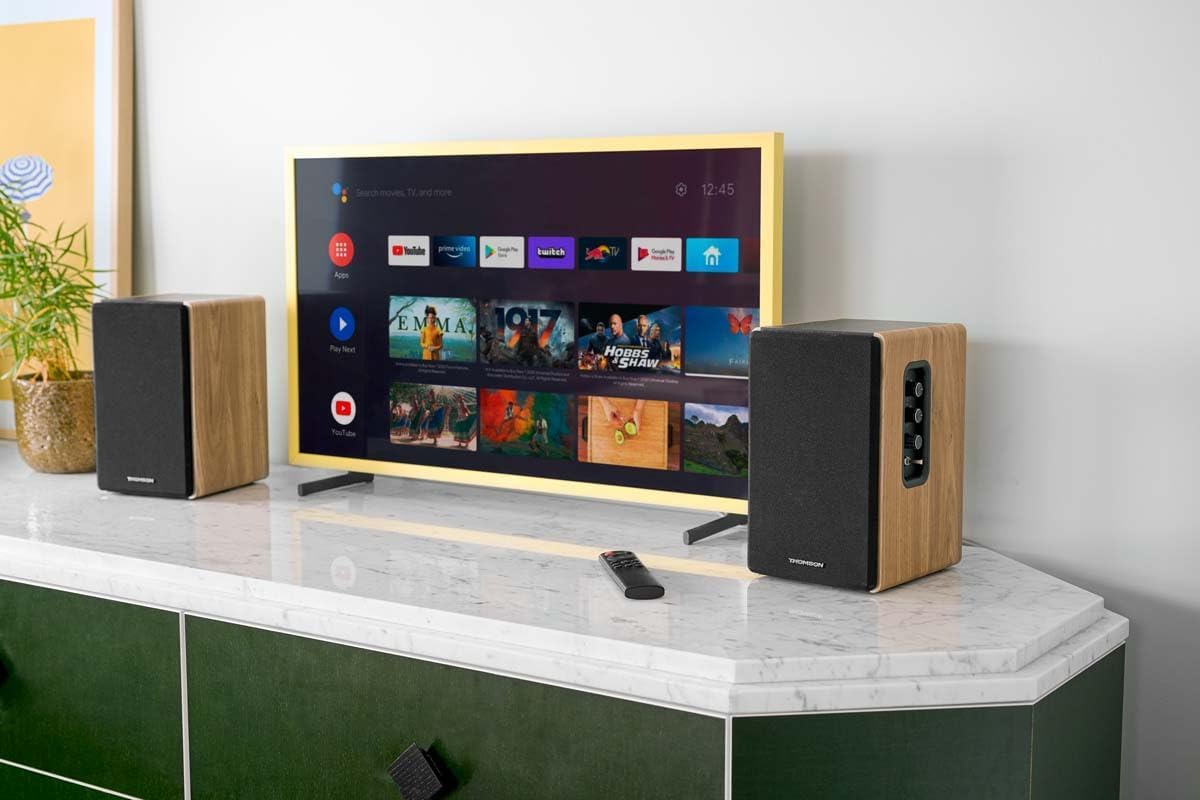
Abbildung 4.2: Anschlüsse auf der Rückseite.
- Optischer Eingang: For connecting digital audio sources like TVs, game consoles, or Blu-ray players.
- Aux-Eingang (Cinch): For connecting analog audio sources such as turntables, CD players, or PCs. A 3.5mm jack adapter is provided.
- TV Audio (HDMI ARC): For connecting to a TV's HDMI ARC port, allowing TV remote control of the speaker volume.
- USB-Wiedergabe: Zum Abspielen von MP3-Dateien files direkt von einem USB-Stick.
- Sub Out: For connecting an external active subwoofer for enhanced bass.
- Lautsprecherausgang: Verbindet sich mit dem passiven Lautsprecher.
- Leistungsaufnahme: Wird an die Hauptstromversorgung angeschlossen.
4.3. Fernbedienung
The remote control provides convenient access to all speaker functions from a distance.

Image 4.3: Remote control.
- Netzschalter: Schaltet die Lautsprecher ein/aus.
- Stummschaltfläche: Schaltet den Ton stumm bzw. hebt die Stummschaltung auf.
- Lautstärke +/-: Regelt die Lautstärke.
- Wiedergabesteuerung (Wiedergabe/Pause, Überspringen): Zur USB-Wiedergabe.
- Source Selection Buttons (OPT, BT, ARC, USB, LINE): Wählt die Audioeingangsquelle aus.
- EQ Mode Buttons (MOVIE, MUSIC, DIALOG): Selects preset equalization modes.
5. Einrichtung
5.1. Lautsprecherplatzierung
Place the speakers on a stable, flat surface such as a bookshelf, desk, or speaker stands. For optimal stereo imaging, position the speakers equidistant from your listening position and at ear level. Ensure there is adequate space around the speakers for ventilation.
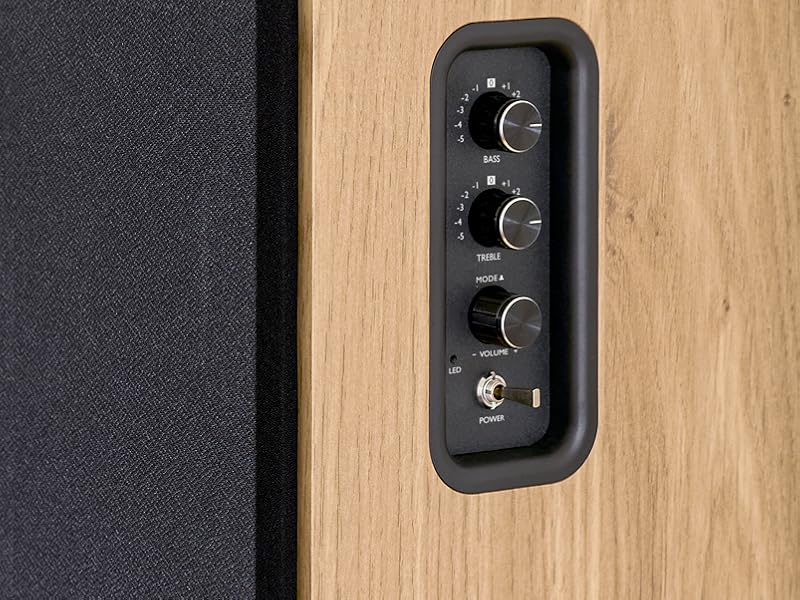
Image 5.1: Recommended speaker placement on a desk.
5.2. Anschließen der Lautsprecher
- Identify the active speaker (with controls and inputs) and the passive speaker.
- Connect the included speaker cable from the speaker output terminals on the active speaker to the input terminals on the passive speaker. Ensure correct polarity (+ to + and - to -).
5.3. Audioquellen anschließen
Connect your desired audio sources to the active speaker using the appropriate cables.
- Optischer Eingang: Use an optical cable to connect your TV, game console, or Blu-ray player to the OPTICAL IN port.
- HDMI (ARC) Eingang: Use an HDMI cable to connect your TV's HDMI ARC port to the TV AUDIO (HDMI) port on the speaker. This allows your TV remote to control the speaker volume.
- RCA (AUX) Input: Use an RCA cable (or the provided 3.5mm jack to RCA adapter) to connect devices like a turntable, CD player, or PC to the AUX IN (RCA) ports.
- USB Eingang: Stecken Sie einen USB-Stick mit MP3 ein files into the USB PLAY port.

Image 5.2: Speakers connected to a television via HDMI ARC.
5.4. Bluetooth-Kopplung
- Stellen Sie sicher, dass die Lautsprecher eingeschaltet sind.
- Press the 'BT' button on the remote control or the side panel to select Bluetooth input. The LED indicator will flash, indicating pairing mode.
- Aktivieren Sie Bluetooth auf Ihrem Smartphone, Tablet oder Computer und suchen Sie nach verfügbaren Geräten.
- Select "THOMSON WS902DUO" from the list of devices.
- Nach erfolgreicher Kopplung leuchtet die LED-Anzeige dauerhaft. Sie können nun kabellos Audio streamen.
5.5. Subwoofer-Anschluss (optional)
If you wish to enhance bass further, connect an active subwoofer to the 'Sub Out' port on the rear panel of the active speaker using an RCA cable.
6. Bedienungsanleitung
6.1. Ein-/Ausschalten
Use the power switch on the side control panel or the power button on the remote control to turn the speakers on or off.
6.2. Quellenauswahl
Press the corresponding source button on the remote control (OPT, BT, ARC, USB, LINE) to switch between connected audio inputs. The LED indicator will change to reflect the selected source.
6.3. Lautstärkeregelung
Adjust the volume using the 'Volume' knob on the side control panel or the 'VOL+/-' buttons on the remote control.
6.4. Audio-Anpassungen
Fine-tune the sound to your preference:
- Bass Hochtöne: Use the 'Bass' and 'Treble' knobs on the side control panel to adjust the low and high frequencies.
- EQ-Modi: Press the 'MOVIE', 'MUSIC', or 'DIALOG' buttons on the remote control to select preset equalization settings optimized for different content types.
6.5. USB-Wiedergabe
When a USB flash drive with MP3 files is inserted and USB source is selected, the speakers will automatically begin playing. Use the playback control buttons on the remote control (Play/Pause, Skip) to manage your music.
6.6. Bluetooth-Betrieb
After successful pairing (see Section 5.4), you can stream audio from your Bluetooth device. Use your device's controls or the speaker's remote control for playback and volume adjustments.
7. Wartung
Durch sachgemäße Wartung werden die Langlebigkeit und Leistungsfähigkeit Ihrer Lautsprecher sichergestellt.
- Reinigung: Wipe the speaker surfaces with a soft, dry cloth. Do not use liquid cleaners or abrasive materials.
- Belüftung: Stellen Sie sicher, dass die Belüftungsöffnungen nicht blockiert sind, um eine Überhitzung zu vermeiden.
- Lagerung: If storing the speakers for an extended period, unplug them from the power outlet and store them in a cool, dry place.
- Feuchtigkeit vermeiden: Keep the speakers away from water and high humidity.
8. Fehlerbehebung
Wenn Sie auf Probleme stoßen, lesen Sie die folgende Anleitung zur Fehlerbehebung:
| Problem | Mögliche Ursache | Lösung |
|---|---|---|
| Kein Strom | Power cable not connected; Power switch off; Wall outlet not working. | Ensure power cable is securely connected. Turn on the power switch. Test the wall outlet with another device. |
| Kein Ton | Incorrect input source selected; Volume too low; Mute function active; Audio cable not connected properly. | Select the correct input source. Increase volume. Press Mute button on remote. Check all audio cable connections. |
| Die Bluetooth-Kopplung schlägt fehl | Speakers not in pairing mode; Device too far; Bluetooth disabled on source device. | Ensure speakers are in Bluetooth pairing mode (flashing LED). Move device closer to speakers. Enable Bluetooth on your source device. |
| USB-Wiedergabe funktioniert nicht | USB drive not formatted correctly; Files not MP3; USB drive not inserted properly. | Ensure USB drive is FAT32 formatted. Verify files are in MP3 format. Re-insert USB drive firmly. |
| Klangverzerrung | Volume too high; Source audio quality poor; Bass/Treble settings too extreme. | Lower the volume. Test with a different audio source. Adjust Bass and Treble controls. |
9. Spezifikationen
| Besonderheit | Spezifikation |
|---|---|
| Marke | THOMSON |
| Modellnummer | WS902DUO |
| Maximale Lautsprecherausgangsleistung | 150 Watt |
| Frequenzgang | 60 Hz |
| Konnektivitätstechnologie | Bluetooth, HDMI (ARC), Optical, RCA, USB |
| Bluetooth-Version | 5.3 |
| Audioausgabemodus | Stereo (2.0 Kanäle) |
| Eingangslautstärketage | 230 Volt (Wechselstrom) |
| Montagetyp | Regalhalterung |
| Lautsprechertyp | Multimedia Bookshelf |
| Besondere Merkmale | Stereo Pairing, USB Port, Sub-Out, Remote Control, EQ Modes |
| Empfohlene Verwendung | Smartphone, Tablet, PC, TV, Game Console, DVD Player, Turntable |
| Farbe | Natürliches Holz-Finish |
| Kontrollmethode | Fernbedienung, seitliche Drehknöpfe |
| Tieftönergröße | 10 Zentimeter |
| Abmessungen (H x B x T) | 28 cm x 24 cm x 47 cm (approximate, per speaker) |
| Gewicht | 5048 Grams (total for pair) |
| Anzahl der Artikel | 2 |
| Ursprungsland | China |
10. Garantieinformationen
This THOMSON WS902DUO product comes with a 1 Jahr eingeschränkte Garantie Diese Garantie gilt ab Kaufdatum und deckt Herstellungs- und Verarbeitungsfehler bei normalem Gebrauch ab. Sie deckt keine Schäden ab, die durch Missbrauch, Unfälle, nicht autorisierte Änderungen oder normale Abnutzung verursacht wurden. Bitte bewahren Sie Ihren Kaufbeleg für Garantieansprüche auf.
11. Kundendienst
For technical assistance, warranty claims, or any questions regarding your THOMSON WS902DUO speakers, please contact your retailer or visit the official THOMSON support website. Please have your model number (WS902DUO) and proof of purchase ready when contacting support.
Online-Hilfe: www.thomsonconsumer.com (Bitte prüfen Sie die regionalen Ansprechpartner für Unterstützung.)