
1. Wichtige Sicherheitshinweise
Bitte lesen Sie vor der Benutzung dieses Geräts alle Anweisungen sorgfältig durch und bewahren Sie diese zum späteren Nachschlagen auf. Die Nichtbeachtung dieser Anweisungen kann zu Stromschlag, Brand oder schweren Verletzungen führen.
- Stellen Sie sicher, dass die Stromversorgungslautstärketage entspricht dem Typenschild des Geräts.
- Betreiben Sie den Ventilator nicht mit einem beschädigten Kabel oder Stecker. Ist das Kabel beschädigt, muss es vom Hersteller, dessen Kundendienst oder einer ähnlich qualifizierten Person ausgetauscht werden, um Gefahren zu vermeiden.
- Vor der Reinigung, Wartung oder dem Umstellen des Ventilators muss dieser immer vom Stromnetz getrennt werden.
- Führen Sie bei laufendem Lüfter weder Finger noch andere Gegenstände in das Lüftergitter ein.
- Keep the fan away from water or other liquids. Do not use it in wet or damp Umgebungen.
- Dieses Gerät ist nur für den Innenbereich bestimmt. Nicht im Freien verwenden.
- Do not place the fan near heat sources such as radiators, heat registers, stoves, or other appliances that produce heat.
- Beaufsichtigen Sie Kinder, um sicherzustellen, dass sie nicht mit dem Gerät spielen.
- Do not use the fan in areas where gasoline, paint, or flammable liquids are stored.
2. Produktüberschreitungview
The Altus AL 40 TFB is a sleek and efficient tower air cooler designed for indoor use. It features a compact design, multiple speed settings, and easy-to-use push-button controls.
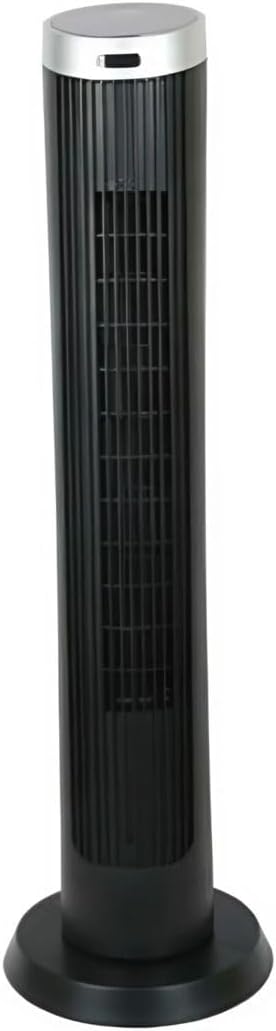
Abbildung 2.1: Front view of the Altus AL 40 TFB Tower Air Cooler. This image shows the tall, slender black body of the fan with its air outlet grille and a stable round base.
Komponenten:
- Bedienfeld: Befindet sich oben am Gerät und ermöglicht so einen einfachen Zugriff auf alle Funktionen.
- Luftauslassgitter: Vertical grille on the front for air dispersion.
- Base: Stable round base for secure placement.
- Netzkabel: Befindet sich im hinteren Bereich des Gebäudes.

Abbildung 2.2: Detaillierte view of the control panel on top of the Altus AL 40 TFB Tower Air Cooler. The panel features a digital display showing '28' and several push buttons for various functions.
3. Einrichtung
Follow these steps to set up your Altus AL 40 TFB Tower Air Cooler:
- Auspacken: Carefully remove the fan from its packaging. Retain the packaging for future storage or transport.
- Grundbaugruppe (falls erforderlich): Some models may require minor base assembly. If your unit's base is detached, align the base sections and secure them according to the diagrams in the packaging. Ensure it is firmly attached.
- Platzierung: Place the fan on a firm, level surface. Ensure there is adequate space around the fan for proper airflow, at least 30 cm (12 inches) from walls or furniture. This appliance is designed for indoor use only.
- Stromanschluss: Plug the power cord into a standard electrical outlet. Ensure the outlet meets the voltagDie auf dem Produktetikett angegebenen Anforderungen.
4. Bedienungsanleitung
Your Altus AL 40 TFB Tower Air Cooler is equipped with user-friendly push-button controls on the top panel.
Funktionen des Bedienfelds:
- Power-Taste (⏻): Press once to turn the fan ON, press again to turn it OFF.
- Geschwindigkeitstaste (💨): Press repeatedly to cycle through the 3 available fan speeds: Low, Medium, and High. The current speed setting may be indicated on the digital display.
- Modus-Taste (M): If available, press to select different operating modes (e.g., Normal, Natural, Sleep). Refer to the digital display for the active mode.
- Oszillationsknopf (↔): Press to activate or deactivate the oscillation function, which allows the fan to rotate from side to side to distribute air over a wider area.
- Timer-Taste (🕒): If available, press to set an automatic shut-off timer. Each press typically increases the timer duration by a set increment (e.g., 1 hour).
Allgemeine Bedienung:
- Schließen Sie den Ventilator an eine geeignete Steckdose an.
- Drücke den Power Knopf (⏻) to turn on the fan.
- Select your desired fan speed using the Speed Button (💨).
- Activate oscillation if desired by pressing the Oscillation Button (↔).
- To turn off the fan, press the Power Button (⏻) wieder.
5. Wartung
Regular maintenance ensures optimal performance and extends the lifespan of your Altus AL 40 TFB Tower Air Cooler.
Reinigung:
- Ziehen Sie vor der Reinigung immer den Stecker aus der Steckdose.
- Außenreinigung: Wischen Sie die Außenflächen des Ventilators mit einem weichen, fusselfreien Tuch ab.amp cloth. Do not use abrasive cleaners, waxes, or polishes as they may damage the finish.
- Lufteinlass-/Luftauslassgitter: Use a vacuum cleaner with a brush attachment to gently remove dust and debris from the air inlet and outlet grilles. Do not attempt to disassemble the fan for cleaning.
- Stellen Sie sicher, dass der Ventilator vollständig trocken ist, bevor Sie ihn wieder anschließen und in Betrieb nehmen.
Lagerung:
Bei längerer Nichtbenutzung sollte der Ventilator an einem kühlen, trockenen Ort aufbewahrt werden. Es wird empfohlen, ihn in der Originalverpackung aufzubewahren, um ihn vor Staub und Beschädigungen zu schützen.
6. Fehlerbehebung
If you encounter any issues with your Altus AL 40 TFB Tower Air Cooler, please refer to the following common problems and solutions:
- Lüfter geht nicht an:
- Prüfen Sie, ob das Netzkabel fest in einer funktionierenden Steckdose eingesteckt ist.
- Stellen Sie sicher, dass der Netzschalter am Bedienfeld gedrückt wurde.
- Verify that the household circuit breaker or fuse has not tripped.
- Schwacher Luftstrom:
- Check if the fan speed is set to a higher setting.
- Ensure the air inlet and outlet grilles are not blocked by dust or obstructions. Clean them if necessary.
- Ungewöhnliches Geräusch:
- Stellen Sie sicher, dass der Ventilator auf einer stabilen, ebenen Fläche steht.
- Check for any foreign objects that might have fallen into the fan grilles.
- Sollten die Geräusche weiterhin bestehen, stellen Sie die Nutzung ein und kontaktieren Sie den Kundendienst.
If the problem cannot be resolved using the above steps, please contact Altus customer support.
7. Spezifikationen
Detailed technical specifications for the Altus AL 40 TFB Tower Air Cooler:
| Besonderheit | Spezifikation |
|---|---|
| Marke | Altus |
| Modellname | AL 40 TFB |
| Farbe | Schwarz |
| Elektrisches Ventilatordesign | Floor Fan (Tower Type) |
| Stromquelle | Kabelgebundene Elektrik |
| Produktabmessungen (T x B x H) | 29 cm (T) x 29 cm (B) x 101 cm (H) |
| Montagetyp | Bodenhalterung |
| Ausführung | Lackiert |
| Innen-/Außenbereich | Innenbereich |
| Kontrollmethode | Druckknopf |
| Anzahl der Leistungsstufen | 3 |
| Kabellos | NEIN |
8. Garantie und Support
Altus provides comprehensive support for its products. For any assistance or warranty-related inquiries, please contact our customer service.

Abbildung 8.1: Altus customer service and warranty information. The image displays the Altus logo, a message about service availability, and a contact number for support.
Our services are always available for your Altus products. You can benefit from our door-to-door service by calling our support line for any assistance you may need.
Arçelik Service Warranty: For products under warranty, our home product pickup service is provided free of charge.
Customer Support Line: 0850 210 0 888
Please have your product model number (AL 40 TFB) and purchase details ready when contacting support.