
Wichtige Sicherheitshinweise
Please read these instructions carefully before using the Avtech DGM5907SVSGAT IP Dome Camera. Keep this manual for future reference.
- Ensure proper power supply (PoE or compatible adapter) to prevent damage.
- Do not expose the camera to extreme temperatures, humidity, or direct sunlight beyond its operating specifications.
- Handle the camera with care. Avoid dropping or subjecting it to strong vibrations.
- Installation should be performed by qualified personnel and comply with local electrical codes.
- Versuchen Sie nicht, die Kamera zu zerlegen oder zu verändern. Dadurch erlischt die Garantie.
- Clean the camera lens and housing with a soft, dry cloth. Avoid harsh chemicals.
Produkt überview
The Avtech DGM5907SVSGAT is a 5MP AI IP Dome Camera designed for advanced surveillance. It features AI-based human and vehicle detection to minimize false alarms, ONVIF support for system integration, and Power-over-Ethernet (PoE) for simplified installation. The camera provides clear images with Starlight visibility, an integrated microphone for audio recording, and an effective IR range of up to 50 meters for night surveillance. Its WDR (Wide Dynamic Range) function enhances image clarity in challenging lighting conditions, and the IP66 housing ensures durability in various environments.
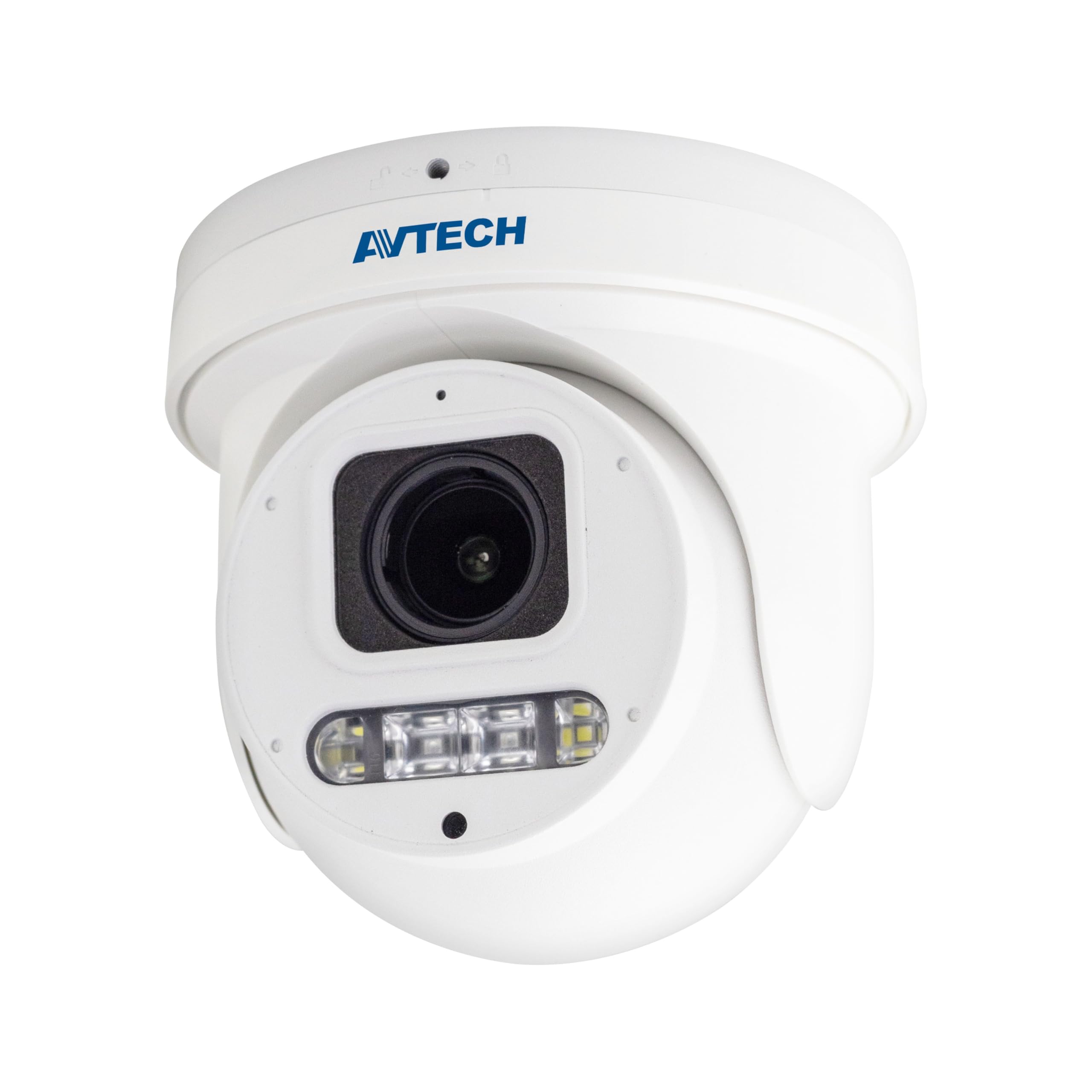
Abbildung 1: Front view of the Avtech DGM5907SVSGAT 5MP AI IP Dome Camera. This image shows the dome-shaped camera housing, the lens assembly, and the IR LEDs visible around the lens.
Packungsinhalt
Prüfen Sie, ob alle Artikel im Paket enthalten sind. Sollten Artikel fehlen oder beschädigt sein, kontaktieren Sie umgehend Ihren Händler.
- Avtech DGM5907SVSGAT 5MP AI IP Dome Camera
- Montageschrauben-Set (Schrauben, Dübel)
- Wasserdichter Stecker für Ethernet-Kabel
- Kurzanleitung
- Bohrschablone
Aufstellen
1. Physische Installation
Before mounting, ensure the installation location provides a clear field of view and is within range of your network infrastructure (PoE switch/injector).
- Bereiten Sie die Montagefläche vor: Use the provided drilling template to mark the screw holes on the wall or ceiling.
- Bohrlöcher: Bohren Sie an den markierten Stellen Vorbohrungen. Verwenden Sie Wanddübel, wenn Sie die Montage an Gipskarton- oder Mauerwerkswänden vornehmen.
- Secure the Camera Base: Befestigen Sie die Montagebasis der Kamera mit den mitgelieferten Schrauben an der Oberfläche.
- Netzwerkkabel anschließen: Connect an Ethernet cable (RJ-45) from your PoE switch/injector to the camera's network port. Ensure the waterproof connector is properly sealed if installing outdoors.
- Kamerawinkel anpassen: Loosen the adjustment screws on the dome to position the camera lens for the desired viewEinstellwinkel. Schrauben nach dem Einstellen festziehen.
Abbildung 2: Illustrative diagram of the Avtech DGM5907SVSGAT camera mounting process. This image depicts the camera base being secured to a surface, with an Ethernet cable connected.
2. Netzwerkkonfiguration
The camera typically obtains an IP address automatically via DHCP. If your network does not use DHCP, you may need to use a discovery tool provided by Avtech or manually configure the IP address.
- Mit Netzwerk verbinden: Ensure the camera is powered via PoE and connected to your local network.
- IP-Adresse ermitteln: Use the Avtech IP Camera Utility software (available on the Avtech webWebsite), um die IP-Adresse der Kamera in Ihrem Netzwerk zu ermitteln.
- Zugang Web Schnittstelle: Öffnen Sie ein web browser (Internet Explorer 6+, Microsoft Edge, or Google Chrome) and enter the camera's IP address in the address bar.
- Login: Enter the default username and password (refer to the Quick Start Guide for default credentials). It is highly recommended to change the default password immediately for security.
- Assistent für die Ersteinrichtung: Follow the on-screen wizard to configure basic network settings, date/time, and user accounts.
Bedienungsanleitung
1. Leben View und Aufzeichnung
Sobald Sie sich eingeloggt haben web interface, you can access the live video feed and manage recording settings.
- Live View: Navigieren Sie zu „Live“. View' section to see the real-time video feed from the camera.
- Recording to MicroSD: The camera supports a MicroSD card up to 256 GB. Insert the card into the designated slot (usually accessible by opening the dome cover). Configure recording schedules and event-triggered recording (e.g., motion detection, AI detection) in the 'Storage' or 'Recording' settings.
- Videokomprimierung: The camera supports H.265 and H.264 compression. H.265 offers better compression efficiency, reducing storage and bandwidth requirements. Adjust this in the 'Video Settings'.
2. AI Detection (Human and Vehicle)
The AI detection feature helps reduce false alarms by distinguishing between humans/vehicles and other moving objects.
- Enable AI Detection: Go to 'Event' or 'AI Settings' in the web interface. Enable 'Human Detection' and/or 'Vehicle Detection'.
- Erkennungszonen konfigurieren: Draw specific areas on the live view where you want AI detection to be active.
- Empfindlichkeit einstellen: Adjust the sensitivity levels to optimize detection performance and minimize false positives.
- Aktionen konfigurieren: Specify actions to be taken upon detection, such as recording, sending notifications, or triggering alarms.
3. Image Enhancement Features
- IR Nachtsicht: The camera automatically switches to IR mode in low light conditions, providing clear black and white images up to 50 meters. Ensure the IR LEDs are not obstructed.
- WDR (Wide Dynamic Range): Enable WDR in 'Image Settings' to improve image quality in scenes with both very bright and very dark areas, such as entrances or windows.
- Starlight Visibility: This feature enhances low-light performance, allowing the camera to capture color images in very dim conditions before switching to IR mode.
Wartung
Regelmäßige Wartung gewährleistet optimale Leistung und Langlebigkeit Ihrer Kamera.
- Reinigung: Periodically clean the camera lens and housing with a soft, lint-free cloth. For stubborn dirt, use a mild cleaning solution specifically designed for optical lenses. Do not use abrasive cleaners.
- Firmware-Updates: Check the Avtech official website regularly for firmware updates. Firmware updates can improve performance, add new features, and enhance security. Follow the instructions provided with the firmware update package carefully.
- Speicherverwaltung: If using a MicroSD card for recording, periodically review aufgenommenes footage and manage storage space. Format the MicroSD card occasionally to maintain performance.
- Kabelinspektion: For outdoor installations, inspect network cables and waterproof connectors for any signs of wear or damage.
Fehlerbehebung
In diesem Abschnitt werden häufig auftretende Probleme behandelt, die bei Ihrer Kamera auftreten können.
| Problem | Mögliche Ursache | Lösung |
|---|---|---|
| Kein Bild-/Videofeed | No power; Network connection issue; Incorrect IP address | Check PoE connection; Verify network cable; Use IP utility to find camera IP; Ensure firewall is not blocking access. |
| Kamera offline | Network cable disconnected; Router/switch issue; IP address conflict | Check physical network connections; Restart network equipment; Verify unique IP address. |
| Schlechte Bildqualität | Dirty lens; Incorrect resolution settings; Insufficient lighting; WDR not enabled | Clean the lens; Adjust resolution in settings; Ensure adequate lighting or enable IR; Enable WDR for high contrast scenes. |
| Häufige Fehlalarme | Sensitivity too high; Detection zone too wide; Environmental factors (e.g., moving branches) | Adjust AI detection sensitivity; Refine detection zones; Ensure AI detection is enabled for human/vehicle only. |
| Kein Zugriff möglich web Schnittstelle | Incorrect IP address; Browser compatibility; Firewall blocking | Verify IP address; Use recommended browsers (IE, Edge, Chrome); Temporarily disable firewall for testing. |
Technische Daten
Detailed technical specifications for the Avtech DGM5907SVSGAT IP Dome Camera.
- Bildsensor: 1/2.8-Zoll-CMOS
- Maximale Auflösung: 2592 x 1944 (5MP)
- Linse: f2.7 ~ 13.5mm / F1.6 ~ F2.2
- Viewing Angle (Diagonal): Tele 40° ~ Wide 117°
- Mindestbeleuchtung: 0.001 Lux (IR off), 0 Lux (IR on)
- Verschlusszeit: AUTO, 1 / 25s ~ 1 / 100000s
- IR-LEDs: 4 Einheiten
- Effective IR Distance: Bis zu 50 Meter
- Tag-/Nachtmodus: Automatisch
- WDR: Ja (120 dB)
- RTC (Echtzeituhr): Ja
- MicroSD-Steckplatz: Bis zu 256 GB
- Videokomprimierung: H.265 / H.264
- Main Stream Resolution: 5MP (2592x1944) / 4MP (2560x1440) / 3MP (2304x1296) / 2MP (1080P) / 720P
- Bildrate: 5MP @ 25FPS
- Mehrere Videostreams: 2 Streams
- Bitratensteuerung: 512Kbps - 12Mbps, VBR/CBR
- Bildverbesserung: WDR / BLC / HLC / 2D DNR / 3D DNR
- Audio: Integriertes Mikrofon
- Netzwerkprotokolle: ONVIF supported
- Leistung: PoE (Power-over-Ethernet)
- Gehäuse: IP66 Wetter
- Kompatibilität: Internet Explorer 6+, Microsoft Edge, Google Chrome, Windows 10/8/7, DirectX 9.0+
Garantie und Support
Avtech products are designed for reliability and performance. This product comes with a standard manufacturer's warranty against defects in materials and workmanship.
- Garantiezeit: Please refer to your purchase documentation or the Avtech official webAuf der Webseite finden Sie die spezifischen Garantiebedingungen und die Dauer der Garantie, die in Ihrer Region gelten.
- Technische Unterstützung: For technical assistance, troubleshooting, or warranty claims, please contact Avtech customer support.
- Online-Ressourcen: Visit the official Avtech website for FAQs, driver downloads, firmware updates, and additional product information.
Kontaktinformationen:
WebWebsite: www.avtech.com.tw
E-Mail: support@avtech.com
Telefon: +1-XXX-XXX-XXXX