
OKP Life L1
OKP Life L1 Lidar Robot Vacuum Cleaner User Manual
Modell: L1
1. Einleitung
Thank you for choosing the OKP Life L1 Lidar Robot Vacuum Cleaner. This manual provides essential information for the safe operation, maintenance, and troubleshooting of your device. Please read it thoroughly before use and retain it for future reference.
2. Wichtige Sicherheitshinweise
Um das Risiko von Verletzungen oder Schäden zu verringern, lesen Sie diese Sicherheitshinweise sorgfältig durch und bewahren Sie sie beim Aufstellen, Benutzen und Warten Ihres Roboters griffbereit auf.
- Dieses Gerät kann von Kindern ab 8 Jahren und von Personen mit eingeschränkten physischen, sensorischen oder geistigen Fähigkeiten oder Mangel an Erfahrung und Wissen verwendet werden, wenn sie beaufsichtigt werden oder in die sichere Verwendung des Geräts eingewiesen wurden und die damit verbundenen Gefahren verstehen.
- Kinder sollten beaufsichtigt werden, um sicherzustellen, dass sie nicht mit dem Gerät spielen.
- Reinigung und Benutzerwartung dürfen nicht durch Kinder ohne Aufsicht durchgeführt werden.
- Verwenden Sie ausschließlich das vom Hersteller mitgelieferte Original-Netzteil.
- Der Roboter darf nicht in Umgebungen mit offenem Feuer oder zerbrechlichen Gegenständen eingesetzt werden.
- Ensure the robot is used on dry surfaces only.
- Halten Sie Haare, lose Kleidung, Finger und alle Körperteile von Öffnungen und beweglichen Teilen fern.
3. Packungsinhalt
Überprüfen Sie, ob alle Komponenten im Paket vorhanden sind:
- OKP Life L1 Robot Vacuum Cleaner
- Ladestation
- Netzteil
- Seitenbürsten (2 Paar)
- HEPA Filter (1 extra)
- Reinigungswerkzeug
- Bedienungsanleitung
4. Produktüberschreitungview
Familiarize yourself with the components of your OKP Life L1 robot vacuum.

Abbildung 4.1: Spitze view of the OKP Life L1 Lidar Robot Vacuum Cleaner alongside its mobile application interface. The robot is white with a dark grey Lidar sensor on top and a power button. The app shows cleaning status and control options.
Roboterkomponenten:
- Lidar-Sensor: Für präzise Navigation und Kartierung.
- Netzschalter: To start/pause cleaning or power on/off.
- Mülltonne: Sammelt Schutt.
- Seitenbürsten: Fegen Sie den Schutt in den Hauptbüschweg.
- Hauptbürstenrolle: Agitates and lifts debris from floors.
- Ladekontakte: For automatic recharging at the dock.
- Klippensensoren: Verhindern Sie, dass der Roboter die Treppe hinunterfällt.
- Stoßstange: Erkennt Hindernisse.
5. Einrichtung und Erstgebrauch
5.1 Vorbereitung des Roboters
- Remove all protective films and stickers from the robot and charging dock.
- Die Seitenbürsten werden durch Drücken auf die Stifte montiert, bis sie einrasten.
5.2 Aufstellen der Ladestation
Stellen Sie die Ladestation an einer Wand in einem offenen, aufgeräumten Bereich auf. Achten Sie darauf, dass zu beiden Seiten mindestens 0.5 Meter und vor der Ladestation mindestens 1.5 Meter freier Platz vorhanden sind. Schließen Sie das Netzteil an.
5.3 Erstgebühr
Place the robot on the charging dock. The indicator light will show charging status. Fully charge the robot before its first use (approximately 5-6 hours).
5.4 Connecting to the OKP Life App
The OKP Life L1 supports remote control via the OKP Life App. This allows for scheduling, mode customization, and real-time monitoring.
- Download the "OKP Life" app from your mobile device's app store.
- Registrieren Sie ein Konto und melden Sie sich an.
- Follow the in-app instructions to add your L1 robot vacuum. Ensure your Wi-Fi network is 2.4GHz.
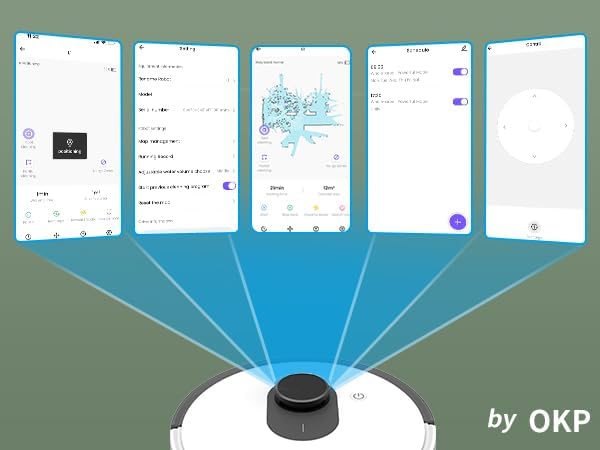
Abbildung 5.1: Various screenshots of the OKP Life mobile application, demonstrating features like device connection, settings, mapping, and remote control options.
5.5 Sprachsteuerungsintegration
The L1 is compatible with Amazon Alexa and Google Assistant for hands-free operation.
- Ensure your robot is connected to the OKP Life App.
- Öffne die Alexa- oder Google Home-App.
- Suchen nach the "OKP Life" skill/service and enable it.
- Link your OKP Life account.
- You can now use voice commands such as "Alexa, turn on L1" or "Hey Google, start cleaning with L1."

Abbildung 5.2: The OKP Life L1 robot vacuum on a rug, with an Amazon Echo Dot speaker and a smartphone displaying the control app. This illustrates the voice and app control capabilities.
6. Bedienung Ihres Saugroboters
6.1 Reinigungsmodi und Navigation
The L1 utilizes advanced LDS laser radar and SLAM navigation to create accurate real-time maps of your home, optimizing cleaning routes and ensuring comprehensive coverage.

Abbildung 6.1: The OKP Life L1 robot vacuum navigating a living room, with blue lines illustrating its precision LiDAR mapping and navigation path.
Der Roboter bietet verschiedene Reinigungsmodi, die über die App zugänglich sind:
- Automatische Reinigung: Der Roboter reinigt Ihr gesamtes Zuhause auf intelligente Weise.
- Fleckenreinigung: Reinigt einen bestimmten Bereich mit konzentrierter Anstrengung.
- Zone Clean: Select specific rooms or areas on the map for cleaning.
- Geplante Reinigung: Legen Sie bestimmte Zeiten fest, zu denen der Roboter automatisch reinigen soll.

Abbildung 6.2: The OKP Life L1 robot vacuum next to a smartphone displaying its app, which shows a floor plan map where a user can select a specific zone for vacuuming using the LiDAR sensor data.

Abbildung 6.3: The OKP Life L1 robot vacuum on a rug, with a smartphone displaying the app's features including No-Go Zones, Real-time Mapping, Recharge Resume, Partial Cleaning, and Spot Cleaning.
6.2 Saugkraft und Teppichverstärkung
The L1 features a 4000Pa suction motor for effective cleaning. It automatically increases suction power when detecting carpets for deeper cleaning.

Abbildung 6.4: The OKP Life L1 robot vacuum moving from a hard floor to a carpet, illustrating its ability to boost suction power for effective carpet cleaning.
6.3 No-Go Zones and Invisible Walls
Use the OKP Life App to define "No-Go Zones" or "Invisible Walls" to prevent the robot from entering specific areas or protecting fragile items.

Abbildung 6.5: The OKP Life L1 robot vacuum demonstrating its ability to respect "No-Go Zones" (preventing entry into a pet area) and "Invisible Walls" (blocking access to a specific room entrance).
6.4 Hindernisvermeidung
Freemove 3.0 obstacle avoidance technology ensures the robot navigates smoothly around furniture, stairs, walls, and pets, minimizing collisions and preventing it from getting stuck.
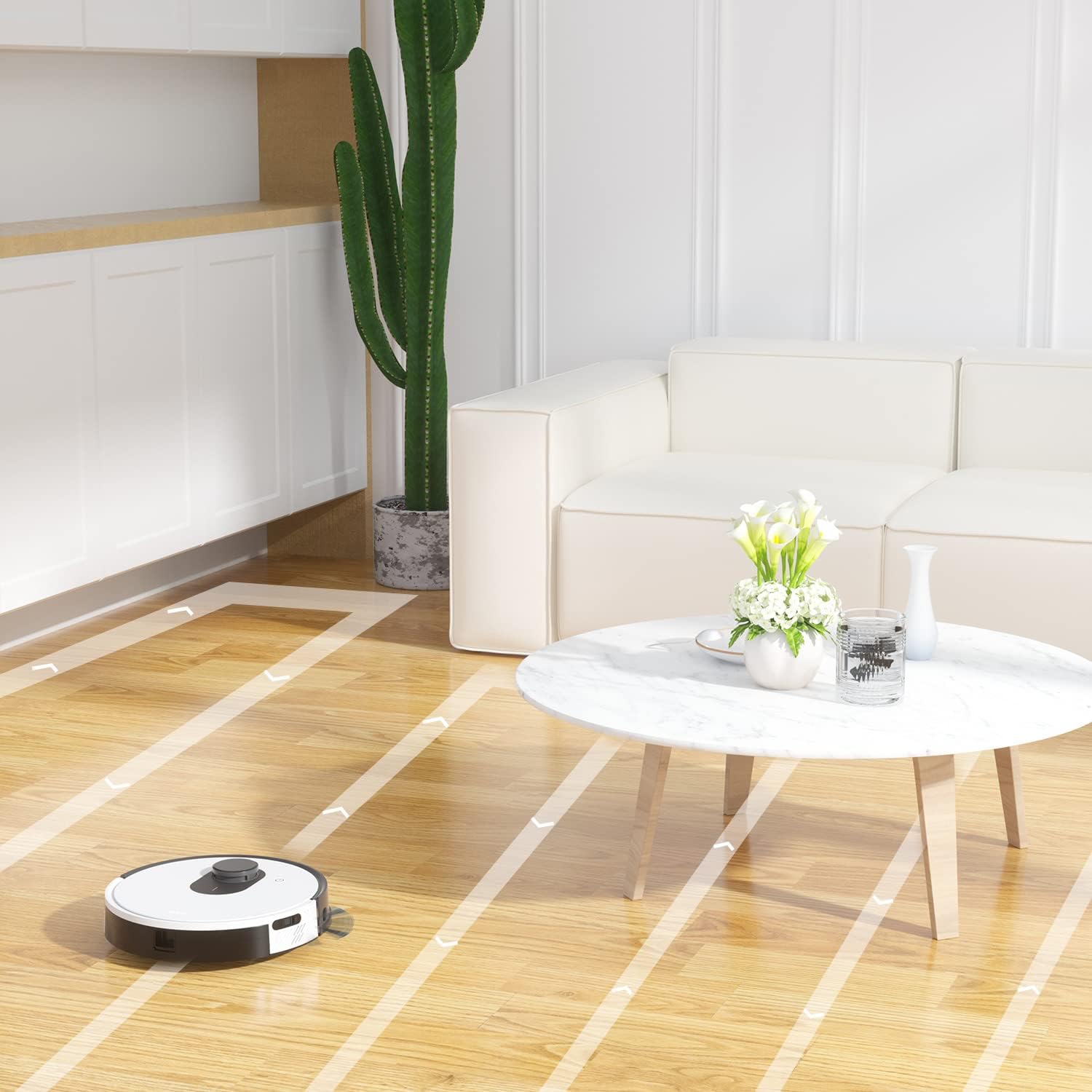
Abbildung 6.6: The OKP Life L1 robot vacuum cleaning a room, illustrating its efficient path planning and obstacle avoidance capabilities.
6.5 Batteriemanagement
The robot features a 4000mAh battery, providing up to 200 minutes of continuous cleaning. When the battery is low or cleaning is complete, the robot automatically returns to its charging dock.
7. Wartung
Regelmäßige Wartung gewährleistet die optimale Leistung Ihres Saugroboters.
7.1 Den Mülleimer leeren
Empty the dustbin after each cleaning cycle. Press the dustbin release button, remove the dustbin, and discard collected debris. Clean the filter inside the dustbin.
7.2 Cleaning the Main Brush Roll
The self-cleaning brush roll reduces hair tangles. However, periodically remove the main brush roll and use the provided cleaning tool to remove any tangled hair or debris.
7.3 Reinigung der Seitenbürsten
Check side brushes regularly for wear or damage. Remove any tangled hair or debris. Replace worn brushes as needed.
7.4 Reinigung der Sensoren und Ladekontakte
Wipe the cliff sensors, bumper sensor, and charging contacts on both the robot and the charging dock with a clean, dry cloth to ensure proper function.
7.5 Filterwechsel
Replace the HEPA filter every 3-6 months, or more frequently depending on usage, to maintain optimal suction performance.
8. Fehlerbehebung
In diesem Abschnitt finden Sie häufig auftretende Probleme und deren Lösungen.
| Problem | Mögliche Ursache | Lösung |
|---|---|---|
| Roboter lässt sich nicht einschalten. | Niedriger Batteriestand; Netzschalter ausgeschaltet. | Laden Sie den Roboter auf; Stellen Sie sicher, dass der Netzschalter eingeschaltet ist. |
| Der Roboter kann nicht zur Ladestation zurückkehren. | Ladestation blockiert; Roboter zu weit von der Ladestation entfernt. | Clear obstacles around the dock; Manually place robot near dock. |
| Die Saugkraft ist schwach. | Staubbehälter voll; Filter verstopft; Hauptbürste verheddert. | Leeren Sie den Staubbehälter; Reinigen/ersetzen Sie den Filter; Reinigen Sie die Hauptbürste. |
| Der Roboter bleibt häufig stecken. | Loose cables/rugs; Small obstacles. | Clear floor of obstructions; Use No-Go Zones. |
| Probleme mit der App-Verbindung. | Falsches WLAN (nicht 2.4 GHz); Routerprobleme. | Ensure 2.4GHz Wi-Fi; Restart router and robot; Re-pair in app. |
9. Spezifikationen
| Besonderheit | Detail |
|---|---|
| Marke | OKP-Leben |
| Modellname | L1 Lidar Robot Vacuum |
| Besonderheit | HEPA Filtration, Vacuums |
| Farbe | Wolkenweiß |
| Technische Daten | 12 Zoll L x 12 Zoll B x 3.5 Zoll H |
| Im Lieferumfang enthaltene Komponenten | Batterie |
| Akkulaufzeit | Bis zu 200 Minuten (4000-mAh-Akku) |
| Kapazität (Mülleimer) | 500 Milliliter |
| Batterien erforderlich | 1 Lithium-Ionen-Akku (im Lieferumfang enthalten) |
| Kompatible Geräte | Amazon Echo, Google Home, Smartphones |
| Artikelgewicht | 7 Pfund |
| Hersteller | OKP-Leben |
| Artikelmodellnummer | L1 |
10. Garantie und Support
For warranty information and technical support, please refer to the official OKP Life webBesuchen Sie die Website oder kontaktieren Sie den Kundenservice. Bewahren Sie Ihren Kaufbeleg als Kaufnachweis auf.
Online-Hilfe: Visit the official OKP Life webAuf dieser Website finden Sie häufig gestellte Fragen, Anleitungen zur Fehlerbehebung und Kontaktinformationen.
Kundendienst: Refer to your product packaging or the OKP Life webWebsite für spezifische Kundendienst-Kontaktdaten.
Ask a question about this manual
Ask about setup, troubleshooting, compatibility, parts, safety, or missing instructions. Manuals+ will review the question and use this page’s manual context to help answer it.