
1. Einleitung
This manual provides detailed instructions for the operation and maintenance of your NBD 5K Digital Camera. Please read this manual thoroughly before using the camera to ensure proper function and to maximize your photography and videography experience. This camera is designed for capturing high-resolution photos and videos, featuring a 48MP sensor, 5K video recording, 16X digital zoom, and a 180° flip screen.
2. Packungsinhalt
Bitte überprüfen Sie, ob alle unten aufgeführten Artikel in Ihrem Paket enthalten sind:
- NBD S100F 5K Digital Camera
- 52-mm-Weitwinkelobjektiv
- Makro-Objektiv
- Mikrofon
- 64GB-Speicherkarte
- USB-Kabel
- Wiederaufladbare Batterien (x2)
- Ladegerät
- Kartenleser
- Camera Neck Rope (Strap)
- Black Leather Bag
- Objektiv-Reinigungstuch

Image 2.1: All components included with the NBD 5K Digital Camera.
3. Ersteinrichtung
3.1. Einlegen des Akkus
- Suchen Sie die Abdeckung des Batteriefachs an der Unterseite der Kamera.
- Schieben Sie den Deckelriegel, um das Fach zu öffnen.
- Legen Sie die Batterie entsprechend den Polaritätsmarkierungen (+/-) im Batteriefach ein.
- Schließen Sie den Batteriefachdeckel, bis er sicher einrastet.
3.2. Einlegen der SD-Karte
- Open the SD card slot cover, usually located on the side of the camera.
- Setzen Sie die 64-GB-SD-Karte so ein, dass die Metallkontakte zur Vorderseite der Kamera zeigen, bis sie hörbar einrastet.
- Schließen Sie die Abdeckung des SD-Kartensteckplatzes.
3.3. Anbringen des Objektivs
- Align the lens mount with the camera's lens attachment point.
- Gently twist the lens clockwise until it locks into position.
- To attach the macro or wide-angle lens, screw it onto the primary lens.
3.4. Erstes Einschalten
Press and hold the power button until the screen illuminates. Follow any on-screen prompts for initial settings such as date and time.
4. Bedienung der Kamera
4.1. Ein-/Ausschalten
Press the power button to turn the camera on. Press and hold the power button again to turn it off.
4.2. Moduswahlrad
Rotate the mode dial to select different shooting modes:
- Automatikmodus: For general photography with automatic settings.
- Szenenmodus: Voreingestellte Modi für bestimmte Szenarien (z. B. Hochformat, Querformat).
- Effektmodus: Verleihe deinen Fotos mit kreativen Filtern mehr Ausdruckskraft.
- Lapse Mode: For time-lapse photography.
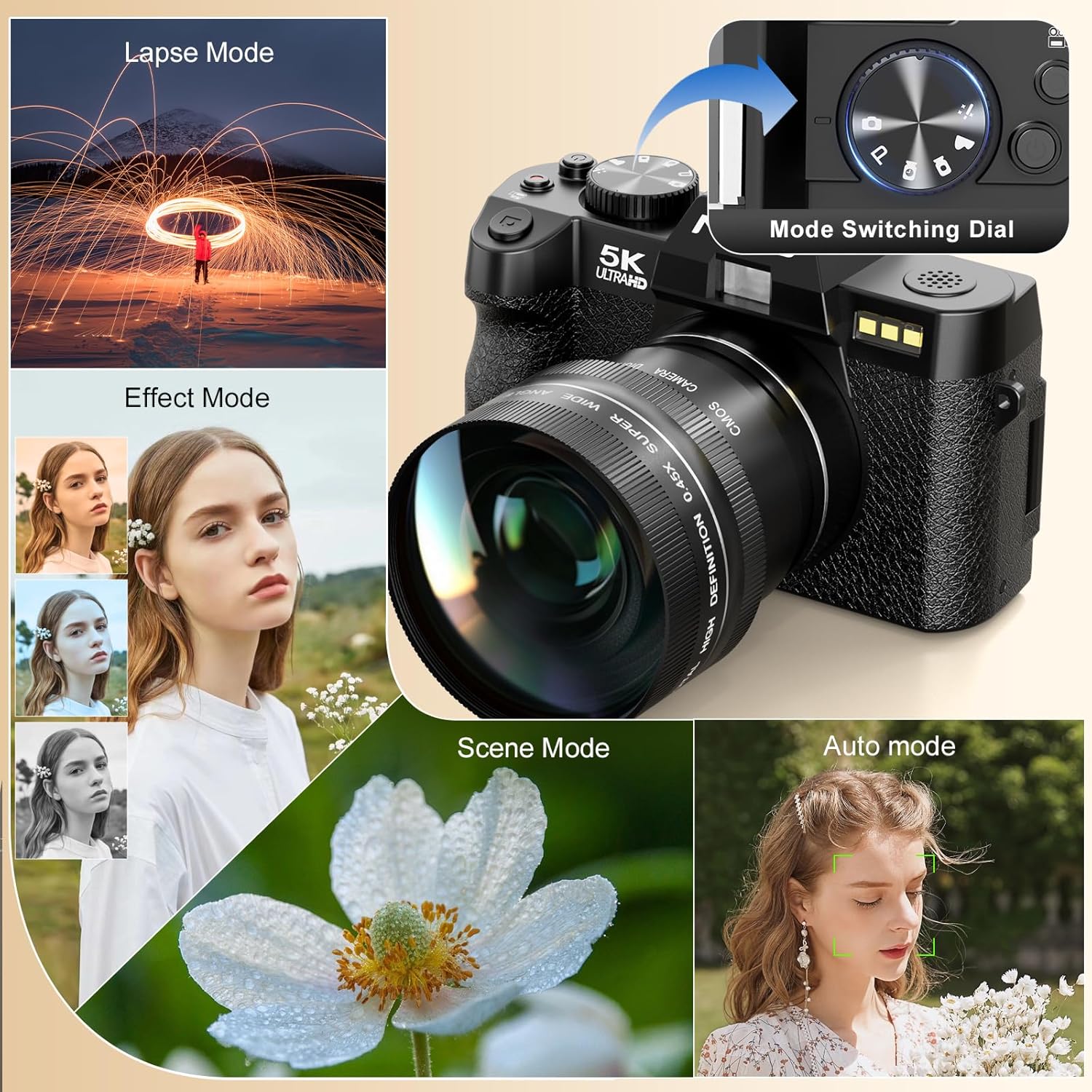
Image 4.1: Camera mode dial and examples of different shooting modes.
4.3. Fotos machen
The camera features a 48MP sensor for high-resolution images. Utilize the AF (Autofocus) mode for sharp subjects and low-light focusing capabilities for challenging lighting conditions.

Image 4.2: Photo features including 48MP resolution, AF mode, and low-light performance.
4.4. Videos aufnehmen
Record videos in 5K (5210*2880) or 1080p resolution. Press the dedicated video recording button to start and stop recording.

Image 4.3: Visual representation of 5K video resolution.
4.5. Zoomfunktion
The camera supports 16X digital zoom. Use the zoom controls to adjust the magnification for your shots.

Image 4.4: HDR feature and examples of 4x, 8x, and 16x digital zoom.
4.6. Using the 180° Flip Screen and Microphone
The 180° flip screen allows for easy self-recording and vlogging. The included microphone enhances audio quality for video recordings.
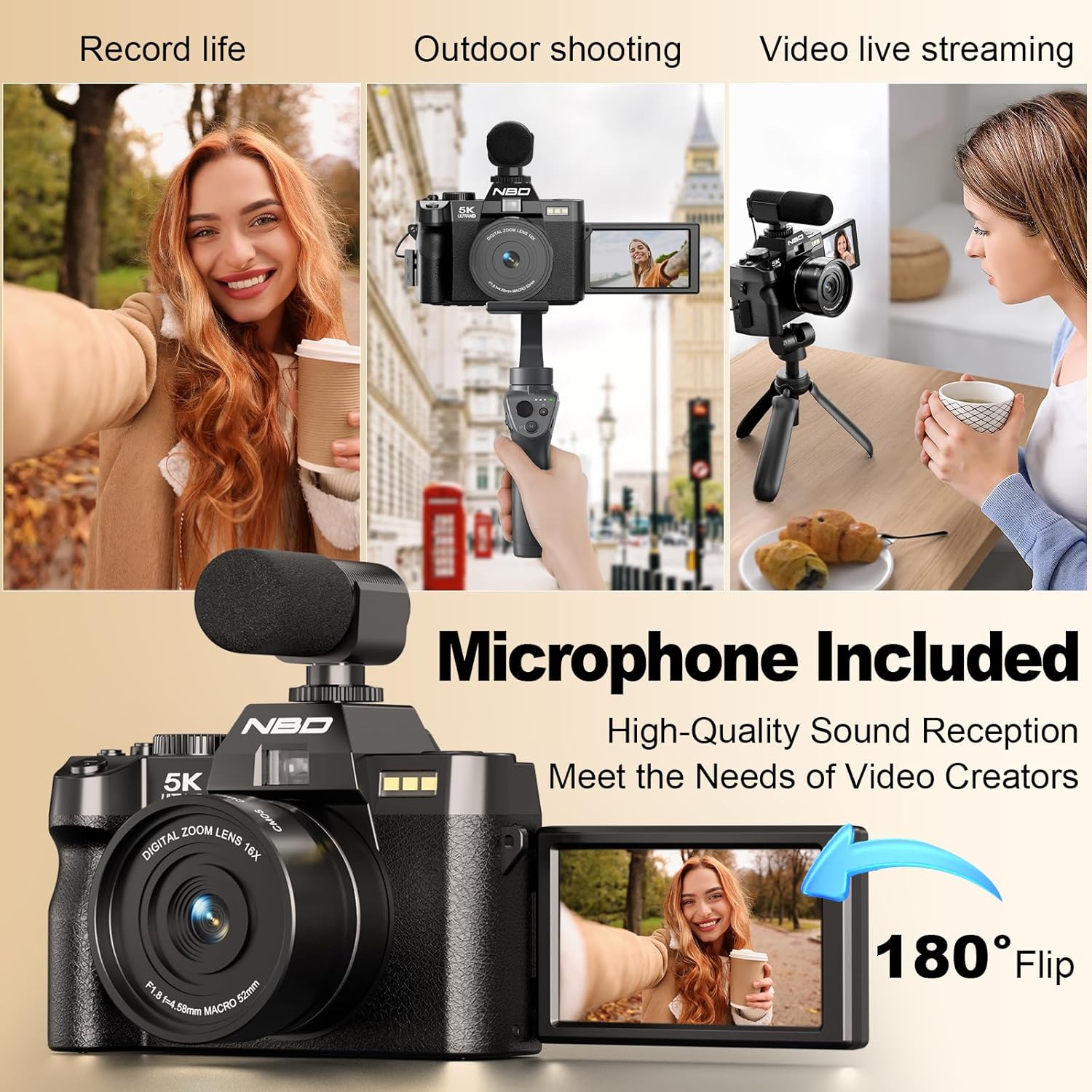
Image 4.5: Demonstrating the 180° flip screen and external microphone for vlogging and live streaming.
4.7. Wi-Fi-Konnektivität und File Überweisen
Connect your camera to a smartphone or tablet via Wi-Fi for remote control and swift image transfer. Download the dedicated mobile application to access these features.
- Wi-Fi-Verbindung: Navigate to the camera's settings menu, select Wi-Fi, and follow the on-screen instructions to connect to your device.
- App-Steuerung: Nutzen Sie die mobile App, um view ein Live-Preview, control camera settings, and initiate photo/video capture remotely.
- File Übertragung: Transfer photos and videos directly to your connected device for sharing or backup. Alternatively, connect the camera to a computer via the USB cable for file Übertragung.

Image 4.6: Wi-Fi picture transfer and camera control via a mobile application.

Image 4.7: Options for swift image transfer via USB or Wi-Fi/App.
5. Wartung
5.1. Reinigung der Kamera und des Objektivs
- Use the provided lens cleaning cloth to gently wipe the lens surface. Avoid using abrasive materials.
- For the camera body, use a soft, dry cloth to remove dust and smudges. Do not use liquid cleaners directly on the camera.
5.2. Batteriepflege
- Die Batterien vor dem ersten Gebrauch vollständig aufladen.
- Bewahren Sie Batterien an einem kühlen, trockenen Ort auf, wenn Sie sie nicht verwenden.
- Setzen Sie Batterien keinen extremen Temperaturen oder direkter Sonneneinstrahlung aus.
5.3. Speicherung
When not in use for extended periods, store the camera in the provided black leather bag in a dry, dust-free environment. Remove batteries if storing for several months.
6. Fehlerbehebung
| Problem | Mögliche Ursache | Lösung |
|---|---|---|
| Die Kamera lässt sich nicht einschalten. | Die Batterie ist leer oder falsch eingesetzt. | Laden Sie den Akku vollständig auf. Achten Sie darauf, dass der Akku mit der richtigen Polarität eingelegt ist. |
| Bilder sind verschwommen. | Falscher Fokus, Verwacklungen oder eine verschmutzte Linse. | Ensure autofocus is engaged. Hold the camera steady or use a tripod. Clean the lens with the provided cloth. |
| SD-Kartenfehler. | Die SD-Karte ist voll, beschädigt oder falsch eingesetzt. | Check if the SD card is properly inserted. Format the SD card (this will erase all data). Replace with a new SD card if issues persist. |
| Die WLAN-Verbindung schlägt fehl. | Falsches Passwort, außerhalb des Empfangsbereichs oder Problem mit der App. | Verify Wi-Fi password. Ensure camera and device are within range. Restart both camera and mobile device. Reinstall the mobile application. |
7. Spezifikationen
| Besonderheit | Detail |
|---|---|
| Marke | Keine Angabe |
| Modellnummer | f84c2dbf-b0ce-418b-ab21-37b5d1f304dd |
| Fotosensor-Technologie | CMOS |
| Effektive Standbildauflösung | 48 Megapixel |
| Videoauflösung | 5K (5210*2880), 1080p |
| Optischer Zoom | 16x (Digital) |
| Bildstabilisierung | Dynamisch |
| Bildschirmgröße | 3 Zoll |
| Anzeigetyp | LCD (180° Flip Screen) |
| Objektivtyp | Zoom, Macro (F1.8 aperture) |
| Fokustyp | Auto Focus (Hybrid) |
| Konnektivitätstechnologie | W-lan |
| Unterstützt File Format | MP4, H.264, AAC (Video); JPEG, RAW (Image) |
| Speicherkapazität | 32 GB (Included 64GB SD Card) |
| Akku-Typ | Lithium Ion (x2 included) |
| Montagetyp | Stativ |
| Wasserbeständigkeit | Nicht wasserfest |
8. Garantieinformationen
Please refer to the warranty card included in your product packaging for specific warranty terms and conditions. Typically, NBD products come with a limited manufacturer's warranty covering defects in materials and workmanship for a specified period from the date of purchase. Keep your proof of purchase for warranty claims.
9. Kundendienst
For technical assistance, troubleshooting, or any questions regarding your NBD 5K Digital Camera, please contact NBD customer support. Contact information can typically be found on the NBD official webauf der Website oder auf der Ihrem Produkt beiliegenden Garantiekarte.
Online-Ressourcen: Visit the official NBD webWebsite mit häufig gestellten Fragen, Software-Updates und weiterführenden Supportmaterialien.
10. Offizielle Produktvideos
In den bereitgestellten Produktdaten wurden keine offiziellen Produktvideos des Verkäufers gefunden.