
1. Einleitung
Vielen Dank für Ihren Einkauf.asing the Adelagnes AI Voice Recorder M3. This device is a revolutionary AI-powered voice recorder designed to enhance your productivity with advanced features such as real-time transcription, multi-language translation, and AI assistance. This manual provides detailed instructions on how to set up, operate, and maintain your device to ensure optimal performance.
Bitte lesen Sie diese Bedienungsanleitung vor der Verwendung des Produkts sorgfältig durch und bewahren Sie sie zum späteren Nachschlagen auf.
2. Produktüberschreitungview
2.1 Hauptmerkmale
- KI-gestützte Transkription: Real-time audio-to-text conversion with speaker identification, available both online and offline.
- Mehrsprachige Übersetzung: Supports 15 languages offline and 134 languages online for voice translation. OCR text translation supports 12 languages offline and 71 languages online.
- Integrated AI Tools: Includes AI Q&A, AI Voice Assistant for hands-free operation, AI Writing for automatic document creation, and an AI Character for interactive learning.
- Speicher mit großer Kapazität: 2+16GB internal memory with a built-in 64GB TF memory card, allowing hundreds of hours of offline recording. Cloud storage is also supported.
- Benutzerfreundliche Oberfläche: 4-inch high-definition touch screen displays real-time transcription for easy content verification.
- Geräuschunterdrückung: Advanced noise reduction for clear audio capture up to 10 meters.
- Datensicherheit: Encryption chip and startup password protection for personal information.
2.2 Packungsinhalt
- Adelagnes AI Voice Recorder M3 Main Unit
- Typ C Ladekabel
- Aufbewahrungstasche
- Bedienungsanleitung (Japanisch)

Image: Adelagnes AI Voice Recorder M3 package contents, showing the main unit, a Type-C charging cable, a grey storage pouch, and the instruction manual.
3. Einrichtung
3.1 Aufladen des Geräts
- Schließen Sie das mitgelieferte USB-C-Ladekabel an den Ladeanschluss des Geräts an.
- Verbinden Sie das andere Ende des Kabels mit einem USB-Netzteil (nicht im Lieferumfang enthalten) oder einem USB-Anschluss Ihres Computers.
- Die Akkuanzeige auf dem Bildschirm zeigt den Ladestatus an. Eine vollständige Ladung dauert in der Regel etwa 2–3 Stunden.
The device has a 1500mAh rechargeable battery, providing 5-7 hours of continuous operation.
3.2 Ein-/Ausschalten
- So schalten Sie das Gerät ein: Halten Sie den Ein-/Ausschalter (normalerweise an der Seite) gedrückt, bis der Bildschirm aufleuchtet.
- So schalten Sie das Gerät aus: Halten Sie den Netzschalter gedrückt, bis die Ausschaltoptionen auf dem Bildschirm erscheinen, und wählen Sie dann „Ausschalten“.
3.3 Ersteinrichtung und Netzwerkverbindung
- Upon first power-on, follow the on-screen prompts to select your preferred language and region.
- To access online features (e.g., 134-language translation, cloud storage), connect the device to a Wi-Fi network via the settings menu.
- Set a startup password for enhanced data security, similar to a smartphone.
4. Bedienungsanleitung
4.1 Audioaufzeichnung
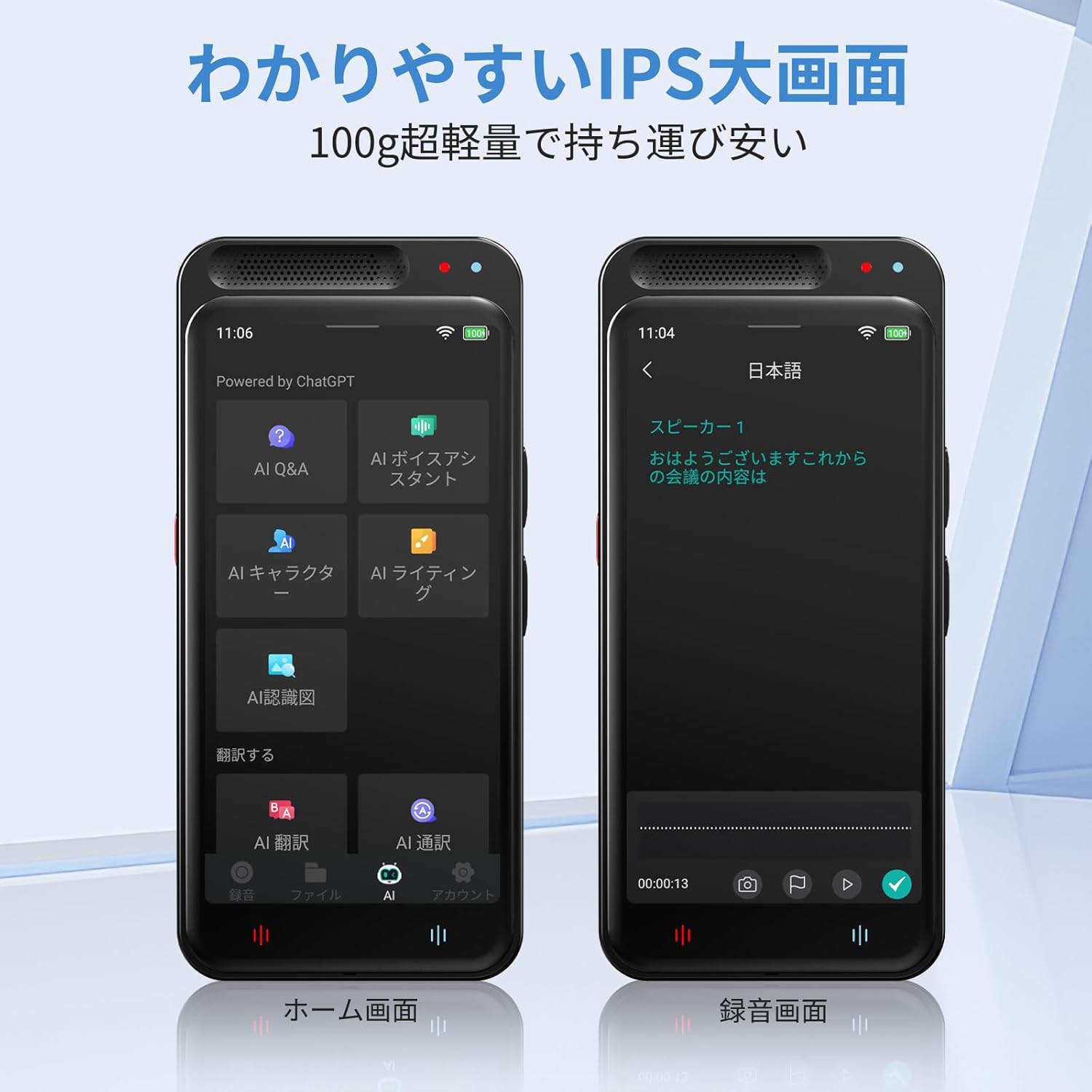
Image: The Adelagnes AI Voice Recorder M3 displaying its home screen on the left and a recording interface on the right, showing real-time transcription.
- From the home screen, tap the "Record" icon.
- To start recording, tap the red record button. The device will begin capturing audio and displaying real-time transcription on the 4-inch screen.
- To pause recording, tap the pause button. To resume, tap it again.
- To stop recording, tap the stop button. The recording will be saved automatically.
The device features high-sensitivity microphones with 360-degree pickup and noise canceling, effective up to 10 meters, ensuring clear recordings for meetings, lectures, and interviews.

Image: A person holding the Adelagnes AI Voice Recorder M3 during a business meeting, with text overlays indicating a 10-meter recording range and 360-degree sound pickup with noise cancellation.
4.2 Transcription and Speaker Identification

Image: The Adelagnes AI Voice Recorder M3 showing a transcribed conversation with distinct speaker labels, demonstrating its speaker identification feature. Two individuals are visible in the background, engaged in a discussion.
The device automatically transcribes recorded audio in real-time. After recording, the transcription can be reviewed and edited. The high-precision speech recognition technology can separate voices by speaker, making it ideal for creating meeting minutes or lecture notes.
Transcription is available for free, both online and offline.
4.3 Translation Functions
4.3.1 Sprachübersetzung
- Access the "Translation" function from the home screen.
- Wählen Sie die Quell- und Zielsprache aus.
- Speak into the microphone, and the device will provide a real-time translation.
Offline voice translation supports 15 languages, while online translation supports 134 languages.
4.3.2 OCR Text Translation
- The device features a 5-megapixel camera.
- Use the OCR function to scan text from documents, menus, or signs.
- The device will convert the scanned text and provide a translation in your chosen language.
Offline OCR supports 12 languages, and online OCR supports 71 languages.
4.4 AI Tools

Image: The Adelagnes AI Voice Recorder M3 showcasing its AI tools interface, including AI Q&A, AI Voice Assistant, AI Writing, and AI Character functions, designed to support daily tasks.
- KI-Fragen und -Antworten: Ask questions and receive instant answers from the built-in AI, available 24/7.
- KI-Sprachassistent: Use voice commands to manage meeting records, schedules, and send messages hands-free.
- KI-Schreiben: Automatically generate and proofread reports, emails, and blogs at an accelerated pace.
- KI-Charakter: Engage with a learning conversational engine that evolves daily.
4.5 File Management and Data Transfer
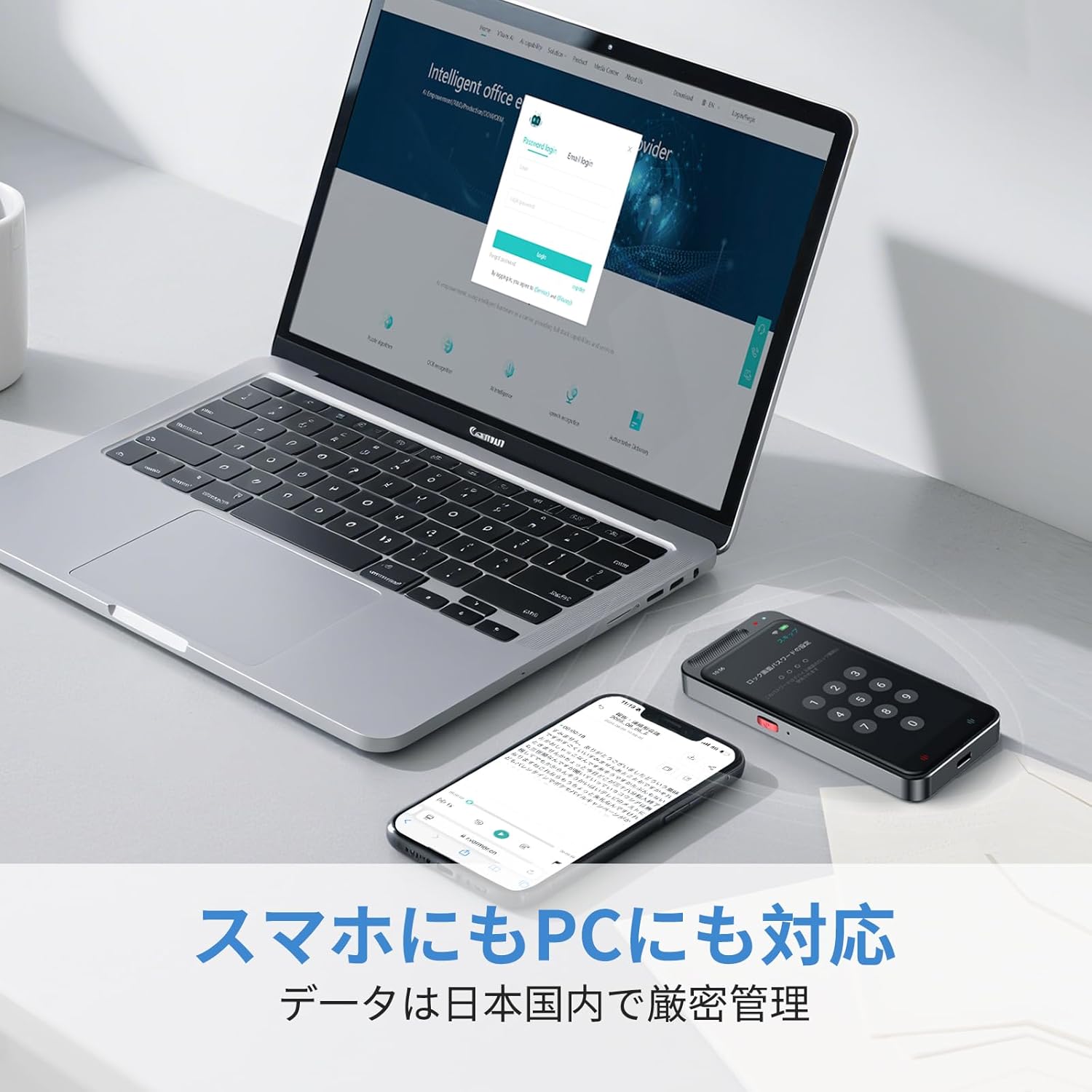
Image: The Adelagnes AI Voice Recorder M3 and a smartphone placed next to a laptop, illustrating the device's compatibility with PCs and smartphones for data transfer.
- Lokaler Speicher: Recordings are saved to the device's internal memory (2+16GB) or the 64GB TF memory card.
- Cloud-Speicher: The device supports cloud storage for real-time data transfer to PCs and smartphones.
- USB-Übertragung: Connect the device to a computer using the Type-C cable to transfer audio files and transcription texts. The device is recognized without special driver installation on Windows 11.
- Datenlöschung: Data can be permanently deleted with a single touch. All data transmission and storage require user permission.
5. Wartung
- Reinigung: Reinigen Sie das Gerät mit einem weichen, trockenen Tuch. Vermeiden Sie die Verwendung von flüssigen Reinigungsmitteln oder scheuernden Materialien.
- Lagerung: Bewahren Sie das Gerät an einem kühlen, trockenen Ort fern von direkter Sonneneinstrahlung und extremen Temperaturen auf.
- Batteriepflege: Um die Akkulaufzeit zu verlängern, vermeiden Sie häufiges vollständiges Entladen des Akkus. Laden Sie das Gerät regelmäßig auf, auch wenn es längere Zeit nicht benutzt wird.
- Software-Updates: Prüfen Sie regelmäßig, ob Software-Updates verfügbar sind, um eine optimale Leistung und den Zugriff auf neue Funktionen zu gewährleisten.
6. Fehlerbehebung
| Problem | Mögliche Ursache | Lösung |
|---|---|---|
| Gerät lässt sich nicht einschalten. | Niedriger Batteriestand; Gerät eingefroren. | Charge the device for at least 30 minutes. If still unresponsive, perform a hard reset (refer to manual for specific reset instructions if available, or hold power button for 10-15 seconds). |
| Schlechte Aufnahmequalität. | Microphone obstructed; excessive background noise; device too far from sound source. | Ensure microphone is clear. Reduce background noise. Place the device closer to the speaker (within 10 meters). |
| Transkriptionsfehler. | Unclear audio; strong accents; specialized terminology; offline mode limitations. | Ensure clear audio input. Connect to Wi-Fi for higher accuracy online transcription. Manually edit the transcription if necessary. |
| Übersetzung funktioniert nicht. | No internet connection (for online translation); incorrect language selection. | Verify Wi-Fi connection for online translation. Check selected source and target languages. Ensure clear speech for voice translation. |
| Übertragung nicht möglich files auf den PC. | Defektes USB-Kabel; falscher Verbindungsmodus. | Try a different Type-C cable. Ensure the device is connected in data transfer mode (if prompted). |
7. Spezifikationen
| Besonderheit | Spezifikation |
|---|---|
| Modellnummer | M3 |
| Bildschirmgröße | 4 Zoll |
| Dauergebrauchszeit | 7 Stunden |
| Kompatible Geräte | Smartphones, PCs |
| Batteriekapazität | 1500 mAh (wiederaufladbar) |
| Interner Speicher | 2+16 GB |
| Externer Speicher | 64GB TF Memory Card (built-in) |
| Mikrofon | Built-in, 360-degree pickup, 10m range |
| Aufnahmeformat | WAV |
| Kamera | 5 Megapixels (for OCR) |
| Technische Daten | 11 x 5 x 1 cm |
| Produktgewicht | 100 g |
8. Garantie und Support
For warranty information and customer support, please refer to the contact details provided with your purchase or visit the official Adelagnes webBewahren Sie Ihren Kaufbeleg für Garantieansprüche auf.
If you encounter any issues not covered in this manual, please contact our customer support team for assistance.