
runstar BG1911
runstar BG1911 Digitale Badezimmerwaage – Benutzerhandbuch
Modell: BG1911
Einführung
This manual provides detailed instructions for the proper use and maintenance of your runstar BG1911 Digital Bathroom Scale. Please read this manual thoroughly before use to ensure accurate readings and safe operation. This scale is designed for measuring body weight with high precision and an extra-high capacity.
Sicherheitshinweise
- Stellen Sie die Waage für genaue Messwerte auf eine harte, ebene Fläche. Vermeiden Sie Teppiche oder unebene Böden.
- Die Waage darf nicht auf nassen oder rutschigen Oberflächen verwendet werden.
- Springen Sie nicht auf die Waage. Steigen und steigen Sie vorsichtig ab.
- Halten Sie die Schuppen von Wasser und extremen Temperaturen fern.
- Dieses Gerät ist nur für den Hausgebrauch bestimmt.
- The scale is made with durable 8mm tempered glass. Handle with care to prevent breakage.
Packungsinhalt
Prüfen Sie nach dem Öffnen der Verpackung, ob alle Artikel vorhanden und in einwandfreiem Zustand sind:
- 1 x runstar BG1911 Digital Bathroom Scale
- 3 x AAA 1.5V Batterien (im Lieferumfang enthalten)
- 1 x Benutzerhandbuch (dieses Dokument)
Produkteigenschaften

Image: The runstar BG1911 Digital Bathroom Scale, featuring a sleek blue-black design and a large LCD display.
- Hohe Kapazität: Supports up to 550lb (250kg) with specialized load cells for accurate readings.
- Hohe Präzision: Delivers accurate readings in 1lb (0.5kg) increments.
- Großes LCD-Display: Extra-wide display with large numbers and backlight for clear readability without bending over.
- Ultra-Wide Platform: Generous 300 x 330mm platform provides ample space und Stabilität.
- Langlebige Konstruktion: Made with 8mm tempered glass for safety and longevity.
- Anti-Rutsch-Füße: Equipped with silicone feet to ensure stable and safe weighing.
- Lange Akkulaufzeit: Low-consumption IC chip allows for approximately 3 months of use per battery change.
- Automatisches Ein-/Ausschalten: Activates automatically when stepped on and turns off after a period of inactivity to save power.

Image: Diagram illustrating the specialized load cells and high-precision sensors that ensure accurate weight measurements.

Image: A person's feet on the scale, highlighting the large, backlit LCD display showing a weight reading of 550.0, with dimensions of the display (82mm wide, 44mm high).

Image: Comparison of the runstar scale's 300mm x 330mm platform size against a smaller, standard scale, emphasizing its ultra-wide design for comfort.
Aufstellen
- Einlegen der Batterie:
Open the battery compartment on the underside of the scale. Insert the three included AAA 1.5V batteries, ensuring correct polarity (+/-). Close the battery compartment securely.
- Platzierung:
Place the scale on a hard, flat, and stable surface. Avoid placing it on carpets, rugs, or uneven flooring, as this can affect accuracy.
- Erstaktivierung:
Step onto the scale briefly to activate it. The display will show "0.0" or "CAL" and then turn off. This indicates the scale is ready for use.
- Unit Selection (if applicable):
If your scale has a unit switch (usually on the back or underside), you can toggle between pounds (lb) and kilograms (kg) as desired. Ensure the desired unit is selected before weighing.
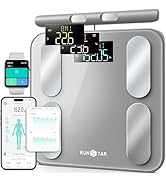
Image: Visual guide for initial setup: 1. Place on hard, flat floor. 2. Step on and off to activate. 3. Scale is ready to use.
Bedienungsanleitung
- Wiegen:
Ensure the scale is on a hard, flat surface. Gently step onto the center of the scale with bare feet. Stand still until your weight is displayed and stabilizes. The reading will flash a few times and then lock. The scale will automatically turn off after a few seconds of inactivity.
- Zeroing/Calibration:
The scale features automatic zeroing. If you move the scale, it is recommended to perform an initial activation (step on and off) to re-calibrate it before taking a measurement.
Wartung und Pflege
- Reinigung: Wischen Sie die Oberfläche der Waage mitamp Verwenden Sie ein Tuch und ein mildes Reinigungsmittel. Scheuermittel dürfen nicht verwendet werden und die Kalkablagerungen dürfen nicht in Wasser eingeweicht werden.
- Lagerung: Store the scale in a cool, dry place. Avoid storing it vertically for extended periods, as this may affect accuracy.
- Batteriewechsel: When the battery indicator appears on the display, replace all three AAA batteries simultaneously. Do not mix old and new batteries.
Fehlerbehebung
| Problem | Mögliche Ursache | Lösung |
|---|---|---|
| Keine Anzeige / Waage schaltet sich nicht ein. | Die Batterien sind leer oder falsch eingelegt. | Check battery polarity. Replace all batteries with new AAA batteries. |
| Inaccurate readings / Inconsistent weight. | Scale is on an uneven surface or carpet. Not properly calibrated. | Place the scale on a hard, flat floor. Step on and off once to activate and calibrate before weighing. Ensure you stand still on the center of the scale. |
| Es wird „Lo“ oder „Err“ angezeigt. | Niedriger Batteriestand oder Überlastung. | Replace batteries if "Lo" appears. If "Err" appears, the maximum weight capacity (550lb/250kg) has been exceeded. |
Sollte das Problem nach Anwendung dieser Lösungsansätze weiterhin bestehen, wenden Sie sich bitte an den Kundendienst.
Technische Daten
| Besonderheit | Detail |
|---|---|
| Modellnummer | BG1911 |
| Marke | runstar |
| Gewichtskapazität | 550 kg |
| Messinkremente | 1 kg |
| Plattformmaterial | 8mm gehärtetes Glas |
| Anzeigetyp | LCD mit Hintergrundbeleuchtung |
| Stromquelle | 3 x AAA 1.5V Batterien (im Lieferumfang enthalten) |
| Technische Daten | 14.52 x 11.8 x 1.96 Zoll (36.88 x 29.97 x 4.98 cm) |
| Artikelgewicht | 4.6 Pfund (2.09 kg) |
Garantie und Support
For warranty information or technical support, please refer to the contact details provided with your purchase or visit the official runstar webBewahren Sie Ihren Kaufbeleg als Kaufnachweis für Garantieansprüche auf.
Besuchen Sie auch die runstar Store on Amazon für weitere Informationen.
Ask a question about this manual
Ask about setup, troubleshooting, compatibility, parts, safety, or missing instructions. Manuals+ will review the question and use this page’s manual context to help answer it.