
1. Einleitung
The HTVRONT A300 Auto Hat Heat Press Machine is designed for efficient and precise heat transfers onto various hat types. This automatic press simplifies the heat transfer process, making it suitable for both beginners and experienced crafters. This manual provides detailed instructions for safe and effective operation, maintenance, and troubleshooting.
2. Sicherheitshinweise
- Caution: Hot Surface. Avoid Contact. The heat plate reaches high temperatures during operation. Always use the provided heat-resistant gloves when handling the machine or materials during and immediately after use.
- Stellen Sie sicher, dass die Maschine auf einer stabilen, hitzebeständigen Oberfläche steht.
- Außerhalb der Reichweite von Kindern und Haustieren aufbewahren.
- Bedienen Sie die Maschine nicht mit nassen Händen oder in der Nähe von Wasser.
- Ziehen Sie den Netzstecker, wenn das Gerät nicht benutzt wird oder vor Reinigungs- und Wartungsarbeiten.
- Do not attempt to disassemble or repair the machine yourself. Contact customer support for assistance.
3. Packungsinhalt
Überprüfen Sie, ob alle Artikel im Paket vorhanden sind:
- HTVRONT A300 Auto Hat Heat Press Machine (x1)
- Large Hat Platen (Pre-Installed) (x1)
- Small Hat Platen (x1)
- Netzkabel (x1)
- Heat-Resistant Gloves (x1 pair)
- User Guide Envelope (x1)

4. Produktmerkmale
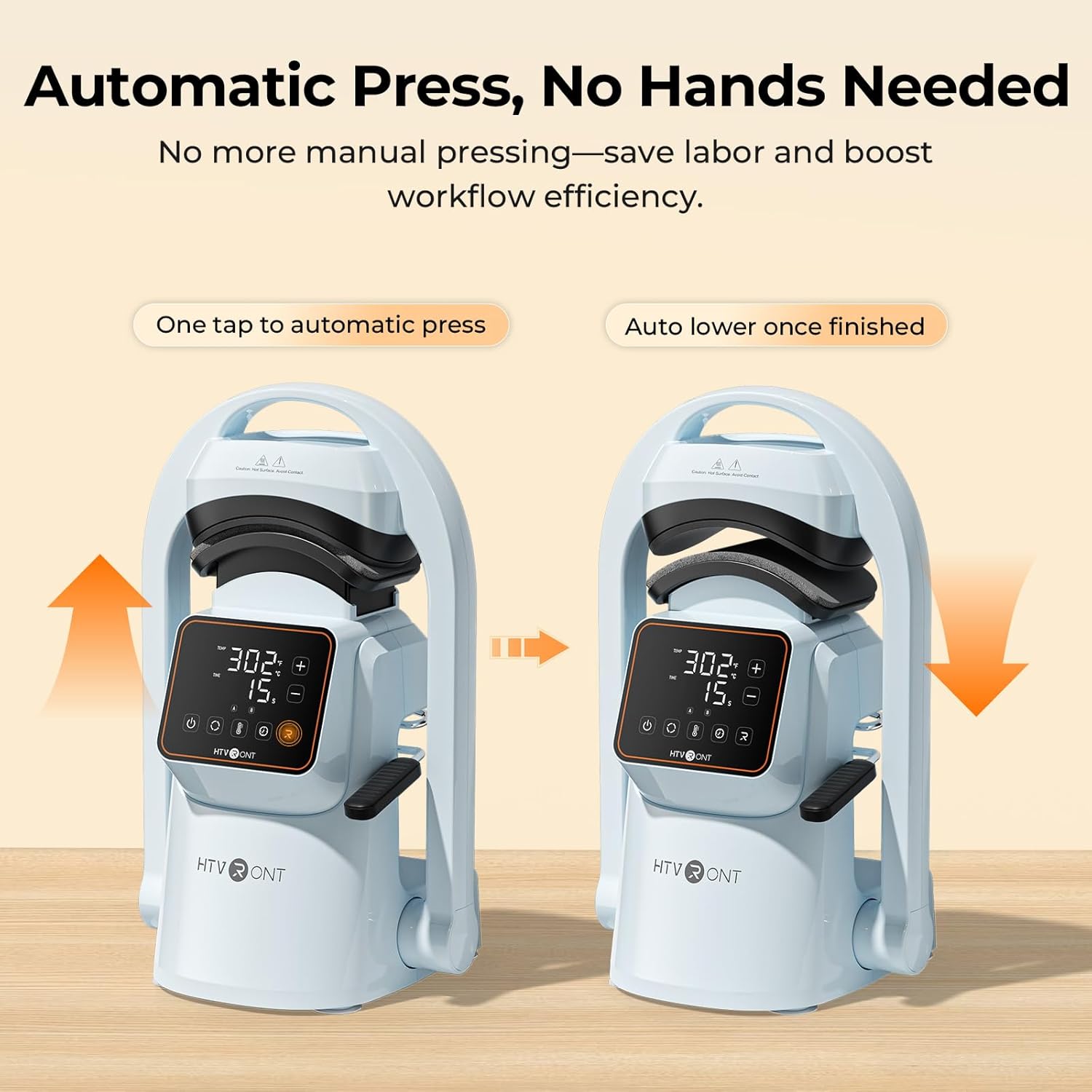
- One-Touch Automatic Press: The machine automatically lowers and lifts, applying consistent pressure and timing with a single touch, reducing manual effort.
- Starker Druck: Delivers over 176 lb (80 kg) of pressure, suitable for various transfer materials including Hotfix rhinestones, embroidered patches, DTF transfer film, puff heat transfer vinyl, and sublimation paper.
- Dual Hat Platens: Includes two quick-swap platens for adult and children's hat sizes, ensuring even pressure and alignment for different cap styles.
- Intelligente voreingestellte Modi: Features two customizable preset modes for saving preferred temperature and time settings, simplifying batch production.
- Precise Temperature & Time Control: Intuitive touchscreen allows precise adjustment of temperature (104–410°F / 40–210°C) and time (1–999 seconds).
- Gleichmäßige Wärmeverteilung: Cast-aluminum heat plate heats rapidly and distributes heat uniformly, preventing cold spots. The PTFE coating helps prevent sticking.
- Kompaktes und leichtes Design: Einfach zu lagern und zu transportieren.
- Starke Saugnäpfe: Ensures stability on your workspace during operation.
- Automatische Abschaltung: Automatically powers off after 15 minutes of inactivity for safety.


5. Einrichtung
- Auspacken: Nehmen Sie alle Komponenten vorsichtig aus der Verpackung. Bewahren Sie die Verpackung für die spätere Lagerung oder den Transport auf.
- Platzierung: Place the HTVRONT A300 on a flat, stable, and heat-resistant surface. The integrated suction cups on the base will help secure the machine.
- Stromanschluss: Connect the power cord to the machine and then to a standard electrical outlet.
- Platen Installation: The large hat platen is typically pre-installed. To swap platens, simply remove the current platen by unscrewing it and snap the desired platen into place. Ensure it is securely fastened.

6. Bedienungsanleitung
- Einschalten: Press the power button on the touchscreen display to turn on the machine.
- Temperatur und Zeit einstellen: Use the intuitive touchscreen to adjust the temperature and time settings according to your transfer material's requirements. You can also select one of the two preset modes (A or B) for quick setup.
- Prepare the Hat: Pull back the handle to open the press. Place your hat onto the platen, ensuring it is centered and smooth. Use the hat stretcher (if applicable) to flatten the hat surface for optimal pressing.
- Position Transfer Material: Carefully place your DTF film, embroidery patch, sublimation paper, or other transfer material onto the desired area of the hat.
- Initiate Press: Push the handle forward to engage the lower platen. Press the 'Go' button (often indicated by 'R' or a play icon) on the touchscreen. The machine will automatically lower the heat plate, apply pressure, and begin the countdown.
- Fertigstellung: Once the timer finishes, the machine will beep, and the heat plate will automatically lift.
- Hut abnehmen: Pull back the handle to fully open the press. Carefully remove the hat using the heat-resistant gloves. Allow the transfer to cool before peeling (if required by your material).


Quick Reference Chart for Heat Transfer Settings
| Materialien | Textil | Temperatur | Zeit | Notiz |
|---|---|---|---|---|
| Reines Wärmeübertragungsvinyl | 100% Cotton, Polycotton, Polyester, etc. | 145°C/293°F | 15er Jahre | Kaltes Peeling |
| Giltter Heat Transfer Vinyl | 100% Cotton, Polycotton, Polyester, etc. | 150°C/302°F | 15er Jahre | Kaltes Peeling |
| Holografisches Wärmeübertragungsvinyl | 100% Cotton, Polycotton, Polyester, etc. | 150°C/302°F | 15er Jahre | Kaltes Peeling |
| Chamäleon-Wärmeübertragungsvinyl | 100% Cotton, Polycotton, Polyester, etc. | 145°C/293°F | 15er Jahre | Kaltes Peeling |
| Metallisches Wärmeübertragungsvinyl | 100% Cotton, Polycotton, Polyester, etc. | 140°C/284°F | 10er Jahre | Kaltes Peeling |
| Bedruckbares Wärmeübertragungsvinyl | 100% Cotton, Polycotton, Polyester, etc. | 145°C/293°F | 15er Jahre | Kaltes Peeling |
| Reflektierendes Wärmeübertragungsvinyl | 100% Cotton, Polycotton, Polyester, etc. | 150°C/302°F | 15er Jahre | Kaltes Peeling |
| Flock Heat Transfer Vinyl | 100% Cotton, Polycotton, Polyester, etc. | 150°C/302°F | 15er Jahre | Kaltes Peeling |
| Puff-Wärmeübertragungsvinyl | 100% Cotton, Polycotton, Polyester, etc. | 155°C/311°F | 15er Jahre | Heißschälen |
| Thermotransferpapier für dunkle Stoffe | 100% Cotton, Polycotton, Polyester, etc. | 160°C/320°F | 20er Jahre | Kaltes Peeling |
| Thermotransferpapier für leichte Stoffe | 160°C/320°F | 20er Jahre | Kaltes Peeling | |
| Sublimation Papier | Polycotton, 100% Polyester, etc. | 200°C/392°F | 40er Jahre | Heißschälen |
| DTF-Transferfolie | 100% Cotton, Polycotton, Polyester, etc. | 150°C/302°F | 15er Jahre | Kaltes Peeling |
| Embroidered Patches | 100% Cotton, Polycotton, Polyester, etc. | 170°C/338°F | 20er Jahre | Kaltes Peeling |
| Hotfix Rhinestones | 100% Cotton, Polycotton, Polyester, etc. | 175°C/347°F | 20er Jahre |
7. Wartung
- Reinigung der Heizplatte: After the machine has cooled completely, wipe the PTFE-coated heat plate with a soft, damp cloth to remove any residue. Do not use abrasive cleaners or sharp objects that could damage the coating.
- Allgemeine Reinigung: Wischen Sie die Außenseite des Geräts mit einem trockenen oder leicht feuchten Tuch ab.amp Tuch.
- Lagerung: Bewahren Sie die Maschine bei Nichtgebrauch in einer trockenen, staubfreien Umgebung auf.
8. Fehlerbehebung
If you encounter issues with your HTVRONT A300, refer to the following common problems and solutions:
- Maschine lässt sich nicht einschalten: Ensure the power cord is securely plugged into both the machine and a working electrical outlet. Check if the outlet has power.
- Ungleichmäßige Wärmeübertragung: Verify that the hat is placed smoothly on the platen and that the transfer material is flat. Ensure the correct temperature and time settings are used for your specific material.
- Transfer Material Not Sticking: Double-check the recommended temperature, time, and pressure settings for your material. Ensure the material is compatible with heat pressing.
- Machine Not Pressing Automatically: Ensure the handle is fully engaged and the 'Go' button has been pressed.
For further assistance, please contact HTVRONT customer support.
9. Spezifikationen
| Besonderheit | Detail |
|---|---|
| Marke | HTVRONT |
| Modell | A300 |
| Material | Aluminium |
| Farbe | Blau |
| Produktabmessungen (L x B x H) | 17.72" x 12.4" x 11.22" |
| Größe der Heizplatte | 5.70" x 3.68" x 2.28" (14.52 x 9.36 x 5.80 cm) |
| Hat Platen Sizes | Small: 6.69" x 2.76" (7 x 17 cm) / Large: 5.9" x 3.15" (8 x 15 cm) |
| Leistung | 350 Watt |
| Temperaturbereich | 40–210 °C |
| Zeitraum | 1–999 Sekunden |
| Maximaler Druck | ≥ 176 lb (80 kg) |
10. Garantie und Support
The HTVRONT A300 Auto Hat Heat Press Machine comes with a 1 Jahr Garantie Diese Garantie gilt ab Kaufdatum und deckt Herstellungsfehler sowie Funktionsstörungen bei normalem Gebrauch ab.
For warranty claims, technical support, or any questions regarding the product, please contact HTVRONT customer service through their official webBitte wenden Sie sich an den Kundenservice oder den Händler, bei dem Sie das Produkt gekauft haben. Halten Sie bitte Ihren Kaufbeleg und die Produktmodellnummer bereit, wenn Sie den Kundenservice kontaktieren.