
Einführung
The ZOMBIES CAT MGALL X22 Clip On Wireless Headphones offer a unique open-ear listening experience combined with a fashionable design. These headphones feature Bluetooth 6.0 connectivity, an LED HD display for battery status, and a comfortable clip-on fit. This manual provides essential information for setting up, operating, and maintaining your headphones.
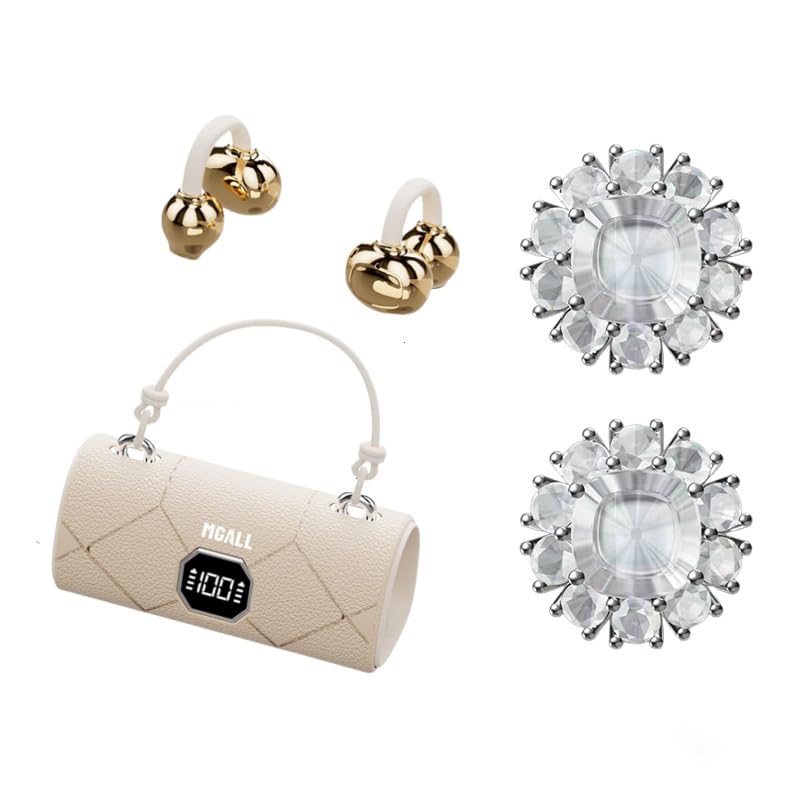
MGALL X22 Clip On Wireless Headphones in their charging case, showcasing the unique handbag-style design and open-ear earbuds.
Hauptmerkmale
- Offenes Ohr-Design: Provides a comfortable and pleasant listening experience without blocking the ear canal.
- Bluetooth 6.0: Ensures fast pairing, seamless audio, and ultra-low latency.
- Dual AI Noise-Canceling Mics: Enhances voice clarity by suppressing ambient noise during calls.
- Immersiver Stereoklang: Delivers crisp highs, rich bass, and a wider soundstage with advanced directional audio.
- Verlängerte Akkulaufzeit: Up to 6 hours of listening per charge, with a total of 40 hours using the charging case.
- LED-HD-Display: Shows real-time battery levels for both the charging case and earbuds.
- Modisches Design: Features a unique handbag-style charging case with a smooth leather finish and graceful handle.

Diagram illustrating the open listening experience and key features of the MGALL X22 headphones, including comfort, battery display, lossless HiFi sound, luxury leather texture, Dual-mode Bluetooth 6.0, and open ear clip design.
Aufstellen
Aufladen der Kopfhörer
Vor dem ersten Gebrauch die Kopfhörer und das Ladecase vollständig aufladen.
- Connect the provided USB-C cable to the charging port on the back of the charging case.
- Stecken Sie das andere Ende des USB-C-Kabels in eine kompatible USB-Stromquelle.
- The LED HD display on the case will show the charging progress. A green indicator light on the case signifies it is charging or fully charged.
- Place the earbuds into their respective slots inside the charging case. They will begin charging automatically.

Close-up of the MGALL X22 charging case with earbuds inside, showing the green indicator light, indicating charging or readiness.

Image showing the LED dynamic power HD digital display on the charging case, indicating the battery level of the charging case and earphones.
Kopplung mit einem Gerät
- Stellen Sie sicher, dass die Ohrhörer aufgeladen sind und sich im Ladecase befinden.
- Öffnen Sie das Ladeetui. Die Ohrhörer wechseln automatisch in den Kopplungsmodus.
- Aktivieren Sie Bluetooth auf Ihrem Gerät (Smartphone, Tablet usw.).
- Suchen nach available Bluetooth devices and select "MGALL X22" from the list.
- Sobald die Verbindung hergestellt ist, hören Sie eine akustische Benachrichtigung, und die Ohrhörer sind einsatzbereit.
Official product video demonstrating the charging case and earbuds, highlighting the handbag-style design and LED display.
Kopfhörer bedienen
Tragen der Kopfhörer
The MGALL X22 headphones feature an open-ear clip-on design for comfort and awareness of your surroundings.
- Identifizieren Sie den linken (L) und den rechten (R) Ohrhörer.
- Gently clip each earbud onto your ear, ensuring the speaker portion is positioned just outside your ear canal.
- Adjust for a secure and comfortable fit. The flexible design allows for slight adjustments.

Image showing a person wearing the MGALL X22 clip-on headphones, demonstrating the secure and comfortable fit.
Touch-Bedienelemente
The earbuds feature touch-sensitive controls for easy management of audio and calls.
- Abspielen/Pause: Tippen Sie einmal auf einen der Ohrhörer.
- Nächster Titel: Doppeltippen Sie auf den rechten Ohrhörer.
- Vorheriges Lied: Doppeltippen Sie auf den linken Ohrhörer.
- Anruf annehmen/beenden: Einmaliges Tippen auf einen der Ohrhörer während eines eingehenden Anrufs.
- Anruf ablehnen: Bei einem eingehenden Anruf einen der Ohrhörer lange drücken.
- Sprachassistenten aktivieren: Dreimaliges Tippen auf einen der Ohrhörer.
Removable Earring Charms
The headphones come with optional removable earring charms for customization.
- To attach a charm, open the clasp on the charm.
- Carefully attach the clasp to the designated loop on the earbud.
- Close the clasp securely.
- To remove, simply open the clasp and detach.
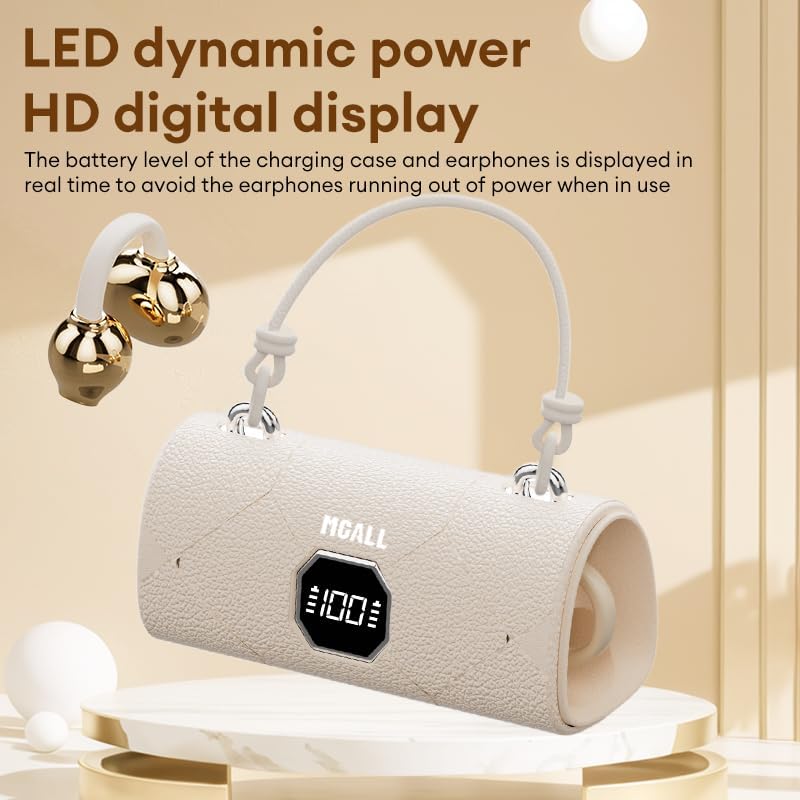
Image showing the removable earring charms that can be attached to the headphones for a personalized look.
Offizielles Produktvideo präsentiertasing the MGALL X22 clip-on earbuds, demonstrating how they are worn and the optional earring attachments.
Wartung
Reinigung
- Wischen Sie die Ohrhörer und das Ladecase mit einem weichen, trockenen, fusselfreien Tuch ab.
- Verwenden Sie keine Scheuermittel, Lösungsmittel oder Aerosolsprays.
- Vermeiden Sie, dass Feuchtigkeit in die Öffnungen eindringt.
Lagerung
- Bewahren Sie die Kopfhörer bei Nichtgebrauch im Ladecase auf, um sie zu schützen und geladen zu halten.
- Bewahren Sie das Gerät an einem kühlen, trockenen Ort auf und schützen Sie es vor extremen Temperaturen und direkter Sonneneinstrahlung.
Fehlerbehebung
Häufige Probleme und Lösungen
- Kein Ton:
- Stellen Sie sicher, dass die Ohrhörer ordnungsgemäß mit Ihrem Gerät gekoppelt sind.
- Überprüfen Sie die Lautstärke sowohl auf Ihrem Gerät als auch an den Ohrhörern.
- Stellen Sie sicher, dass die Ohrhörer aufgeladen sind.
- Kopplungsprobleme:
- Schalten Sie Bluetooth auf Ihrem Gerät aus und wieder ein.
- Legen Sie die Ohrhörer zurück in das Etui, schließen Sie es und öffnen Sie es erneut, um den Kopplungsmodus erneut aufzurufen.
- Forget/delete "MGALL X22" from your device's Bluetooth list and try pairing again.
- Ladeprobleme:
- Stellen Sie sicher, dass das Ladekabel sowohl mit dem Gehäuse als auch mit der Stromquelle fest verbunden ist.
- Prüfen Sie, ob der Ladeanschluss sauber und frei von Verunreinigungen ist.
- Versuchen Sie es mit einem anderen USB-C-Kabel oder Netzteil.
Technische Daten
| Besonderheit | Detail |
|---|---|
| Modellname | X2202+TYEJPS06 |
| Marke | ZOMBIES CAT |
| Konnektivitätstechnologie | Kabellos, Bluetooth 6.0 |
| Bluetooth-Reichweite | 10 Meter |
| Lärmschutz | Hybrid Noise Cancellation (for mics) |
| Form der Hörmuschel | Offenes Ohr |
| Kontrollmethode | Berühren |
| Impedanz | 32 Ohm |
| Material | Plastik |
| Akkulaufzeit (Ohrhörer) | Bis zu 6 Stunden |
| Gesamte Akkulaufzeit (mit Hülle) | Bis zu 40 Stunden |
Lieferumfang
- MGALL X22 Clip On Wireless Headphones
- Ladeetui
- USB-C-Ladekabel
- Bedienungsanleitung
- Removable Earring Charms
Garantie und Support
Your ZOMBIES CAT MGALL X22 Clip On Wireless Headphones are covered by a standard manufacturer's warranty against defects in materials and workmanship. Please refer to the product packaging or contact customer support for specific warranty details and duration.
For technical support, troubleshooting assistance, or warranty claims, please contact ZOMBIES CAT customer service through the retailer where the product was purchased or visit the official ZOMBIES CAT webWebsite für Kontaktinformationen.