
1. Einleitung
This manual provides detailed instructions for the installation, operation, and maintenance of your new XTRONS Android 14 Qualcomm 665 Car Stereo. Please read this manual thoroughly before using the product to ensure proper functionality and safety.
1.1 Anwendbare Modelle und Baujahre
Dieses Autoradio ist mit folgenden Fahrzeugmodellen und Baujahren kompatibel:
- Für BMW: E46 4-door Sedan (1998-2005), E46 2-door Coupe (1999-2006), E46 2-door Convertible (1999-2006), E46 5-door Touring (1999-2005), E46 3-door Hatchback (2000-2004), E46 M3 (2000-2006)
- Für Rover: Rover 75 (1999-2005)
- Für MG: ZT (2001-2005)

Abbildung 1: Anwendbare Modelle und Jahre
1.2 Wichtige Hinweise zur Kompatibilität
Before installation, please check your car's center console and air-conditioning cover for compatibility. If necessary, remove the air-conditioning cover to fit the unit perfectly. Additional cables may be required depending on your vehicle's original setup.

Figure 2: Important Notes on Compatibility and Required Cables
2. Hauptmerkmale
- 9-Zoll-QLED-IPS-Bildschirm: 1280*800 high-definition QLED display with a capacitive touchscreen, 178° wide viewing angle, powered by Adreno 610 GPU for ultra-smooth 4K entertainment.
- Hochleistungs-CPU: Qualcomm Snapdragon 665 Octa-Core processor with 8GB RAM and 256GB ROM storage, running Android 14 for responsive performance.
- Smartphone-Konnektivität: Built-in Wireless Car Auto Play, Built-in Wireless & Wired Android Auto, and Bluetooth 5.0 for calls and voice control.
- Eingebauter DSP: Digitales Amplifier Processing (TDA7808) and DTS Digital Sound (Si47925) for enhanced audio fidelity and interference immunity.
- Optimierte CANbus-Dekodierung: Seamless integration with vehicle features like steering wheel control, ACC control, reversing control, and door status.
- Split-Screen & Bild-in-Bild: Run two applications side-by-side or watch videos while multitasking.
- Dualband-WLAN: Unterstützt sowohl das 2.4-GHz- als auch das 5-GHz-Band für eine schnellere und stabilere Internetverbindung.
2.1 Visuelle Merkmale

Figure 3: 9-inch QLED IPS Screen
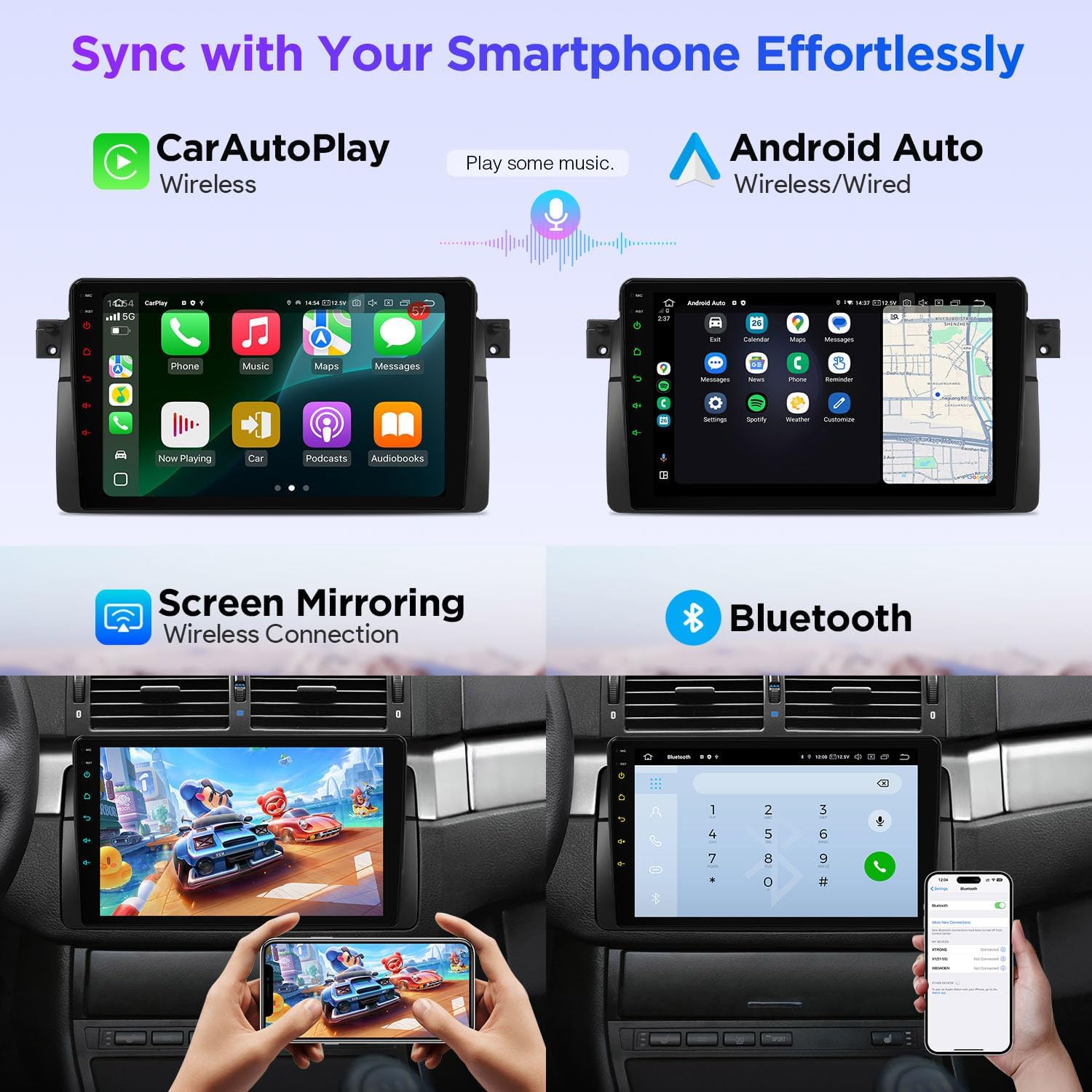
Figure 4: Smartphone Connectivity (CarPlay & Android Auto)

Figure 5: Smart and Intuitive UI with Day/Night Mode
2.2 Audiofunktionen

Figure 6: DTS Digital Sound and DSP Controls
2.3 Fahrzeugintegration
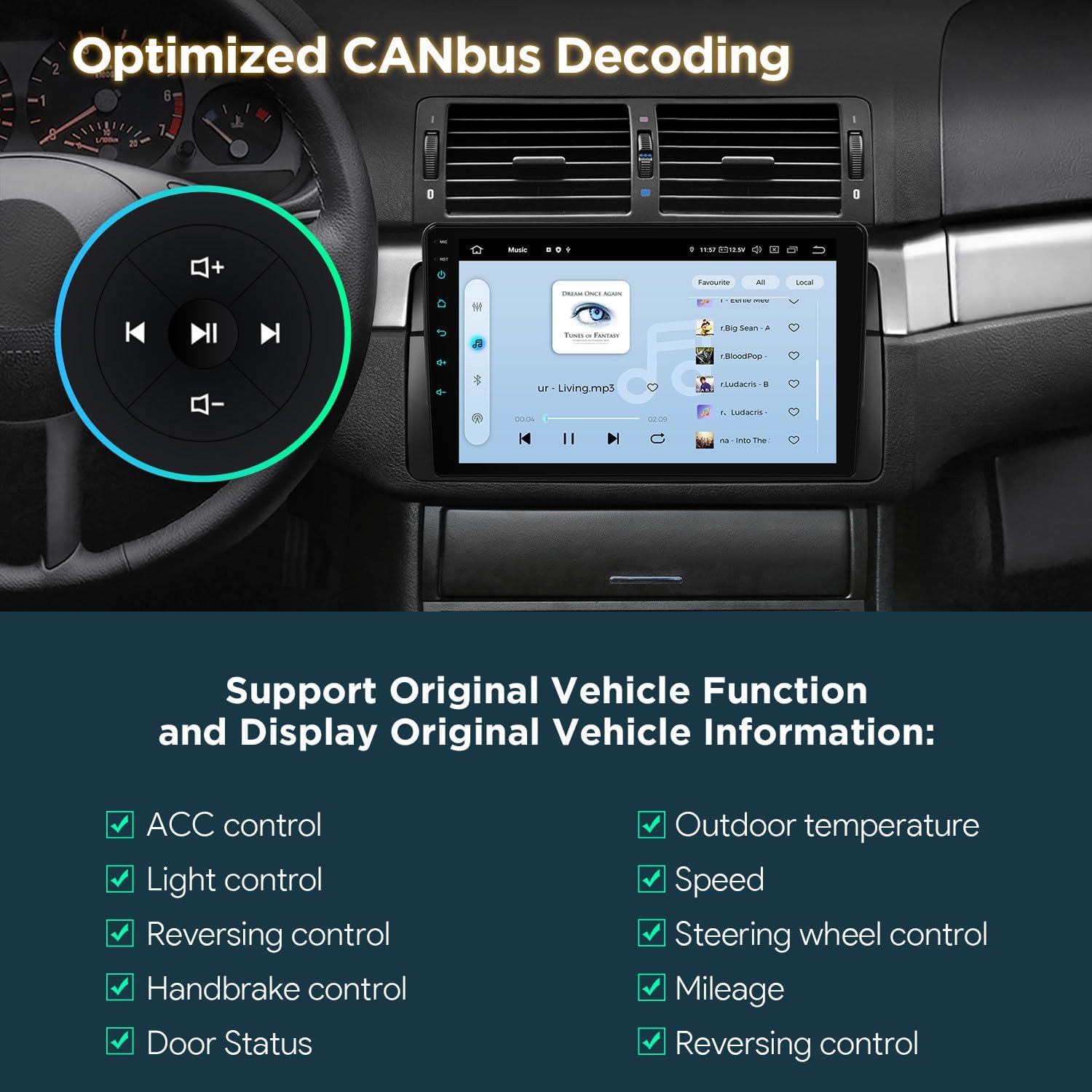
Figure 7: Optimized CANbus Decoding
3. Einrichtung und Installation
Dieser Abschnitt bietet einen allgemeinen Überblickview of the installation process. For detailed, step-by-step instructions, please refer to the included English Manual and German Manual.
3.1 Auspacken und Komponenten

Figure 8: Package Content and Accessories
3.2 Installationsprozess abgeschlossenview
Installation typically involves removing the existing car stereo, connecting the provided wiring harness and accessories, and securing the new head unit. Ensure all connections are secure before reassembling the dashboard.
Video 1: XTRONS 9 Inch Qualcomm Car Stereo for BMW E46 M3 Rover 75 MG ZT - Product Overview and Features. This video provides a visual overview of the product's features and how it integrates into the car environment.
Video 2: Eonon Car Stereo for E46X6S - Installation Guide. This video demonstrates the installation process for a car stereo in a BMW E46, which is highly relevant for this product.
4. Bedienungsanleitung
4.1 Navigation der Benutzeroberfläche (UI)
The unit features a smart and intuitive UI with customizable day/night modes and quick access toggles for your favorite applications. Navigate through menus by swiping and tapping the QLED touchscreen.
4.2 Smartphone-Integration (CarPlay & Android Auto)
Connect your smartphone wirelessly via Bluetooth for Wireless Car Auto Play (iPhone) or Wireless & Wired Android Auto (Android phones). This allows access to navigation, calls, music, and voice assistants (Siri/Google Assistant) directly from the head unit.
4.3Bluetooth 5.0
Utilize Bluetooth 5.0 for hands-free calling and audio streaming. Pair your device through the Bluetooth settings menu on the head unit.
4.4 Built-in DSP Audio Control
Access the built-in Digital Sound Processor (DSP) to fine-tune your audio experience. Adjust equalizer settings, sound field, and other audio parameters to your preference.
4.5 Split Screen & Picture-in-Picture
To activate split-screen mode, long-press an app icon and drag it to one side of the screen. For Picture-in-Picture, start a video and then navigate to another app; the video will continue playing in a small, movable window.
4.6 GPS-Navigation
The unit supports various GPS navigation applications. Download your preferred navigation app from the Play Store and follow its instructions for route planning and guidance.
4.7" AHD-Kameraeingang
Connect an AHD (Analog High Definition) camera for clear rearview oder Vorderseiteview display. The system automatically switches to the camera view beim Rückwärtsfahren.
4.8 Dualband-WLAN
Connect to available Wi-Fi networks (2.4GHz or 5GHz) to access online features, download apps, and browse the internet.
5. Wartung
Um die Langlebigkeit und optimale Leistung Ihres XTRONS-Autoradios zu gewährleisten, beachten Sie bitte folgende Wartungshinweise:
- Bildschirmreinigung: Verwenden Sie ein weiches, fusselfreies Tuch, um den QLED-Touchscreen vorsichtig abzuwischen. Bei hartnäckigen Flecken etwas nachhelfen.ampReinigen Sie das Tuch mit einem Bildschirmreiniger, der speziell für Elektronikgeräte entwickelt wurde. Vermeiden Sie aggressive Chemikalien oder scheuernde Materialien.
- Software-Updates: Periodically check for software updates through the unit's settings menu to ensure you have the latest features and performance enhancements.
- Temperaturkontrolle: Vermeiden Sie es, das Gerät über längere Zeiträume extremen Temperaturen auszusetzen.
- Verbindungsprüfungen: Überprüfen Sie gelegentlich alle Kabelverbindungen, um sicherzustellen, dass sie fest sitzen und frei von Korrosion sind.
6. Fehlerbehebung
Sollten Sie Probleme mit Ihrem Autoradio haben, beachten Sie bitte die folgenden gängigen Schritte zur Fehlerbehebung:
- Kein Strom: Prüfen Sie alle Stromanschlüsse und stellen Sie sicher, dass die Zündung des Fahrzeugs eingeschaltet ist. Vergewissern Sie sich, dass die Sicherung intakt ist.
- Kein Ton: Check speaker connections, volume levels, and audio settings (including DSP). Ensure the correct audio source is selected.
- Touchscreen reagiert nicht: Versuchen Sie, das Gerät neu zu starten. Sollte das Problem weiterhin bestehen, setzen Sie das Gerät auf die Werkseinstellungen zurück (Hinweis: Dadurch werden alle Benutzerdaten gelöscht).
- GPS-Signal verloren: Stellen Sie sicher, dass die GPS-Antenne ordnungsgemäß installiert ist und eine freie Sicht hat. view des Himmels.
- Bluetooth-/WLAN-Verbindungsprobleme: Ensure Bluetooth/Wi-Fi is enabled on both the head unit and your device. Try re-pairing or reconnecting.
- CAN-Bus-Funktionen funktionieren nicht: Verify the CANbus box and cable are correctly installed and configured.
For more detailed troubleshooting or persistent issues, please consult the full English Manual or contact XTRONS customer support.
7. Spezifikationen
| Besonderheit | Beschreibung |
|---|---|
| Marke | XTRONS |
| Modell | B0FMJSN8NP |
| Betriebssystem | Android 14 |
| CPU | Qualcomm Snapdragon 665 Octa Core |
| RAM | 8 GB |
| Speicherkapazität | 256 GB |
| Bildschirmgröße | 9 Zoll |
| Anzeigetyp | QLED, IPS Panel |
| Auflösung | 1280*800 |
| Konnektivitätstechnologie | Bluetooth 5.0, USB, Dual Band Wi-Fi (2.4GHz & 5GHz) |
| Besondere Merkmale | Bluetooth, Touchscreen, Built-in DSP, Wireless CarPlay, Android Auto, Optimized CANbus Decoding, Split Screen, Picture-in-Picture |
| Unterstütztes Satellitennavigationssystem | GPS |
| Kontrollmethode | Berührung, Stimme |
8. Lieferumfang
The following components are included with your XTRONS Car Stereo:
- 1 × ISO-Kabelbaum
- 1 × RCA-Kabel
- 1 × Radioantennenkabel
- 1 × 4G +Antenna (4G Function not supported in USA)
- 1 × 4G -Antenna
- 1 × GPS-Antenne
- 2 × USB-Kabel
- 1 × CANbus-Box
- 1 × Kamerakabel
- 1 × CANbus-Kabel
- 1 × English Manual
- 1 × German Manual
9. Garantie und Support
9.1 Garantieinformationen
Dieses Produkt wird mit einem 1 Jahre HerstellergarantieBitte bewahren Sie Ihren Kaufbeleg für Garantieansprüche auf.
9.2 Kundendienst
Bei technischen Problemen, Fragen zur Fehlerbehebung oder Garantieansprüchen wenden Sie sich bitte über die offizielle Website an den XTRONS-Kundendienst. webWebsite oder die Kontaktinformationen, die auf Ihrer Produktverpackung angegeben sind.