
Einführung
Thank you for choosing the SuperRC M23 Mini RC Drone. This manual provides essential information for the safe operation, setup, maintenance, and troubleshooting of your drone. Please read this manual thoroughly before operating the drone to ensure proper function and to avoid damage or injury. This drone is designed for adult beginners and features a lightweight, portable design with an HD camera and intelligent flight functions.
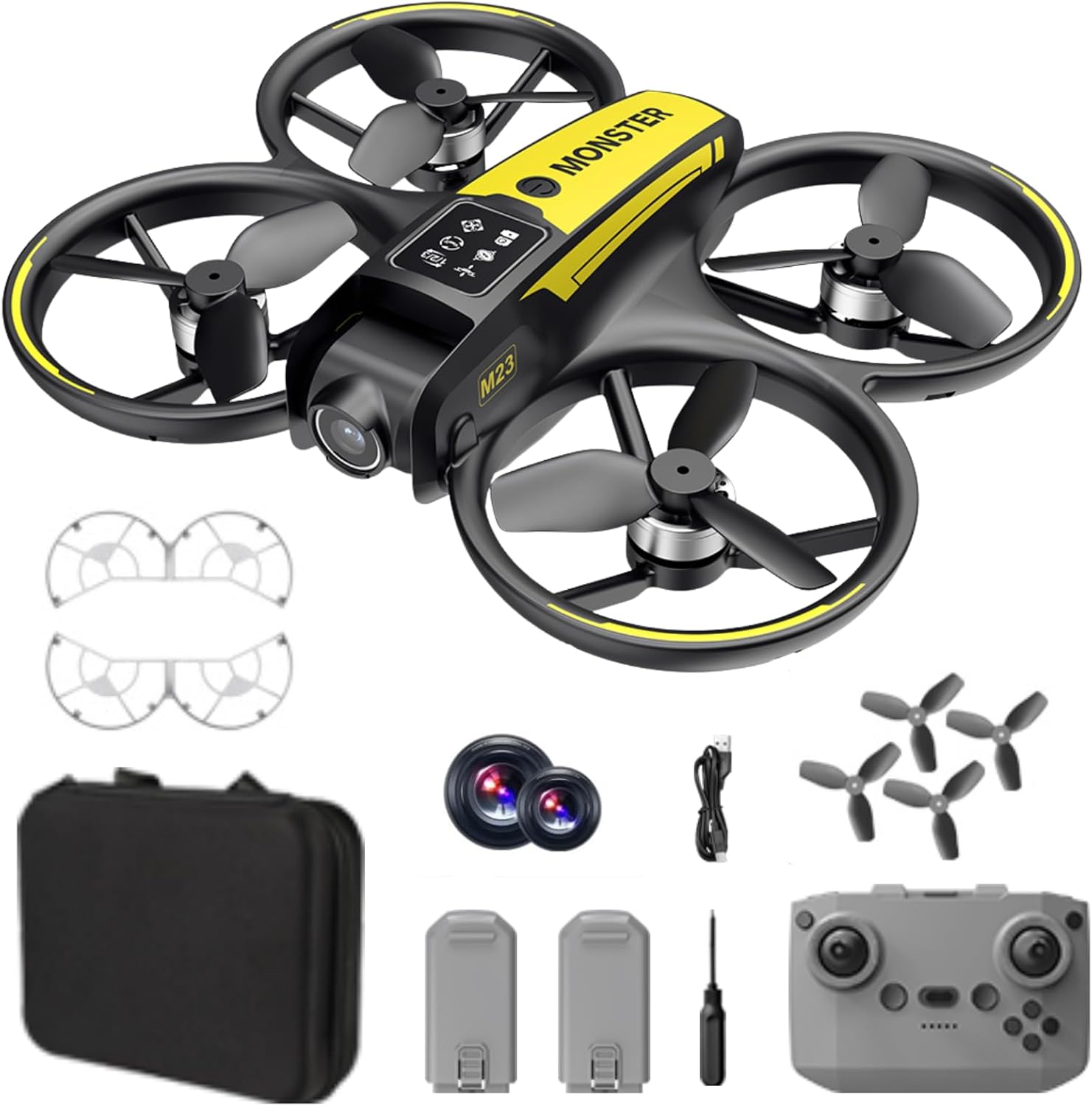
Lieferumfang
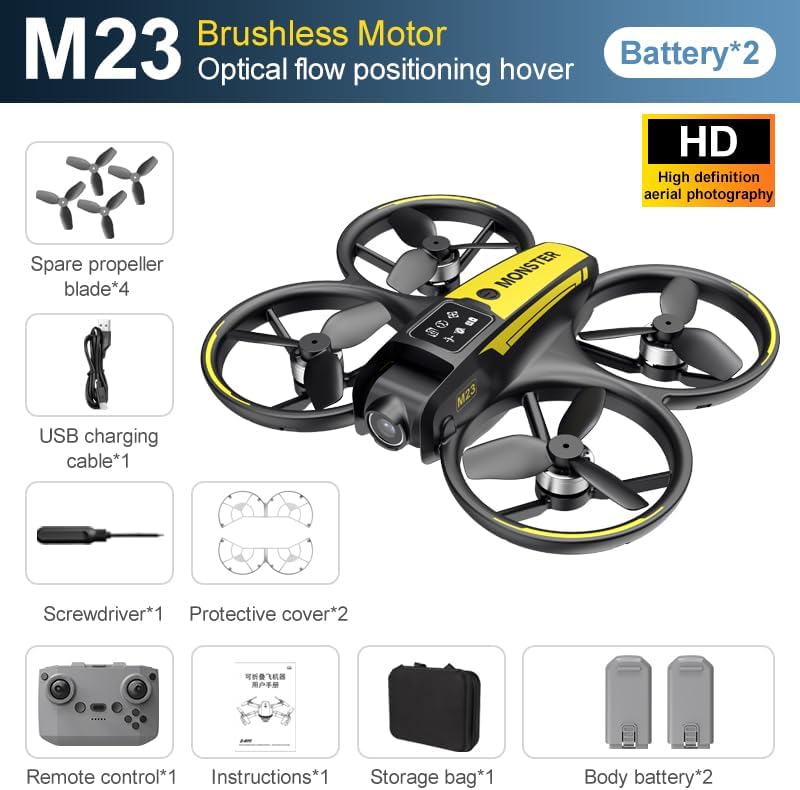
The SuperRC M23 drone package includes the following components:
- M23 Drohne
- Fernbedienung
- 2 x 3.7 V 1050 mAh wiederaufladbare Batterien
- 4 x Ersatzpropeller
- 2 x Propellerschützer
- Speicherkarte
- Kartenleser
- Schraubendreher
- USB-Ladekabel
- Aufbewahrungstasche
- Benutzerhandbuch (dieses Dokument)

Produkt überview
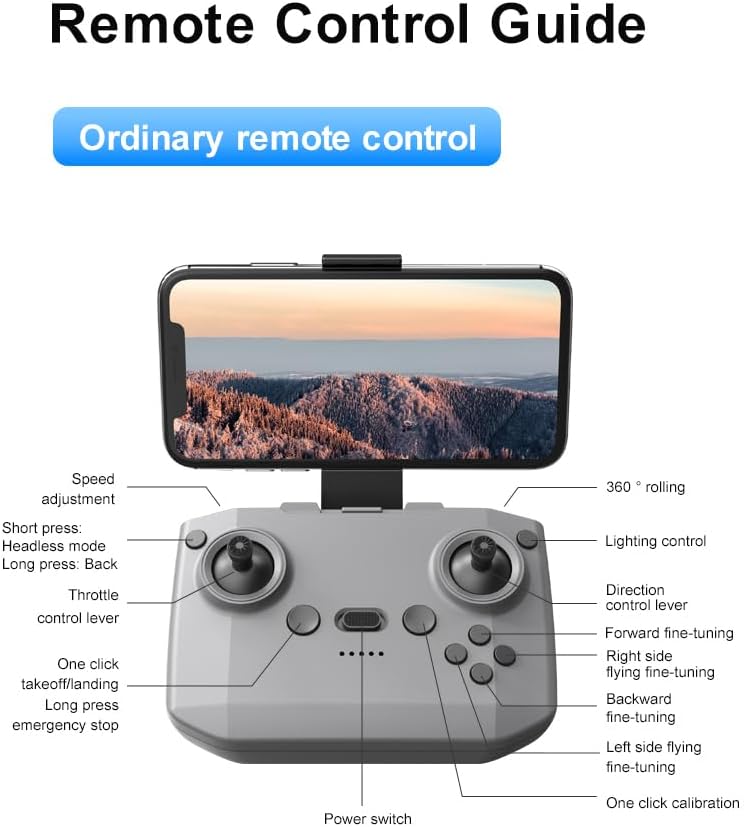
Layout der Fernbedienung
Familiarize yourself with the remote control buttons and their functions before flight.
Aufstellen
1. Einlegen der Batterie
- Stellen Sie sicher, dass Drohne und Fernbedienung ausgeschaltet sind.
- Suchen Sie das Batteriefach an der Drohne.
- Insert a charged 3.7V 1050mAh battery into the compartment until it clicks securely into place.
- For the remote control, open the battery cover and insert the required batteries (not specified in product data, assume standard AA/AAA, user should refer to physical manual for exact type).
2. Propellermontage
Die Drohne wird mit vorinstallierten Propellern geliefert. Falls ein Austausch erforderlich ist:
- Identifizieren Sie die Markierungen „A“ und „B“ auf den Propellern und den entsprechenden Motorarmen.
- Attach 'A' propellers to 'A' motor shafts and 'B' propellers to 'B' motor shafts. Ensure they are firmly secured.
3. Montage des Propellerschutzes
For added safety, attach the propeller guards:
- Align each propeller guard with the designated slots on the drone's motor arms.
- Gently push until they snap into place.
4. Aufladen
Charge the drone batteries using the provided USB charging cable.
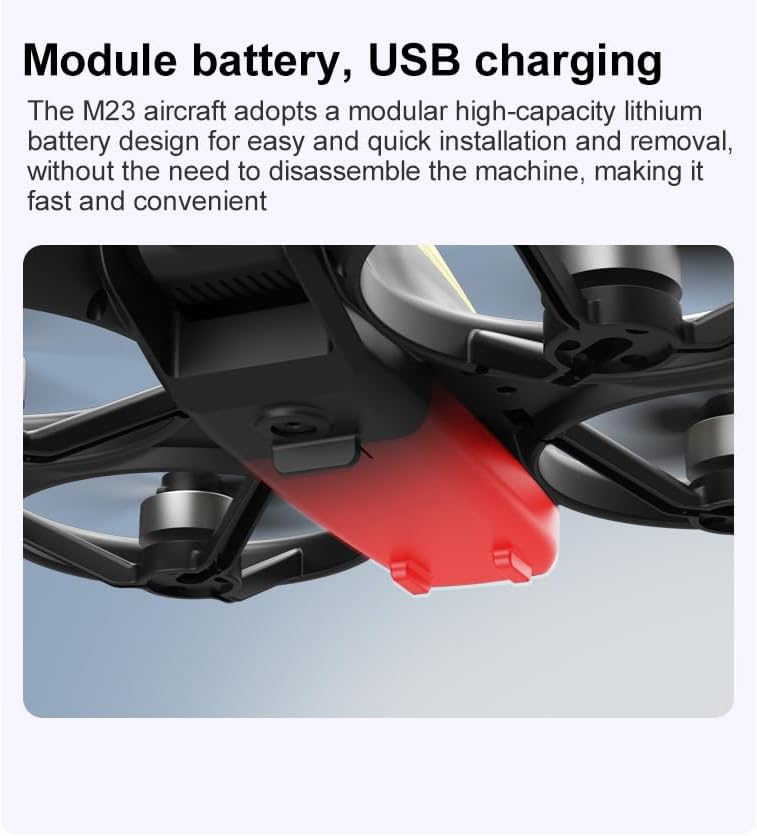
- Schließen Sie das USB-Ladekabel an den Drohnenakku an.
- Plug the other end into a USB power source (e.g., computer, USB wall adapter).
- The indicator light on the cable will show charging status (refer to physical manual for specific light indications).
- Die Ladezeit für eine vollständige Ladung beträgt etwa 60-90 Minuten.
Bedienungsanleitung
Checkliste vor dem Flug
- Stellen Sie sicher, dass die Akkus von Drohne und Fernbedienung vollständig geladen sind.
- Die Propeller sind ordnungsgemäß installiert und befestigt.
- Propeller guards are attached (recommended for beginners).
- Wählen Sie einen offenen, freien Bereich ohne Hindernisse, Menschen und Tiere.
- Bitte informieren Sie sich vor dem Flug über die örtlichen Drohnenvorschriften.
Grundlegender Flugbetrieb
The following video demonstrates key flight features including one-key takeoff, optical flow positioning, 360-degree roll, and speed switching.
Ein-Tasten-Start und -Landung
- Abheben: Place the drone on a flat surface. Press the One-Key Takeoff button on the remote control. The drone will automatically ascend and hover at a stable altitude.
- Landung: Press the One-Key Landing button. The drone will slowly descend and land automatically.
Flugmodi und Funktionen
- Headless-Modus: Press the Headless Mode button. In this mode, the drone's orientation is relative to the pilot, making it easier to control without worrying about the drone's front direction.
- Geschwindigkeitsanpassung: Use the speed adjustment button (or switch) on the remote control to cycle through low, medium, and high speeds. This allows for adaptable flight control based on skill level and environment.
- 360° Rolle: Press the 360° Roll button and then move the right joystick in any direction to perform an aerial flip. Ensure sufficient altitude before attempting.
- Optische Flusspositionierung: The drone utilizes a bottom camera for optical flow positioning, which helps maintain stable hovering, especially indoors or in areas with good ground texture. This feature assists in precise altitude hold.
- Flugbahn: Through the mobile application, you can draw a desired flight path on your screen. The drone will then follow this trajectory automatically.

Kamerabedienung
The M23 drone is equipped with an HD camera with a 90-degree adjustable lens for capturing photos and videos.

- Foto-/Videoaufnahme: Use the dedicated buttons on the remote control or the mobile app to start/stop video recording or take photos.
- Echtzeit-Bildübertragung: Verbinden Sie Ihr Smartphone mit dem WLAN-Netzwerk der Drohne, um view Echtzeit footage from the drone's camera on your device.
Wartung
Reinigung
- Regularly clean the drone body with a soft, dry cloth.
- Ensure propellers are free from dust, dirt, or debris.
- Clean the camera lens gently with a microfiber cloth to maintain image quality.
Lagerung
- Store the drone and its components in the provided storage bag to protect them from dust and physical damage.
- Bewahren Sie die Drohne an einem kühlen, trockenen Ort auf, fern von direkter Sonneneinstrahlung und extremen Temperaturen.
Batteriepflege
- Die Batterien dürfen nicht überladen oder tiefentladen werden.
- Bei längerer Lagerung sollten die Batterien auf etwa 50-60% ihrer Kapazität geladen werden.
- Avoid exposing batteries to high temperatures or direct sunlight.
Fehlerbehebung
If you encounter issues with your SuperRC M23 drone, refer to the following common problems and solutions:
| Problem | Mögliche Ursache | Lösung |
|---|---|---|
| Drohne reagiert nicht auf Fernbedienung | Low battery on drone or remote; Not paired correctly; Interference | Charge batteries; Re-pair drone and remote (refer to physical manual for pairing steps); Move to an area with less interference |
| Drohne driftet während des Fluges | Not calibrated; Wind interference; Damaged propeller | Perform calibration (refer to physical manual); Fly in calm conditions; Replace damaged propellers |
| Schlechte Kamerabildqualität | Dirty lens; Low light conditions; Wi-Fi interference | Clean camera lens; Fly in well-lit areas; Ensure strong Wi-Fi connection |
| Kurze Flugzeit | Akku nicht vollständig geladen; Alter Akku; Aggressives Flugverhalten | Ensure battery is fully charged; Consider replacing old batteries; Practice smoother flight maneuvers |
Technische Daten
Key technical specifications for the SuperRC M23 Mini RC Drone:
| Besonderheit | Detail |
|---|---|
| Modellname | M23-Drone |
| Marke | SuperRC |
| Artikelgewicht | 0.2 Kilograms (Under 250g) |
| Artikelabmessungen (L x B x H) | 7"L x 6"B x 2"H (ca. 18 x 15 x 5 cm) |
| Material | Plastik |
| Fähigkeitsstufe | Anfänger |
| Altersspanne (Beschreibung) | Erwachsene |
| Kamera | HD Camera with 90° Adjustable Lens |
| Auflösung der Videoaufnahme | 720p |
| Videoausgabeauflösung | 720 Pixel |
| Videoaufnahmeformat | MP4 |
| Unterstütztes Bildformat | JPEG |
| Optische Sensorik | CMOS |
| Konnektivitätstechnologie | Wi-Fi, RF |
| Steuerungstyp | Fernbedienung |
| Batteriekapazität | 1050 mAh (pro Akku) |
| Zusammensetzung der Batteriezellen | Lithium-Ionen |
| Besondere Merkmale | Adjustable, One Button Return, One Key Rotation, Rechargeable, Speed Adjustment, Headless Mode, Optical Flow Positioning |
Garantie und Support
SuperRC provides a standard warranty for the M23 Mini RC Drone against manufacturing defects. Please retain your proof of purchase for warranty claims.
Garantieinformationen
- The warranty period typically covers defects in materials and workmanship under normal use.
- Damage resulting from misuse, accidents, unauthorized modifications, or improper maintenance is not covered.
- For specific warranty terms and conditions, please refer to the warranty card included in your product packaging or contact SuperRC customer service.
Kundenservice
If you require further assistance, have questions, or need to report an issue, please contact SuperRC customer support through the following channels:
- Online-Hilfe: Visit the official SuperRC webWebsite mit häufig gestellten Fragen, Hilfestellungen und Kontaktformularen.
- E-Mail-Support: Refer to your product packaging or the SuperRC webWebsite für die E-Mail-Adresse des Kundenservice.
- Unterstützung für Einzelhändler: If purchased from a retailer, you may also contact their customer service for assistance.
When contacting support, please provide your product model (M23) and a detailed description of the issue.