
1. Einleitung
Thank you for choosing the T-Wolf T61 60% Wired Mechanical Gaming Keyboard. This manual provides detailed instructions for setting up, operating, and maintaining your keyboard to ensure optimal performance and longevity. Please read this manual carefully before using the product.
2. Produktüberschreitungview
2.1 Hauptmerkmale
- Mechanische Schalter: Delivers precise tactile feedback and long-lasting performance.
- Kabelgebundene USB-Verbindung: Stable USB 2.0 plug-and-play interface; no drivers required.
- 60 % kompaktes Layout: Functional design that saves space while maintaining key usability.
- Multi-Key Rollover: Supports simultaneous key presses without input errors, ensuring precise performance during intense typing or gaming sessions.
- RGB-Hintergrundbeleuchtung: Customizable vibrant RGB backlighting for enhanced aesthetics.
- Geräuscharmer Betrieb: Moderate sound level suitable for various environments.
- Spritzwassergeschütztes Design: Helps protect against light spills (not waterproof).
2.2 Packungsinhalt
- 1 x T-Wolf T61 60% Wired Mechanical Gaming Keyboard
- 1 x Benutzerhandbuch (dieses Dokument)
2.3 Tastaturdiagramm
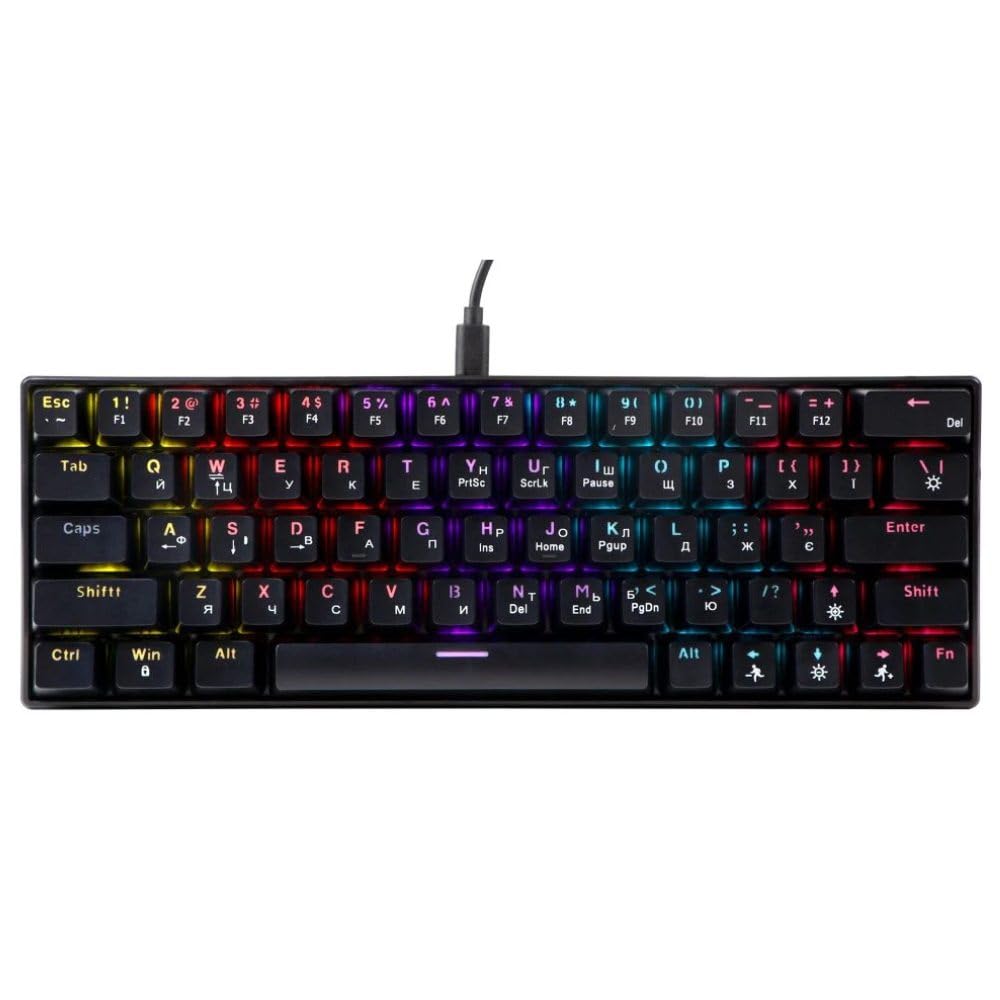
An image showing the T-Wolf T61 60% Wired Mechanical Gaming Keyboard, highlighting its compact layout and design.
3. Einrichtung
- Auspacken der Tastatur: Nehmen Sie die Tastatur und sämtliches Zubehör vorsichtig aus der Verpackung.
- Verbinden Sie sich mit Ihrem Gerät: Locate an available USB port on your computer (PC, laptop) or gaming console. Insert the USB connector of the T-Wolf T61 keyboard into the USB port.
- Automatische Treiberinstallation: The keyboard is plug-and-play. Your operating system will automatically detect and install the necessary drivers. This process may take a few moments.
- Bereit zum Benutzen: Sobald die Treiber installiert sind, ist die Tastatur sofort einsatzbereit.
4. Bedienungsanleitung
The T-Wolf T61 keyboard functions as a standard QWERTY layout keyboard. Its 60% compact design means some functions are accessed via key combinations.
4.1 RGB-Hintergrundbeleuchtungssteuerung
The keyboard features customizable RGB backlighting. Specific key combinations are used to change lighting modes and effects. Refer to the keyboard's function layer markings for exact controls, typically involving the Fn key combined with other keys (e.g., Fn + \| for mode changes, Fn + [{ or Fn +]} for brightness/speed adjustments).
- Beleuchtungsmodi ändern: Drücken Fn + \| to cycle through various RGB lighting effects.
- Anpassen der Helligkeit: Verwenden Fn + [{ um die Helligkeit zu verringern und Fn +]} Helligkeit zu erhöhen.
- Geschwindigkeit anpassen: Verwenden Fn +;: um die Wirkungsgeschwindigkeit zu verringern und Fn + '" um die Wirkungsgeschwindigkeit zu erhöhen.
4.2 Multi-Key Rollover
The T61 keyboard supports multi-key rollover, allowing multiple keys to be pressed simultaneously without ghosting or missed inputs. This feature is particularly beneficial for fast typing and complex gaming commands.
5. Wartung
Durch sachgemäße Wartung wird die Langlebigkeit und Leistungsfähigkeit Ihrer Tastatur sichergestellt.
- Reinigung: Use a soft, dry cloth to wipe the surface of the keyboard. For deeper cleaning, use a can of compressed air to remove dust and debris from between the keycaps. For stubborn dirt, a slightly damp Man kann ein Tuch mit einer milden Reinigungslösung verwenden, wobei darauf zu achten ist, dass keine Flüssigkeit in die Tastatur gelangt.
- Spritzwassergeschütztes Design: While the keyboard features a spill-resistant design to protect against light spills, it is nicht wasserdicht. In case of a spill, immediately disconnect the keyboard from your device, gently wipe away any liquid, and allow it to air dry completely before reconnecting.
- Lagerung: Bewahren Sie die Tastatur an einem kühlen, trockenen Ort fern von direkter Sonneneinstrahlung und extremen Temperaturen auf.
6. Fehlerbehebung
If you encounter issues with your T-Wolf T61 keyboard, please refer to the following common solutions:
- Tastatur reagiert nicht:
- Ensure the USB cable is securely connected to both the keyboard and your device.
- Versuchen Sie, die Tastatur an einen anderen USB-Anschluss anzuschließen.
- Testen Sie die Tastatur an einem anderen Computer, um ein gerätespezifisches Problem auszuschließen.
- Starten Sie Ihren Computer neu.
- RGB-Hintergrundbeleuchtung funktioniert nicht/ist fehlerhaft:
- Stellen Sie sicher, dass die Tastatur ordnungsgemäß mit Strom versorgt wird.
- Cycle through the RGB modes using the designated key combinations (e.g., Fn + \|).
- Adjust brightness settings (e.g., Fn + [{ / Fn +]}).
- Tasten werden nicht registriert oder es werden doppelte Eingaben getätigt:
- Clean the affected keycap and switch area using compressed air to remove any debris.
- Ensure no software conflicts are present (e.g., other keyboard drivers or utilities).
Sollte das Problem nach Durchführung dieser Schritte weiterhin bestehen, wenden Sie sich bitte an den Kundendienst.
7. Spezifikationen
| Besonderheit | Beschreibung |
|---|---|
| Marke | T-WOLF |
| Modell | T61 |
| Konnektivitätstechnologie | Kabelgebundenes USB |
| Tastaturbeschreibung | Mechanisch |
| Anzahl der Schlüssel | 65 |
| Tastaturlayout | QWERTY |
| Besondere Merkmale | RGB Backlit, Multi-Key Rollover, Low-Noise Operation, Spill-Resistant Design |
| Kompatible Geräte | PC, laptop, gaming consoles |
| Material | Metall, Kunststoff |
| Farbe | Schwarz |
| Ursprungsland | China |
8. Garantie und Support
The T-Wolf T61 keyboard comes with a standard manufacturer's warranty. Please refer to the warranty card included with your purchase or contact your retailer for specific warranty terms and conditions.
For technical support, troubleshooting assistance, or warranty claims, please contact the retailer where you purchased the product or visit the official T-Wolf webSite für Supportressourcen.